
Key takeaways
 Smartsheet uses an Excel-style grid for linear tracking, while Airtable is a relational database built to link complex data across tables.
 Standard Smartsheet tiers cap at 20,000 rows per sheet, while Airtable's record-based pricing can cause costs to spike sharply as your database grows.
 Milient is the best alternative for mid-sized and large IT consulting and professional services teams. It replaces manual workarounds with a native offer-to-invoice workflow that links project phases directly to your bottom line.
Managing a growing firm often feels like you're fighting your own software. You might be struggling to bridge the gap between your project tasks and your actual bank account, leading to missed hours or shrinking margins.
If you’ve been searching for a better way to compare Smartsheet vs Airtable, the answer is knowing when your firm has outgrown generic tools.
In this guide, we’ll explore the specific strengths of Airtable vs Smartsheet and introduce how a specialised system like Milient handles the professional services lifecycle.
Smartsheet vs Airtable: Comparison Table
| Feature | Smartsheet | Airtable |
| Best For | Corporate teams needing traditional spreadsheet power. | Creative teams building visual, custom databases. |
| Standout Feature | Automated sheet-to-sheet data dependencies. | No-code interface builder for custom apps. |
| Pros | Familiar Excel feel; great for massive portfolios. | Highly visual; endless customization for workflows. |
| Cons | High learning curve; can feel rigid and dated. | Can get expensive and messy as data grows. |
| Price | Starts at $12/member/month. | Starts at $20/seat/month |
| Customer Support | Help desk & enterprise-level support. | Community forums and email-based help. |
| Project Structure | Standard Spreadsheet/Grid | Relational Database. |
| Resource Planning | High-level overview only. | Manual setup required. |
| Time Tracking | Basic (Often needs an add-on). | Basic (Requires custom fields). |
| Invoicing | Manual or third-party export. | Manual or third-party export. |
Who Is Smartsheet Best For?
Smartsheet is built for teams that need high-level governance and structured execution. It thrives in environments that require strict project logic.
It is ideal for:
-
-
- Enterprise PMOs: Large-scale project management offices managing thousands of rows across global portfolios with complex cross-sheet references and roll-up reporting.
- Traditional industries (AEC & manufacturing): Organisations that rely on critical path analysis, rigid Gantt charts, and multi-layered task dependencies.
- Excel power users: Teams transitioning from complex spreadsheets who want to keep familiar formula logic while adding enterprise security and automation.
- IT & operations leaders: Those who need a unified intelligent work management layer that offers SOC2, HIPAA, and administrative controls across the entire organisation.
-
For Whom Is Airtable Useful?
Airtable is a flexible, no-code platform that transforms static data into interactive applications. It is useful for teams that need to manage multidimensional information while maintaining a highly visual, engaging interface.
These include:
-
-
- Marketing & creative teams: For managing complex content calendars, digital asset libraries, and multi-channel campaign tracking.
- Product operations: Teams building custom internal tools for feature roadmapping, bug tracking, and user feedback loops.
- Agencies & professional services: For coordinating client projects, streamlining workflows, and centralising communication across various stakeholders.
- Operations & HR managers: Those looking to automate repetitive processes, from employee onboarding to budget management, without needing a developer.
-
Milient Resource Flow: An Alternative
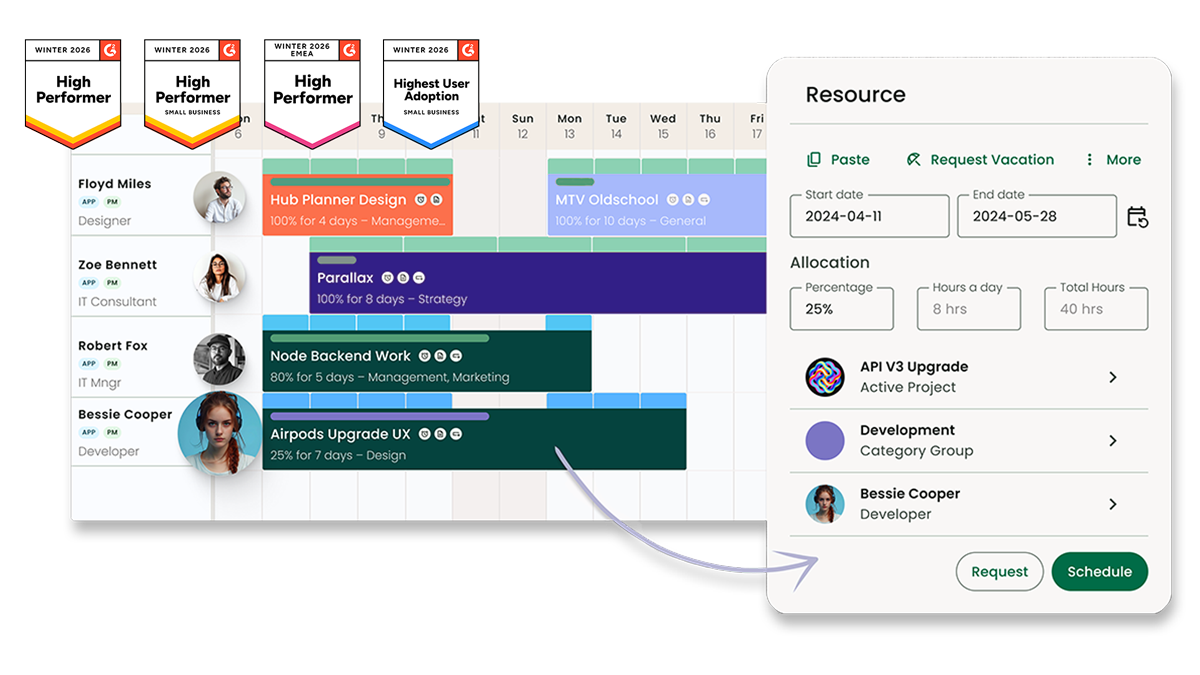
While Smartsheet and Airtable offer a “build-anything” canvas, the administrative load of configuring them from scratch often leads to lost hours and tool fatigue.
Milient Resource Flow provides a purpose-built alternative for firms that want clarity and control without the setup headache. It is specifically built consultancies, IT teams, and internal IT departments.
Milient also connects your project planning directly to your people’s time and your firm’s profitability. It’s about keeping work flowing rather than just managing a list of tasks
Here’s why project-based firms choose Milient:
-
-
- Effortless capacity planning: Real-time view of availability based on actual project dates. If a deadline moves, you can reallocate staff instantly without crashing the rest of your schedule.
- Precision skills matching: Filter your entire team by skills, roles, or location to find the best fit for a specific task in seconds.
- Proactive utilisation tracking: See exactly who is overstretched and who has time to spare. This helps you balance the current workload and forecast hiring needs based on live data.
- Full project control: Integrates scheduling with project budgets and fixed costs, so you can see the direct impact of your staffing decisions on the firm's financial health.
-
Milient Resource Flow also offers specialised pricing tiers specifically for resource management.
Unlike Smartsheet or Airtable, where resource views are often an expensive add-on or a complex DIY build, Milient’s Resource Flow is ready to use from day one.
Pricing starts at $7/month, providing a cost-effective alternative to the expensive add-ons often required by generalist tools.
Price
Choosing Smartsheet vs Airtable often comes down to how you prefer to pay for scale.
Smartsheet offers a traditional per-user model, while Airtable’s premium pricing reflects its power as a custom app builder.
Smartsheet
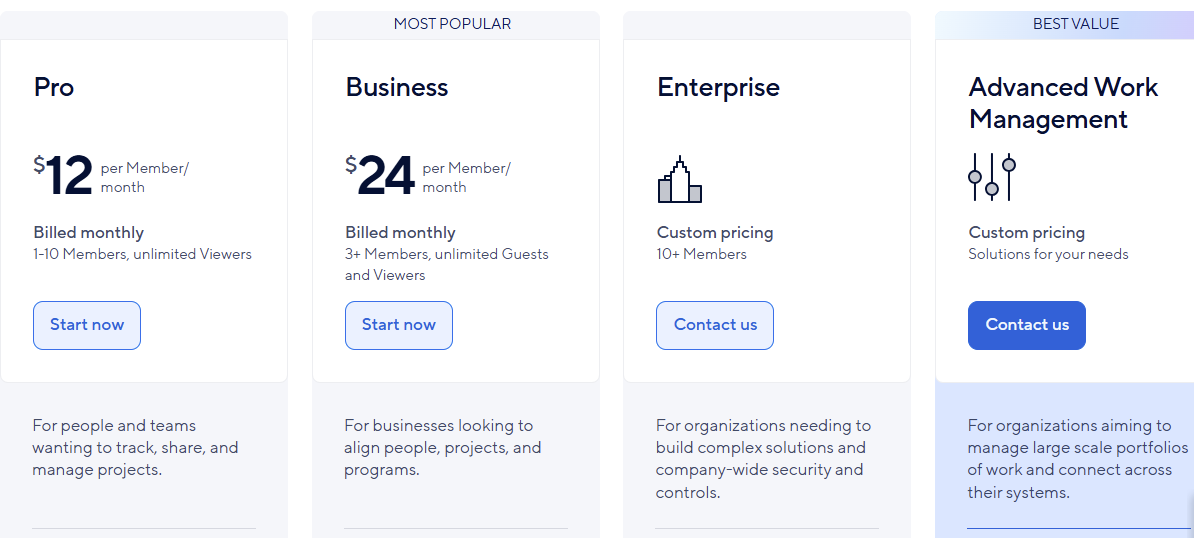
Smartsheet is the most budget-friendly entry point. But full resource management often requires a paid add-on.
The standard plans focus on sheet-based project tracking, with advanced capacity planning and heatmaps usually sold separately.
-
-
- Pro plan: Gantt and Grid views and basic dashboards, but limits you to 250 automations and lacks deeper workload visibility.
- Business plan: Unlimited automations, workload tracking to spot over-allocation, and unlimited sheets per project.
- Enterprise plan: Targeted at large organisations needing single sign-on (SSO), advanced security governance, and the scale engine for massive data sets.
-
If you are analyzing total platform costs, our breakdown of Smartsheet vs Teamwork explores how other tools structure their packaging.
Airtable
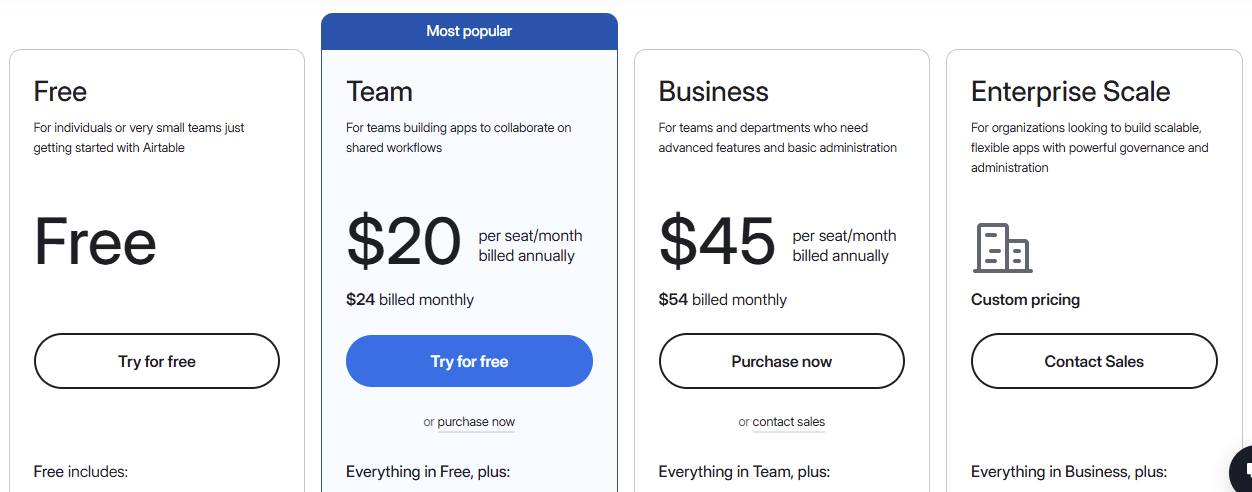
Airtable is a premium app builder that uses a relational database to link staff, skills, and projects.
While more expensive than a flat spreadsheet, its recent updates specifically target resource management needs within its higher tiers.
-
-
- Free plan: Unlimited bases, the Interface Designer, and up to 1,000 records per base. While it lacks Gantt and timeline views, it offers 500 AI credits per month to help automate basic tasks.
- Team plan: Gantt and timeline views, 50,000 records per base, and 25,000 automation runs.
- Business plan: Native utilisation tracking and data dependencies. It also unlocks the admin panel, SAML-based SSO, and 125,000 records per base.
- Enterprise Scale: Up to 500,000 records, HyperDB for large datasets, an enterprise Hub, and advanced security features such as DLP.
-
Verdict
Smartsheet wins on pure affordability for firms that need a familiar grid. However, it often requires a paid add-on for deep resource forecasting.
Airtable is the better investment for visual firms, as its Business plan now includes native utilisation and dependencies without needing extra plugins.
Ease of Use
The choice depends on whether your team prefers a traditional spreadsheet environment or a custom visual database.
Smartsheet mimics Excel for speed, while Airtable focuses on building a custom, app-like interface.
Smartsheet
Smartsheet is built for those who want a familiar files-and-folders structure.
While simple for task tracking, its reliance on spreadsheet logic can feel clunky when linking complex resource schedules across multiple projects.
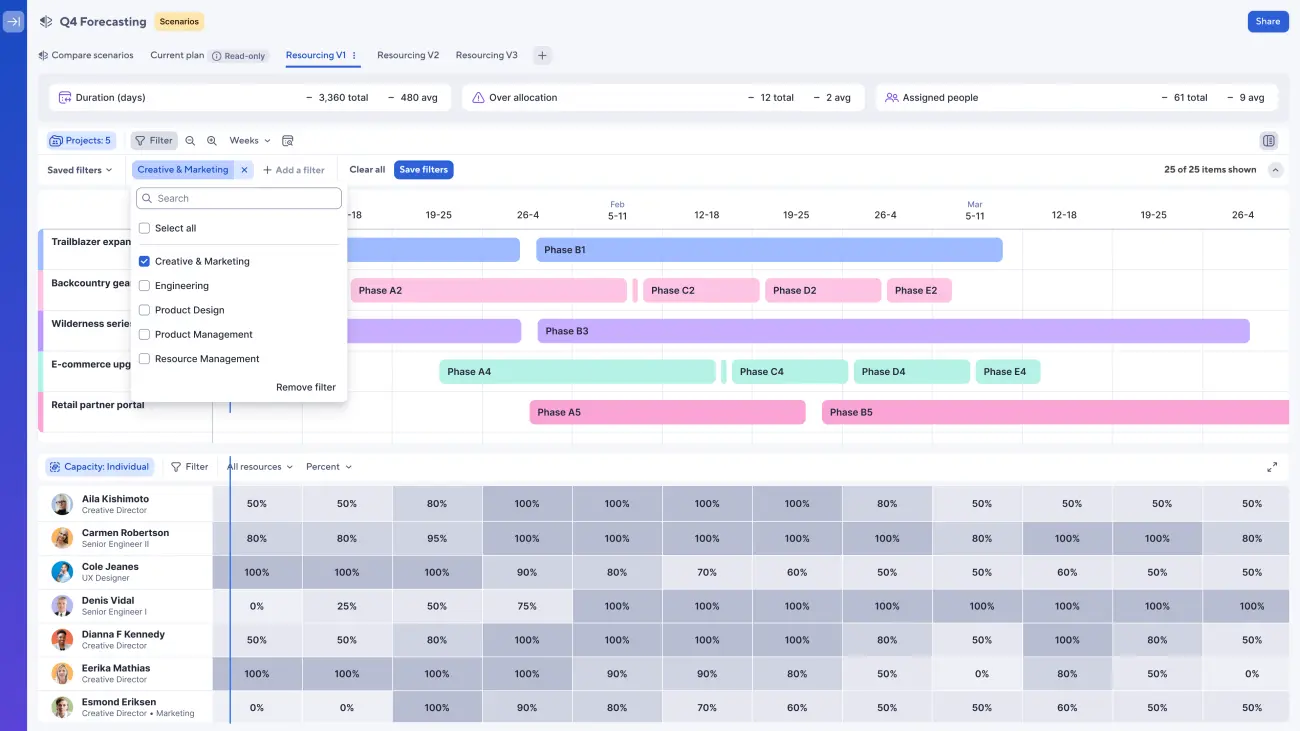
It features:
-
-
- Excel-style Grid: Almost zero learning curve for anyone comfortable with rows and columns.
- One-click views: Switch instantly between Grid, Gantt, and Card views to change how you see project data.
- Automation engine: Use a visual builder to set up simple "if-this-then-that" rules for status updates and alerts.
-
Airtable
Airtable requires more setup because it is a relational database.
However, once built, the Interface Designer allows you to create a clean, distraction-free workspace that makes it much easier for staff to manage their capacity.
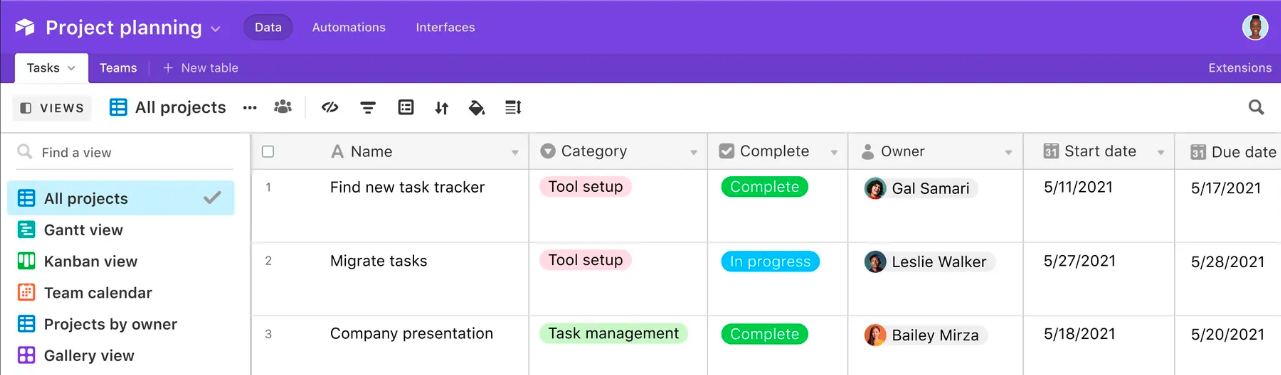
It features:
-
-
- Visual organisation: Uses rich formatting and colour-coding to make over-allocation or project gaps obvious at a glance.
- Interface designer: Create custom dashboards so users only interact with relevant resource data, not the raw database.
- Relational logic: Update a team member's availability in one spot, and it automatically syncs across every project.
-
Verdict
Smartsheet wins for quick adoption. It’s best for firms that need to get moving immediately without retraining.
Airtable wins for flexibility. If you invest the time into the initial setup, its app-like interface provides a far more scalable way to manage resource flows.
Customer Support
Support acts as a safety net when managing tight project timelines.
Smartsheet leans on structured packages and professional services for corporate reliability, while Airtable focuses on self-service resources and community-led knowledge for its smaller plans.
Smartsheet
Smartsheet uses a tiered support model that scales with business complexity.
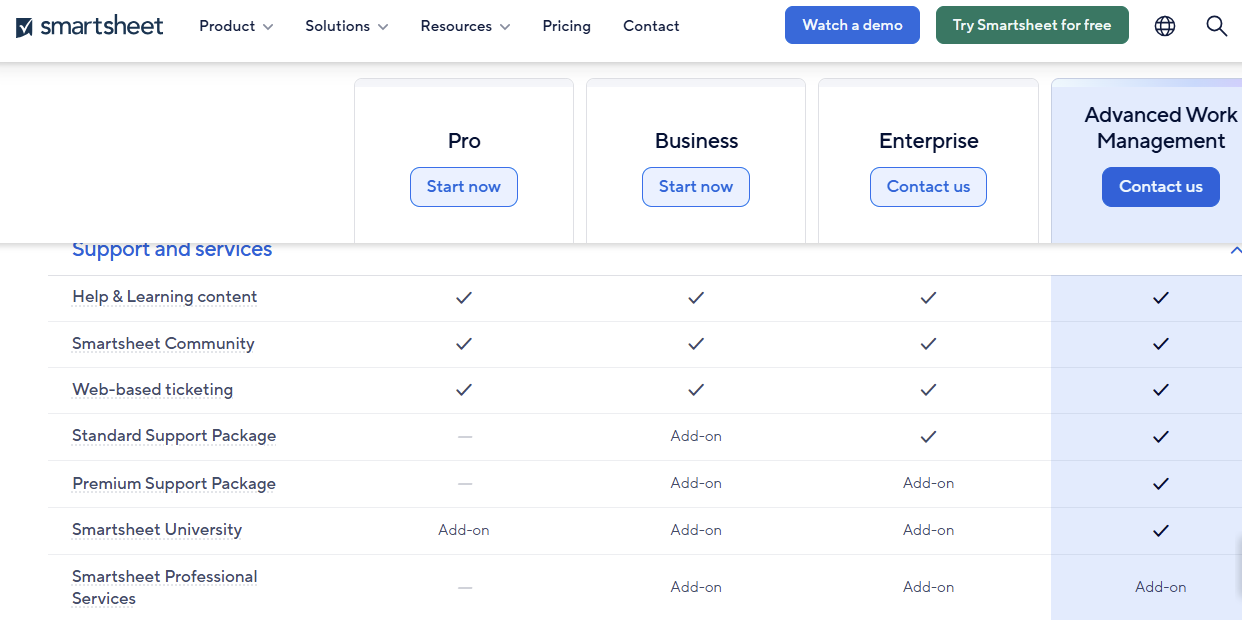
While basic help content is available to all, deeper technical assistance is managed through specific support packages and professional service add-ons.
-
-
- Support packages: Standard support is included for Enterprise users and available as an add-on for Business plans. Premium packages offer faster response times and deeper technical resources.
- Smartsheet University: A formalised training platform available as an add-on across all plans.
- Professional services: For complex implementations, firms can pay for dedicated professional services or technical account managers to oversee their workspace architecture.
-
Airtable
Airtable’s support is modern and highly community-focused.
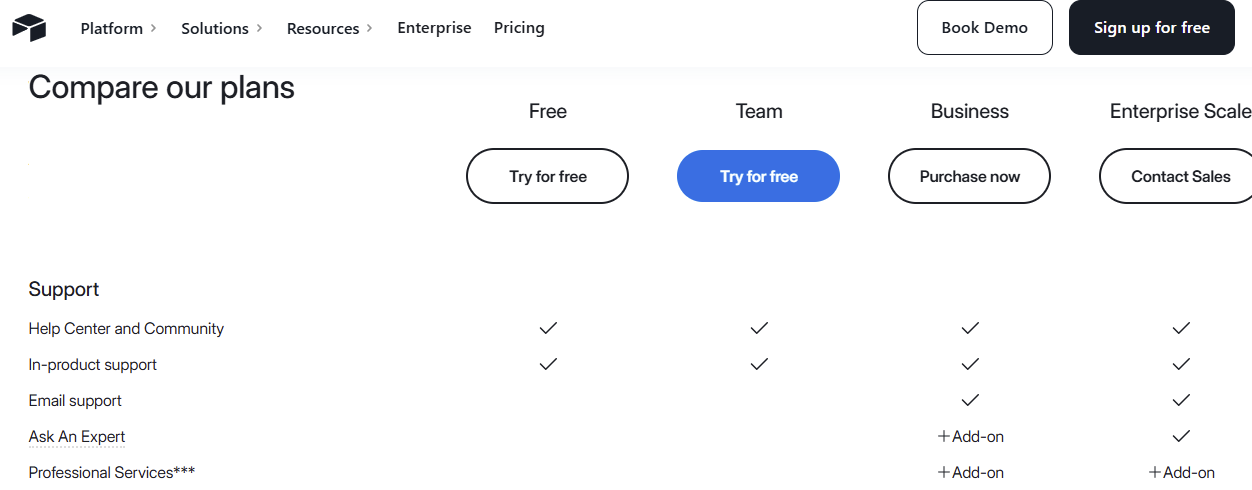
While they provide extensive documentation, direct human support is tiered, with premium services and professional services reserved as add-ons for Business or Enterprise users.
-
-
- Help centre & community: A very active forum where users find pre-built scripts and community-sourced solutions for relational database problems.
- Tiered support access: All paid plans include email and in-app support, but Business and Enterprise tiers receive priority routing and dedicated success management.
- Expert add-ons: Higher tiers can add “Ask An Expert” or professional services for tailored technical guidance and onboarding support.
-
Verdict
Smartsheet wins for structured corporate assistance. Its reliance on formal support packages and professional services makes it a reliable choice for firms that need guaranteed service levels.
Airtable wins for community-led problem solving. If your team is comfortable using forums and documentation to build custom solutions, Airtable’s massive user base is an invaluable resource.
Integrations
For project-based firms, the right integration moves data between your resource schedules and your financial or communication apps, eliminating manual double-entry.
Smartsheet
Smartsheet is built for the enterprise ecosystem. It offers deep, "out-of-the-box" connections that make your data portable across the apps your firm already uses every day.
-
-
- Microsoft Teams & Slack: Get status alerts and approval requests sent straight to your chat channels. You can also pin sheets as tabs in Teams so the team doesn't have to toggle between apps.
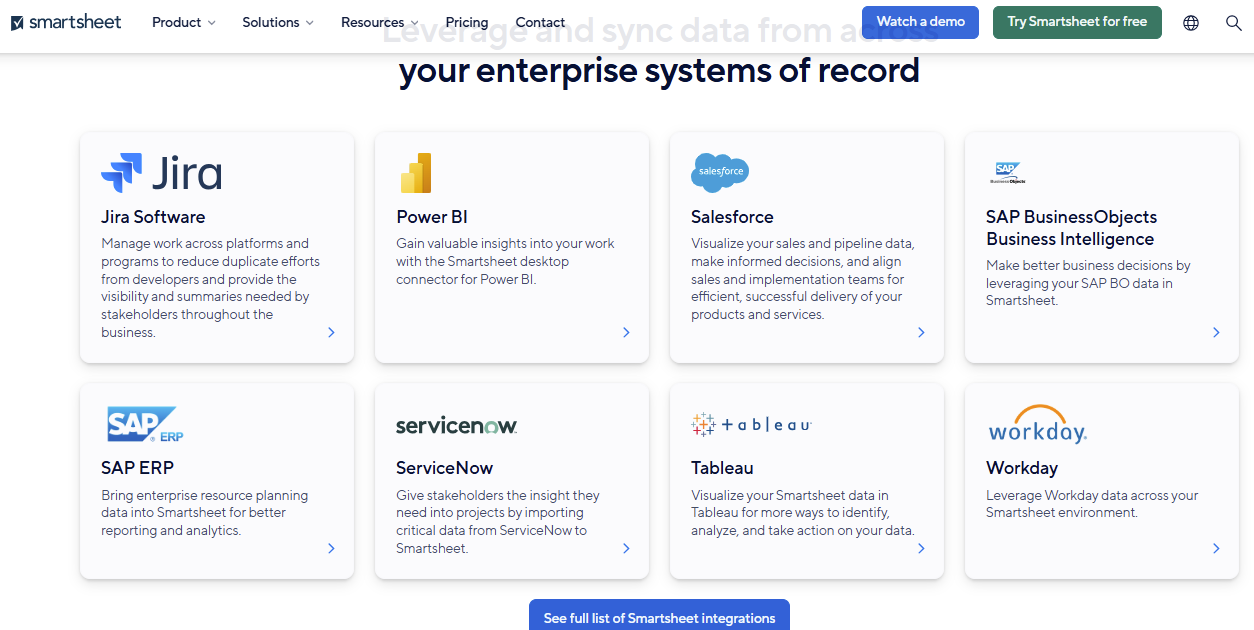
- Data Shuttle: Use this to automatically move data between Smartsheet and your ERP or CRM. It works with SAP, Salesforce, and ServiceNow to keep your resource plans and financial data in sync.
- Professional connectors: Dedicated links to Jira, Power BI, and Tableau let you pull technical tasks and complex analytics into a single central view.
-
Airtable
Airtable acts as a hub, pulling data from external sources into its relational database.
This lets you build a single source of truth by aggregating information from various technical and creative platforms into a single visual dashboard.
-
-
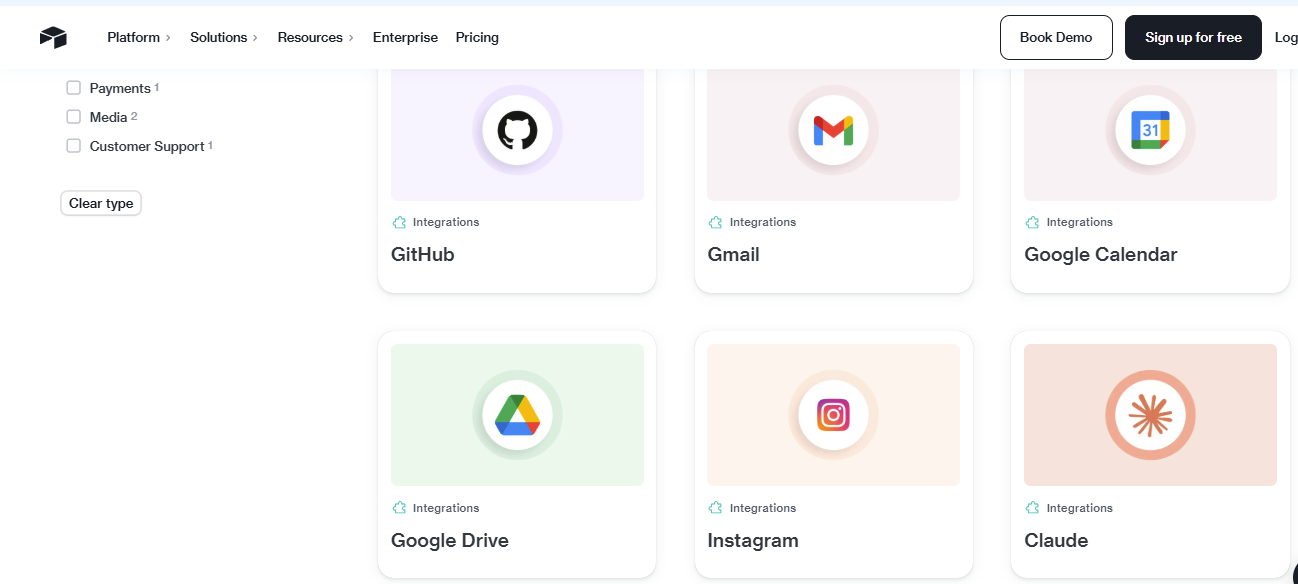
- Sync integrations: Pull live data from Jira, Salesforce, and Zendesk. When a ticket or lead status changes in the source app, your resource availability in Airtable is automatically updated.
- Creative & AI connections: Link directly to Miro, Typeform, and YouTube, or use native integrations with Claude and ChatGPT to automate content and data categorisation.
- Developer & data tools: Native integrations with GitHub, Snowflake, and Stripe make this a strong pick for technical firms that need to track development velocity alongside billing.
-
Verdict
Smartsheet wins for large-scale corporate connectivity. It is the better choice for firms that rely on Microsoft and need to move data reliably between heavy-duty platforms like SAP.
Airtable wins for custom workflows. If you need to pull data from a mix of technical or creative tools into a tailor-made dashboard, Airtable’s syncing is far more versatile.
How to Choose the Best Work Management Software
The right choice depends on whether you need a generic tool or a specialised system that connects project planning directly to your firm's profitability.
Here are the key elements to consider:
Unified Resource Forecasting
A work management tool should show exactly who is available and when, without you having to cross-reference multiple sheets.
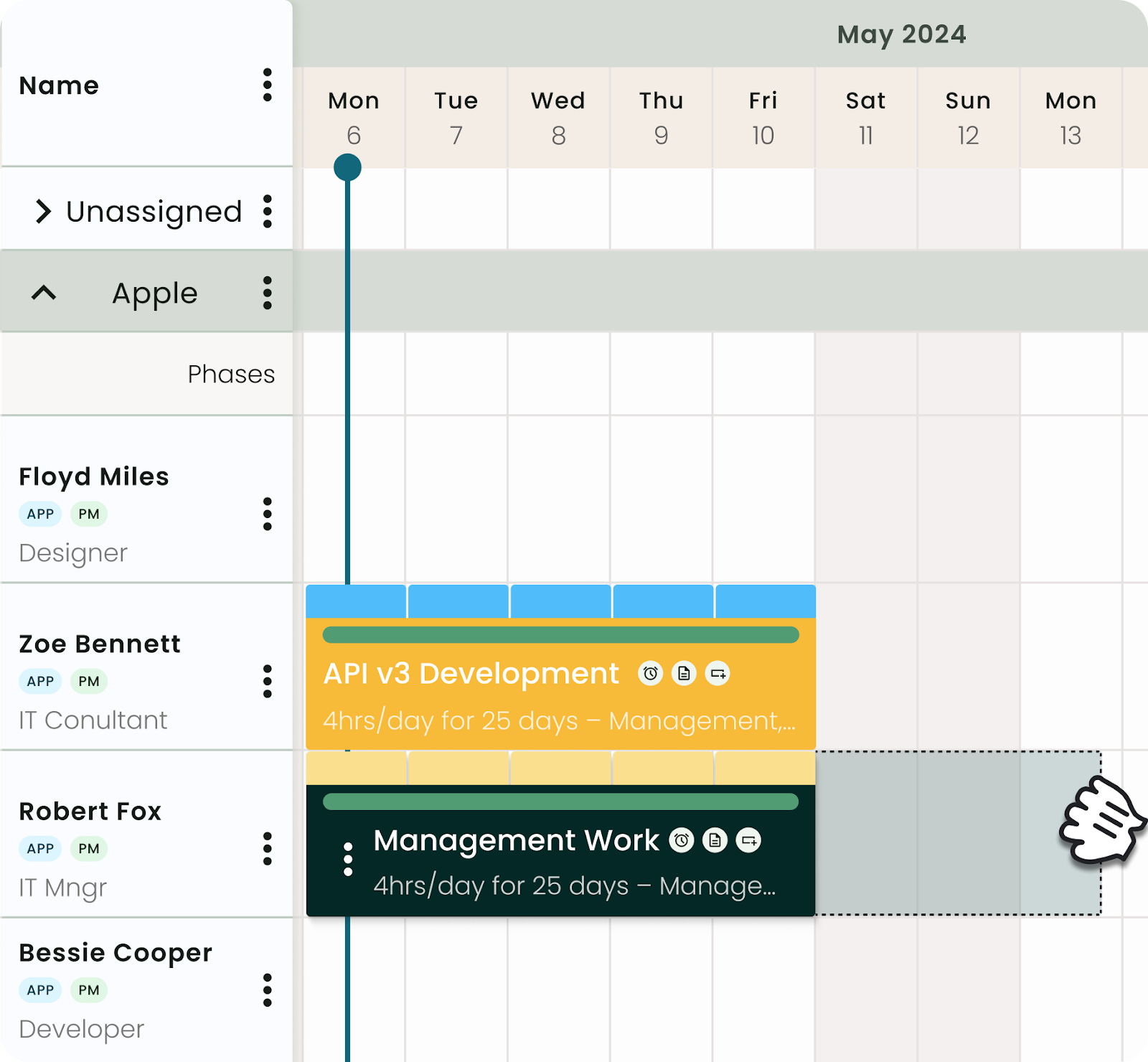
Most general tools treat resources as an afterthought, but true management requires live capacity data linked to project timelines. Milient does this well through Resource Flow, a dedicated space where team availability, skills, and time off are natively connected to prevent overbooking.
Visual & Intuitive Resource Scheduling
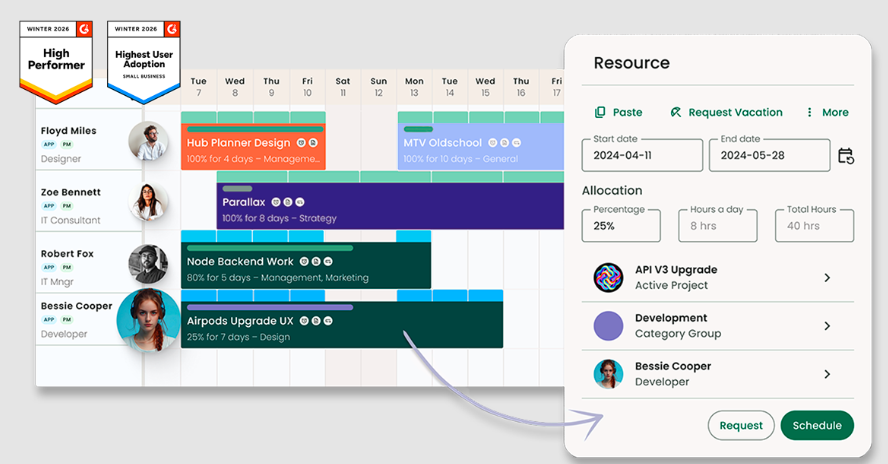
Efficiency drops when scheduling feels like a chore. For a growing firm, you need a best-in-breed resource scheduler that handles complex supply and demand without the clutter of a traditional spreadsheet.
Milient provides an intuitive interface featuring drag-and-drop interactivity. You can find resources based on requirements like skills or location and instantly see availability insights.
Strategic Utilization Reporting
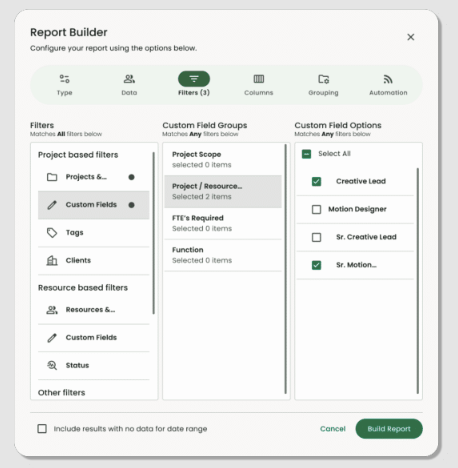
Choosing the right software means moving beyond basic lists and into actionable data. You need to see not just what is being done, but how effectively your team's time is being spent across the entire organization.
Milient excels here with its intuitive report builder that allows you to generate unlimited combinations of data, specifically focusing on utilization reports.
Alternative To Smartsheet and Airtable: Milient Software
While Smartsheet vs Airtable are flexible blank canvases, Milient is purpose-built for the professional services lifecycle.
It bridges the gap between project planning and accounting, ensuring that billable hours, project budgets, and profit margins stay in sync, work that usually requires manual workarounds in general-purpose tools.
Key Features
Milient provides a structured environment where financial health is the priority.
Instead of manually linking spreadsheet rows to invoices, the system automates the movement of data from a project bid directly into the team workflow and final billing.
Here are its key features:
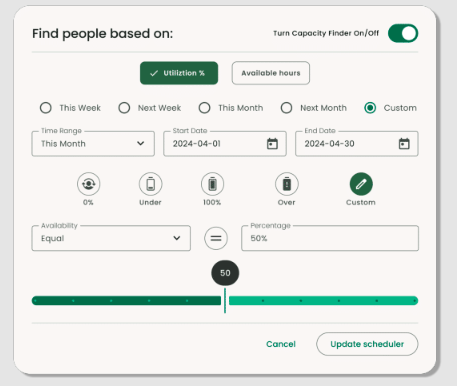
Real-Time Capacity Planning
Milient replaces scattered spreadsheets and disconnected calendars with a single, high-level overview of your entire organization’s capacity.
Unlike static grids that use vague weeks, this feature allows you to build schedules that reflect actual project dates.
You can see exactly who is available and who is overbooked at a glance, allowing you to shift work without disrupting the rest of your schedule.
Skills-Based Resource Matching
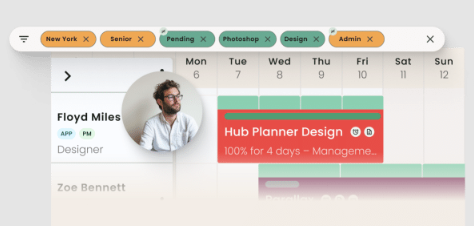
Milient includes a dedicated skills matrix to tag team members with specific expertise and certifications.
When planning a new phase, you can filter for the exact qualifications needed, ensuring the right person is assigned based on both their availability and their competency.
Proactive Utilization Tracking
While general tools require you to build manual formulas to see team availability, Milient provides a live overview of over- and under-utilization.
You can monitor how effectively your team’s total capacity is being used across different projects in real time.
By linking live project data to your resource overview, you can accurately forecast future hiring needs and prevent burnout before it happens.
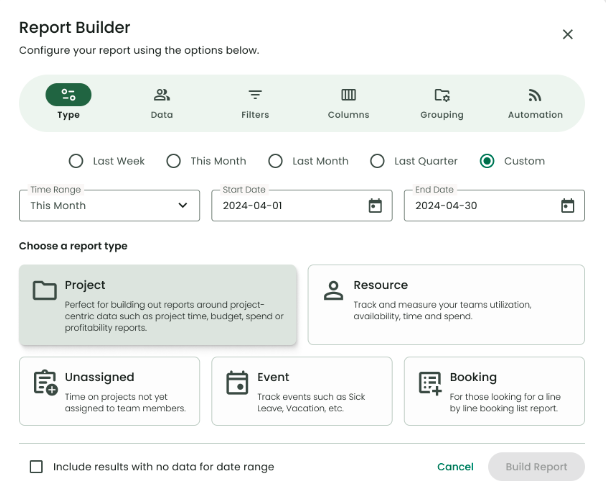
Pricing
| Plan | Pricing |
| Plug & Play | £7/month |
| Premium | £18/month |
| Business Leader | £54/month |
Where Milient Shines
-
-
- Complex, multi-team environments: Resource Flow is built for organisations running concurrent projects across departments or geographies. Capacity planning, granular permissions, and a configurable report builder let resource managers plan at scale without losing visibility.
- Utilisation-driven businesses: For professional services firms, resource management directly impacts project margins and profitability. Milient gives consultancies clear visibility into utilisation, spend, and project performance, all in one place.
- Organisations that need structured access control: Different roles across the business see exactly what they need and nothing more. Particularly valuable for IT consultancies managing client work alongside internal projects.
-
Where Milient Falls Short
-
-
- Not suited for very small teams: If you're managing fewer than ten people with straightforward scheduling needs, Milient's feature depth may be overkill. A simpler visual scheduling tool will likely do the job.
- Capacity Finder is a paid add-on: Capacity Finder isn't included as standard, it's available as a paid extension across all plans. Worth factoring in when comparing total costs.
-
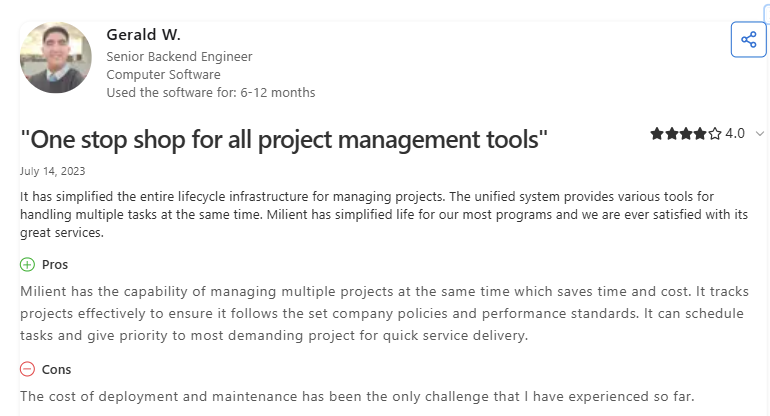
Customer Reviews
Who Milient is Best for
- Best for mid-sized and large IT consulting and professional services teams needing a more customisable, feature-heavy resource management tool built to scale across global teams.
Smartsheet vs Airtable vs Milient: Which One Should You Choose?
Choosing between Smartsheet vs Airtable usually comes down to whether you prefer a traditional spreadsheet or a flexible database.
Both are excellent for general organization or marketing calendars. However, they often fall short for professional service firms because they don't natively link your project tasks to your actual bank account.
Milient is the better move built to handle the business of a project, not just the to-do list.
While you’d have to build your own trackers in Smartsheet or Airtable, Milient integrates Resource Flow with project budgets, allowing you to see the direct financial impact of your scheduling and fixed costs out of the box.
If you're still using spreadsheets to manage your team, this blog on Spreadsheets vs. Resource Scheduling Software is worth a read.
 Andrea Neeve
Marketing Associate
Want more content like this? Follow Milient:

/hubplanner_resource.png?width=1024&height=1024&name=hubplanner_resource.png)