Key takeaways
 Milient Project Flow – Best for architecture, engineering, and consulting firms that need project management, resource planning, time tracking, and financial visibility in one platform.
 Asana – Best for marketing teams and cross-functional collaboration, offering an intuitive interface, workflow automation, and a wide range of project views.
 Monday.com – Best for growing businesses and operations teams looking for highly customisable workflows, AI-powered automation, and extensive integrations.
 Jira – Best for software development and agile teams, with industry-leading Scrum boards, backlog management, sprint planning, and developer integrations.
Choosing the right project management software is only part of the equation, success also depends on using the right project management techniques and tools. Whether you're managing client work, software development, marketing campaigns, or internal initiatives, having the right management tools and techniques can improve collaboration, increase productivity, and keep projects on track.
This guide compares some of the best options available in 2026. We'll explore their key features, pricing, strengths, and ideal use cases to help you manage project team tools and techniques more effectively. We'll also touch on program management tools and techniques for organisations coordinating multiple projects across teams.
Best Project Management Tools and Techniques in 2026: A Quick Look
1. Milient Software: Best for Architecture, Engineering and Consulting Firms Needing Financial Control
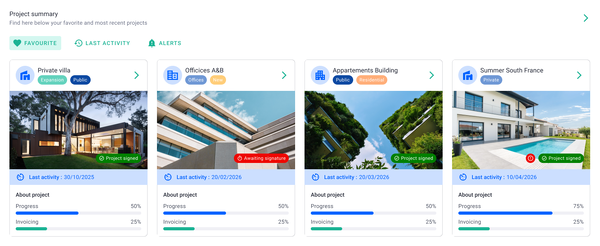
Milient Project Flow is a project management platform built specifically for architecture, engineering, and consulting firms that have outgrown spreadsheets and entry-level project management tools. Alongside project planning, it provides real-time financial visibility, resource allocation, time tracking, and automated invoicing, helping firms deliver projects while maintaining profitability.
Key features
Successful project management relies on more than organising tasks. Milient Project Flow combines planning, financial management, resource visibility, and reporting in one connected platform so project managers can make informed decisions throughout the project lifecycle.
Project Progress Dashboard
/general_dashboard.png?width=1200&height=645&name=general_dashboard.png)
The Project Progress Dashboard provides a live overview of every active project in one place. Project managers can instantly view project status, fee values, budget consumption, invoicing progress, and revision history without switching between spreadsheets or multiple systems. This real-time visibility helps identify projects that require attention before small issues become costly problems.
Time & Budget Tracking
/time%20management.svg)
Project Flow compares budgeted hours, expected hours, and actual hours side by side throughout every project. As teams log time, managers receive continuous visibility into budget performance, allowing them to spot overruns early and keep projects financially on track before profitability is affected.
Phase-Level Planning
/schedule_task2.png?width=1200&height=645&name=schedule_task2.png)
Built-in Gantt planning allows teams to organise projects into clearly defined phases, from concept and design through to delivery. Managers can schedule activities across multiple projects, adjust timelines as priorities change, and maintain a clear overview of project progress without relying on separate scheduling software.
Roles & Resource Allocation
/roles_2.jpg?width=732&height=487&name=roles_2.jpg)
Project Flow enables firms to assign team members to project roles while applying role-specific hourly rates and tracking billable versus non-billable work. This gives project managers greater confidence when planning workloads, balancing capacity, and ensuring the right people are assigned to the right projects at the right time.
Pricing
Pricing may vary depending on contract length, users, and implementation requirements.
Where Milient shines
-
-
- Real-time financial visibility: Project managers can monitor budgets, fees, invoicing, and profitability from a single dashboard, helping reduce financial surprises throughout project delivery.
- Built specifically for AEC firms: Unlike general-purpose project management software, Project Flow is designed around the workflows of architecture, engineering, and consulting businesses, including multi-phase planning, resource management, and fee tracking.
- Reduces spreadsheet dependency: By bringing project planning, time tracking, reporting, invoicing, and project data together, Project Flow removes the need to manage projects across disconnected spreadsheets and documents.
-
Where Milient falls short
-
-
- Timesheet workflow could be clearer: Some users note that it isn't always obvious whether submitted timesheets have been approved or validated.
- Limited calendar view for logged hours: Users have requested the ability to view project hours within a calendar layout.
- Some administrative functionality could be expanded: Features such as invoice numbering by accounting period and certain document editing capabilities could be more flexible for larger organisations.
-
Customer reviews
Project Flow receives positive feedback for its usability, visibility, and customer support. Users on Capterra frequently highlight the intuitive interface, multilingual support, and the ability to replace spreadsheet-based project management. Others praise the responsive support team and the billable forecasting functionality for helping save time and improve project visibility.
Who Milient is best for
-
-
- Growing architecture and engineering firms: Teams that need project management alongside financial visibility, budgeting, and invoicing.
- Consulting businesses: Organisations managing multiple client projects while tracking utilisation, profitability, and resources.
- Project managers overseeing complex projects: Professionals looking for one platform to manage project planning, financial performance, resource allocation, and reporting.
-
You can also read our detailed guide on engineering project management software to explore how specialized feature sets streamline complex technical workflows.
2. Monograph: Best for Managing Architecture Projects
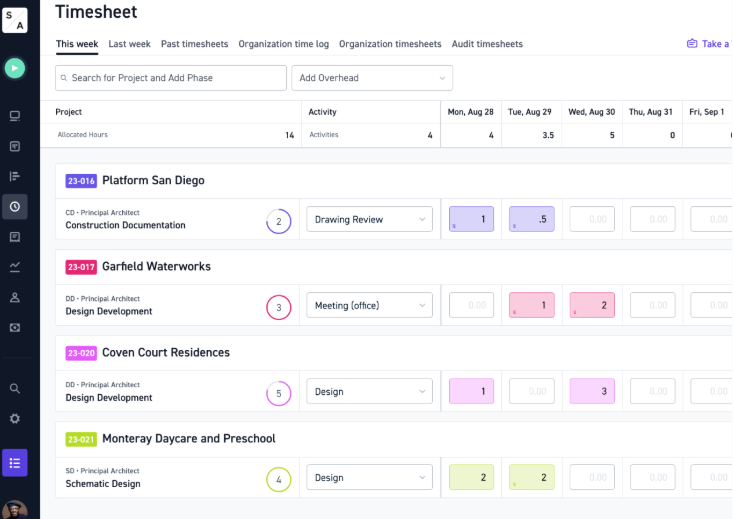
Monograph is a cloud-based project management platform built specifically for architecture and engineering (A&E) firms. It brings together project planning, staffing, financial management, invoicing and business development into a single platform, helping firms reduce reliance on disconnected spreadsheets and multiple software tools. Its biggest differentiator is its architecture-first approach, combining project delivery with financial visibility so firms can better understand profitability throughout every project lifecycle.
Key features
-
-
- Pipeline & CRM: Track leads, proposals and opportunities in one place to improve forecasting and convert more work.
- Project Financial Management: Monitor budgets, fees, project phases and profitability in real time to identify potential overruns early.
- Resource & Staffing Planning: Allocate staff across projects while balancing workloads and future capacity.
- Integrated Invoicing & Accounting: Generate invoices, monitor payment status and integrate with accounting platforms such as QuickBooks.
-
Where Monograph shines
-
-
- Built specifically for architects and engineers: Unlike general project management tools, Monograph is designed around the workflows, project phases and financial requirements of A&E firms.
- Strong financial visibility: Real-time budget tracking, fee forecasting and profitability reporting help firms make better commercial decisions throughout a project's lifecycle.
- Business development included: CRM, proposal management and opportunity forecasting allow firms to manage the entire client journey alongside project delivery.
-
Where Monograph falls short
-
-
- Some users report missing all-in-one functionality: Reviews mention needing additional software for certain workflows, particularly outside Monograph's core project management capabilities.
- Support and bug resolution receive mixed feedback: While many customers praise the platform, others report slower support responses and unresolved bugs affecting invoicing workflows.
- Mobile functionality could improve: Some reviewers note the iOS app and project communication features are less developed than the desktop experience.
-
Customer reviews
Monograph generally receives positive feedback for its intuitive interface, project financial management and budgeting capabilities. Users frequently praise the Gantt charts, QuickBooks integration and visibility into project performance. However, some reviews mention invoicing limitations, occasional software bugs and slower customer support, particularly following rapid product growth.
"It lets me track multiple projects at once and know which projects need my attention." – Capterra (4/5)
"Interface is very intuitive… integration with QuickBooks is important to us." – Capterra (4/5)
"Timesheet analysis and budget forecasting." – Capterra (4/5)
See more reviews: https://www.capterra.co.uk/software/178124/monograph
Who Monograph is best for
-
-
- Architecture & engineering firms: Designed for firms that want to manage business development, projects, staffing and finances within a single platform.
- Growing design practices: Particularly suited to firms seeking stronger financial visibility and project profitability reporting.
-
Pricing
Monograph uses custom pricing based on firm size and requirements, with annual and monthly billing options available. Prospective customers need to contact the sales team for a personalised quote and product demonstration.
3. Asana: Best for Cross-Functional Team Collaboration
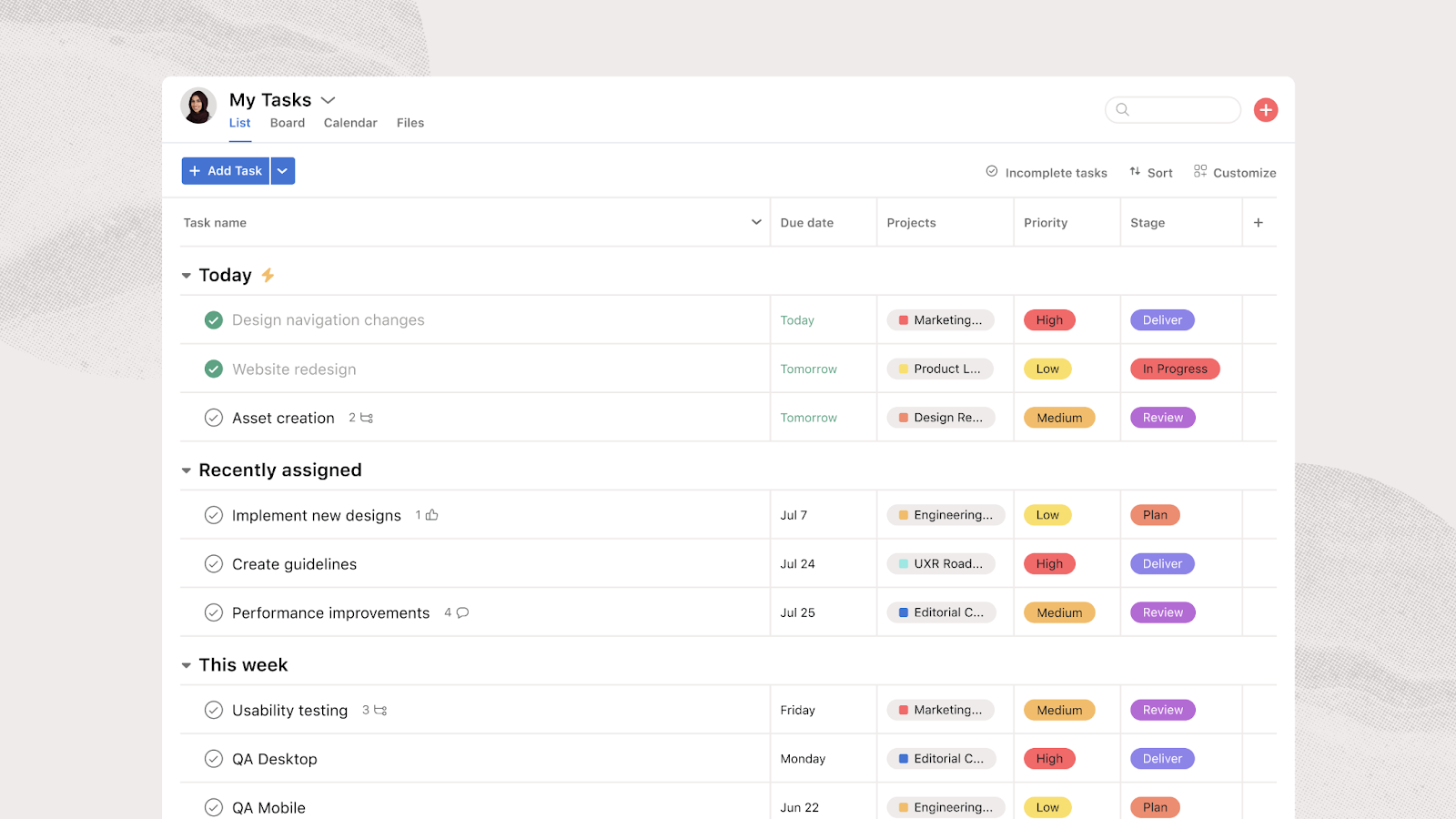
Asana is a work management platform that helps teams plan, organise and track projects in one central workspace. Originally built for task management, the platform has expanded to include workflow automation, reporting, AI-powered assistance and hundreds of third-party integrations. Its flexibility makes it suitable for organisations across many industries, allowing marketing, operations, IT, HR and product teams to collaborate on projects while improving visibility into work across the business.
Key features
-
-
- Project & Task Management: Create projects, assign tasks, manage dependencies and track progress using lists, boards, calendars or timeline views.
- Workflow Automation: Automate repetitive tasks with rules, approvals and custom workflows to reduce manual administration.
- AI & Reporting: Use Asana AI, dashboards and reporting tools to identify blockers, monitor workloads and gain real-time project visibility.
- Extensive Integrations: Connect with tools including Microsoft 365, Google Workspace, Slack, Zoom, Salesforce and Power BI.
-
Where Asana shines
-
-
- Excellent collaboration: Shared workspaces, task ownership, comments and timelines make it easy for cross-functional teams to stay aligned on projects.
- Highly flexible: Supports a wide range of industries and workflows, from marketing campaigns and software development to HR and operations.
- Strong automation and integrations: AI features, workflow automation and hundreds of integrations help reduce manual work while fitting into existing technology stacks.
-
Where Asana falls short
-
-
- Advanced features require higher-tier plans: Portfolio management, workload planning, AI capabilities and reporting become more expensive as organisations scale.
- Can become complex: Extensive customisation means new users may face a learning curve when building larger workflows and automations.
- Some usability limitations: Reviews mention slower mobile performance, search functionality that could be improved and limited workload visualisation in lower-tier plans.
-
Customer reviews
Asana is widely praised for its intuitive interface, automation capabilities and ability to organise work across multiple teams. Many users also highlight its growing AI functionality and extensive integrations. Common criticisms include mobile app performance, search limitations and some advanced planning features only being available on premium plans.
"The user interface is very easy to follow… We have used the AI some and it seems to work very well." – G2 (5/5)
"Asana makes it easy to manage a high volume of tasks across multiple projects without losing track of priorities and deadlines." – G2 (4.5/5)
"It brings structure and visibility to cross-functional work." – G2 (4.5/5)
Who Asana is best for
-
-
- Cross-functional teams: Ideal for organisations managing projects across marketing, operations, HR, IT and product teams.
- Growing businesses: Well suited to companies looking for flexible project management with automation and integration capabilities.
-
Pricing
Asana offers a free plan for individuals and small teams, alongside paid plans that unlock automation, reporting, AI capabilities and portfolio management. Enterprise pricing is available through custom quotes.
*Pricing may vary by region and billing cycle.
4. Monday.com: Best for Cross-Functional Project & Workflow Management
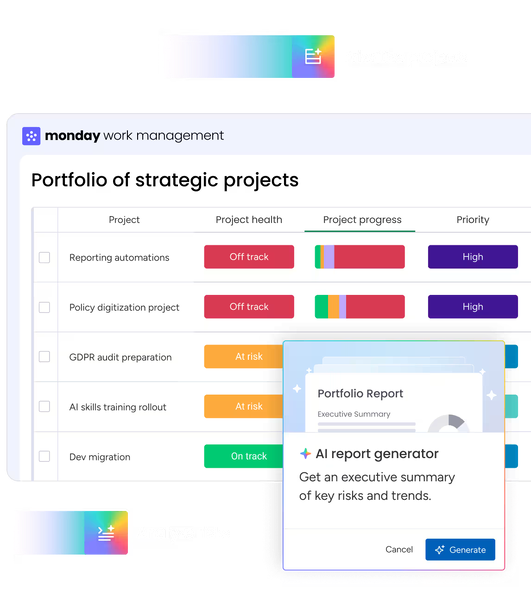
Monday.com is a flexible work management platform that helps teams plan projects, automate repetitive tasks, and collaborate from a single workspace. While it started as a project management solution, it has expanded into an AI-powered work platform with dedicated products for CRM, IT, development, and service management.
Its biggest strengths are highly customizable workflows, no-code automations, extensive integrations, and AI capabilities that help teams streamline everyday work across departments.
Key features
-
-
- Customisable project boards: Build workflows using Kanban boards, Gantt charts, calendars, timelines, and dashboards that adapt to different project management styles.
- AI-powered automation: Automate repetitive admin work, generate project briefs, summarise updates, create tasks, and use AI agents to support marketing, operations, HR, and other teams.
- Extensive integrations: Connect with tools including Microsoft Teams, Slack, Outlook, Google Workspace, HubSpot, Jira, Salesforce, and hundreds of other business applications.
- Real-time dashboards & reporting: Track project progress, workload, budgets, deadlines, and team performance using live dashboards that consolidate data across multiple boards.
-
Where Monday shines
-
-
- Cross-functional collaboration: Marketing, HR, sales, IT, finance, and operations teams can manage work together within one connected platform.
- Automation at scale: Powerful no-code automations reduce manual work, improve consistency, and help teams spend more time on high-value tasks.
- Highly flexible workflows: Teams can tailor boards, fields, views, and dashboards to fit their own processes instead of adapting to rigid software.
-
Where Monday falls short
-
-
- Learning curve for advanced setups: Although basic boards are easy to create, building sophisticated automations, dashboards, and workflows can take time.
- Can become inconsistent: Because the platform is highly customisable, organisations without clear governance may end up with inconsistent workflows between teams.
- Premium features increase costs: Advanced automation limits, reporting capabilities, AI features, and enterprise controls are reserved for higher-priced plans.
-
Customer reviews
"Best-in-Class Project Management Performance with an Easy-to-Use Interface"
"Easy to use interface, making sharing tasks among a team, and keep tracking track of progress... As a project management tool, the performance is second to none."
"Cross-Department Work Visible & Trackable A Strong Tool for Team Accountability One Shared Place"
"The best part would be having one shared place where tasks, owners, deadlines, status, files, and follow-up notes are easy to see at a glance."
"Monday.com is a great project management tool for our Marketing Team"
"The downsides is not being able to manage notifications from updates... Unless a team member is not on the application, then they can receive notifications."
"Streamlined Marketing Workflows with monday.com Forms and Automations"
"Overall, the support we've received through monday.com could be improved... I just think more consistent support from a dedicated support specialist would make a big difference."
Read more reviews here
Who Monday is best for
-
-
- Marketing teams: Ideal for managing campaigns, content calendars, creative approvals, and cross-channel workflows.
- Growing businesses: Well suited to organisations that need a flexible platform capable of supporting multiple departments.
- Operations & project managers: A strong choice for teams looking to automate processes, improve visibility, and centralise project tracking.
-
Pricing
5. Jira: Best for Agile Software Development Teams
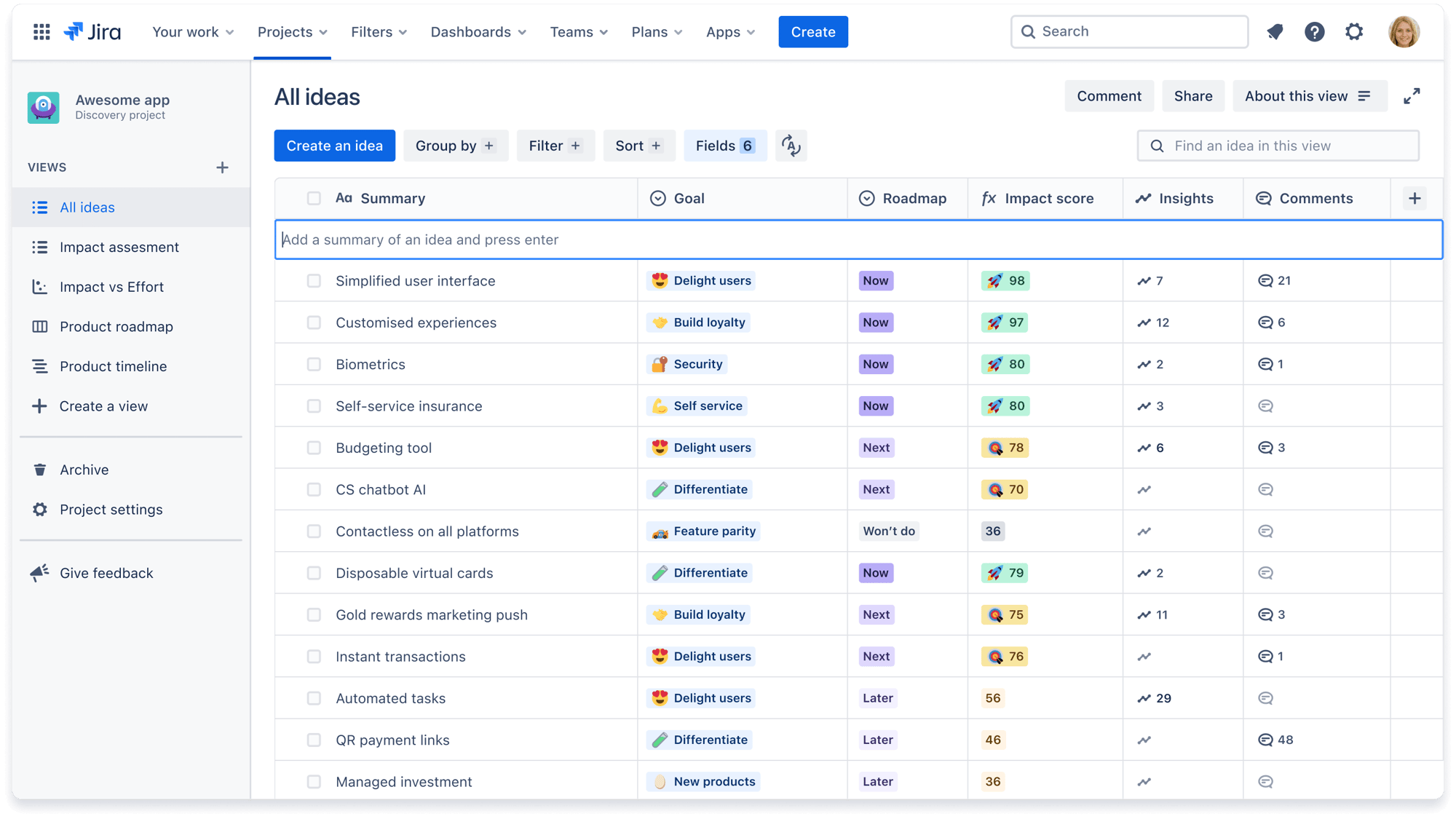
Jira is Atlassian's project management and issue-tracking platform designed for software development teams, agile projects, and complex workflows. It combines Scrum and Kanban boards with AI-powered automation, sprint planning, backlog management, and over 3,000 integrations. While Jira has expanded beyond engineering into business teams, its greatest strength remains helping development teams manage software projects at scale with highly configurable workflows.
Key features
-
-
- Agile project management: Manage Scrum and Kanban projects with sprint planning, backlogs, roadmaps, and issue tracking designed for agile software development.
- AI-powered automation: Use Atlassian Intelligence and Rovo AI to automate repetitive tasks, generate work items, create workflows, and surface project insights.
- Extensive integrations: Connect with over 3,000 apps including GitHub, Slack, Figma, Google Workspace, Microsoft Teams, Bitbucket, and Confluence.
- Advanced reporting & dashboards: Monitor project progress, dependencies, team capacity, and delivery performance with configurable dashboards and reporting tools.
-
Where Jira shines
-
-
- Built for agile teams: Excellent support for Scrum, Kanban, sprint planning, backlog management, and software development workflows.
- Highly configurable: Teams can customise workflows, issue types, permissions, automation rules, and project structures to suit complex processes.
- Strong developer ecosystem: Deep integration with Atlassian products and popular development tools makes it ideal for engineering teams.
-
Where Jira falls short
-
-
- Steeper learning curve: The large number of configuration options can feel overwhelming, particularly for new users or non-technical teams.
- Can feel overly complex: Smaller projects or simple task management may not require Jira's extensive feature set.
- Performance can slow: Large projects with heavily customised workflows or extensive backlogs may experience slower loading times.
-
Customer reviews
"good for trackin but too slow sometimes"
"its basically the industry standard right now. even tho its a bit slow i dont think ther is any other tool that handles complex projects as good as jira does."
"good for trackin but too slow sometimes"
"honestly jira is just way too heavy. sometimes it takes forever to load a single page... also the UI can be super confusing for new people."
"Once a leader in Agile planning, now at the bottom of the AI foodchain"
"The company has leaned heavily into AI without first polishing existing features. There is a lot of core functionality missing, and a lot of it feels very low quality."
Who Jira is best for
-
-
- Software development teams: Ideal for Scrum, Kanban, sprint planning, and issue tracking.
- Engineering organisations: Well suited to teams managing complex development workflows.
- Technical project managers: Best for organisations needing highly configurable project management and deep developer integrations.
-
Pricing
How to Choose the Best Project Management Tool
The best project management software should do more than organise tasks—it should help your team deliver projects on time, improve collaboration, and give you greater visibility over performance. Here are the key features to consider before making your decision.
1. Choose software built for your industry
Every industry manages projects differently. Architects, engineers, consultants, IT teams, and construction firms all have unique workflows, reporting requirements, and commercial processes. Generic task management software may work initially, but industry-specific tools often reduce manual work and improve adoption.
Project Flow is purpose-built for project-based businesses, with features designed around project delivery, resource planning, financial visibility, and time tracking rather than simple task management.
2. Look for strong resource and workload management
Projects quickly become difficult to manage if you can't see who is available, overallocated, or sitting on the bench. Effective resource allocation in project management helps balance workloads, improve utilisation, and avoid costly scheduling conflicts before they impact delivery.
Project Flow combines project planning with resource management, giving managers real-time visibility into team capacity, availability, and future demand from a single platform.
/Expense%20report.png?width=898&height=506&name=Expense%20report.png)
2. Look for strong resource and workload management
Projects quickly become difficult to manage if you can't see who is available, overallocated, or sitting on the bench. Resource planning helps balance workloads, improve utilisation, and avoid costly scheduling conflicts before they impact delivery.
Project Flow combines project planning with resource management, giving managers real-time visibility into team capacity, availability, and future demand from a single platform.
/planning_team.png?width=1578&height=1122&name=planning_team.png)
3. Prioritise financial visibility
Managing deadlines is important, but understanding project profitability is equally valuable. The best project management tools connect budgets, costs, time, and progress so project managers can identify issues before they become expensive.
Project Flow provides real-time budget tracking, project financials, and profitability insights, helping firms stay in control throughout the entire project lifecycle.
/invoicing_dashboard.png?width=1200&height=645&name=invoicing_dashboard.png)
4. Make sure it integrates with your existing tools
Your project management platform should work alongside the software your team already relies on. Integrations reduce duplicate data entry, improve collaboration, and keep information flowing between departments.
Project Flow integrates with the wider Milient platform, allowing teams to connect project management with time tracking, invoicing, resource planning, and other business processes.
5. Consider reporting and real-time visibility
Project managers need quick answers, not spreadsheets compiled at the end of the month. Look for software that offers live dashboards, custom reporting, and clear project health indicators so decisions can be made with confidence.
Project Flow provides real-time dashboards that combine project progress, financial performance, resources, and time tracking in one place, helping managers make informed decisions faster.
Take Your Project Management to the Next Level with Milient
Choosing the right project management tool depends on your team's size, workflows, and long-term goals. While many platforms excel in specific areas, project-based businesses often need more than task management alone. Project Flow combines project planning, resource management, time tracking, and financial visibility to help teams deliver projects more efficiently from start to finish.
Whether you're replacing spreadsheets or upgrading your existing software, Project Flow is designed to help growing businesses gain greater control over every project.
 Andrea Neeve
Marketing Associate
Want more content like this? Follow Milient: