
Key takeaways
 Resource allocation means matching the people, time, budget, and tools a project needs to what's actually available, then tracking whether the plan holds
 Get it right, and deliver project objectives on time without burning out your team. If done wrong, you end up with overallocated people and slipping deadlines and margins
 Resource allocation is best for IT and professional services teams that run multi-project environments and need a live view of capacity, skills, and utilisation
 Use Milient Resource Flow for resource allocation: See your full team's availability in real time, match the right skills to the right tasks, track utilisation against project budgets, and catch overallocation before it affects delivery
Projects slip when teams commit work without a clear view of available people or future capacity.
Resource allocation in project management helps you plan around available resources, keeping workloads, budgets, and delivery expectations aligned.
Below, we explain everything about resource allocation, plus why Milient Resource Flow is a strong software fit for any IT and professional services team.
What Is Resource Allocation in Project Management?
/Hub_Planner_Resource-Management_Feature.jpg?width=1062&height=981&name=Hub_Planner_Resource-Management_Feature.jpg)
Resource allocation is the process of assigning the right people, budget, tools, and time to the right project tasks, based on actual resource availability and priority.
A project manager owns the allocation day-to-day. On larger engagements, resource managers or operations leads handle it across the portfolio, with stakeholders involved when priorities conflict or budgets need rebalancing.
The objective of resource allocation is to get the most out of what's available without overloading people or letting costs drift.
Step-by-Step Process for Resource Allocation
/resources_rf.png?width=1200&height=645&name=resources_rf.png)
PMI's global study of more than 5,800 project professionals found that only half of projects today meet a modern definition of success. The top barrier cited by executives is a disconnect between planning and execution.
With resource allocation, you'll plan projects that can follow the timeline without exhausting your teams or budgets.
Here are some steps to start with.
1. Divide the Project into Tasks
Break the project into phases and specific tasks, then identify what roles, skills, hours, and budget each task needs before assigning anyone.
2. Identify Resource Requirements
For each task, define exactly what's needed: people, skills, tools, and budget. Note dependencies so you know which tasks need to be staffed first and what can't start until something else finishes.
Resource Flow's project dependencies keep your schedule in sync automatically when task sequences shift.
3. Audit What You Have
Check your full team's availability against existing commitments across all active projects. Account for leave, part-time schedules, and any work already booked, then set up resource assignments.
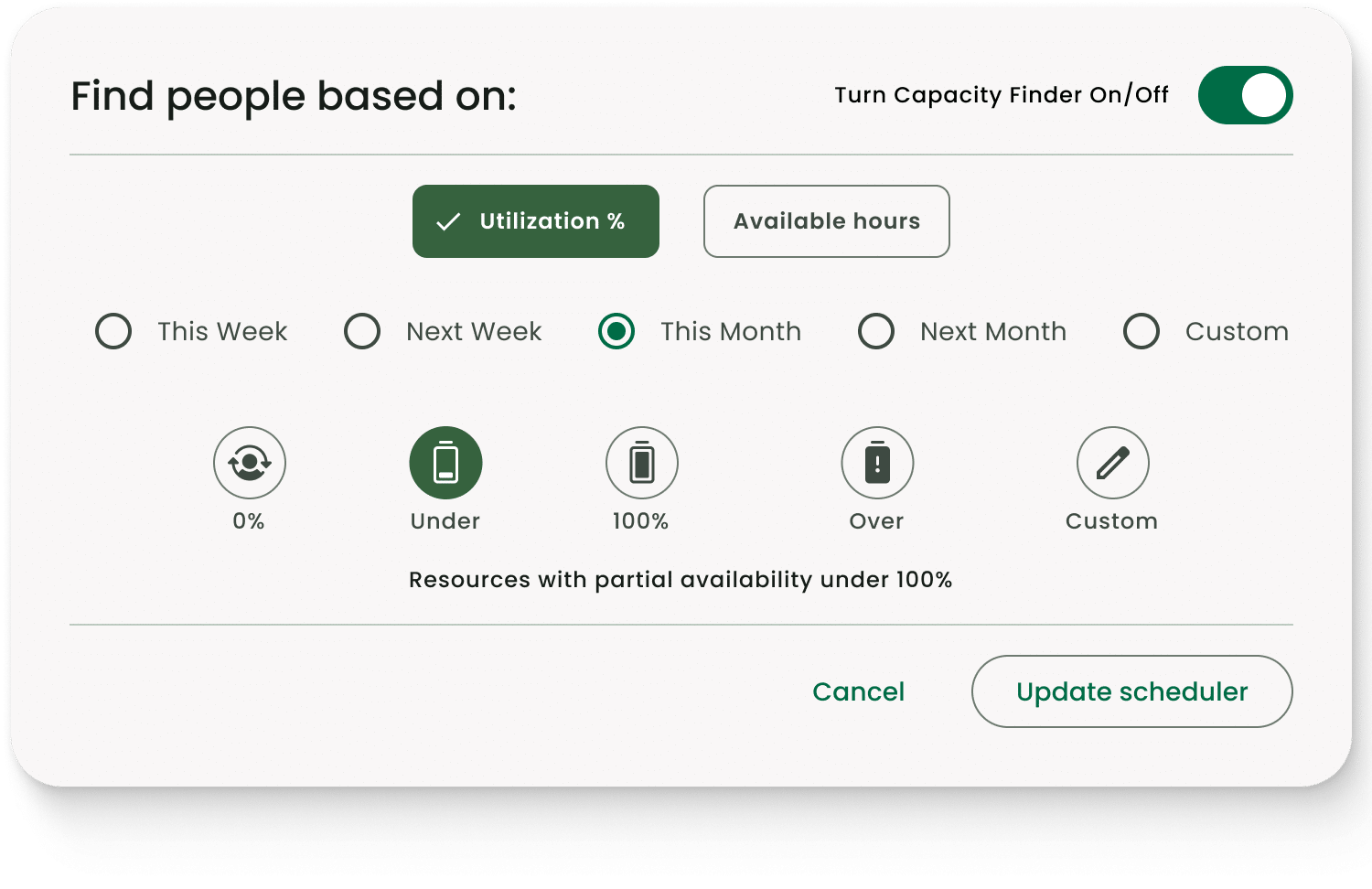
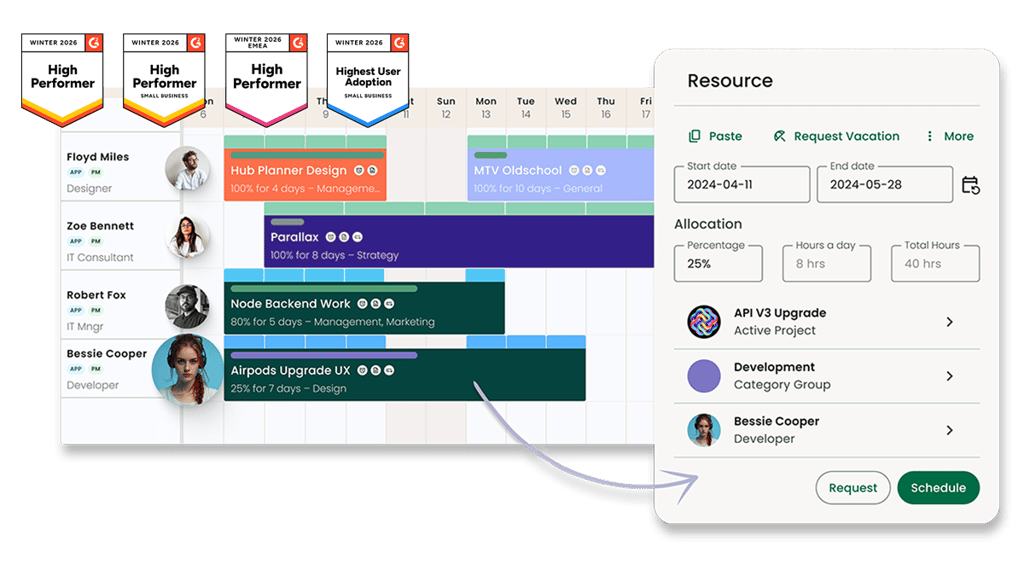
You can use Resource Flow's Capacity Planning to filter your team by availability, utilisation percentage, skills, and seniority before a single booking is confirmed.
4. Assign Resources to Tasks
Match people to tasks based on skill fit and confirmed availability, not who's easiest to reach. For instance, senior resources go to high-priority or high-risk work, while you can assign flex roles for support tasks.
You need a solution such as Resource Flow's Skills Matching to filter your resource pool by role and seniority in seconds.
5. Resolve Conflicts Before They Start
Check for overallocation before finalising the schedule. If the same person is booked across two tasks at the same time, adjust the timeline, split their capacity, or bring in another resource.
The goal is to build contingency plans for critical roles before the project starts
6. Track Utilisation and Adjust
Once resources are allocated, track whether the plan is holding. If utilisation is drifting from what was planned, you need to adjust.
Sometimes the work is taking longer than estimated, or the project scope has quietly grown. Either way, you have options: adjust the timeline, reassign hours, or flag it before it reaches the client.
Resource Flow's Reporting Templates cover utilisation and project spend in real time, so you won’t need to wait until the end of the week to make adjustments.
Key Resource Allocation Techniques and Methods
/Hub-Planner_IT-consultancies.png?width=800&height=739&name=Hub-Planner_IT-consultancies.png)
How you allocate resources in project management depends on the constraints you're working with. These are some techniques you can apply:
Resource Levelling
Resource levelling adjusts a project schedule based on what the team can actually deliver.
When someone is overbooked, and the deadline has room to move, you shift tasks around their capacity rather than forcing delivery against a plan that doesn't reflect reality.
With this, the end date will move, but you’ll optimise the team’s capacity and maintain the quality of work.
Resource Smoothing
Resource smoothing redistributes work within the existing schedule slack without touching the project end date.
When a deadline is contractual and moving it isn't an option, smoothing evens out utilisation peaks by working within the float already built into the plan, without affecting the critical path.
 Read more about resource smoothing vs resource levelling to know when each can solve conflicts before they become costly.
Critical Path Method (CPM)
CPM maps the sequence of tasks that determines the minimum time required to complete a project.
The tasks on that path get resourced first because any delay on one of them has nothing downstream to absorb it. Confirm the right people on critical path tasks before scheduling anything else.
Capacity Planning
Resource forecasting through capacity planning tells you whether your team capacity can absorb incoming work before you commit to it.
Without this, teams can commit to work beyond their available capacity, putting project milestones, delivery timelines, and profitability at risk.
With reliable capacity planning software, you can filter your team by skills, utilisation, and seniority across any date range, and plan from confirmed availability.
Skills-Based Allocation
Skills-based allocation matches people to tasks based on capability and availability together, not just who has hours free.
Use it when task complexity varies across the project, particularly on high-risk or client-facing work where the wrong fit creates rework.
Signs Your Resource Allocation Is Breaking Down (& What to Do About It)
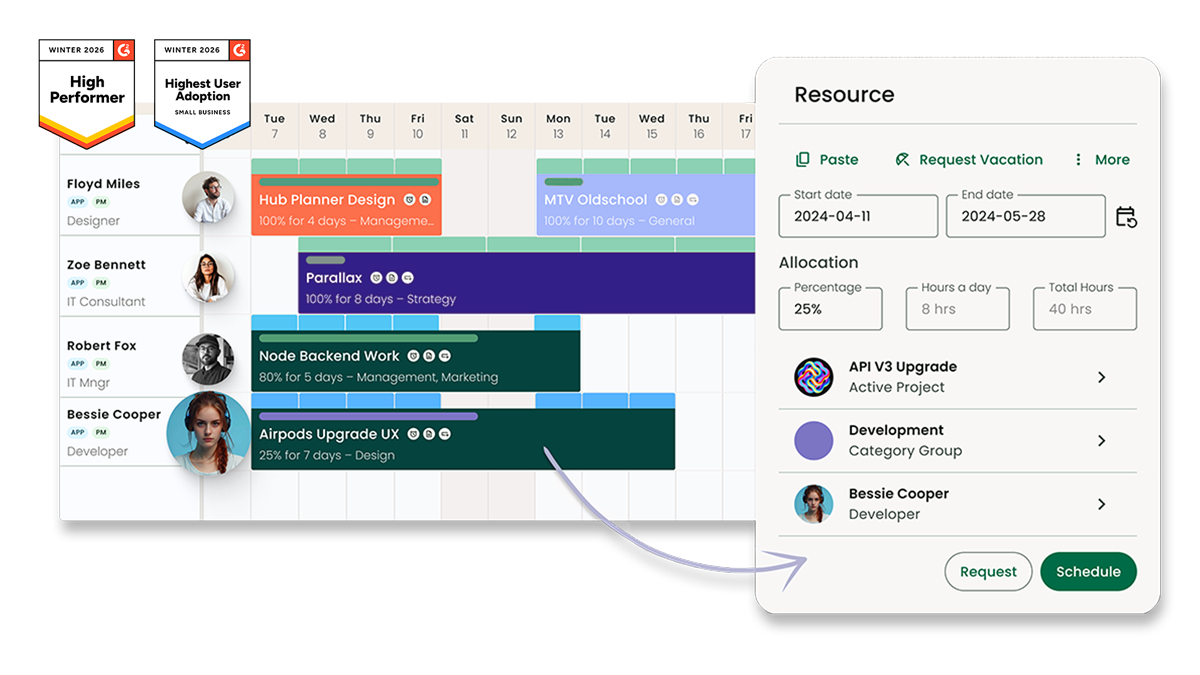
The signs that your resource allocation is slipping tend to show up quietly in day-to-day project work, so here’s what you can look out for:
-
-
- The same people always at capacity, while others have idle time: In this case, you’re allocating without a shared view of who's already committed. You can use resource scheduling software to show confirmed bookings across the full team before anyone gets assigned
- Team members are constantly switching between projects: If people are split across too many projects at once, output slows and client satisfaction drops. Sequence work so each person has focused blocks on one project before moving to the next
- Mistakes and rework are becoming routine: This usually means the wrong person is on the task, or someone's utilisation is consistently above 80%. Allocate based on availability, skill, and role, so the right person is confirmed at planning
- Deadlines slip without a clear reason why: Most likely, the plan isn't reflecting actual availability. Time off, existing commitments, and part-time schedules all reduce available hours in ways that don't show up unless you're tracking them. Use software, such as Resource Flow, to surface those gaps when allocating resources
- You can't say who's available next month without calling people: This shows that forward capacity planning isn't in place, and you need software that gives a live availability view filtered by skills, utilisation, and date range
-
How Resource Allocation, Capacity Planning, and Project Scheduling Connect
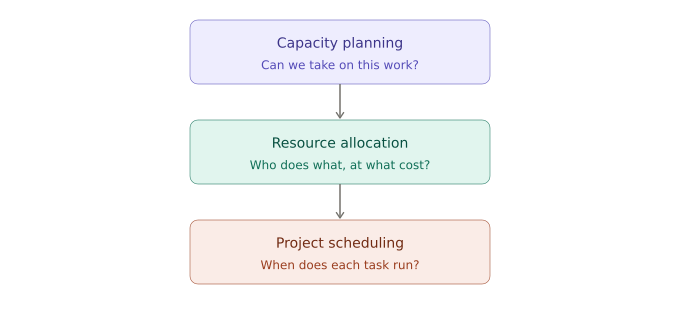
Capacity planning, resource allocation, and project scheduling are three distinct pillars of streamlined project management. Project managers work across all three as follows.
-
-
- Capacity planning assesses whether your organisation can take on new work at all. It focuses on team availability, skills, demand forecasting, and workload management before anyone is assigned to anything
- Resource allocation comes once capacity is confirmed. People, budget, tools, and time get assigned to specific tasks based on skills, availability, and cost rate. This is where ownership is established
- Project scheduling is where allocation becomes a timeline. Tasks get start and end dates, dependencies get mapped, and the project plan becomes something the team can actually execute against.
-
Resource Flow connects all three, so a change in one updates the others automatically.
How Resource Allocation Differs Across Project Types and Industries
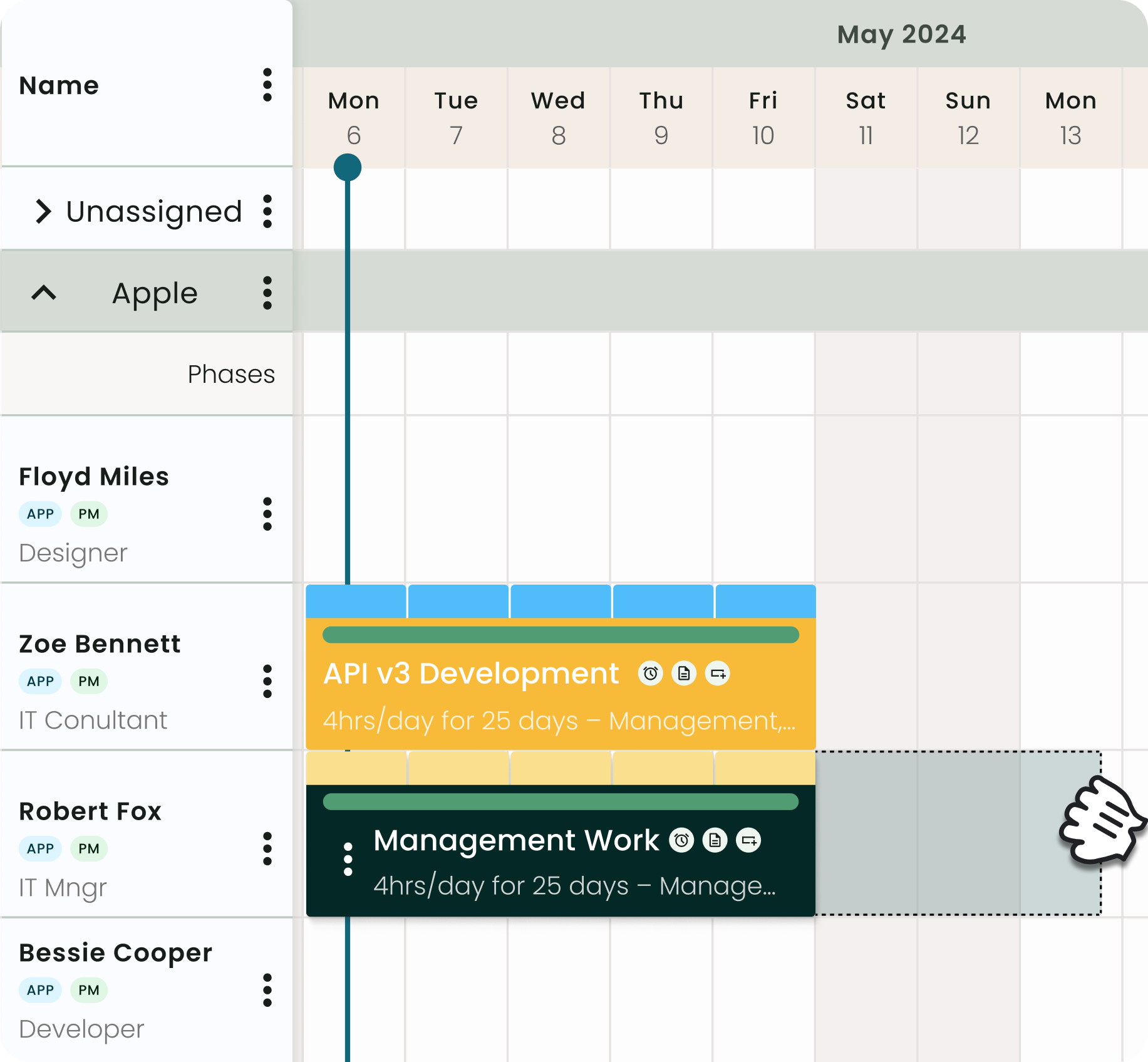
Resource allocation follows the same principles everywhere, but the constraints and priorities shift depending on the type of work and the environment it runs in.
Below is how allocation plays out across three contexts most relevant to project-based teams:
IT Consultancy
Senior consultants in IT firms typically work across all active client engagements. They’re needed at different intensities and against different deadlines at the same time.
Strategic resource planning gives you a balanced view of each consultant's commitments across the full portfolio. You can then assign the right person to the right engagement, whether it's a single fixed-scope project or five concurrent ones running in parallel.
IT Department
For internal IT teams, the project planning challenge is often that demand often comes from different directions, such as infrastructure, security, and business-led projects, at once.
As such, you end up allocating the same engineers, but with no clear client deadline to sequence against.
Resource allocation gives you a structured way to prioritise that demand, assigning people to projects based on confirmed capacity, skills, and business impact.
Ready to allocate resources better? Here’s how IT departments use Milient Resource Flow.
Professional Services
In professional services, the people doing the work are the primary resource.
So, allocation decisions directly affect margin: the wrong seniority level on the wrong phase at the wrong cost rate erodes the fee budget before delivery is done.
Structured resource allocation matches skills, cost rate, and availability together, keeping billable utilisation in the range where projects stay profitable.
The Tradeoffs Every Project Manager Faces When Allocating Resources
Resource allocation requires continuous compromise because every decision you make on people, time, cost, and scope affects the others. These are the most common tradeoffs to plan for.:
-
-
- Over-allocation vs. under-allocation. When you book someone at 90% across two projects, delivery quality drops on both. Leave capacity unused, and margins suffer. The target is a utilisation range that keeps projects profitable without stretching the team past what they can sustain
- Time vs. cost. Adding more experienced or specialised resources accelerates delivery but increases the cost of the project. On the other hand, keeping costs lean means the timeline stretches. Your allocation decision at the planning stage can set the balance before it becomes a constraint you're working around
- Utilisation vs. quality. Pushing billable utilisation above 80% would leave no buffer for rework, knowledge transfer, or scope changes. When something shifts mid-project, and it usually does, that buffer would keep delivery on track. So, build it into the allocation from the start
- One project vs. the portfolio. Prioritising allocation for a single high-pressure project pulls capacity from others. The right call is to look across the full portfolio before committing, so you know what you're trading off before the impact shows up somewhere else. You can create a checklist to plan across project phases
-
Resource Allocation in Practice: How It Plays Out on a Real Project
/HubPlanner_Old/Hub-Planner_Capacity-Planning_Combine-with-filters.jpg?width=452&height=439&name=Hub-Planner_Capacity-Planning_Combine-with-filters.jpg)
Here are two scenarios that show how resource allocation decisions play out in day-to-day project work.
Scenario 1: IT Consultancy, Multi-Client Environment
An IT consultancy has three active client engagements and a fourth incoming. A senior cloud engineer is needed on all three at overlapping timelines.
If there’s no portfolio view of confirmed bookings, each project manager would assume the engineer’s availability and book them. If the engineer ends up at 130% utilisation for weeks, deadlines will likely slip, and clients can escalate.
With confirmed capacity data across the portfolio, the project managers would allocate the engineer better. One project manager could push their phase back two weeks, and another could split the requirement with a mid-level engineer on the less complex tasks.
This way, the senior engineer runs at 75%, and all three projects deliver.
Scenario 2: Professional Services Firm, Fixed-Fee Project
A professional services firm wins a fixed-fee engagement, and the project manager assigns the work based on who has free hours, without checking cost rates.
Two senior consultants end up on tasks that a junior consultant could have handled at a third of the cost. By week four, the fee budget is 60% spent, with half the work remaining.
Allocation by skills and cost rate at the start would have matched the right seniority to each phase, thus maintaining project margins and delivering quality work.
How Poor Resource Allocation Affects Project Profitability and Delivery
/hubplanner_cal.png?width=1200&height=645&name=hubplanner_cal.png)
When resource allocation decisions are made without full visibility, the impact lands directly on project margins and delivery timelines.
-
-
- Fee budget overruns. The wrong seniority level on the wrong phase burns through budget before delivery is complete. By the time it's visible, the margin is already gone
- Missed deadlines. Overallocated teams cut corners or simply can't sustain the pace. One slipped deadline in a multi-project environment creates a cascade across the portfolio
- Staff attrition. Research shows that 77% of employees have experienced burnout at work. Poor resource allocation is the main driver here, since it leads to staff who cannot manage their utilisation productively
- Revenue left unrealised. Low billable utilisation means capacity is going unbilled. At 60% average utilisation across a team of 20 consultants, the gap between that and a 75% target represents significant lost revenue every month
-
How Milient Resource Flow Helps Project-Based Teams Allocate Resources Better
Resource allocation keeps projects profitable, teams sustainable, and clients satisfied.
For IT departments, IT consulting firms, and professional services teams running multiple concurrent projects, it requires live capacity data, skills visibility, and utilisation tracking to work together.
Milient Resource Flow is the resource management software that connects all of that in one platform. Book a meeting to explore how it fits your workflow.
FAQs
 Andrea Neeve
Marketing Associate
Want more content like this? Follow Milient:
/Hub-Planner_Resource-Request_Hero.png?width=1024&height=1024&name=Hub-Planner_Resource-Request_Hero.png)