
Searching for Smartsheet alternatives usually means one thing: the spreadsheet-style approach that once worked is starting to feel limiting. As projects grow, many teams find themselves managing complex formulas, cross-sheet references, and dashboards just to keep visibility across projects and resources.
In this guide, we’ll break down the best alternatives to Smartsheet, including dedicated resource planning tools like Milient Resource Flow, scheduling platforms such as Float and Runn, and popular work management tools like Asana and Monday.com.
Smartsheet Alternative at a Glance
| Tool | Best For | Standout Feature | Price Starting Point |
| Milient Resource Flow | Structured resource management | Real-time scheduling, utilisation tracking, and forecasting | From ~£7 per user/month |
| Float | Visual resource scheduling | Drag-and-drop workload planning | From ~$6–$7 per user/month |
| Runn.io | Resource forecasting and capacity planning | Scenario modelling and utilisation insights | From ~$10 per user/month |
| Asana | Task and workflow management | Goals, portfolios, and collaboration tools | From £8.49 per user/month |
| Monday.com | Visual project and workflow management | Customisable boards and automation | From £8 per user/month |
Milient Resource Flow: Best For Structured Resource Management
Smartsheet is widely appreciated for combining “power with simplicity.” Many users value its familiar spreadsheet-style layout and quick implementation, particularly when migrating from Excel or Google Sheets.
However, some reviewers note that as projects grow, Smartsheet can begin to feel more complex, especially when using advanced formulas, automations, and cross-sheet references. Larger datasets may clutter the interface, and reporting customisation can feel limited compared to more specialised tools.
For organisations managing resource capacity across multiple projects, this is often the turning point.
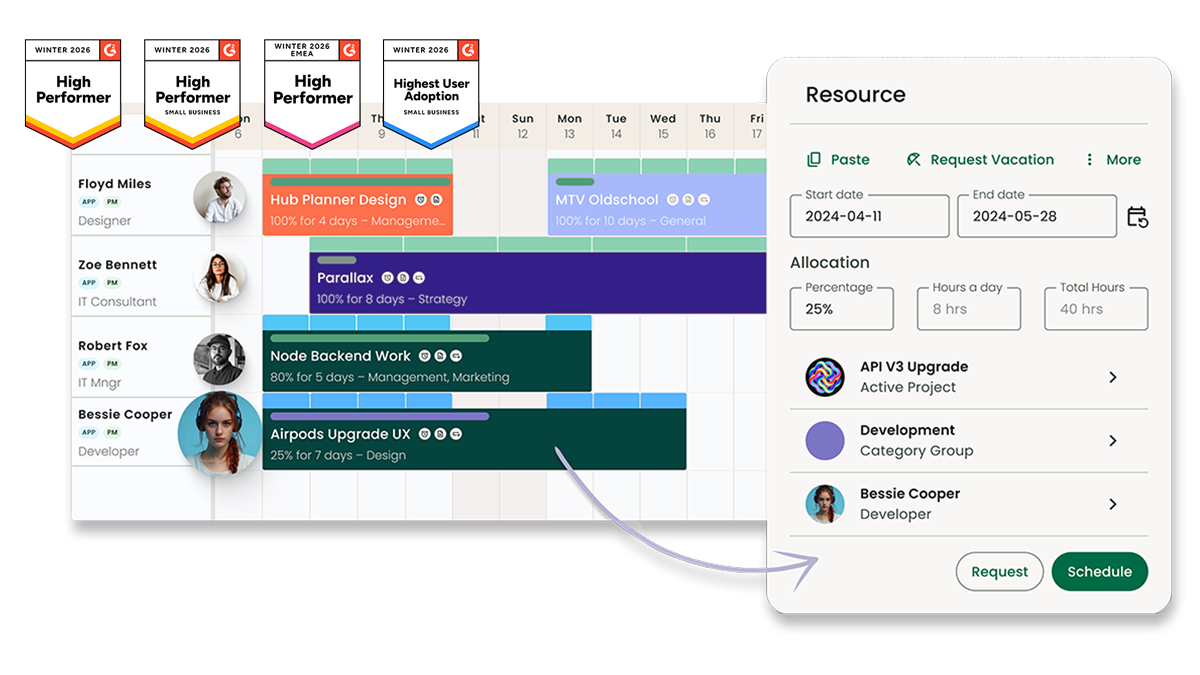
Milient Resource Flow is purpose-built for structured resource management — replacing formula-heavy spreadsheets with real-time scheduling, utilisation tracking, and forecasting designed specifically for project-based teams.
Key Features
Milient Resource Flow is designed to centralise resource scheduling, capacity management, and forecasting in one structured platform, helping teams move beyond spreadsheet-based planning.
1. Visual Capacity Planning & Live Scheduling
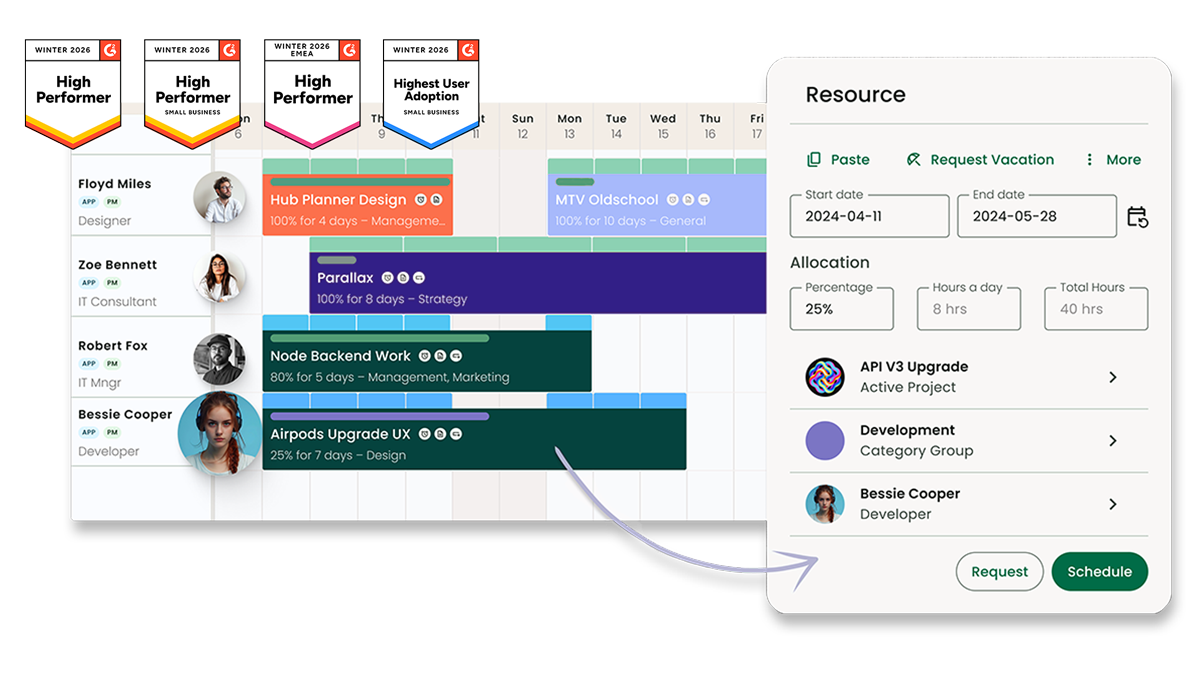
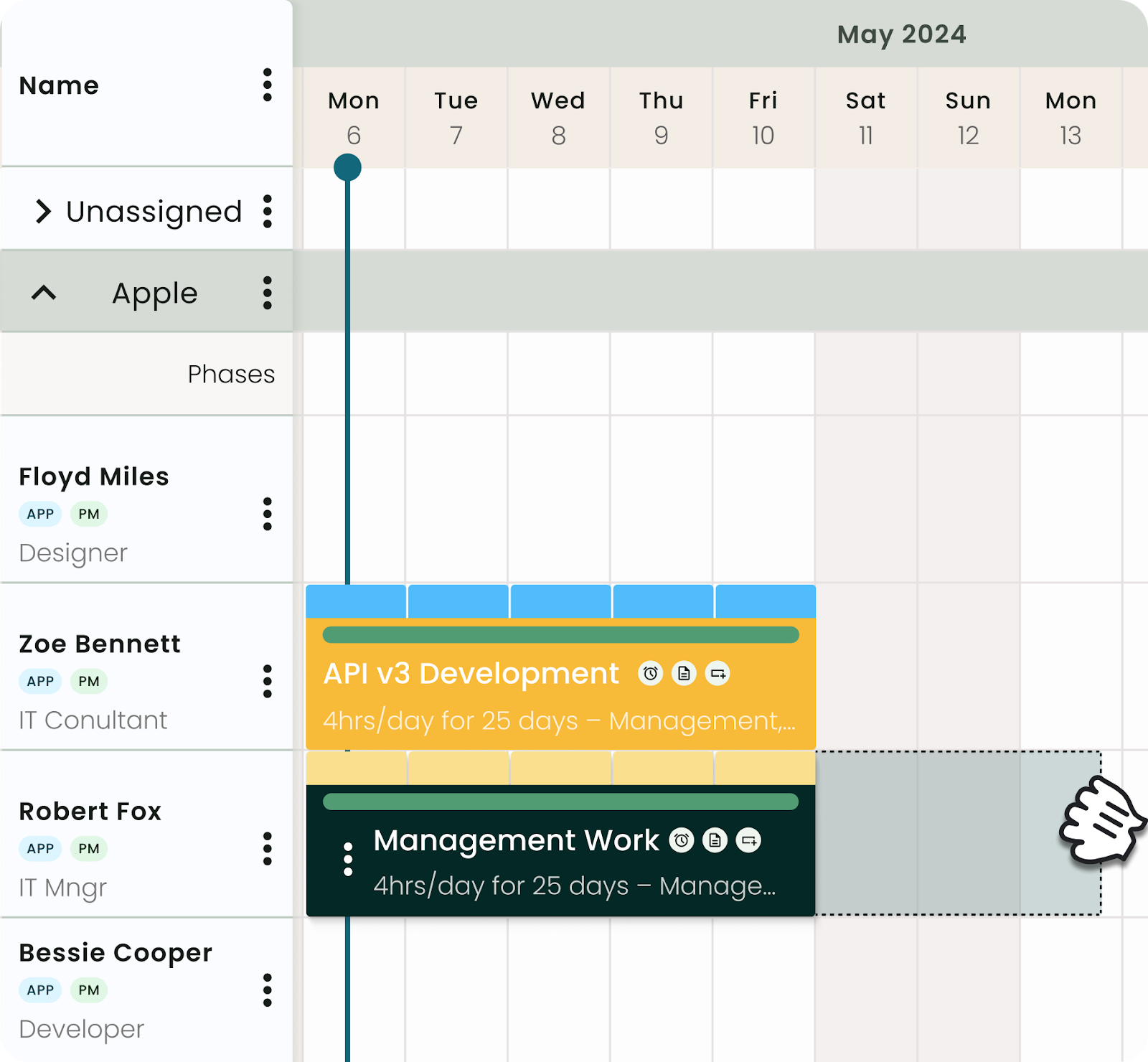
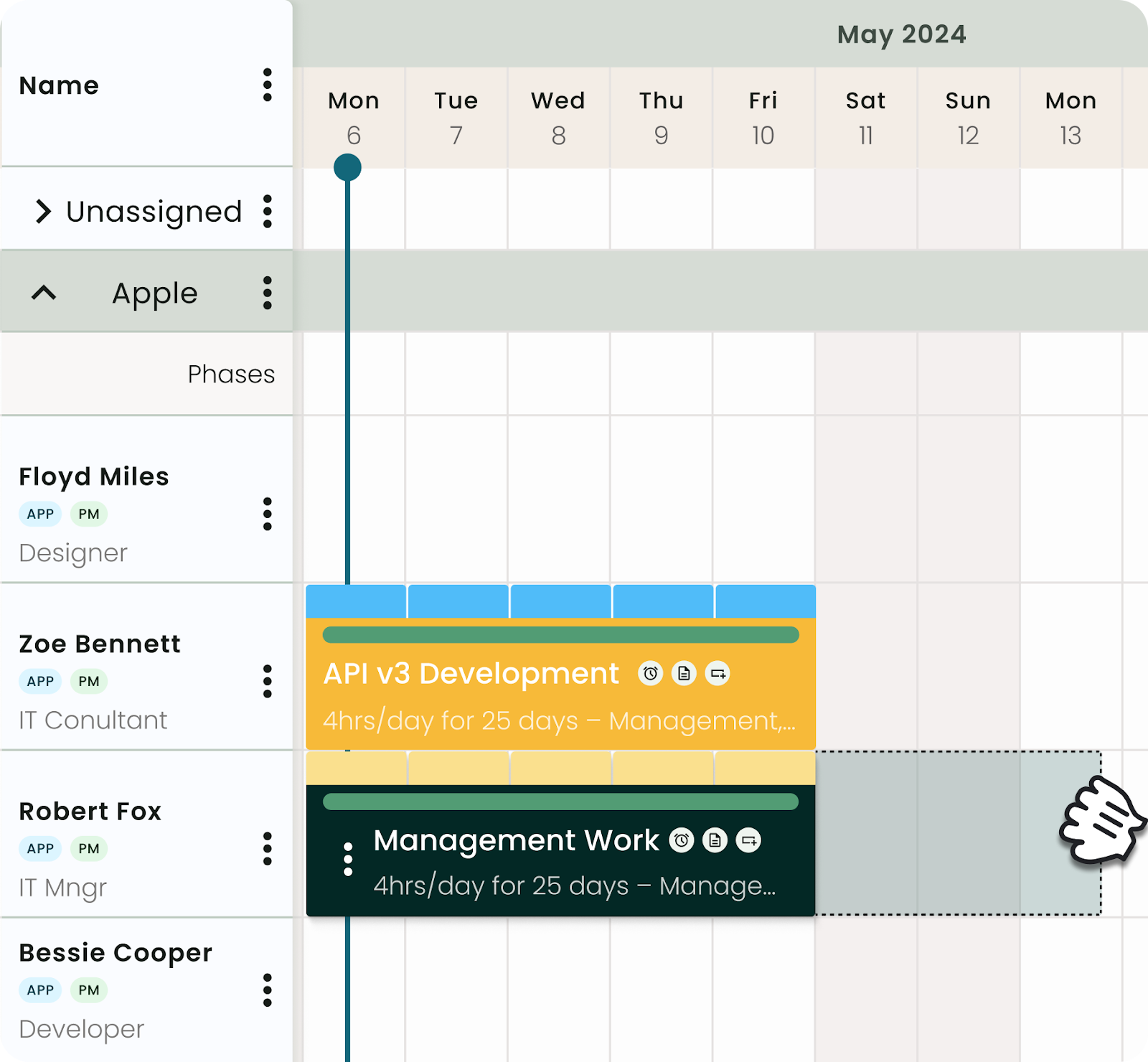
Resource Flow provides a real-time scheduling interface that shows exactly who is allocated, overbooked, or underutilised. Managers can drag and adjust allocations instantly, preventing booking clashes and improving workload balance. Unlike spreadsheet planning, availability updates dynamically across projects.
2. Real-Time Utilisation Tracking
Track billable vs non-billable time, overtime, and overall team utilisation through built-in dashboards. This allows leadership teams to spot trends, protect margins, and identify capacity gaps before they impact delivery — without relying on manual Smartsheet reports.
3. Forecasting & Scenario Planning
Resource Flow connects scheduling data with forward-looking forecasting. Teams can model future demand, predict resource shortages, and plan hiring decisions with greater confidence. This structured forecasting goes beyond static spreadsheet formulas.
Where Resource Flow Shines
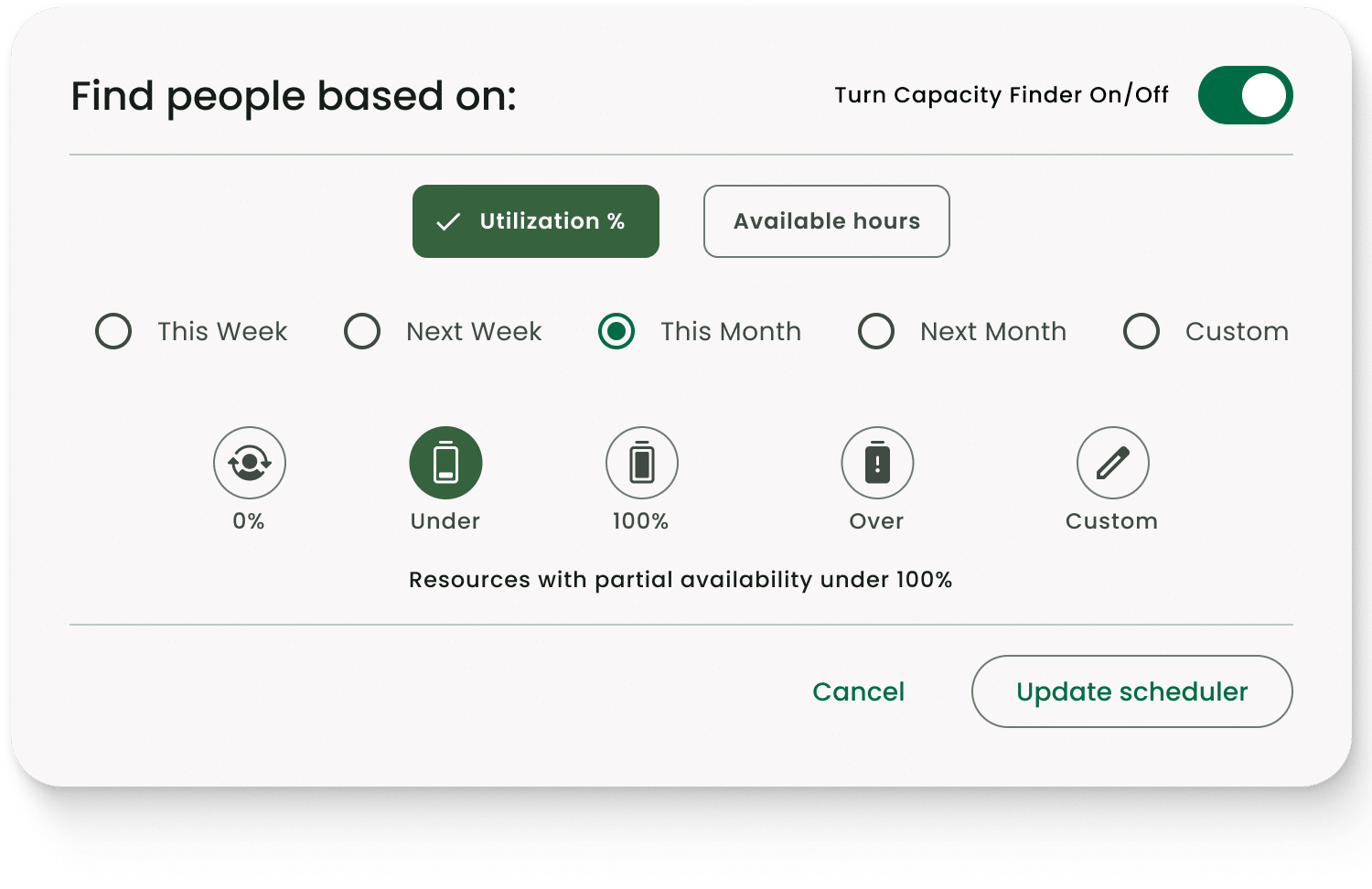
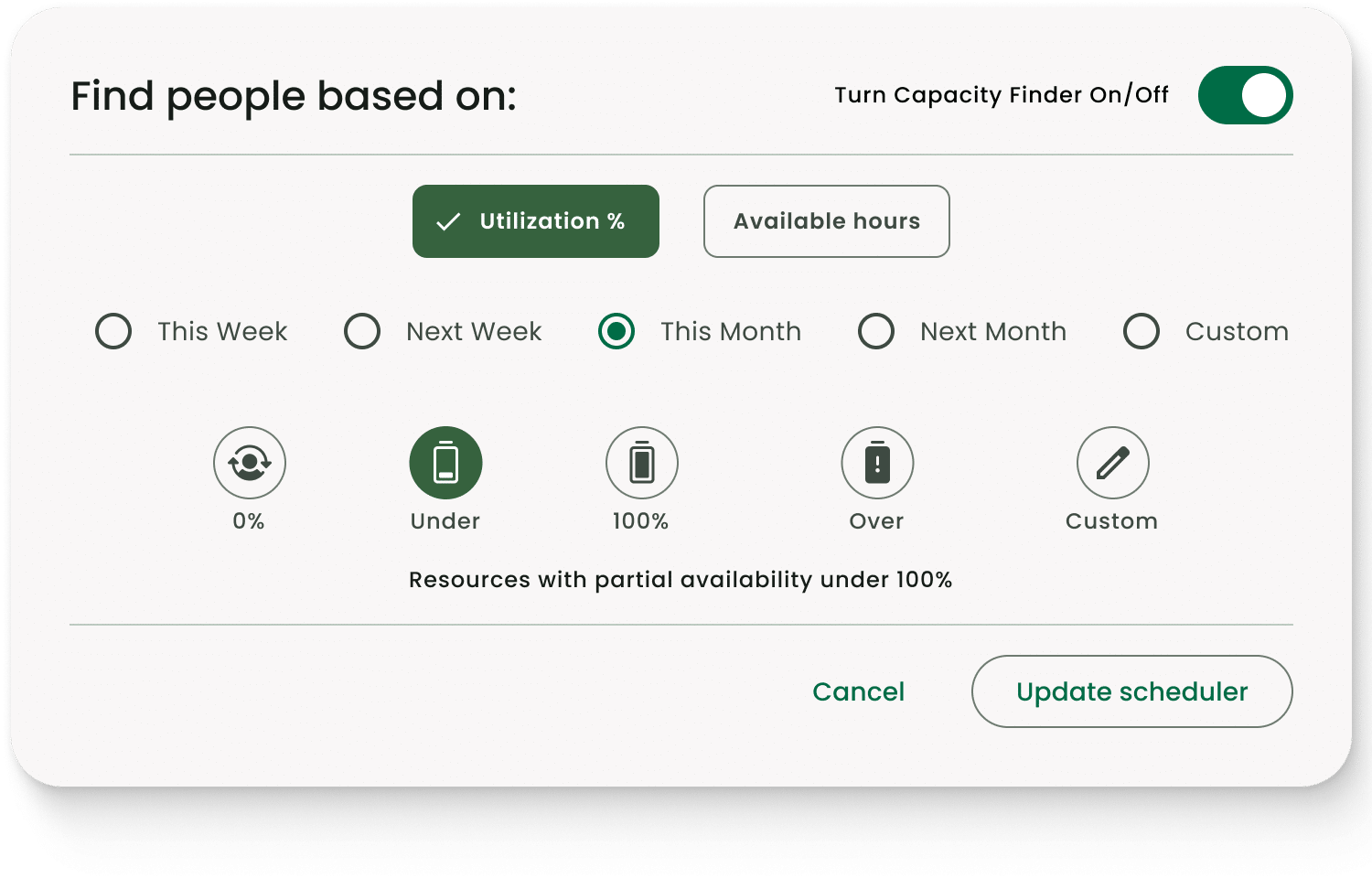
- Purpose-built for structured resource management: Unlike spreadsheet-based tools, Milient Resource Flow is designed specifically for capacity planning, scheduling, and utilisation tracking. Features like Capacity Finder, skills matching, and live availability views make it easier to allocate the right people without manual cross-sheet tracking.
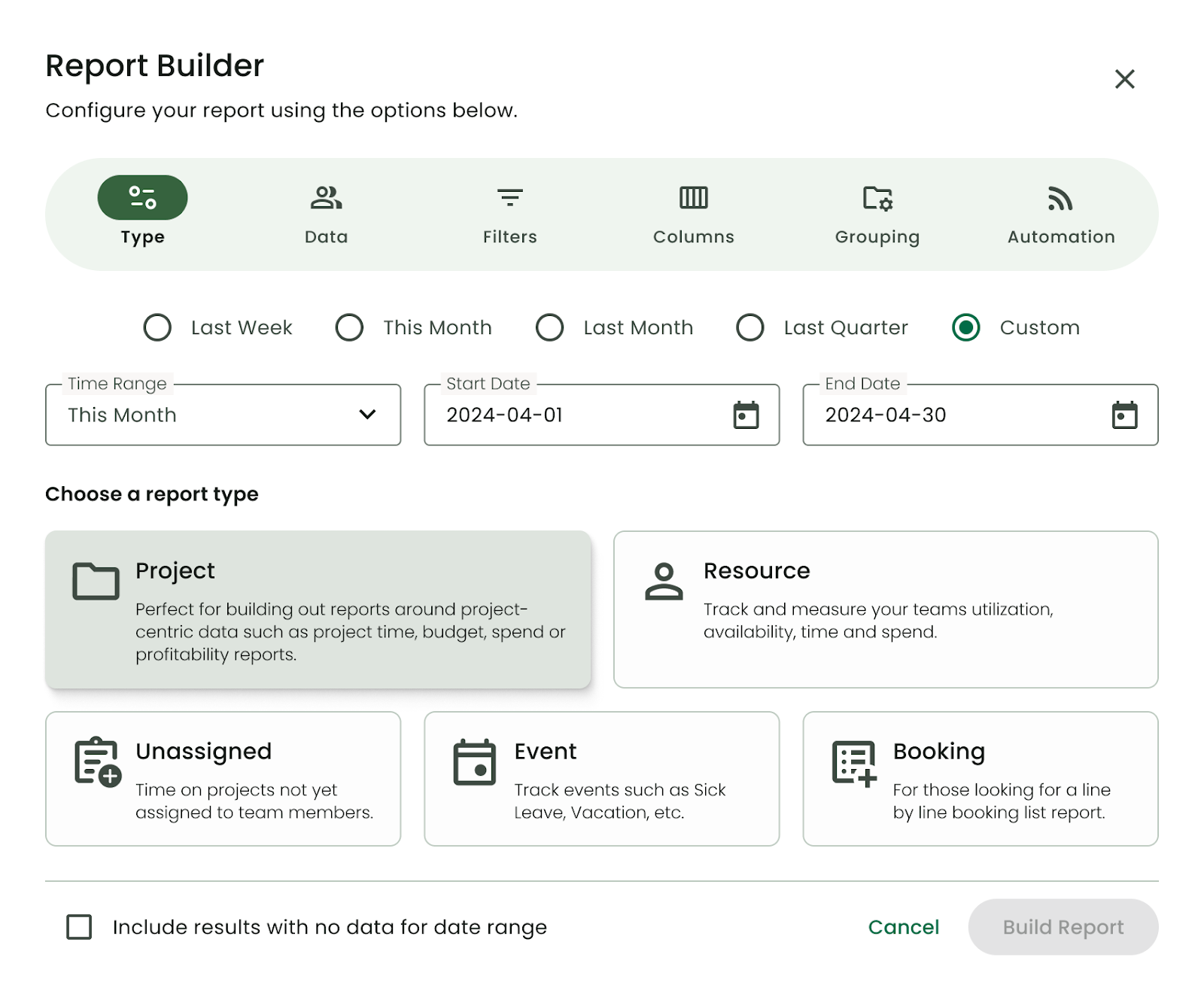
- Real-time visibility into utilisation and forecasting: Built-in dashboards and a configurable report builder allow teams to monitor over/under utilisation, forecast resourcing needs, and track performance without complex formulas. This is particularly valuable for project-based teams managing billable time and profitability.
- Integrated project and resource data: Resource Flow connects scheduling, dependencies, fixed costs, and reporting in one platform. That reduces double handling across spreadsheets and gives leadership a single source of truth as projects scale.
- Scalable feature tiers: With plans ranging from Plug & Play to Business Leader, teams can start simple and add features such as timesheets, approvals, skills matching, and advanced capacity planning as they grow.
Where Resource Flow Falls Short
- More structured than flexible spreadsheet tools: Teams that prefer highly custom, open-ended grid layouts (like Smartsheet) may find Milient more process-driven and structured in comparison.
- Advanced reporting can require configuration: While there are many built-in reports, customising reporting beyond standard templates may require some setup, particularly for teams with very specific reporting needs.
- Best suited to project-driven organisations: Milient is designed for professional services and resource-heavy teams. Organisations looking for a general-purpose collaboration tool may find it more specialised than necessary.
- Complexity increases with scale: As some reviews note (e.g., around categories and large project volumes), managing very high numbers of ongoing projects can require thoughtful setup to maintain clarity.
Customer Reviews
“Resource Flow makes scheduling work very simple, and the user interface is intuitive. Their customer service is top-notch.” –
“PMs save a lot of time visualising resource planning and can quickly decide who to move and where.” –
Who is Resource Flow Best For
- Growing consultancies: Project-based teams that need clear capacity planning, utilisation tracking, and forecasting — without the complexity of a full PSA suite.
- Operations & resource managers: Leaders who need real-time visibility of team availability to make faster staffing decisions.
- Multi-project organisations: Businesses managing billable work across multiple clients, locations, and time zones.
Pricing
Milient Resource Flow offers tiered pricing based on feature depth and team size.
| Plan | Price (per user / month) | Best For |
| Plug & Play | £7 / month | Small teams needing core scheduling features |
| Premium | £18 / month | Growing teams needing forecasting, approvals & skills matching |
| Business Leader | £54 / month | Large enterprises with advanced capacity requirements |
All plans are scalable depending on user numbers and feature requirements.
If your team is relying on spreadsheets to track workloads and availability, it can quickly become difficult to see who’s overloaded and who has capacity.
Milient Resource Flow helps teams plan smarter with real-time resource scheduling and forecasting.
2. Float: Best for Simple Visual Scheduling
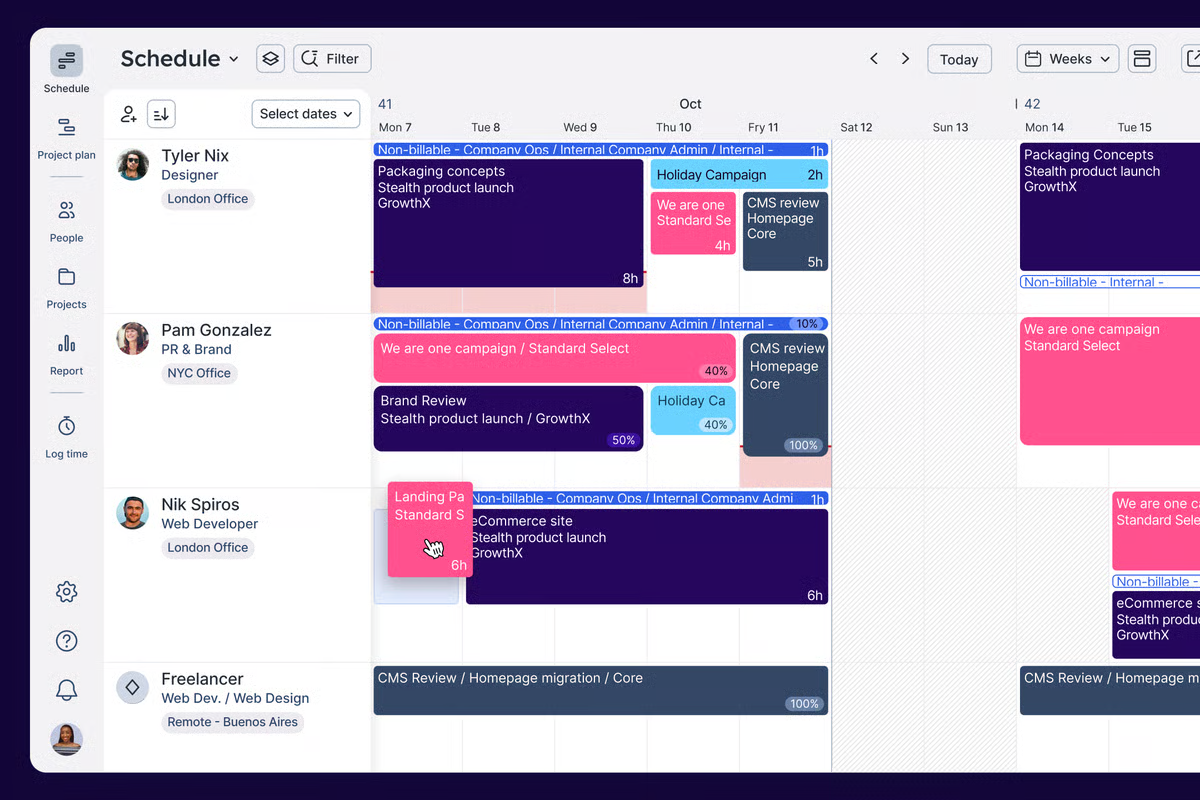
Float is a dedicated resource management and scheduling platform designed to help teams plan workloads, allocate people, and forecast capacity in real time. Unlike spreadsheet-style tools such as Smartsheet, Float focuses specifically on visual scheduling rather than broader project management workflows.
Its drag-and-drop interface and clean layout make it particularly popular among agencies and consultancies managing billable teams across multiple projects.
Key Features
- Visual scheduling board: A drag-and-drop interface that shows team allocations across projects in real time, making workload balancing fast and intuitive.
- Capacity & workload forecasting: Provides forward-looking visibility into availability, helping managers prevent overbooking and spot hiring gaps early.
- Time tracking integration: Compare planned vs actual hours to monitor utilisation and improve project accuracy.
- Third-party integrations: Syncs with tools like Asana, Jira, Slack, and calendar apps to reduce double handling.
Where Float Shines
- Intuitive for day-to-day use: Many G2 reviewers highlight how easy it is to move between projects and people views, particularly for managers balancing multiple schedules.
- Clear visual overview: Compared to spreadsheet-heavy tools like Smartsheet, Float offers a more visual, less formula-driven approach to scheduling.
- Strong adoption across teams: Users report daily usage across departments, supported by responsive customer service.
Where Float Falls short
- Schedule view can feel overwhelming: While some users find it intuitive, others report that the main scheduling screen can be difficult to interpret without training — particularly for non-owners.
- Limited flexibility in calendar syncing: Items synced from external calendars cannot always be repositioned freely within the schedule.
- Not a full project management solution: Float focuses on resource planning rather than complex task workflows, reporting layers, or financial governance.
Customer Reviews
“I like Float for its intuitiveness and how easy it is to use. It’s implementation is smooth; it's straightforward to add my schedule in the time-blocking section and quickly get a clear, visual view of what I have on for the day. However Float’s least helpful feature is probably that, once items are synced from my calendar, they can’t be moved around within the schedule. Sometimes I want to place a timed meeting between two other untimed tasks to block out that time, but I can’t reposition the meeting if it’s stuck at the bottom of the day.”
Who Float is Best For
- Creative & digital agencies: Teams needing quick visual scheduling without heavy governance.
- People managers: Leaders balancing multiple contributors across projects.
- Growing consultancies: Firms prioritising allocation clarity over deep project workflows.
Pricing
| Plan | Price (per user / month) | Best For |
| Starter | From $7 | Core scheduling |
| Pro | From $12 | Forecasting & time tracking |
Pricing varies depending on billing frequency and team size.
Runn.io: Best For Forecasting And Capacity Planning
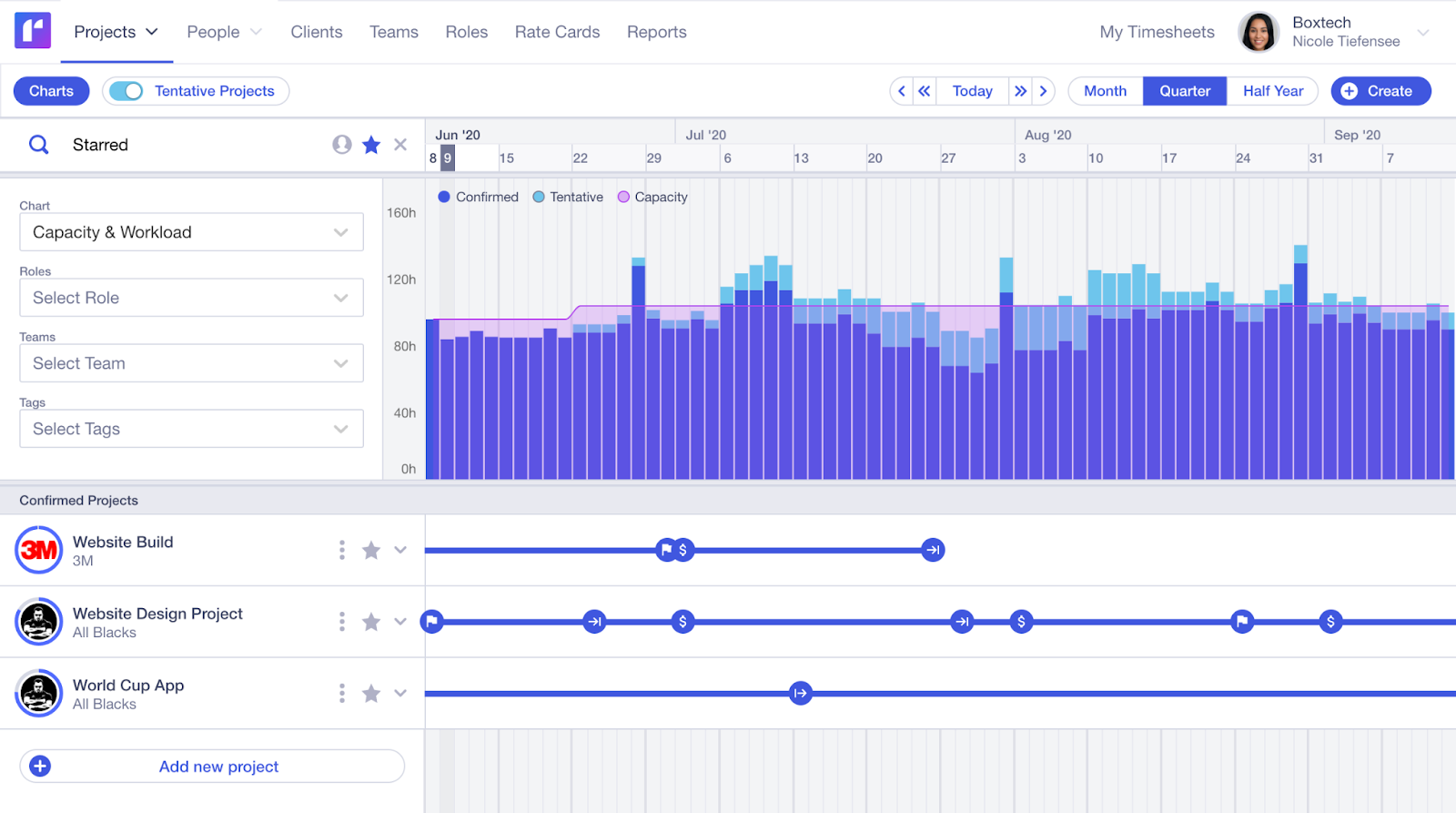
Runn is a resource management and capacity planning platform designed to help project-based teams forecast workloads, allocate resources, and monitor utilisation across multiple projects. Unlike spreadsheet-style tools such as Smartsheet, Runn focuses specifically on forecasting and workforce planning rather than flexible task management.
Its visual scheduling timeline and built-in forecasting tools allow managers to quickly understand team capacity, spot resource gaps, and plan upcoming project demand without relying on complex formulas or manual spreadsheet tracking.
Key Features
- Visual resource scheduling: A drag-and-drop timeline shows team allocations across projects, making it easy to adjust workloads and rebalance schedules in real time.
- Capacity forecasting: Forward-looking forecasting tools help teams anticipate resource shortages, hiring needs, and project demand weeks or months ahead.
- Utilisation tracking: Built-in reporting tracks billable vs non-billable work and overall team utilisation to support better project profitability.
- Integrations: Connects with tools like Harvest, Jira, and project management platforms to sync time and project data automatically.
Where Runn Shines
- Simple and intuitive interface: Many Capterra users highlight how quickly they were able to learn the platform. The clean layout makes it easy to see both people allocation and project timelines without navigating complex spreadsheets or formulas like those often used in Smartsheet.
- Strong resource forecasting: Runn’s forecasting tools allow teams to test different allocation scenarios and ensure projects are properly staffed without overbooking team members.
- Clear workload visibility: Managers can instantly see who is working on what and when, helping teams prioritise work and rebalance schedules quickly.
Where Runn Falls Short
- User interface could be more polished: Some reviewers mention small usability issues such as inconsistent navigation paths or smaller click areas within the interface.
- Limited reporting customisation: Users note that additional reporting flexibility, such as custom fields, would improve deeper analysis and reporting.
- Focused primarily on resource planning: While Runn excels at forecasting and allocation, organisations needing deeper project management workflows may still rely on additional tools.
Customer Reviews
“My team is very happy about resource management, tracking projects, utilization, financial metrics and permissions features. But the UI could use a little polish in a few places - some navigation is a little unintuitive (one can't always access things from the 'quick' menu bar - on one page you can, but from another you can't and have to click through to the full item page first - that inconsistency is a bit weird), and sometimes buttons/click areas seem a bit small.”
Who Runn is best for
- Consultancies: Firms needing forward-looking resource planning and forecasting.
- Professional services teams: Organisations managing billable projects and utilisation targets.
- Operations managers: Leaders responsible for long-term workforce planning.
Pricing
| Plan | Price (per user / month) | Best For |
| Lite | $7 per resource seat | Small teams needing basic scheduling |
| Standard | $11 per resource seat | Teams needing timesheets and deeper visibility |
| Advanced | Custom pricing | Organisations requiring onboarding and advanced features |
4. Asana: Best For Task And Workflow Management
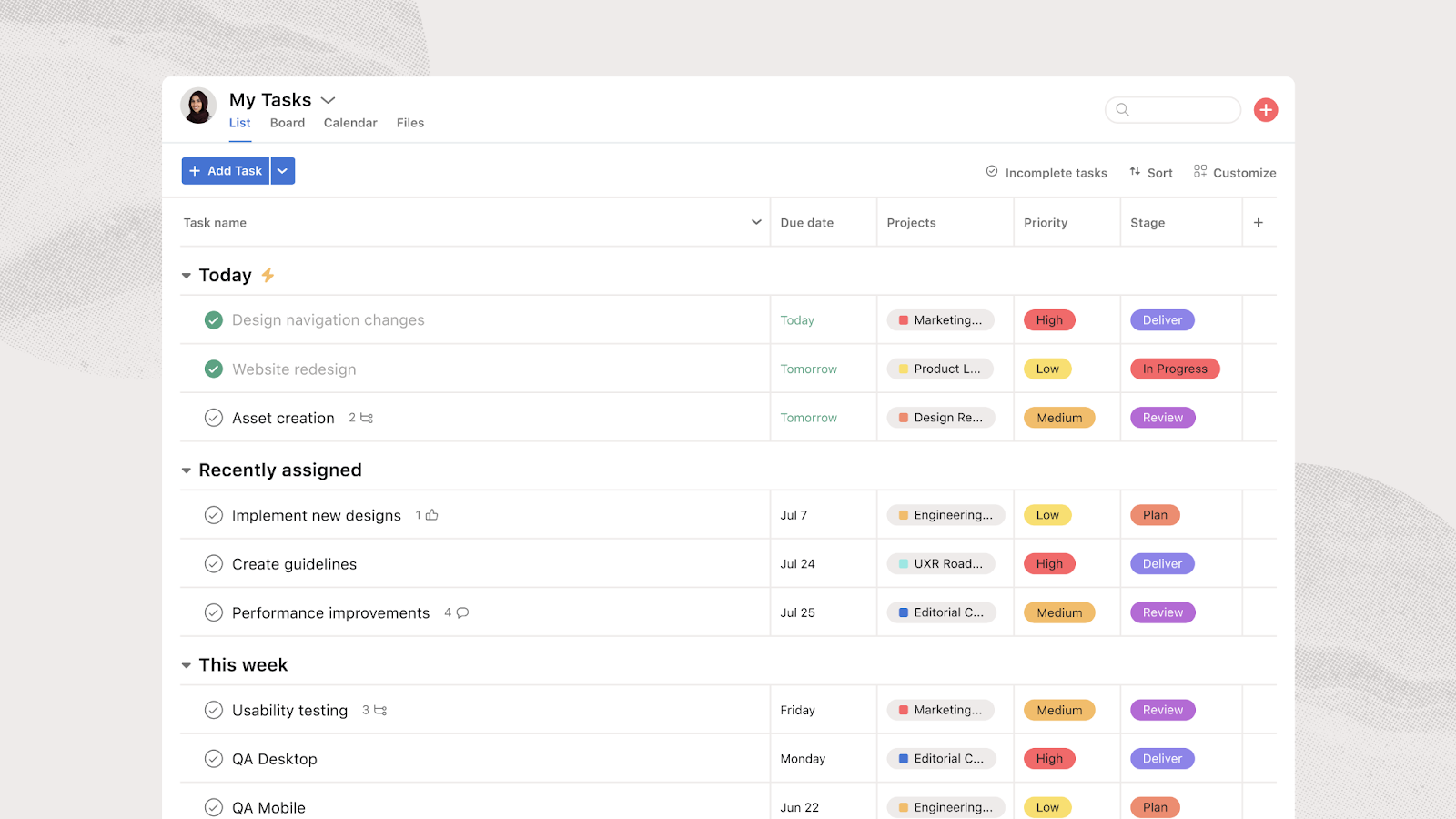
Asana is a popular work management platform that helps teams organise projects, track tasks, and collaborate across departments. Unlike spreadsheet-style tools such as Smartsheet, Asana focuses on structured task workflows with visual project views, reporting dashboards, and automation features that help teams coordinate work more efficiently.
The platform is widely used by marketing, product, and operations teams to centralise project communication, track progress, and align day-to-day tasks with broader organisational goals.
Key Features
Multiple project views: Teams can manage work through list, board, timeline, and calendar views, allowing different teams to track projects in the way that suits their workflow.
Workload and capacity visibility: Asana’s workload feature helps managers identify overloaded team members and rebalance tasks across projects.
Goals and portfolio tracking: Leadership teams can connect individual projects to company objectives using goal tracking and portfolio-level visibility.
Reporting dashboards: Custom dashboards provide insights into project progress, task completion, and team performance.
Where Asana Shines
- Structured project visibility: Many users highlight how Asana helps teams move beyond email and messaging chaos by providing a centralised system for tracking projects and receiving status updates.
- Strong workflow organisation: Features such as Goals, Reporting, and Portfolios help leadership teams maintain visibility across multiple projects and align work with strategic priorities.
- Mature integration ecosystem: Asana connects with a wide range of tools, making it easier to integrate into existing workflows.
Where Asana Falls Short
- Some workflows rely on integrations: Users note that certain processes, such as exporting data or handling form submissions, may require third-party tools like Google Sheets integrations.
- AI capabilities still evolving: While AI features exist, some reviewers report that their practical value is still developing compared to other tools.
- Per-user pricing can become costly: As teams grow, paying for every user at higher feature tiers can make pricing challenging for smaller organisations.
Customer Reviews
“What I appreciate the most is how clearly it allows me to structure projects, breaking down large initiatives into manageable tasks, assigning responsibilities, and tracking progress in a way that the whole team can easily understand. But Asana really needs to allow users assign a task to more than one person. Right now, you’re stuck picking just one, which slows things down when teams are working together, especially on web development or marketing projects. People end up creating subtasks or other workarounds, which just adds clutter. Customer support could use a serious upgrade, too. Users often complain about slow replies, chatbots that don’t actually help, and getting the runaround with refunds.” -
Who Asana is Best For
- Marketing and product teams: Organisations managing large volumes of tasks and campaigns.
- Growing companies: Businesses transitioning from informal project tracking to structured workflows.
- Cross-functional teams: Teams needing a shared platform to coordinate projects across departments.
Pricing
Asana offers several pricing tiers depending on feature depth and team size.
| Plan | Price (per user / month) | Best For |
| Personal | Free | Individuals or small teams |
| Starter | £8.49 | Growing teams needing reporting and automation |
| Advanced | £16.99 | Organisations needing workload planning and goals |
| Enterprise | Custom pricing | Large companies requiring advanced governance |
5. Monday.com: Best For Visual Project Management
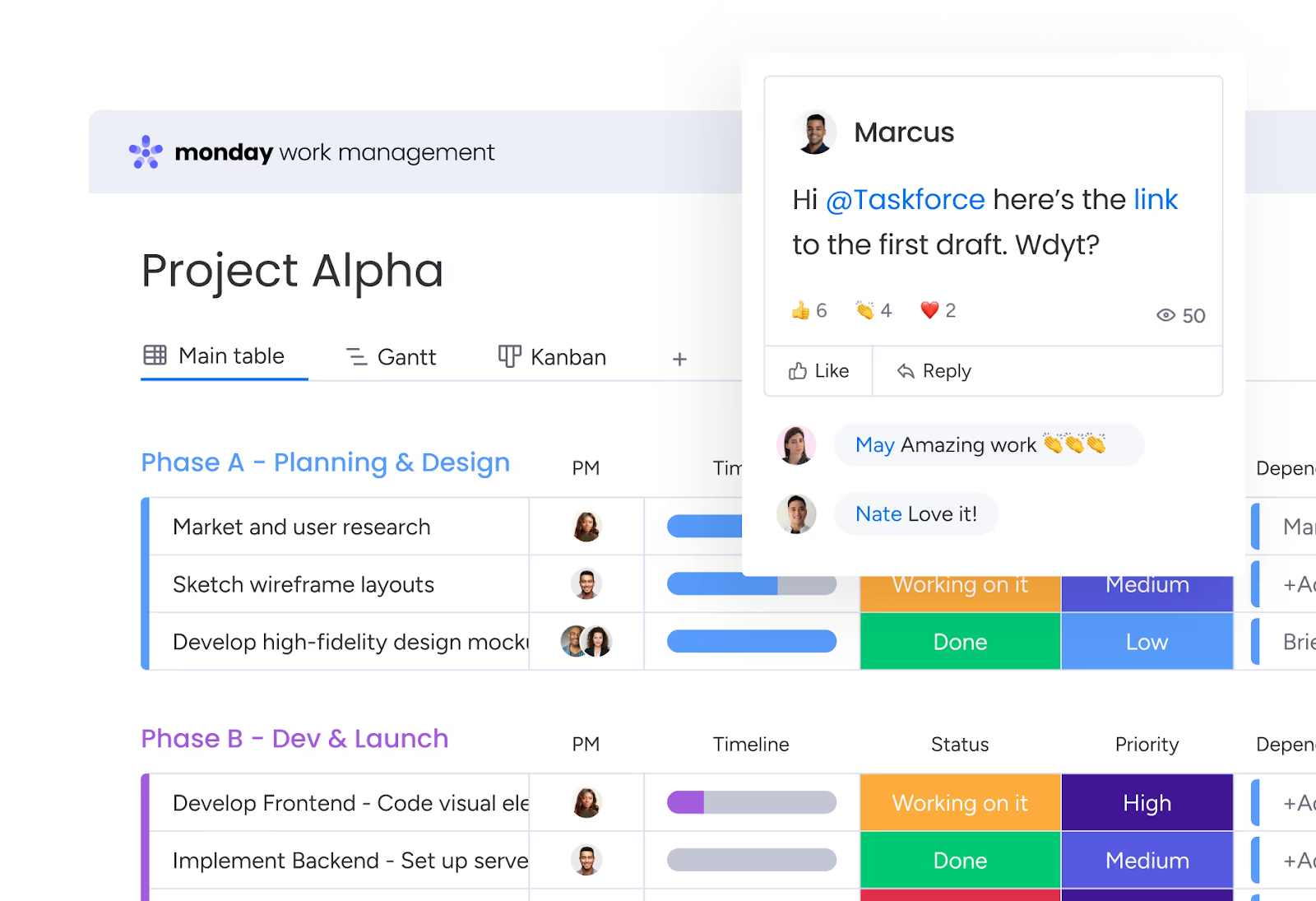
Monday.com is a highly visual work management platform designed to help teams organise projects, track tasks, and collaborate across departments. Unlike spreadsheet-based tools such as Smartsheet, Monday.com replaces grid-heavy project tracking with colourful boards, drag-and-drop task management, and workflow automation.
Its flexible interface allows teams to customise workflows for everything from marketing campaigns to product development, making it a popular alternative for organisations looking for a more visual and collaborative project management experience.
Key Features
- Visual project boards: Monday.com uses colour-coded boards to organise tasks, assign owners, and track progress across projects in a highly visual way.
- Workload and capacity views: Managers can see team workload distribution and rebalance tasks when individuals become overloaded.
- Automation workflows: Built-in automations allow teams to trigger actions such as status updates, notifications, or task assignments automatically.
- Reporting dashboards: Teams can build custom dashboards to monitor project progress, workload distribution, and performance metrics.
Where Monday.com Shines
- Highly visual project management: Many users prefer Monday.com over spreadsheet-style tools like Smartsheet because it provides a clearer, more visual way to manage tasks and workflows.
- Centralised collaboration: Monday.com creates a single source of truth for project information, helping teams avoid multiple spreadsheet versions and scattered updates.
- Flexible workflows: Teams can customise boards and automations to match a wide range of internal processes.
Where Monday.com Falls Short
- Pricing scales quickly: Many users report that per-user pricing can become expensive as teams grow, especially when occasional users still require full licences.
- Minimum seat requirements: Some plans require a minimum number of users, which can make the platform less accessible for smaller teams testing the tool.
- Resource planning is not its core focus: While workload views exist, Monday.com is primarily designed for task management rather than dedicated resource capacity planning.
Customer Reviews
“It is SO much easier than our previous project plans on Excel, I love the functionality of assigning tasks, dragging them around, adding labels and marking as complete. It's super satisfying. But costing can be prohibitive when you need to add more users, especially for a non-profit. Customer service is not great and can be very frustrating.” -
Who Monday.com Is Best For
- Marketing and operations teams: Organisations managing collaborative workflows across departments.
- Growing companies: Teams moving away from spreadsheets toward more visual project management.
- Cross-functional teams: Businesses needing a shared workspace for project coordination.
Pricing
Monday.com offers several pricing tiers depending on feature access and team size.
| Plan | Price (per user / month) | Best For |
| Free | £0 | Individuals or very small teams |
| Basic | £8 |
Small teams managing simple workflows
|
| Standard | £11 | Teams needing collaboration and automation |
| Pro | £17 | Organisations running more complex workflows |
| Enterprise | Custom pricing | Large companies with advanced governance needs |
Reasons to Consider an Alternative to Smartsheet
Smartsheet is a powerful project management platform, but it isn’t always the best fit for teams managing complex resource planning. As projects grow, users often report that spreadsheet-style workflows become harder to manage, with formulas, automations, and cross-sheet references adding complexity. Large datasets can also clutter the interface and make reporting harder to maintain.
1. Spreadsheet-style Complexity At Scale
Smartsheet’s spreadsheet-style interface can be familiar at first, but as projects grow it often requires complex formulas, cross-sheet references, and manual configuration to maintain accurate reporting. This can make resource planning across multiple projects difficult to manage.
Milient Resource Flow removes the need for spreadsheet logic by providing built-in scheduling, utilisation tracking, and forecasting tools, giving teams real-time visibility into resource availability.
2. Limited Dedicated Resource Management
While Smartsheet supports project tracking, resource capacity planning typically requires additional configuration or integrations. Teams often need to build custom dashboards to understand workload distribution or team availability.
Milient Resource Flow is designed specifically for resource management, offering real-time scheduling views and capacity planning tools that help managers allocate the right people to the right projects.
3. Reporting and Forecasting Require Configuration
Smartsheet offers powerful reporting capabilities, but many teams rely on manually configured dashboards and reports to track project performance or utilisation. Maintaining these structures can become time-consuming as projects evolve.
Milient simplifies this with built-in utilisation dashboards and forecasting tools, helping teams monitor workload trends and predict future capacity needs without complex report building.
Get Started With The Best Smartsheet Alternative Today
Choosing the right Smartsheet alternative depends on your organisation’s priorities. Tools like Asana and Monday.com are strong options for task and workflow management, while Float and Runn focus more on scheduling and forecasting.
For organisations managing multiple projects, billable teams, and resource capacity, Milient Resource Flow provides a more structured solution built specifically for professional services teams.
If you're looking to move beyond spreadsheet-based project management, the next step is to see how a dedicated resource planning platform works in practice.
 Andrea Neeve
Marketing Associate
Want more content like this? Follow Milient:

/hubplanner_resource.png?width=1024&height=1024&name=hubplanner_resource.png)