Struggling to find the best project management software for your architecture firm? With projects, people, and profitability constantly under pressure, generic tools often fall short.
In this guide, we break down the best software for architects, compare leading platforms, and show which solution fits your firm’s size, workflow, and growth goals.
Project Management Software Comparison Table
1. Milient's Project Flow: Best for Mid-Size Architecture Firms
/Blocs%20Project%20Cards.png?width=1529&height=628&name=Blocs%20Project%20Cards.png)
Milient’s Project Flow is purpose-built project management software designed specifically for architecture firms. It supports the full project lifecycle, from planning and delivery to resourcing and fee control, without the complexity of traditional ERP systems.
Unlike generic project tools, Project Flow gives architects a clear, real-time view of project progress, workloads, and financial performance in one connected platform. Its intuitive interface reduces admin overhead and reliance on spreadsheets, making it particularly well suited to mid-size practices managing multiple projects, teams, and deadlines while still protecting design quality and profitability.
Key Features
Project Flow focuses on the areas architects rely on daily: clarity, coordination, and confidence in delivery. Instead of forcing teams into accounting-heavy workflows, it provides a clean, intuitive way to manage projects, capacity, and fees, helping practices reduce admin, stay on track, and protect profitability as they scale.
Project Visibility and Control
/project_dashboard.png?width=1200&height=645&name=project_dashboard.png)
Architecture teams often manage multiple live projects across different stages, deadlines, and stakeholders. Without a clear overview, project information ends up scattered across spreadsheets, emails, and shared folders, creating delays, duplicated work, and last-minute surprises.
Project Flow provides a central view of project stages, progress, and fees, helping teams instantly understand what’s on track, what’s slipping, and where action is needed. This improves coordination between project managers and delivery teams, and makes it easier to maintain consistent delivery standards across the practice.
With Project Flow, teams can:
- Monitor project status, phases, and deadlines in one view
- Quickly spot risks before they become delivery issues
- Reduce time spent chasing updates across tools
Resource & Capacity Planning
/employees_dashboard.png?width=1200&height=645&name=employees_dashboard.png)
Even strong project plans fail when resourcing isn’t realistic. Without clear capacity planning, firms risk overbooking key team members, missing deadlines, or burning out staff, especially when several projects overlap or priorities shift unexpectedly.
Project Flow helps firms understand who is working on what, and when so workloads stay balanced across projects. Teams can allocate the right people to the right work, forecast availability, and make resourcing decisions proactively rather than reactively.
With Project Flow, firms can:
- See team capacity across multiple projects at a glance
- Avoid overload by balancing workloads earlier
- Improve utilisation without micromanaging individuals
Financial Awareness for Architects
One of the biggest reasons projects lose profit is that cost issues are discovered too late. Traditional ERP tools can make fee and budget tracking feel finance-owned and complex, leaving delivery teams in the dark until problems escalate.
Project Flow connects time, fees, and budgets in a way that makes financial performance visible without turning architects into accountants. Teams can track time spent against fees, understand whether work is trending over budget, and take action early, protecting margins while maintaining design quality.
With Project Flow, teams can:
- Compare time spent vs fees in real time
- Spot scope creep and budget risk earlier
- Improve forecasting and profitability across projects
Pricing
Milient offers tailored pricing based on team size and requirements, ensuring firms only pay for the functionality they need, without unnecessary ERP modules or consultant-led complexity.
*Pricing depends on region, team size, and configuration.
Where Milient Shines (Project Flow)
- Built for architects: Designed around architectural workflows rather than generic task management or finance-first systems.
- Clear project oversight: Combines project delivery, resourcing, and financial visibility in one platform, reducing reliance on spreadsheets and disconnected tools.
- Fast adoption: An intuitive interface and focused feature set mean teams can get value quickly without weeks of training or specialist expertise.
Where Milient Falls Short
- Not ideal for very small studios: Sole practitioners or very small teams may find Project Flow more robust than necessary for their needs.
- Accounting-lite by design: Firms requiring deep accounting or payroll functionality may need to integrate with dedicated finance systems rather than rely on Project Flow alone.
"The project management tool gathers all project functions in the system in our company so that I can get an overview of the progress of all projects which has helped me asses the projects on time and spend less time on administrative work and focus on other services like our customers, has greater flexibility with all different types of workflow being entered to one similar system"
Software Advice Reviewer
For a broader look at comprehensive business tools that handle these functions, you can also learn more about Scoro alternatives in our in-depth guide.
Who Milient Is Best For
Mid-size architecture firms that need better project control, clearer resourcing, and real-time fee visibility, without the complexity, cost, or overhead of enterprise ERP systems.
See how Milient Project Flow supports growing and larger architecture teams.
2. Monograph
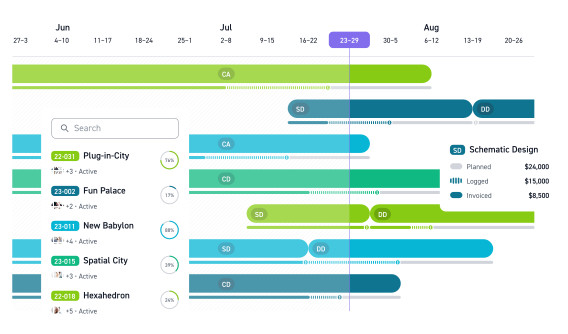
Monograph is a lightweight project management and fee-tracking tool built specifically for architecture studios. It focuses on visual budgeting, forecasting, and high-level project insight rather than deep operational control.
Known for its design-led interface and tools like MoneyGantt, Monograph is popular with small practices that want quick financial clarity without complex setup. However, it is not designed to manage detailed resourcing or day-to-day project delivery at scale.
Key Features
Monograph prioritises financial visibility and simplicity over operational depth, making it easy for architects to understand project performance at a glance.
- Budget & fee tracking: Visual tools such as MoneyGantt help teams forecast fees by phase and understand projected profitability early.
- Phase-based project timelines: Simple project views aligned to architectural stages support high-level planning.
- Project dashboards: Clean dashboards provide principals and directors with quick insight into budgets and performance without complex reporting.
Pricing
Where Monograph Shines
- Built for architects: Monograph is purpose-built for architecture firms, with strong alignment around project budgets, fee tracking, and phase-based delivery.
- Timesheet tracking with accounting sync: Users value the ability to track employee timesheets and sync directly with QuickBooks, helping connect time tracking with financial reporting.
- Clear, user-friendly interface: The platform is frequently praised for its intuitive design. Firms report that team members across different age groups can adopt it quickly with minimal friction.
- Budget forecasting & timesheet analysis: Monograph provides visibility into project performance, including forecasting tools that help firms monitor profitability and resource allocation.
Where Monograph Falls Short
- Customer support responsiveness: Some users report difficulty reaching support or delays in communication, which can be challenging when issues affect daily operations.
- Mobile app limitations: Reviews suggest that the iOS app could be improved, particularly for teams needing strong mobile access to project data.
- Limited project communication tracking: Users note that more robust project detail and communication tracking features would be helpful, particularly for firms managing complex collaboration.
- Reliance on third-party services: While Monograph integrates with payroll and insurance providers, feedback suggests that the performance and responsiveness of these third-party services can vary.
As firms grow and projects become more complex, many firms research Monograph alternatives to find platforms like Milient’s many look to platforms like Milient’s project management solution for deeper resourcing, delivery control, and real-time visibility.
Customer Review
“Interface is very intuitive, time tracking is almost always correct. Although customer support was great at the start but it’s a bit slower and more elusive now, and there is no community forum or easy way we have found to interact with others users to pick their brains and gain from their experience in resolving questions or issues.”
Who Monograph Is Best For
Small architecture studios with straightforward workflows that prioritise visual fee tracking and high-level project insight over detailed resourcing and delivery management.
3. Deltek Ajera
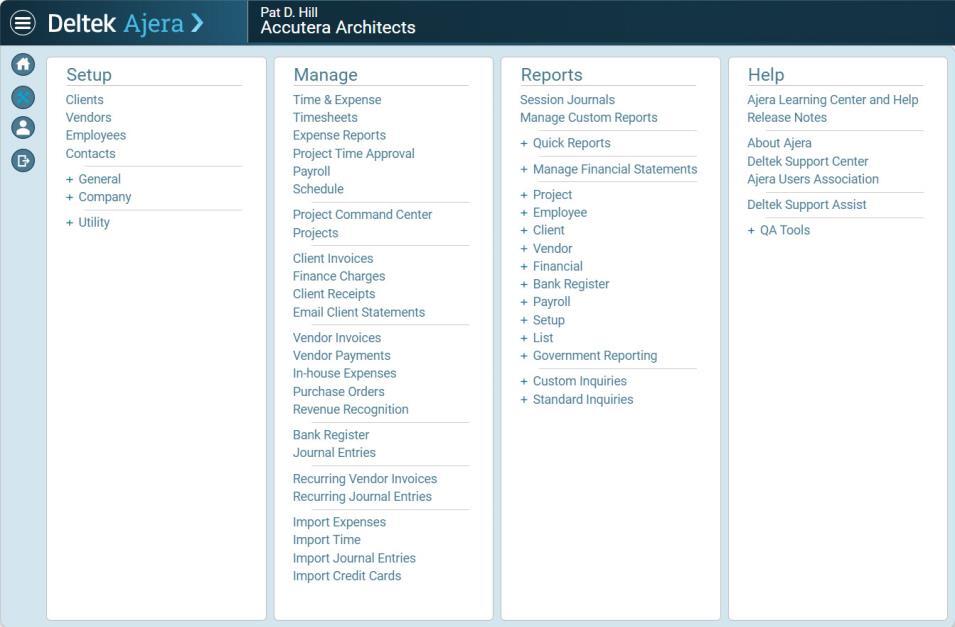
Deltek Ajera is an integrated accounting and project management solution built specifically for architecture and engineering firms. It combines project delivery with deep financial controls, making it a long-standing choice for finance-led practices that prioritise accounting accuracy, compliance, and reporting.
While Ajera offers extensive functionality and real-time financial visibility, its complexity and training requirements can be challenging for teams seeking a more intuitive, design-friendly project management experience. Many firms in this position begin looking for Deltek alternatives that offer a better balance between power and usability.
Key Features
Ajera’s feature set is heavily oriented around financial control and compliance, with project management supporting those goals.
- Advanced project accounting: Robust accounting, billing, and financial reporting designed to support audit and compliance requirements.
- Time and expense tracking: Integrated timesheets and expenses feed directly into billing and project financials.
- Dashboards and reporting: Real-time dashboards provide principals and finance teams with visibility into firm and project profitability.
Pricing
Pricing varies by firm size, configuration, and onboarding requirements, typically placing Ajera at the higher end of the market compared with more focused project management tools.
Where Deltek Ajera Shines
- Purpose-built for AEC firms: Deltek Ajera is designed specifically for architecture and engineering practices, with strong alignment around project accounting, billing, and financial management.
- Comprehensive project accounting: Once configured properly, Ajera offers robust financial oversight, including invoicing workflows, project-level financial tracking, and custom dashboard widgets.
- Customisable widgets and reporting structures: Experienced users highlight the ability to build custom widgets and fields to tailor the system to firm-specific processes.
- Highly rated support team: Several users praise the responsiveness and helpfulness of Deltek’s support staff, particularly when handling technical or system configuration queries.
Where Deltek Ajera Falls Short
- Steep learning curve: While powerful, Ajera can take significant time to master. New users may find the platform complex before becoming fully comfortable with its structure.
- Reporting limitations: Some users report that standard reporting options lack flexibility. Customising reports to display specific financial or operational data can be restrictive compared to other platforms.
- Invoice approval workflow complexity: The client invoice review and project manager approval process can feel less intuitive, particularly for firms wanting streamlined billing oversight.
- Reliance on custom fields: Certain workflows require creating additional custom fields to capture firm-specific data, which can add administrative overhead during setup.
Customer Review
“I appreciate the real-time data capabilities of Deltek Ajera, which significantly enhance my ability to manage accounting and project tasks effectively. However, I find the process of creating custom reports in Deltek Ajera challenging. The current system lacks adequate resources such as support materials, instructional videos, or detailed 'How To' guides, which could greatly assist in simplifying and streamlining the report customization process.”
Who Deltek Ajera Is Best For
Deltek Ajera is best for finance-led architecture and engineering firms that need integrated project accounting, billing, and compliance reporting, and have the internal capacity to manage a more complex system.
Firms seeking a more intuitive, project-first approach often explore alternatives like Milient’s project management platform4. Total Synergy
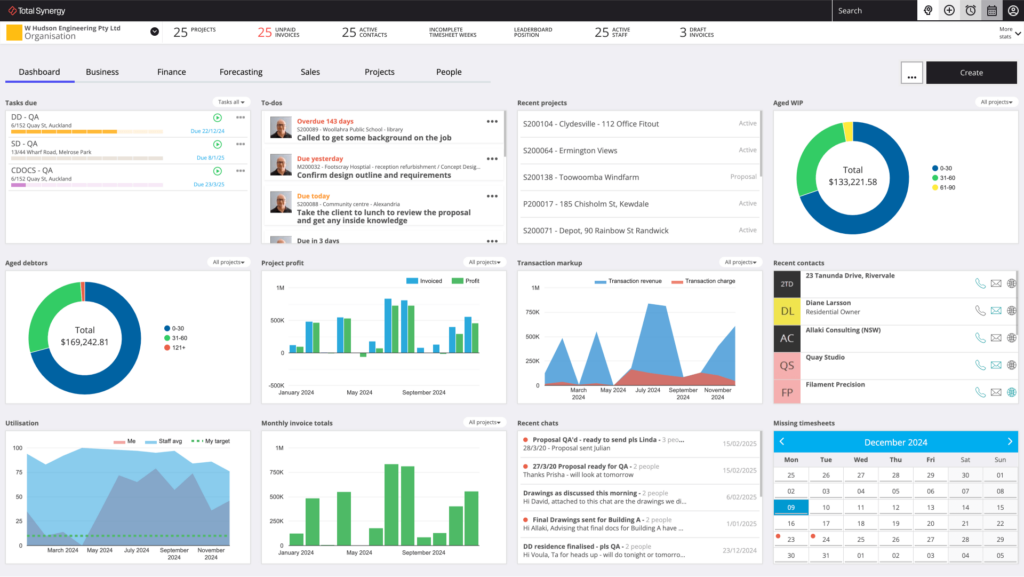
Total Synergy is an AEC-focused project and financial management platform built for architects, engineers, and construction design teams. It follows a structured, stage-based approach to project delivery that mirrors traditional architectural workflows, making it a familiar choice for firms that value consistency, compliance, and clear governance.
While it offers solid financial and delivery controls, its rigidity and more traditional interface can feel limiting for teams seeking flexibility and faster day-to-day workflows.
Key Features
Stage-based Product Delivery
Total Synergy focuses on structured delivery and financial administration, supporting firms that prefer defined processes over flexible planning.
- Stage-based project delivery: Projects are organised around clearly defined stages aligned with AEC standards and compliance requirements.
- Timesheets and invoicing: Integrated time tracking, invoicing, purchase orders, and cost tracking support reliable financial administration.
- Resource planning tools: Basic resource allocation and scheduling help teams plan work across projects, though best suited to predictable workflows.
Pricing
*Pricing based on publicly available ranges; exact amounts vary.
Where Total Synergy Shines
- Built for architecture and engineering practices: Synergy is designed specifically for AEC firms, with workflows aligned to project costing, budgeting, invoicing, and delivery. This industry focus makes implementation more straightforward for design practices.
- All-in-one project financial management: Users value having timesheets, invoicing, purchase orders, and cost tracking in one central platform. This consolidation reduces manual processes and improves financial visibility.
- User-friendly with short learning curve: Reviews frequently highlight the intuitive interface and ease of adoption. Teams report being able to integrate Synergy into daily operations relatively quickly.
- Stable platform with regular updates: Users describe the system as reliable, with ongoing product improvements rolled out over time.
Where Total Synergy Falls Short
- Enterprise-level pricing considerations: Some feedback suggests that the cost — particularly at enterprise level — may be high for certain firms, potentially affecting long-term scalability for smaller practices.
- Resource scheduling limitations: Firms managing many small or fast-moving projects report that keeping resource allocation up to date can be time-consuming, and may not suit all workflow styles.
- Limited mobile functionality: As a web-based platform, Synergy currently relies on browser access. Users note that a dedicated mobile app with expanded functionality (e.g. timesheets, file sharing, communications) would improve flexibility for teams working remotely or on site.
Customer Review
“Synergy’s timesheets, document register and ability to save emails to a project database is great. However, what I dislike is their reports.I find creating them and producing them very counter intuitive.I also find that there are multiple feature that could be added to Synergy but when i ask if they can be integrated their isn't a drive to look to expand the potential of the software. Pricing is also quite steep for medium sized practices"
Who Total Synergy is Best For
- Small to mid-sized AEC firms that prioritise structured, stage-based project delivery and compliance over flexibility and real-time resource visibility.
-
Firms seeking a more intuitive, project-first approach often explore alternatives like Milient’s project management platform.
5. CMAP
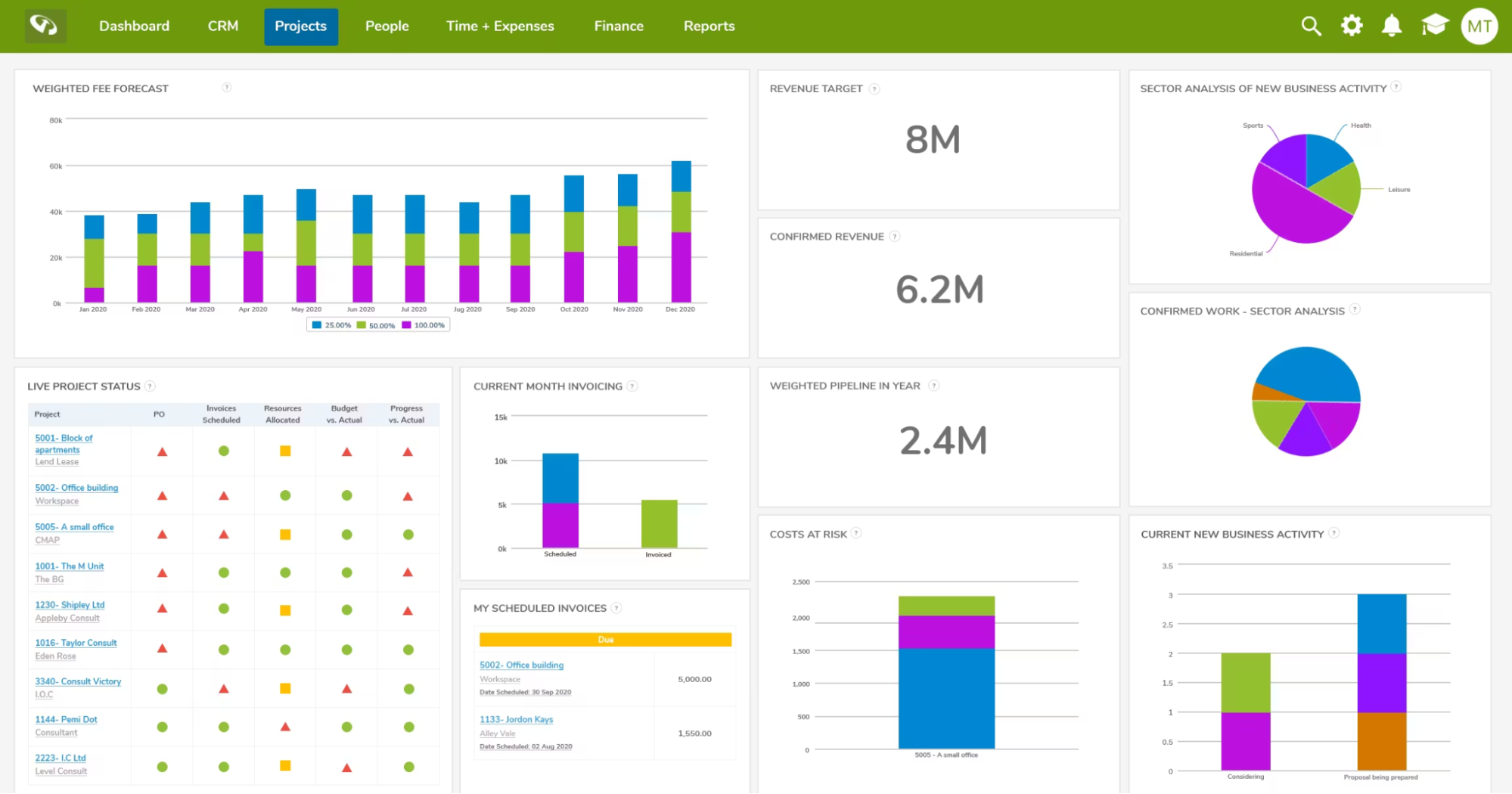
CMAP is a project and financial management platform widely used by consultancies and engineering-led firms, and is often compared with Deltek Costpoint. It places a strong emphasis on financial forecasting, utilisation, and profitability, making it appealing to organisations that want detailed operational and financial insight.
While powerful, CMAP typically requires careful configuration and onboarding, which can be a barrier for teams seeking a simpler, project-first management experience.
Key Features
CMAP is designed around financial performance and utilisation control, rather than lightweight project delivery.
- Financial forecasting and profitability analysis: Helps firms monitor margins, revenue, and project performance across portfolios.
- Job costing and fee estimation: Supports detailed fee models and cost tracking across different project types.
- Resource scheduling and utilisation tracking: Strong focus on capacity planning and billable utilisation, particularly for consultancy-style operations.
Pricing
Where CMAP Shines
- Designed for professional services: CMap consolidates key workflows from fee proposals through to invoicing and performance tracking, making it well suited to architecture and consultancy practices.
- Strong dashboard visibility: Users highlight the dashboard functionality, which gives leadership teams clear oversight of project performance, margins, and organisational health.
- Time-saving project administration: By centralising financials, resourcing, and project data, CMap reduces manual admin and improves operational visibility.
- Simple implementation and training: Reviews mention straightforward setup and strong onboarding guidance, helping teams get up and running efficiently.
- AI-assisted functionality: Emerging AI features are helping to streamline processes and support faster decision-making.
Where CMAP Falls Short
- Reporting limitations: Some users report constraints in cross-functional reporting. For example, combining resourcing data with revenue information in a single report may not be possible without additional manual work.
- API and external reporting complexity: When integrating with tools such as Power BI, certain calculations (e.g. margin or resourcing metrics) may need to be computed manually rather than generated automatically within the system.
- Pipeline visualisation gaps: Users note that a Kanban-style pipeline view with drag-and-drop functionality would improve visibility over project stages and sales progression.
Customer Review
“Once set up it's very easy to use, they've thought of pretty much everything (for a consulting business), and they're generally responsive to feedback. However, the Fee Estimator template needed a lot of tailoring to fit to our way of doing things and how we cost our work. It's also not really optimised for the tailoring we needed to do, and we've had to use workarounds that makes it a touch less elegant in use."
Who CMAP is Best For
Consultancies and engineering-led architecture firms that prioritise financial forecasting, utilisation tracking, and detailed operational control, and are prepared to invest in setup and configuration.
How to Choose Project Management Software for Architects
Choosing the right project management software for architects goes beyond task lists and timelines. Architecture firms need tools that provide clear visibility across projects, help teams plan capacity realistically, and offer financial insight without adding admin overhead.
When evaluating architecture project management tools, it’s important to focus on how well they support real-world workflows, from early planning through delivery, while scaling with the size and complexity of your practice.
1. Project & Fee Visibility
Architectural projects involve multiple phases, stakeholders, and budgets, making visibility critical. Firms need real-time insight into project progress, fees, and risks without relying on spreadsheets or manual reporting. Clear dashboards allow project managers and leadership to quickly understand what’s on track, what’s at risk, and where action is needed, supporting better decisions throughout delivery.
Milient’s Project Flow supports this with intuitive dashboards that bring project progress, phases, and financial performance into one central view, keeping teams aligned and informed without complexity.
/invoicing_dashboard.png?width=1200&height=645&name=invoicing_dashboard.png)
See how real-time project and fee visibility works in practice.
2. Resource Planning
Without clear resource planning, firms risk burnout, underutilisation, and missed deadlines. Understanding who is working on what and when, is essential for balancing workloads across projects, especially as teams grow or project demands shift. Effective resource planning helps practices deliver consistently while protecting team wellbeing.
Project Flow includes built-in capacity and resource planning tools that give firms a clear view of workloads across projects, helping allocate the right people to the right work and avoid reactive resourcing decisions.
/schedule.png?width=1200&height=645&name=schedule.png)
3. Architecture-Specific Workflows
Generic project management tools often fail to reflect how architecture firms actually work. Concepts like project phases, fees, utilisation, and design-led workflows are frequently missing or poorly supported, forcing teams into workarounds that add time and complexity.
Project Flow is designed specifically for architecture project management, supporting real-world practice needs such as phased delivery, fee tracking, and coordination between project teams, without requiring enterprise ERP systems or accounting-heavy workflows.
/project-details.png?width=858&height=973&name=project-details.png)
Get Started With Milient's Project Flow Today
Every architecture firm has different priorities depending on size, complexity, and growth plans. Smaller studios may benefit from lightweight tools focused on budgeting, while larger or finance-led practices may require deeper accounting systems.
For firms seeking a balanced approach, combining clear project visibility, practical resource planning, and real-time financial insight, Milient’s Project Flow offers a purpose-built software designed specifically for architectural workflows.
Ready to simplify how your architecture firm manages projects and fees?
To explore more, try Milient today or view our guides on time tracking, billing rates, and project management best practices.
 Andrea Neeve
Marketing Associate