
If you’re searching for ArchX alternatives, chances are you’re looking for architecture project management software that gives you more visibility, flexibility, or value for money. Whether it’s unclear ArchX pricing, limited scalability, or missing features, many architects reach a point where their current tool no longer fits.
In this guide, we compare the best ArchX alternatives for architects, from specialist AEC software like Milient Project Flow to well-known general tools such as Odoo, Zoho Projects, and Monday.com. The table below highlights who each tool is best for, its standout features, and starting price to help you quickly narrow down your options.
ArchX Alternatives at a Glance
| Tool | Best For | Standout Feature | Starting Price |
|
Milient Project Flow |
Architects & engineers |
Modular, AEC-specific workflows |
From £13 / user |
|
Teamleader |
Small service teams |
All-in-one projects + invoicing |
£32.54 / user |
|
Odoo |
Large organisations |
Deep customisation & ERP modules |
Free (1 app) / paid add-ons |
|
Zoho Projects |
Budget-focused teams |
Strong value for money |
Free / from £3.20 per user |
|
Monday.com |
Cross-functional teams |
Visual task boards |
Free / from £8 per user per month |
1. Milient Project Flow: Best Project Management Software for Architecture Teams of All Sizes
/billing.png?width=846&height=455&name=billing.png)
Milient Project Flow supports architecture and design teams of any size, combining project management, time tracking, planning, and billing in one intuitive platform, with a simplicity that resonates especially well with smaller studios.
Key Features
Project Flow focuses on giving small teams structure, visibility, and control, without heavy setup or enterprise overhead.
Project management built around phases
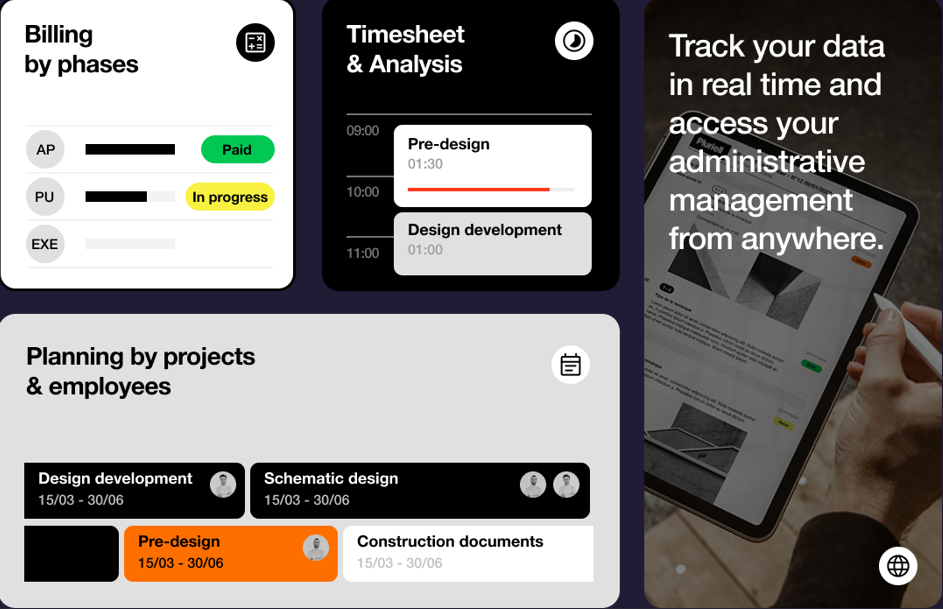
Define the backbone of each project using clear phases such as pre-design, schematic design, and construction documents. Teams can track progress per phase, see who’s involved, and understand exactly where each project stands, without manually updating spreadsheets.
Timesheets & productivity analytics
Project Flow includes simple, built-in time tracking with analytics that show how time is spent across projects and phases. Small teams can spot bottlenecks, improve estimates, and better understand productivity, all without relying on external time-tracking tools.
Planning, workload & billing in one system
Plan project phases, anticipate workloads, and automatically generate billing schedules based on progress. Fees, invoices, and costs stay aligned with the actual work delivered, helping small practices maintain cash flow and profitability as they grow.
Pricing
| Plan | Pricing |
|
Project Flow |
£13/per-user pricing |
(Pricing varies by team size and needs.)
Where Milient Project Flows Shines
- Designed for small practices: Built specifically for small and growing architecture and engineering teams, without the unnecessary complexity of enterprise ERP systems. Practices get structure and control without long setup times or heavy configuration.
- Everything in one place: Combines project management, time tracking, resource planning, and billing in a single platform, reducing reliance on spreadsheets and disconnected tools.
- Phase-based structure: Reflects how architects actually work, with projects organised by delivery phases, improving clarity, consistency, and reporting across projects.
Where Milient falls short
- Less suited to non-AEC teams: Project Flow is built around how architects and engineers run projects (phases, deliverables, fee tracking, time-based work). If you’re a general business looking for a one-size-fits-all tool, it may feel more tailored than you need.
- Not a generic “task board” tool: If your main requirement is simple task lists and lightweight collaboration, general tools like Monday.com or Trello-style boards can feel faster to pick up (but usually need add-ons for time + billing).
- Best fit when you want structure: Practices that prefer completely open-ended workflows may find the built-in structure more prescriptive — it’s designed to create consistency and control as projects and teams grow.
Customer reviews
“Project Flow is a unique tool. It allows us to centralise all our documents, requests, and scheduling in one single piece of software rather than having several separate files. It also gives us an overall view of all service requests, interventions, and works. This software is truly the key tool for our department.”
Who Milient is best for
- Small architecture studios: Managing phased projects and fees
- Growing design consultancies: Needing structure without complexity.
Multi-Project Oversight
/general_dashboard.png?width=1200&height=645&name=general_dashboard.png)
Milient’s Project Flow offers a consolidated view across all active projects, helping leadership and operations teams monitor progress, identify issues early, and maintain consistent quality standards at a portfolio level.
- Portfolio-level visibility across projects
- Easier identification of risks or non-conformance
- Supports consistent delivery standards
Key Evaluation Criteria
Together, these features address the core questions AEC firms typically ask when evaluating Deltek alternatives:
- Can we control project costs and fees?
- Can teams easily see what’s happening across projects?
- Can leadership maintain oversight at a portfolio level?
Pricing
Milient’s Project Flow is priced based on your organisation’s size, region, and requirements. Pricing is tailored to ensure teams get the functionality they need without unnecessary complexity.
| Module | Starting price* |
|
Milient’s Project Flow |
£20/user/month (public pricing) |
*Pricing depends on region, team size, and configuration.
2. Team Leader
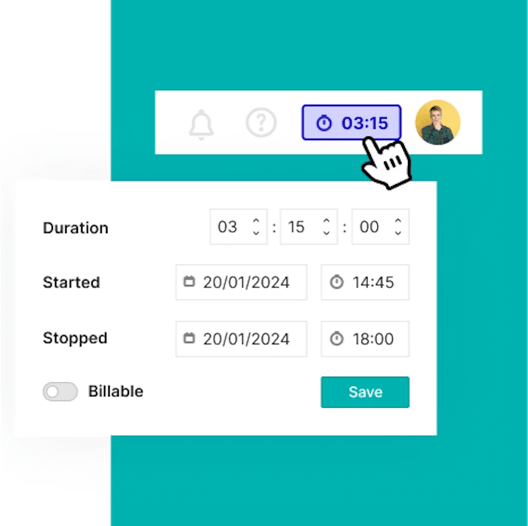
Teamleader is an all-in-one project management and business tool aimed at service-based teams. It focuses on keeping projects profitable through simple planning, time tracking, and invoicing, without overwhelming users with complex setup.
Key features
- Project planning & milestones: Break projects into tasks and reusable templates.
- Time tracking & invoicing: Track billable hours and invoice directly from projects.
- Project insights: Monitor deadlines, budgets, and profitability in one dashboard.
Pricing
| Plan | Monthly price |
|
SMART |
€37.50 / user |
|
GROW (Most popular) |
€49.50 / user |
|
FLOW |
€67.50 / user |
(25% discount on first purchase.)
Where Teamleader shines
- All-in-one business platform: Users frequently praise how seamlessly Teamleader connects CRM, project management, invoicing, and task tracking in one system. For small service-based businesses, this integration reduces tool-switching and keeps operations centralised.
- User-friendly interface: The platform is consistently described as intuitive and easy to navigate. Teams can quickly track project status, budgets, deadlines, and real-time progress without complex configuration.
- Time-saving automations: Built-in automations help manage tasks and deadlines efficiently, saving teams significant administrative time and improving workflow consistency.
- Strong customer support: Many reviewers highlight fast, friendly, and helpful responses from the support team — an important factor for smaller companies that value reliable vendor assistance.
Where Teamleader falls short
- Limited customisation flexibility: While easy to use, some users note that the system is not highly flexible. Structural changes — such as modifying field relationships or deeply tailoring workflows — can be restricted.
- Less suited to complex or specialised workflows: Businesses with highly specific processes, multi-phase project frameworks, or advanced reporting needs may find the platform somewhat rigid.
- May limit scalability for growing teams: As companies expand or require more advanced configuration, the lack of deeper customisation options could become a constraint.
Customer reviews
“What I like best about Teamleader is how it keeps everything in one place without feeling cluttered. But it feels tricky to set up advanced features such as custom reporting.”
Who TeamLeader is best for
- Small service teams: Wanting simple project control with invoicing included
Pro tip: Still managing projects manually? Use this free project checklist
3. Odoo
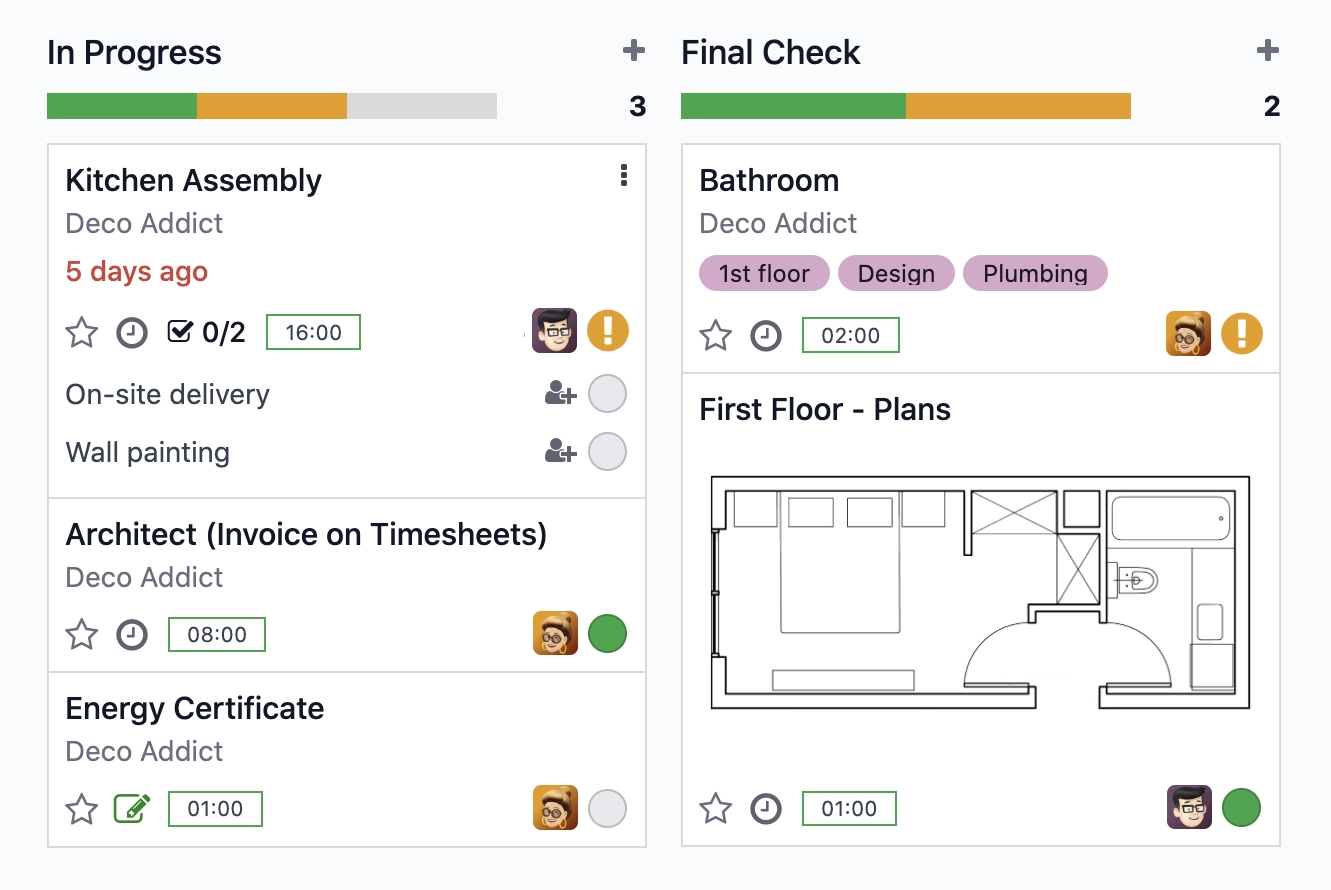
Odoo is a modular, all-in-one business platform that includes project management as part of a wider ERP ecosystem. It helps teams plan, track, and collaborate on projects while connecting tasks with timesheets, invoicing, and accounting, all from a single system.
Key features
- Multiple project views: Manage work using Kanban boards, Gantt timelines, or list views to suit different planning and reporting needs.
- Real-time dashboards: Track project progress, milestones, resources, and profitability in one central overview.
- Time & billing integration: Log time directly against tasks and convert hours or milestones into customer invoices.
- Stakeholder collaboration: Control what clients and external stakeholders can view or edit within each project.
Pricing
| Plan | Cost | What’s included |
|
Free |
£0 |
1 app, unlimited users, hosting, maintenance, and support included |
|
Paid |
Per user / per month |
Access to multiple apps (e.g. Projects, Accounting, CRM), with costs increasing as more apps are added |
Pro tip:
Tools like Odoo can become time-consuming to manage as you add more apps and workflows. If saving time is a priority, focusing on streamlined project setups, fewer tools, and automated updates can significantly reduce admin overhead.
Explore our top 5 time-saving strategies for project teams
Where Odoo shines
- Strong value for money: Many small businesses highlight Odoo’s affordability compared to traditional ERP systems. For companies under 10 employees, the out-of-the-box functionality often covers most operational needs without heavy customisation.
- Broad all-in-one ecosystem: Odoo combines project management, accounting, CRM, invoicing, HR, and more within one connected platform. For businesses wanting everything under one roof, this reduces tool sprawl and centralises data.
- Customisation flexibility: With Odoo Studio and its open API, teams can tailor workflows and build integrations to suit their processes — particularly useful for distribution, field service, and operations-focused companies.
Where Odoo falls short
- Support responsiveness concerns: Some users report slow response times from support, with issues taking weeks to resolve — even for core modules like accounting. This can be frustrating when business-critical functions are affected.
- Version upgrade instability: Upgrading between versions has been noted to “break” configurations or workflows, requiring additional fixes or adjustments. This adds risk for growing teams who need stability.
- Onboarding & implementation complexity: While powerful, setup can feel overwhelming. Initial configuration, module selection, and implementation often require careful planning — and onboarding support quality can vary.
Customer reviews
“I like the simplicity of Odoo ERP and that it offers everything out of the box. However, the initial setup and configuration can be complex, especially for businesses with specific needs.”
Who Odoo is best for
- Growing businesses: Teams that want project management tightly integrated with finance, sales, and operations.
- Tech-confident organisations: Companies willing to invest time in configuration and customisation.
4. Zoho Projects
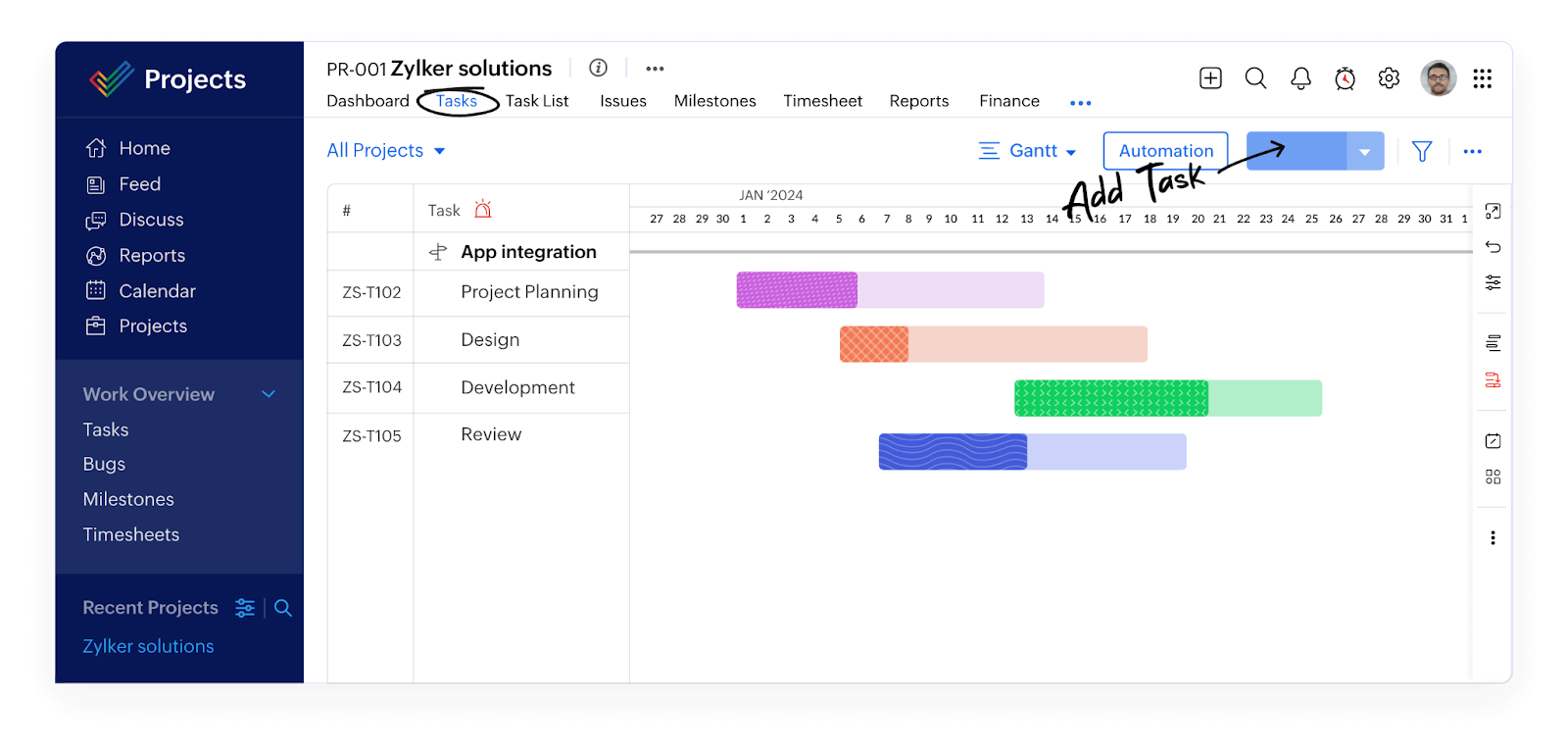
Zoho Projects is a data-driven project management platform designed for growing, distributed teams. It combines task tracking, Gantt charts, timesheets, and workflow automation, with strong integration across the wider Zoho ecosystem for invoicing, analytics, and collaboration.
Key features
- Gantt charts & dependencies: Visualise project timelines, critical paths, and deviations between planned and actual progress.
- Timesheets & billing: Log billable and non-billable hours manually or via timers, with invoices generated through Zoho Invoice integration.
- Workflow automation: Use drag-and-drop automation to streamline routine tasks and approvals.
- Collaboration tools: Centralise comments, file sharing, and updates to keep global teams aligned.
💡 Pro tip:
If your project setup still relies on spreadsheets, moving to structured project software can reduce manual updates and version control issues.
Pricing
| Plan | Price | Best for |
|
Free |
£0 |
Small teams testing basic project management |
|
Premium |
£3.20 / user / month |
Teams needing unlimited projects and timesheets |
|
Enterprise |
£7.20 / user / month |
Larger teams requiring advanced controls & reporting |
|
Ultimate |
£11.20 / user / month |
Organisations managing complex, portfolio-level delivery |
Where Zoho Projects shines
- Cost-effective solution: Zoho Projects is frequently praised for its affordability, particularly for startups and budget-conscious teams. It offers a strong feature set at a competitive price point compared to many enterprise-level project management tools.
- Comprehensive feature set: The platform includes task management, KPI tracking, custom workflows, and detailed reporting. Users highlight its ability to manage complex projects while maintaining visibility over objectives and performance.
- Strong ecosystem integrations: Zoho Projects integrates seamlessly with other Zoho applications such as Zoho Books and scheduling tools, as well as external platforms. For teams already within the Zoho ecosystem, this creates a connected and streamlined experience.
- Customisable workflows: The ability to tailor workflows and reporting structures allows teams to adapt the platform to different project styles.
Where Zoho Projects falls short
- Steep learning curve: While feature-rich, the breadth of functionality can feel overwhelming for new users. Teams unfamiliar with project management software may require additional time for onboarding and training.
- Feature complexity for smaller teams: The number of tools and configuration options may be more than smaller or less process-driven teams need, potentially adding unnecessary complexity.
- Enterprise pricing considerations: Although affordable at entry levels, some users note that enterprise-tier pricing can become expensive for growing startups, particularly if they require advanced features.
Customer reviews
“Zoho Projects is very cost-effective and powerful for task and KPI tracking. However, the interface can feel complicated, with too many clicks, and some reporting and overview features are missing.”
Who Zoho Project is best for
- Budget-conscious teams: Organisations looking for robust features at a lower per-user cost.
- Zoho ecosystem users: Teams already using Zoho CRM, Invoice, or Analytics
5. Monday.com
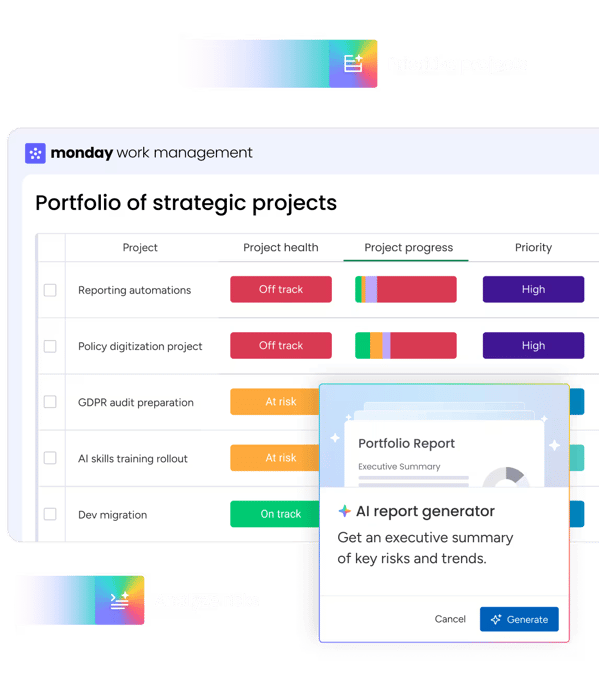
monday.com is a flexible work management platform designed to help teams plan, track, and execute work at scale. Known for its clean interface and powerful automations, it supports projects, portfolios, and everyday task management across marketing, operations, sales, and engineering teams.
Key features
- Customisable boards & workflows: Build project structures that reflect how your team actually works, from simple task lists to complex project plans.
- Automations & AI actions: Reduce manual data entry with code-free automations and AI-powered actions that flag risks and delays.
- Dashboards & visibility: Track ownership, deadlines, resources, and progress across projects in one shared view.
- Integrations: Connect with tools like Slack, Google Workspace, and other productivity platforms.
Pricing
| Plan | Price | Best for |
|
Free |
£0 |
Individuals or very small teams (up to 2 seats) |
|
Basic |
£8 / seat / month |
Simple project and task tracking |
|
Standard |
£11 / seat / month |
Teams needing timelines, automations, and dashboards |
|
Pro |
£17 / seat / month |
Advanced automation, reporting, and portfolio visibility |
Where Monday.com shines
- Highly visual interface: Monday.com is known for its colourful, board-based layout that makes task tracking easy to understand at a glance. For teams that prefer Kanban-style workflows, this can feel intuitive and accessible.
- Flexible board structure: Users can build custom boards, forms, and automations to manage workflows across departments. This makes it adaptable for marketing, operations, HR, and general business use.
- Strong brand adoption across teams: Monday.com is widely recognised and adopted across many industries, making it easy to onboard teams already familiar with board-style collaboration tools.
Where Monday.com falls short
- Not always suited to complex or enterprise workflows: Some users report that while the platform works well for simple task management, it becomes difficult to manage when handling complex, multi-layered processes. Workarounds may be required for more advanced use cases.
- Usability and interface frustrations: Reviews mention layout limitations, pop-up display issues on smaller screens, and challenges navigating completed tasks or ticket visibility. These usability concerns can impact day-to-day efficiency.
- Automation limitations and transparency: Automations operate on a credit-based system, and some users report confusion around usage limits and tracking. For teams heavily reliant on automation, this may require closer monitoring.
- Support experience variability: While support is available, some users describe difficulty reaching human assistance and delays in resolving technical issues.
Customer reviews
“monday.com helps our team save time and hit KPIs, but its flexibility means it takes time to design the right board structure. Without ongoing management, boards can quickly become cluttered.”
Who Moday.com is best for
- Cross-functional teams: Organisations managing projects across marketing, operations, sales, and delivery.
- Process-driven teams: Teams willing to invest time in setup, templates, and ongoing optimisation.
Reasons to consider an alternative to ArchX
ArchX has served architectural practices for many years and is well known within its niche. However, as teams grow, diversify, or modernise their ways of working, some organisations begin to evaluate alternatives that better support scale, cross-discipline collaboration, and cloud-based project delivery.
1. Legacy architecture vs modern cloud platforms
Many long-standing project systems were originally designed as desktop or on-premise solutions and later adapted for the web. While proven, this can limit speed, flexibility, and integration with modern tools.
Milient Project Flow is built as a cloud-native platform, enabling real-time collaboration, faster updates, and seamless connectivity across teams.
2. Specialised tools can limit how architects manage the full project lifecycle
ArchX is purpose-built for architects, which works well for core architectural workflows. However, practices increasingly need stronger links between projects, time, resources, and information to manage delivery at scale.
Milient is also tailored for architects, while offering project, time, resource, and knowledge management products to support the full lifecycle of architectural projects.
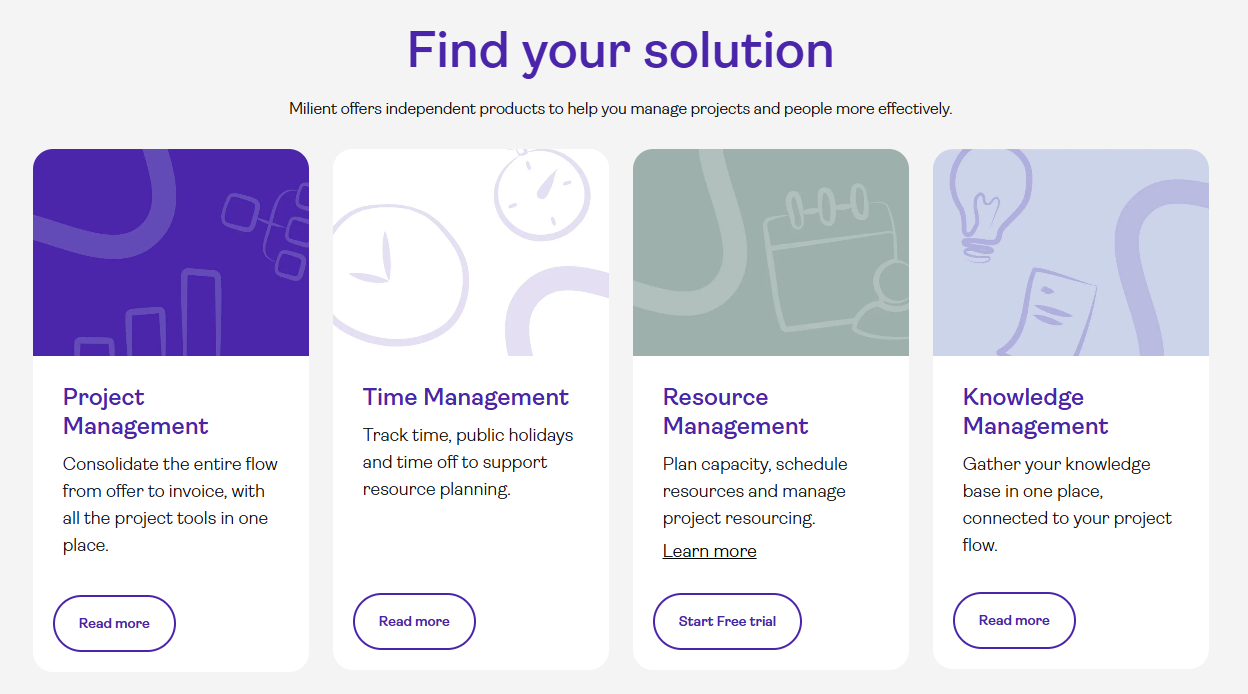
Milient’s wide product portfolio
3. Scaling beyond small to mid-sized practices
Tools built primarily for small to mid-sized firms may struggle to support growing project volumes, increased reporting needs, and portfolio-level visibility.
Milient Project Flow is designed to scale with larger teams, offering structured workflows, cross-project insights, and better visibility as complexity increases.
/employees_dashboard.png?width=800&height=430&name=employees_dashboard.png)
Finding Your Perfect ArchX Alternative
Finding the right ArchX alternative comes down to the challenges your team is trying to solve. Some tools excel at flexibility or broad business management, while others focus on affordability or automation.
For architecture and consultancy teams struggling with fragmented project data, rising admin, or limited visibility across projects, choosing a platform built specifically for structured project delivery can make a measurable difference. Milient supports teams by connecting projects, time, and knowledge in one system, helping reduce admin and improve decision-making as teams grow.
To see how other professional service platforms compare, you can also learn more about Scoro alternatives in our in-depth guide.
 Andrea Neeve
Marketing Associate
Want more content like this? Follow Milient:

/hubplanner_resource.png?width=1024&height=1024&name=hubplanner_resource.png)