
17 of February 2026 - 15 mins


If you’ve ever tried using Excel for project management, you’ve probably experienced both extremes: it’s flexible enough to build almost anything, but it quickly becomes time-consuming to maintain. From tracking deadlines and project phases to documenting scope changes, spreadsheets often work well at the beginning, but as projects grow, so does the admin.
In fact, a 2025 Wellingtone study shows that 42% of project professionals spend one or more days manually collating project reports, highlighting just how time-consuming spreadsheet-based project management can become.
In this article, we’ll compare project management software vs Excel, covering cost, ease of use, collaboration, and scalability. You’ll also learn when Excel is still a smart option, and when a dedicated tool like Project Flow becomes the better choice.
Key Differences (PM Software Vs Excel)
| Heading | Project Management Software | Excel |
| Best For | Growing teams & ongoing projects | Simple projects & small teams |
| Stand Out Feature | Automation + collaboration | Flexibility + low barrier to entry |
| Price | From ~£13/user/month | Included in Microsoft 365 / one-time license |
| Pros | Visibility, templates, dashboards, permissions | Customisable, familiar, cheap |
| Cons | Setup needed, subscription | Errors, version confusion, manual admin |
| Customer Support | Vendor onboarding + in-house support | No product support (only Microsoft docs) |
| Feature #1: Real-time single source of truth | Centralised live project data, real-time updates, version control | Multiple file versions, manual updates, risk of outdated info |
| Feature #2: Automated reporting & dashboards | Live dashboards + automatic KPIs (progress, budgets, workloads) | Manual reporting using formulas/pivots; dashboards break easily |
| Feature #3: Collaboration & permissions | Role-based access, clearer ownership, tracked changes | Anyone can overwrite; hard to manage access across teams |
| Feature #4: Time tracking & budget/fee control | Time linked to projects + budgets; easier job costing/profitability | Disconnected tabs/manual entry; hard to track burn rate accurately |
Who is Project Management Software Best Suited For?
Project management software is best suited for teams running multiple projects at once, especially when deadlines, people, and budgets overlap. Tools like Project Flow, Monday.com and Asana help standardise workflows, reduce admin, and make project progress visible without chasing updates.
Popular Project Management Software Tools (Examples)
| Tool | Best suited for | Standout feature |
| Project Flow by Milient | AEC firms (architecture & engineering teams) | Structured project workflows + real-time project visibility |
| monday.com | Cross-functional teams managing multiple projects | Highly visual boards + automation for workflows |
| Asana | Task and project coordination across departments | Strong task ownership, timelines, and collaboration |
| ClickUp | Teams wanting one flexible tool for tasks/docs/projects | Customisable workflows + all-in-one workspace |
| Microsoft Project | Formal project planning and scheduling | Advanced scheduling tools (Gantt charts, dependencies, critical path) |
Who is Excel Best Suited For?
Excel is best suited for individuals or small teams managing simple, short-term projects with minimal collaboration. For basic tracking, like task lists, deadlines, and simple budgeting, Excel remains a fast and familiar option, particularly when teams already use Microsoft 365.
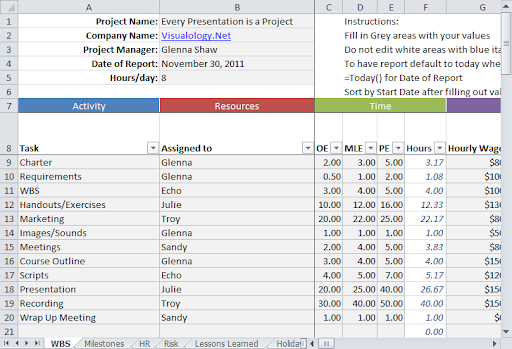
Project Size: How Complex Are Your Projects?
Excel works well when a project has a limited number of tasks and a simple structure. Teams can create trackers, milestones, and even a work breakdown structure in Excel using rows, sub-rows, and colour coding.
However, as projects grow in complexity, Excel becomes harder to maintain. Updating dependencies, reallocating resources, and tracking progress across phases requires constant manual upkeep. Project management software supports complex delivery with built-in timelines, stage tracking, and automated progress updates.
Nearly 40% of businesses still rely on manual time tracking methods, often through spreadsheets, increasing admin workload and the risk of errors.
Pro Tip
 If you’d like a faster starting point, you can also use ready-made project templates to structure your plan and reduce setup time.
Scalability: Is Your Team Growing?
Excel becomes difficult once more people need to edit and reference the same plan. Multiple versions of spreadsheets lead to confusion, mistakes, and duplicated effort. This becomes even more difficult when teams need different access levels, for example, limiting visibility for external collaborators.
Project management software is designed to scale, offering permission controls, dashboards, and one central source of truth, without version conflicts.
Administrative Time: How Much Time Do You Want to Spend On Manual Work?
Using Excel for project management often creates hidden admin work: manually updating task statuses, recreating weekly reports, and chasing missing updates. This may feel manageable at the start, but as workloads increase, spreadsheets pull time away from billable work.
Dedicated PM tools automate reporting, reminders, and progress tracking, helping teams spend less time formatting and more time delivering.
Dependency: What Happens When the Excel Guru Leaves the Company?
Many firms depend on one “Excel expert” who builds and manages complex spreadsheets. Over time, these sheets become harder to understand and maintain, especially with formulas, macros, and manual processes.
If that person leaves, the system often breaks down. PM software reduces this risk by offering standardised workflows, templates, and reliable support from the vendor.
Collaboration and Communication: Is It Easy to Keep Everyone Up to Date?
Excel can track tasks, but it isn’t built for collaboration. Comments and file-sharing help, but key conversations still end up in email or Teams messages, and task ownership isn’t always clear.
Modern PM platforms centralise communication through comments, notifications, and task assignments, helping teams avoid misunderstandings, missed deadlines, and duplicated work.
Data Security and Privacy: Is Your Data Secure?
As more people access the same Excel file, controlling access becomes difficult. Sensitive project data (fees, clients, staffing) may be visible to the wrong stakeholders, especially when spreadsheets are shared externally.
PM systems provide permission levels, audit trails, encrypted data storage, and compliance-friendly access controls, supporting security requirements and regulations such as GDPR.
Milient Project Flow: The Best of Both Worlds
/Project%20Flow%20The%20Best%20of%20Both%20Worlds.png?width=512&height=384&name=Project%20Flow%20The%20Best%20of%20Both%20Worlds.png)
Project Flow Product Image
Project Flow combines the structure and visibility of modern project management software with the flexibility teams often try to recreate in spreadsheets. Instead of manually tracking deadlines, staffing, timesheets, and billing in separate Excel files, Project Flow centralises the entire workflow into one system.
Teams can structure projects by phases, track progress, plan workloads, and capture timesheets in a consistent way, without needing complex Excel formulas or a dedicated spreadsheet expert. It’s particularly suited to architecture and engineering firms that want better control without adopting heavy ERP systems.
| Tool | Pricing | |
| Project Flow | From ~£13/user/month | |
| Excel | Included in Microsoft 365 or one-time license (plus hidden admin cost) | |
Project Management Software vs Excel: Pricing
Price is often the first deciding factor when comparing project management software vs Excel. While Excel looks cheaper upfront, the true cost includes time spent managing spreadsheets, correcting errors, and duplicating work.
Project management software has subscription fees, but it can reduce admin time through automation, collaboration, and reporting.
Project Management Software: Pricing
- Predictable subscription pricing: Most PM tools use per-user pricing. Entry-level plans typically range from £4–£15 per user/month, mid-tier tools sit around £15–£40, and enterprise plans can exceed £40+ per user/month.
- Clear starting points: Popular tools start at around £4–£8 per seat/month (e.g., Zoho Projects, Hive, monday.com), while others like Asana and Microsoft Project start higher depending on billing and plan level.
- Better long-term value: Paid plans often include automation, dashboards, and collaboration features that reduce manual reporting time.
Example Project Management Software Pricing (Per User)
| PM tool | Pricing model | Starting price (approx.) | Best suited for |
| Project Flow by Milient | Per user / per month | ~£13 per user/month | AEC teams (architecture & engineering) needing structured workflows |
| monday.com | Per seat / per month | ~£8 per seat/month | Cross-functional teams managing multiple workflows |
| Asana | Per user / per month | ~£11.59 per user/month | Team task management + collaboration |
| ClickUp | Free + paid plans | ~£7 per user/month | Flexible all-in-one workspace for tasks/projects |
| Microsoft Project | Per user / per month | ~$10–$55 per user/month | Formal project planning, scheduling, enterprise projects |
Excel Pricing
- Low upfront cost: Included in Microsoft 365 plans or via one-off purchase.
- Hidden operational cost: Manual updates, duplicate files, and errors can become expensive.
- Harder to scale: Excel struggles with multi-project visibility and permissions.
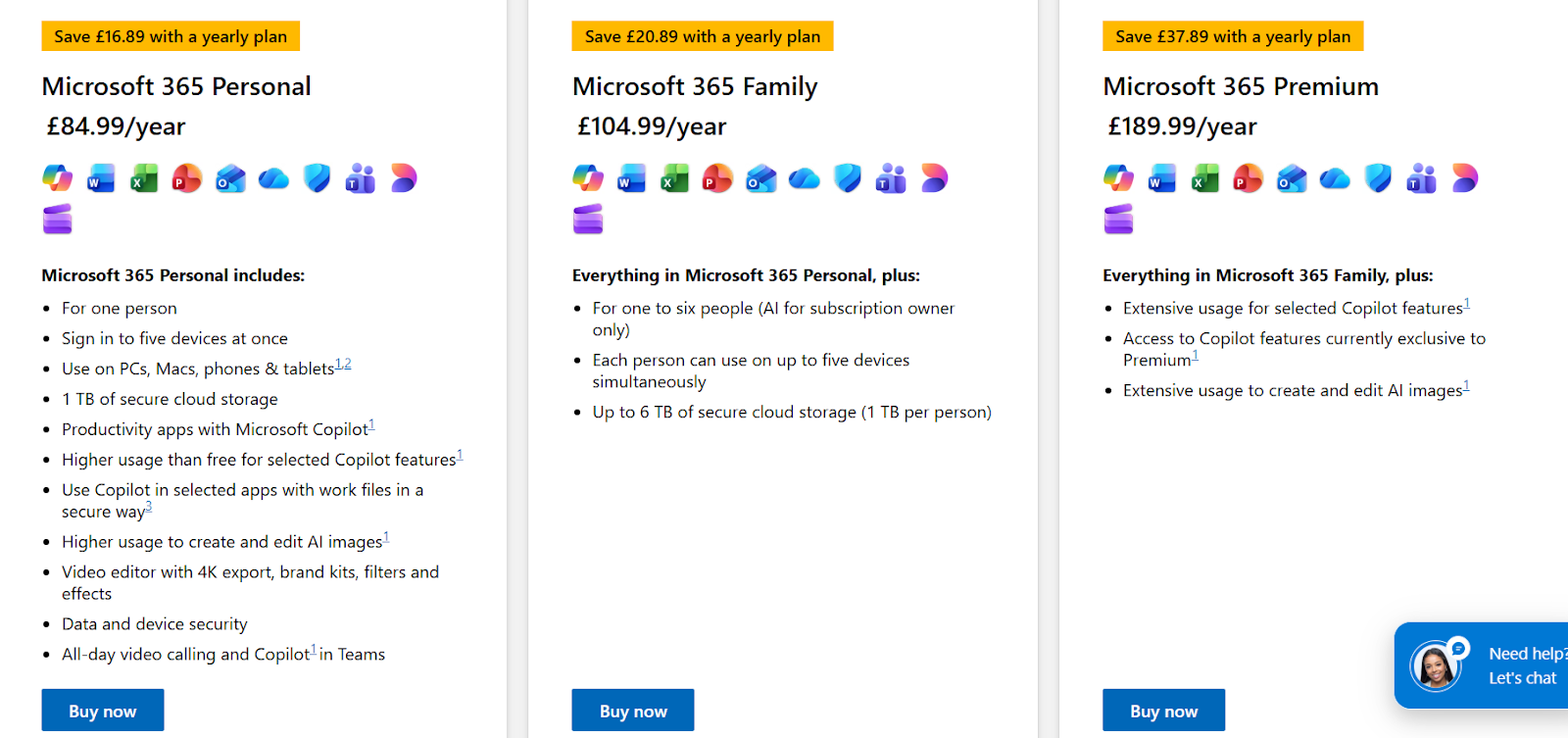
Excel Pricing included in Microsoft 365
Project Management Software vs Excel: Pricing Verdict
Excel wins on upfront price. However, project management software wins on long-term value, especially once teams manage more projects, need collaboration, and want reliable reporting without manual effort.
Project Management Software vs Excel: Ease of Use
Ease of use depends on whether your team needs flexibility or structure. Excel is familiar, but complex spreadsheets quickly become difficult to maintain. Project management software requires initial setup, but it provides consistent workflows and easier day-to-day updates.
Project Management Software: Ease of Use
- Built-in structure: Pre-defined project workflows reduce the need to create trackers, templates, and manual systems from scratch.
- Faster updates: Tasks, deadlines, and project progress are clearer and easier to update than managing multiple spreadsheet tabs.
- Better onboarding: New staff can understand project structures quickly by following one consistent process, rather than learning complex spreadsheet logic and formatting rules.
/Example%20of%20a%20Project%20management%20software%20(Project%20Flow).png?width=1186&height=667&name=Example%20of%20a%20Project%20management%20software%20(Project%20Flow).png)
Example of a Project management software (Project Flow)
Excel: Ease of Use
- Easy to start: Anyone can open a spreadsheet and begin
- Hard to standardise: Each team builds sheets differently
- Prone to errors: Formulas and manual input create risk
Project Management Software vs Excel: Ease of Use Verdict
Excel is easier to start with, but PM software becomes easier over time, especially as projects and teams expand.
Project Management Software vs Excel: Customer Support
Support matters when your team hits issues, needs onboarding, or wants to improve workflows. Excel offers limited support beyond general Microsoft documentation.
Project management software typically includes onboarding, customer support, and knowledge bases to help teams get value faster.
Project Management Software: Customer Support
- Dedicated onboarding options: Helps teams set up workflows correctly from the start and standardise project processes.
- In-product guidance: Clear structure and support resources make it easier for users to understand how to manage projects day to day.
- Faster troubleshooting: Access to a support team means project issues can be resolved quickly, without relying solely on internal knowledge or trial-and-error fixes.
Excel: Customer Support
- No project-specific support: Excel support is general and not tailored to project workflows or industry requirements.
- Reliant on internal experts: Teams often depend on one or two people who “know the spreadsheet” to fix errors or maintain formulas.
- Hard to troubleshoot complex sheets: Large trackers with multiple tabs, formulas, and dependencies can break easily and be difficult to repair confidently.
Project Management Software vs Excel: Verdict
Project management software wins for support, especially when teams need stability and standardisation. Excel may be familiar, but complex spreadsheets quickly become difficult to manage without dedicated internal expertise.
Project Management Software vs Excel: Integrations
Integrations determine how smoothly your tool fits into the rest of your workflow. Excel can import and export data, but it often relies on manual formatting and copy-pasting. Project management software typically integrates with finance, email, calendar, and reporting tools, reducing duplicate work and improving accuracy.
Project Management Software: Integrations
- Integrates with tools teams already use: Many platforms connect with finance systems, ERPs, calendars, BI tools, and CRMs.
- Reduces copy-pasting and duplicates: Automated sync reduces the need for re-entering data across multiple systems.
- Supports scalable workflows and automation: Integrations make it easier to standardise processes as teams and project volume grow.
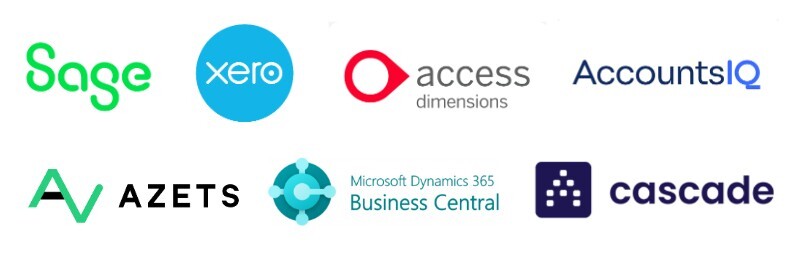
Example of potential integrations on project management softwares
Excel: Integrations
- Works within Microsoft tools: Excel connects well with Microsoft 365 (Teams, SharePoint, Outlook), but integrations beyond that usually require manual work or add-ons.
- Import/export is manual: Data transfers often require reformatting, cleaning, and checking, especially when combining finance and project data.
- Version and formatting issues: Different templates and spreadsheet versions can quickly create inconsistencies, making it harder to maintain one reliable workflow.
Project Management Software vs Excel: Integrations Verdict
Project management software wins for integrations and automation, especially when teams want one connected workflow. Excel can support basic tracking, but it struggles to scale when teams need reliable integrations and less manual admin.
PM Software vs Excel: Real-Time Single Source of Truth
One of the biggest advantages of project management software over Excel is having a real-time single source of truth. Instead of multiple spreadsheet versions being shared and edited separately, all project data stays centralised and always up to date. This helps teams avoid errors, reduce duplication, and make faster decisions based on accurate information.
Project Management Software: Single Source of Truth
- Centralised project data: Everyone works from the same live project plan, meaning updates are instantly visible across the team.
- Version control built-in: No more “final_v2_updated.xlsx” confusion—your project information stays consistent and traceable.
- Improved team collaboration: PMs, team members, and stakeholders can access the most current information without back-and-forth emails.
- Fewer mistakes: Reduces errors caused by outdated spreadsheets, missing updates, or overwritten formulas.
/Pluriell_Features.png?width=1078&height=698&name=Pluriell_Features.png)
Various features available on Project Flow
Excel: Single Source of Truth
- Multiple versions: Excel files are often duplicated, emailed, or stored in separate folders, making it hard to track which version is correct.
- Manual updates: Teams rely on one person to update the spreadsheet regularly, which increases delays and missed changes.
- Higher risk of errors: Formulas, links, and data can be overwritten accidentally, impacting reporting and decision-making.
- Limited collaboration: Even with cloud sharing, spreadsheets can become messy when several people edit at once.
PM Software vs Excel: Verdict
If your projects involve multiple people and frequent changes, project management software wins. A real-time single source of truth helps teams stay aligned, reduces version confusion, and ensures decisions are based on accurate data. Excel is useful for basic planning, but struggles with scale and collaboration.
PM Software vs Excel: Automated Reporting & Dashboards
Automated reporting and dashboards are another key advantage of project management software. Instead of manually building formulas, pivot tables, and charts, project data is automatically turned into clear insights. This helps teams monitor progress, identify risks sooner, and share real-time updates without time-consuming admin.
Project Management Software: Reporting & Dashboards
- Live dashboards: Project progress, budgets, timelines, and workloads can be viewed instantly without manual reporting.
- Automatic KPI tracking: Metrics like project health, time usage, and delivery status update automatically as data changes.
- Better visibility for managers: Leaders can monitor multiple projects and spot delays or bottlenecks early.
- Faster stakeholder reporting: Teams can pull real-time summaries anytime, rather than rebuilding spreadsheets or slides.
Excel: Reporting & Dashboards
- Manual reporting setup: Dashboards require formulas, pivot tables, charts, and formatting—often taking hours to build.
- Hard to maintain: As projects evolve, dashboards break easily due to changed ranges, deleted cells, or overwritten formulas.
- Not real-time: Reports are only accurate once someone updates the spreadsheet, meaning data can become outdated quickly.
- Error-prone: Small mistakes in formulas or data entry can lead to incorrect reporting and poor decision-making.
PM Software vs Excel: Verdict
For teams that need regular updates and visibility across projects, project management software wins. Automated dashboards reduce manual reporting time and provide clearer, more reliable insights. Excel can work for basic reporting, but becomes time-consuming and risky as projects grow.
How to Choose Between Excel and PM Software
Choosing between Excel and project management software comes down to scale, collaboration needs, and how much visibility you want across projects. Excel can work for simple planning, but as teams grow it becomes harder to control versions, reporting, and accountability. PM software adds structure, automation, and real-time oversight.
Collaboration & Version Control
/Milient%20Project%20Flow%20Best%20Project%20Management%20Software%20for%20Small%20Architecture%20Teams.png?width=667&height=500&name=Milient%20Project%20Flow%20Best%20Project%20Management%20Software%20for%20Small%20Architecture%20Teams.png)
If multiple people need to update project plans, Excel quickly becomes risky due to duplicated files, overwritten formulas, and unclear ownership.
Project management software creates one shared workspace where updates are tracked and visible to everyone.
For AEC teams, Project Flow supports structured collaboration without “spreadsheet version chaos.”
Project Visibility & Reporting
/Planning_Pluriell_EN.png?width=619&height=400&name=Planning_Pluriell_EN.png)
Ask how often your team needs project updates and whether reporting is manual. Excel dashboards often take time to build and break easily when data changes. PM software provides automated reporting, dashboards, and clearer project performance insights.
Project Flow makes reporting easier for AEC practices by centralising project data in one system.
Processes, Stages & Standardisation
/Reporting%20%26%20Dashboards.png?width=557&height=359&name=Reporting%20%26%20Dashboards.png)
If you manage repeatable project phases (e.g., bids, design stages, delivery), Excel can’t enforce structure, every project is set up differently. PM software standardises workflows, making projects easier to manage and onboard.
Project Flow is designed for structured AEC project workflows, helping teams stay consistent across every project.
Time Tracking & Fee Control
If your team bills time or works to fee budgets, tracking profitability in Excel quickly becomes time-consuming and error-prone. PM software connects time tracking directly to projects, making it easier to monitor budgets and identify scope creep early. Project Flow supports clearer fee control for AEC teams by linking project progress, time, and reporting.
Alternative To Excel: Project Flow by Milient
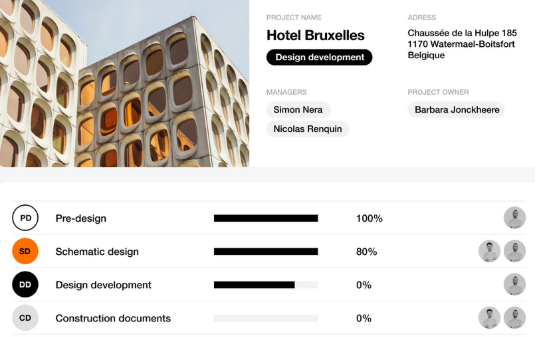
Project Flow by Milient is a project management solution designed to help project-based teams move beyond Excel. Instead of relying on spreadsheets, it centralises project information in one structured system, making it easier to plan work, track progress, and maintain consistency across multiple projects.
Project Flow is especially suited to AEC practices that need clear project stages, improved collaboration, and better project visibility without the admin burden and version issues that come with Excel.
Key Features
Project Flow includes the core benefits of project management software, structure, collaboration, and visibility, while being tailored toward project-driven teams who need control over delivery and reporting.
1. Structured Workflows & Project Stages
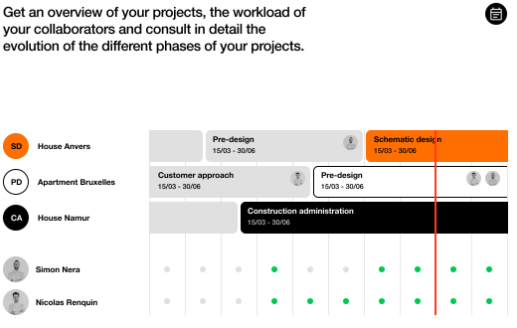
Project Flow helps teams standardise project delivery by using clear workflows and stages. This makes it easier to manage deadlines, responsibilities, and progress across multiple projects.
Unlike Excel templates that change team-to-team, Project Flow keeps project structures consistent and easier to scale.
2. Real-time Project Visibility (Single Source of Truth)
Instead of multiple spreadsheet versions, Project Flow keeps project data centralised so teams always work from the latest information. Updates are visible in real time, reducing confusion and helping teams make faster decisions without chasing updates across emails and spreadsheets.
3. Reporting & Dashboards
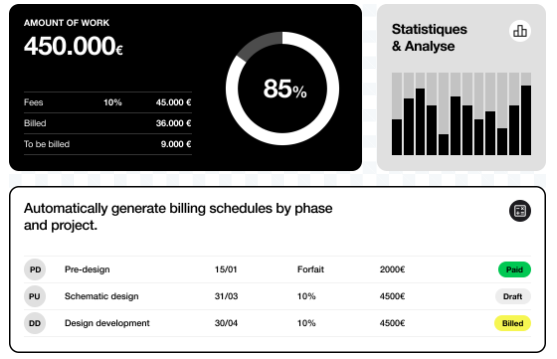
Project Flow supports automated reporting and dashboards so project managers can track key information without manually rebuilding Excel charts and pivot tables.
This reduces admin time and improves visibility across projects, especially useful when reporting internally or to stakeholders.
Pricing
| Plan / Pricing level | Best for | What’s included | Price (starting from) |
| Project Flow | Small & growing AEC teams moving beyond Excel | Core project planning, workflows, collaboration, project visibility & reporting | ~£13 per user/month |
Where Project Flow shines
- Designed for AEC teams: Built to support architecture and engineering workflows, where projects follow clear stages, deadlines, and deliverables.
- Visibility across multiple projects: Centralised project data and dashboards make it easier to track progress across active jobs without relying on multiple Excel trackers.
- Standardised workflows & reporting: Helps teams stay consistent across projects, improving collaboration and reducing the admin time spent building templates, updating spreadsheets, and producing reports.
If you’re looking for practical ways to save time, these tips on time tracking for architects may help:
Where Project Flow falls short
- Less suited to generic use cases: Project Flow is designed with AEC workflows in mind, so it may feel less relevant for teams looking for a more general task-based tool (e.g., marketing or HR).
- Less flexible than spreadsheets: Excel can be customised instantly, while Project Flow requires setup and process alignment to get the most value.
- Subscription cost and adoption time: Teams may hesitate compared to Excel’s low upfront cost, and onboarding is often needed to ensure consistent usage across the business.
Customer reviews
“Project Flow is a unique tool. It allows us to centralise all our documents, requests, and scheduling in one single piece of software rather than having several separate files. It also gives us an overall view of all service requests, interventions, and works. This software is truly the key tool for our department.”
Who Project Flow is best for
- Small AEC teams: Need structured project delivery and easier visibility than Excel without using overly complex enterprise systems.
Stop managing projects in spreadsheets
Switch to Project Flow and gain one structured system for planning, tracking, and reporting across every project.
Conclusion: When Is It the Right Time to Switch?
If your spreadsheets are turning into multiple versions, manual reporting is taking too long, or projects are getting harder to track across teams, it’s usually time to switch from Excel to project management software.
Spreadsheets weren’t built for tracking deadlines, resources, and profitability across live projects.
Project Flow by Milient gives AEC practices one structured system for planning, tracking, and reporting, without the admin overhead.
 Andrea Neeve
Marketing Associate

/hubplanner_resource.png?width=1024&height=1024&name=hubplanner_resource.png)