
Looking for the best Float alternatives in 2026? Float is a popular visual scheduling tool, but many teams outgrow its functionality as planning complexity and team size increase. Here are 5 alternatives to consider:
Float is one of the most intuitive resource scheduling tools out there, and for a lot of teams, it’s the right choice. But it’s built for a specific type of team: visual planners who need clean, fast scheduling without a lot of configuration overhead.
If you’re searching for Float alternatives, you’re probably bumping into one of a few familiar friction points: reporting that doesn't go deep enough, permissions that don't scale with your org, or projects that have grown too large and complex across global teams demanding a level of capacity planning that Float simply wasn't built to support. As complexity increases, understanding the importance of resource management becomes vital for maintaining project profitability and team health.
This guide covers the 5 best Float alternatives for 2026, what each tool does well and who it's built for. Scan through a quick overview of the 5 best alternatives for Float.
5 Float Alternatives - Quick Look
| Tool | Best For | Standout Feature | Starting Price |
| Milient | Large IT Consulting & Professional Services teams | Advanced resource management, reporting, extensive customization & configurable permissions. | £7/resource/month |
| BigTime | Smaller IT, software, PS teams | Resource planning & real-time Forecasting | $7/resource/month |
| Resource Guru | Smaller Agencies & Consulting teams | Simple scheduling for people, equipment & meeting rooms. | $4.16 resource/month |
| Productive.io | Agencies & Consultancies | One platform for resourcing, projects, & financials. | $10/user/month |
| Kantata | Enterprise Professional Services Teams | End to end PSA, ERP, & CRM integrations | No public pricing; typically 50-seat minimum w/ high per-user pricing. |
Not all Float alternatives are built for the same team. The right fit depends on your team size, planning complexity, and how much visibility you actually need. Here's a closer look at each one, starting with the best options for mid-sized to large professional services teams.
1. Resource Flow by Milient
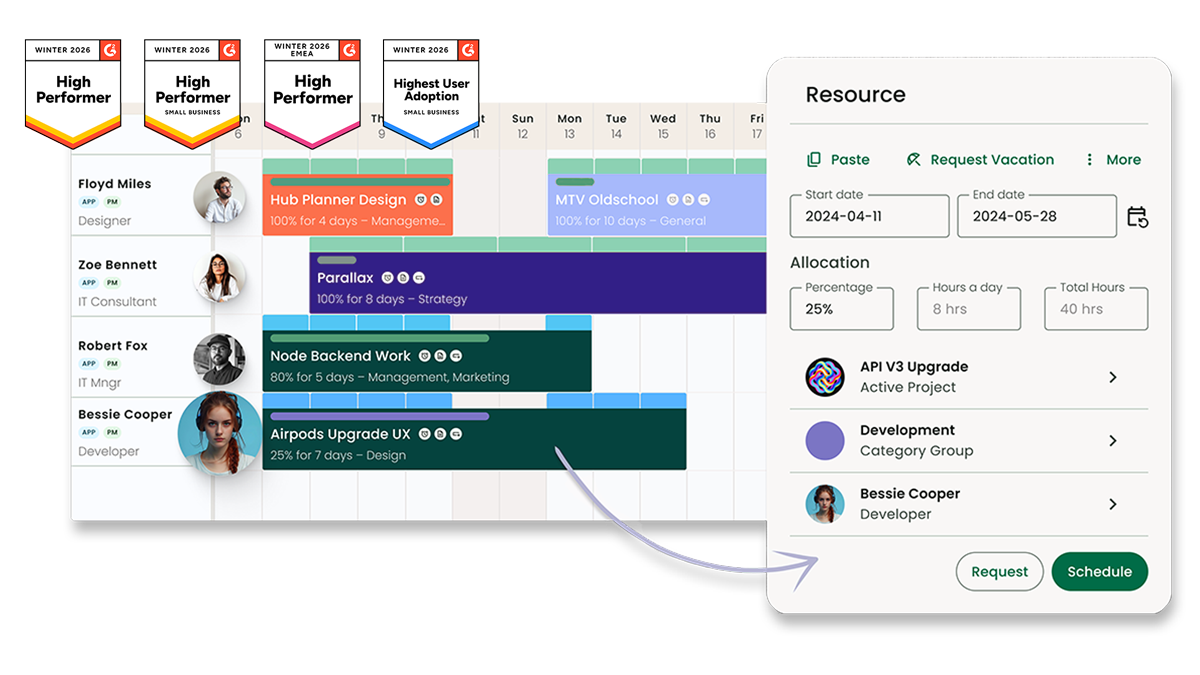
Milient Resource Flow is a dedicated resource management platform built for mid-sized to large IT consulting and professional services teams. Where Float prioritises speed and visual simplicity, Resource Flow is built for organisations with scheduling complexity. Think - multiple teams, global operations, granular reporting requirements, and the need to control who sees what.
The core difference is depth. Resource Flow gives you configurable permissions by role and individual user, a customizable report builder, and a dedicated capacity planning software engine that goes well beyond color-coded bars on a timeline.
Key features
Capacity Planning
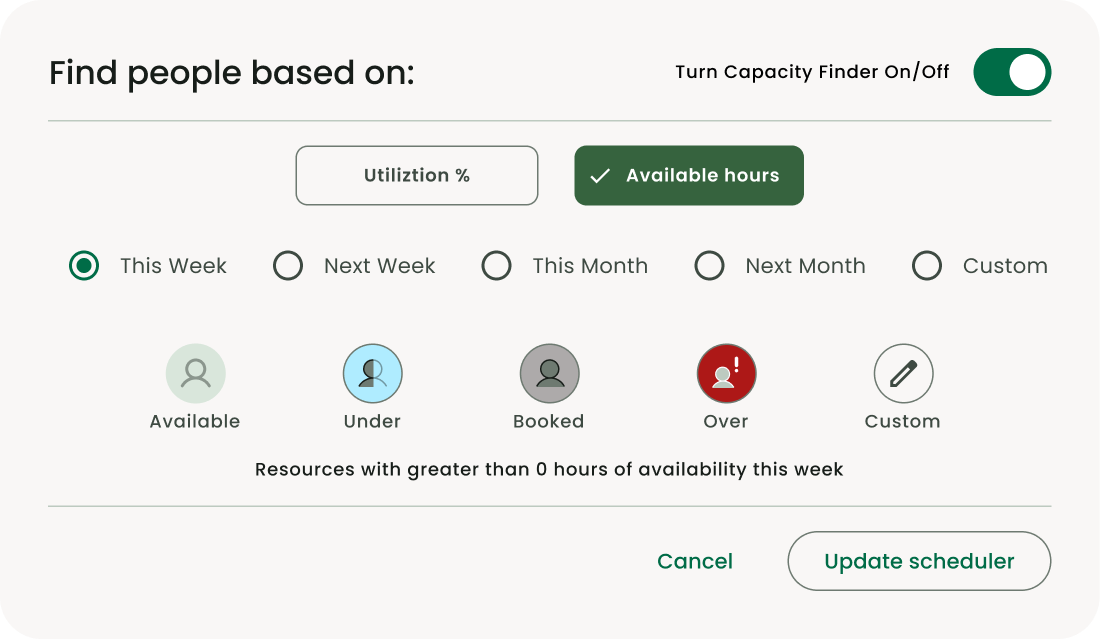
The Capacity Finder gives you a real-time view of your team's availability, filtered by utilisation percentage or available hours across any date range. Combine filters with custom fields like location, skills, and seniority to surface the right person instantly — then save those views as templates for repeated use.
- Filter by utilisation % or available hours across any date range
- Combine capacity filters with location, skills, and seniority
- Built-in smart templates: Available, Fully Booked, Over Utilised, Under Utilised
- Save custom capacity views for repeated use
Reporting
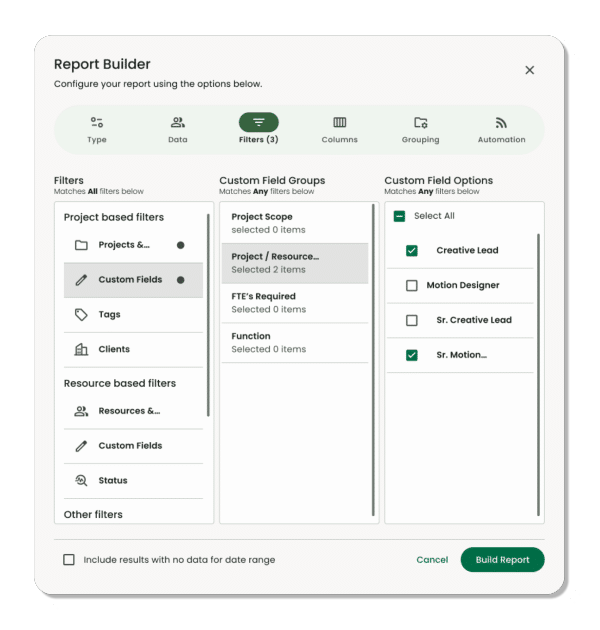
The report engine aggregates data across all teams and projects through an intuitive builder. Reports are generated in real time and cover everything from utilisation and availability to project spend and profitability.
- Fully configurable columns — add, reorder, and group as needed
- Heat map reports to visualise utilisation gaps at a glance
- Budget and profitability tracking across all projects and resources
- Export to Excel or CSV, save or share across the team
- Conditional formatting to highlight the numbers that matter
Roles and Permissions
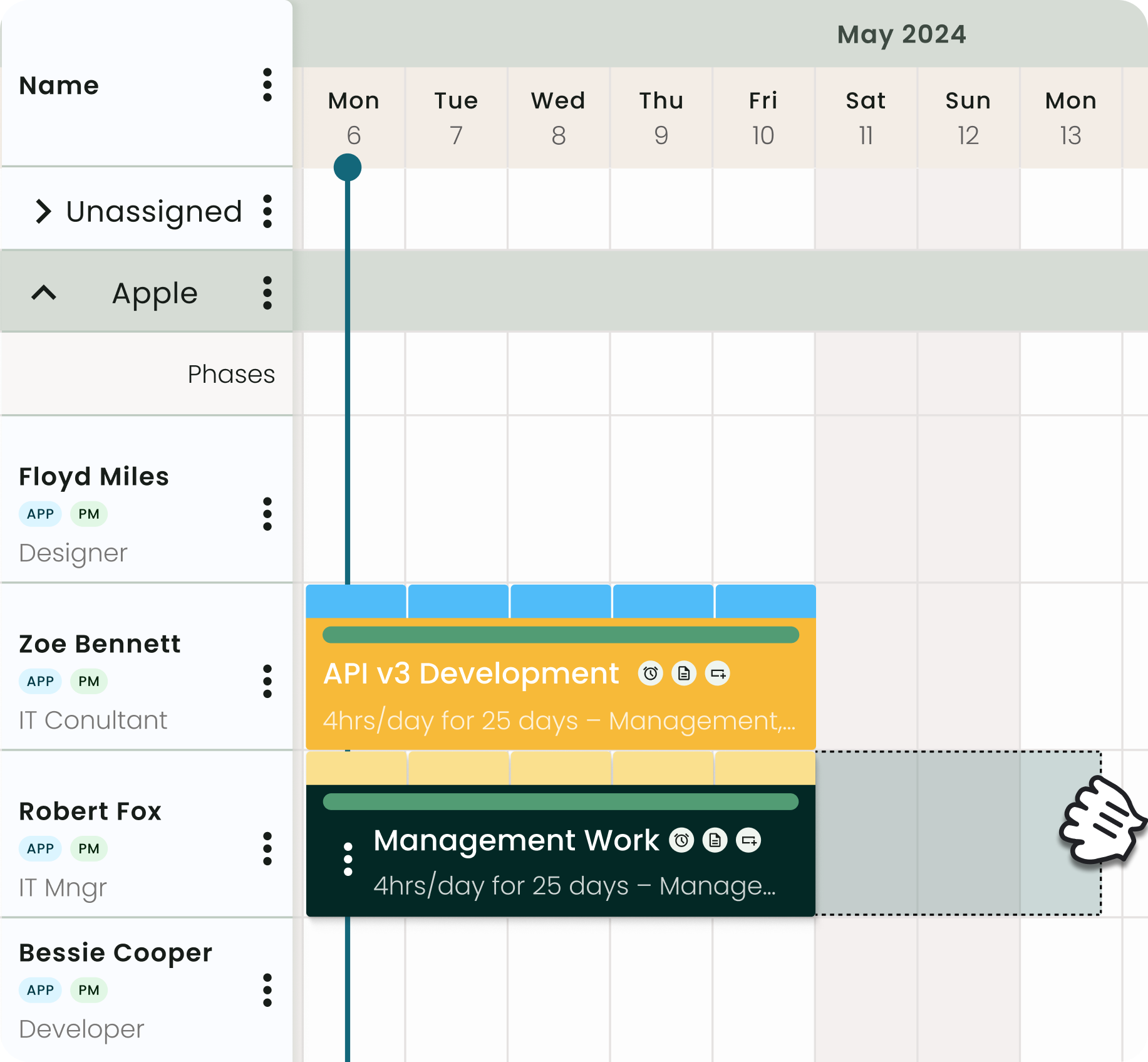
Roles and Permissions let you set up resources under different categories to distinguish levels of access. Each role comes with a default set of permissions out of the box, controlling access to projects, events, resource groups, and unassigned work. Critical for larger organisations where security and data separation across departments matter, permissions can be customised at the role level or adjusted per individual user.
- Default permissions set at the role level, adjustable per individual
- Granular control across projects, events, resource groups, and unassigned work
- Private content masking hides booking details without removing availability visibility
Pricing
|
Plan |
Price |
Best for |
Key inclusions |
|
Plug & Play |
£7/resource/month |
Teams getting started with resource scheduling |
Resource scheduler, unlimited projects, GDPR ready |
|
Premium |
£18/resource/month |
Growing teams needing timesheets, approvals and skills matching |
Everything in Plug & Play + timesheets & approval, skills matching, 24/7 support |
|
Business Leader |
£54/resource/month |
Large enterprise teams with high capacity requirements |
Everything in Premium + MFA security, capacity finder, smart schedules |
Where Milient Resource Flow shines
- Complex, multi-team environments: Resource Flow is built for organisations running multiple concurrent projects across departments or geographies. Capacity planning, granular permissions, and a configurable report builder give resource managers the tools to plan at scale without losing visibility.
- Utilisation-driven businesses: For professional services organisations, resource management is a direct driver of project margins and firm profitability. The most profitable consultancies are the ones with the clearest visibility into utilisation, spend, and project performance.
- Organisations that need structured access control: The permissions system means different roles across the business see exactly what they need and nothing more. Especially valuable for IT consultancies managing client work alongside internal teams.
Where Milient Resource Flow falls short
- Not suited for very small teams: If you have fewer than ten people and your scheduling needs are straightforward, the breadth of features here is more than you need. Simpler visual scheduling tools will suffice.
- Capacity Finder is a paid extension: The Capacity Finder is available as a paid extension across all plans. Teams should factor this into their pricing when comparing options.
Customer reviews
- "Milient Resource Flow has significantly improved our resource management, but the major advantage for our business is the ability to report on resource utilisation in relation to project budgets."
— Andy T., Communication Services Delivery Director, Mid-Market — G2 Reviewer
Who Milient Resource Flow is best for
- IT consulting and professional services teams: mid-sized to large organisations running complex project portfolios across multiple teams or regions
- Resource and operations managers: who need to track utilisation, report on spend, and control visibility across a growing organisation
- Teams with structured permission needs: where line managers, project leads, and executives each require a different level of access to scheduling and financial data
2. Runn
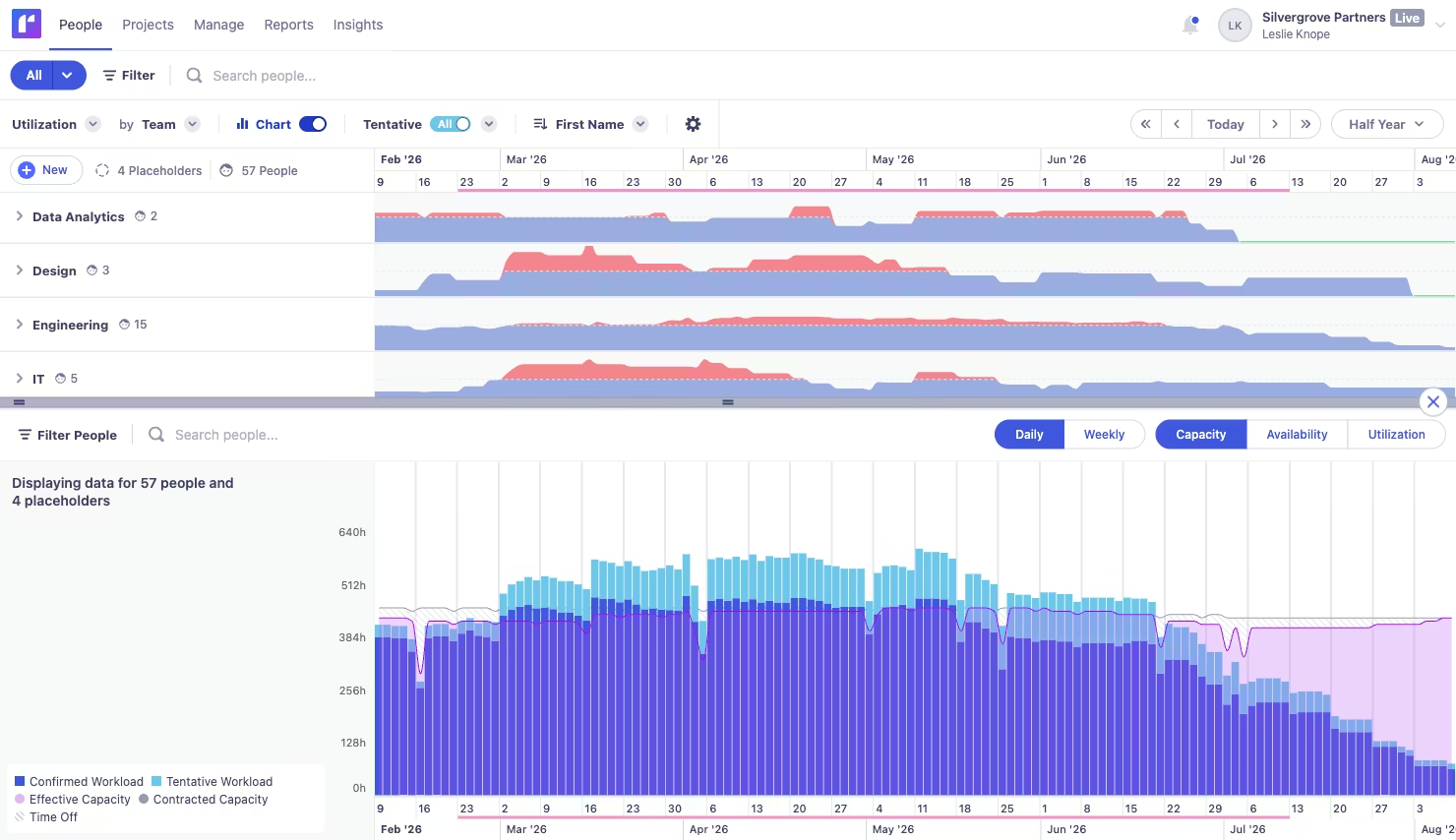
Runn is a visual resource planning and forecasting tool built for smaller professional services and project-based teams. It sits in the same category as Float, purpose-built scheduling rather than full PSA but with a stronger emphasis on forward-looking financial forecasting. Good for consulting teams, agencies, and product development organisations that want clear capacity and light forecasting capabilities without enterprise-level complexity and loads of resource management features.
Key features
- Visual resource scheduling: A centralised People Planner shows availability, utilisation, and capacity across your team, with drag-and-drop scheduling to assign work and spot conflicts before they impact delivery.
- Project forecasting: Provides a forward view of revenue, costs, and project profitability as you plan, useful for teams that want basic financial visibility without building it manually in spreadsheets.
- Timesheets: Team members can log hours against tasks, categories, or projects, with scheduled vs. actual time comparison built in.
Pricing
|
Plan |
Price |
Best for |
Key inclusions |
|
Lite |
$7/resource/month |
Small Teams |
Core scheduling & planning features |
|
Standard |
$11/resource/month |
Growing teams |
Add timesheets, integrations, & API access |
|
Advanced |
Custom |
Larger teams |
Includes advanced reporting & enterprise features |
Where Runn shines
- Low barrier to entry: Free for up to five managed resources (not users) and quick to set up, Runn is a practical first step for small teams moving off spreadsheets into a dedicated resource planning tool.
- Basic forecasting for smaller teams: For organisations that want light forecasting features, what if scenarios, and project profitability insights without investing in a full PSA, Runn covers the fundamentals at a competitive price.
Our Runn review breaks down these financial visibility features in more detail to help you decide if it fits your budget.
Where Runn falls short
- Reporting and permissions are constrained: User reviews flag that reporting depth and security profiles are limited, with some teams resorting to spreadsheet exports to meet their reporting needs. For organisations that need configurable access control or detailed utilisation reporting, Runn falls short.
- Not built for complex environments: Less suited for organisations managing multiple teams, regions, or detailed resource planning requirements.
Pro Tip
 What this means: Lightweight tools can work early on, but as planning complexity grows, teams often need more control to manage resources.
Customer Review
“We are using runn on a day-to-day basis to manage our consulting projects and where our employees are located. We use all features related to project management and reporting. But what we would like to see in the tool is a better way to manage access per user role, it would be useful for us.
Who Runn is best for
- Small teams: needing simple scheduling without complexity
- Agencies & consultancies: looking for lightweight forecasting alongside planning
- Teams early in maturity: transitioning from spreadsheets to a dedicated tool
3. Resource Guru
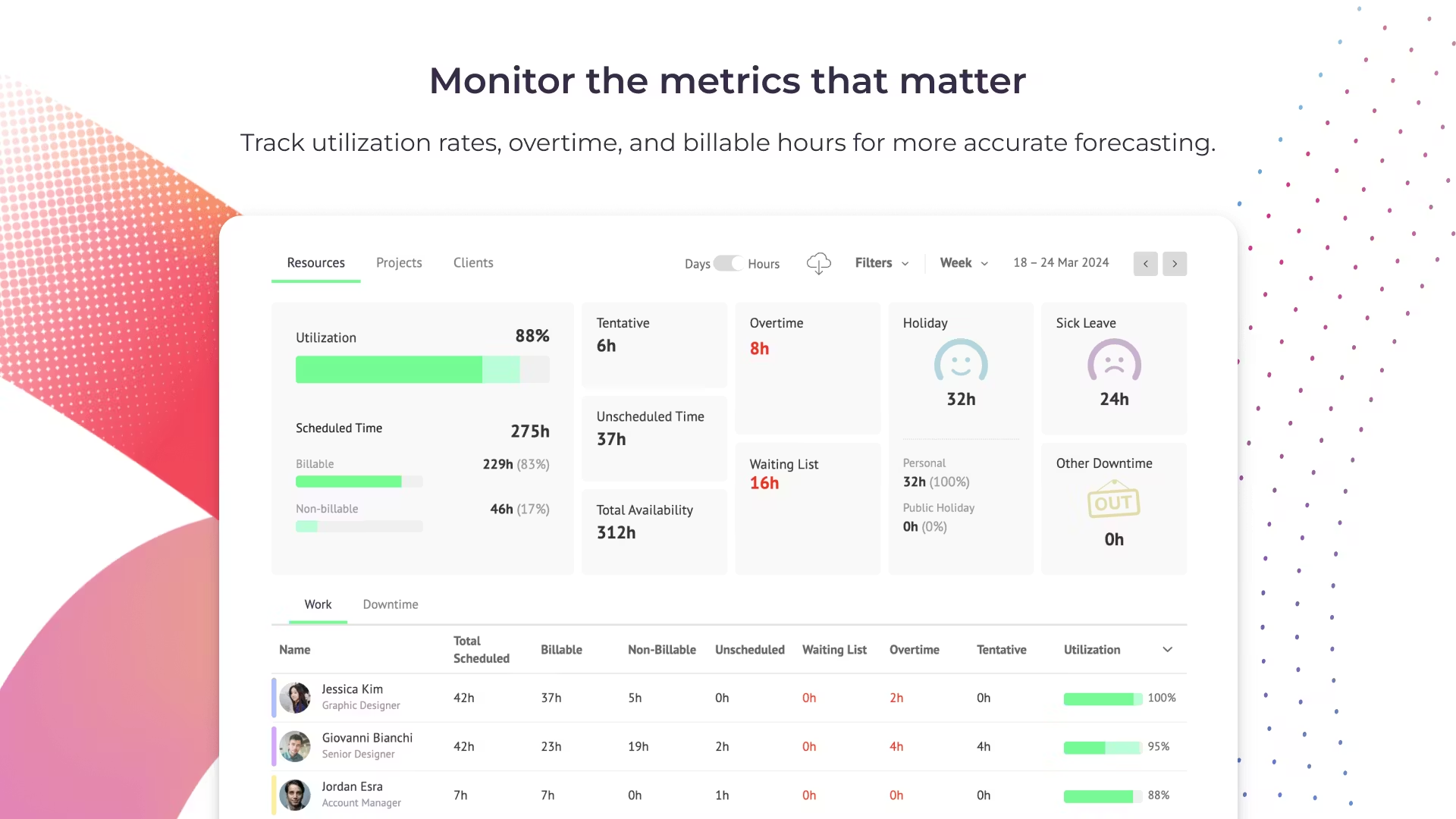
Resource Guru is a lightweight resource management and scheduling tool designed to give teams clear visibility over availability, workloads, and project allocation. Known for its clean interface and ease of use, it helps teams manage multiple projects, track time off, and avoid scheduling conflicts without the complexity of more advanced platforms. It’s particularly popular with small to mid-sized teams that want a simple way to plan resources without heavy configuration.
Key features
- Resource scheduling & availability: Drag-and-drop scheduling with a clear calendar view of who’s working on what, including time off and bookings.
- Capacity planning: Visualize utilisation and availability across teams to avoid overbooking and balance workloads effectively.
- Reporting & insights: Basic reports on utilisation and bookings, helping teams understand performance at a high level.
Pricing
|
Plan |
Price (per user/month) |
|
Grasshopper Plan |
$4.16 |
|
Blackbelt Plan |
$6.65 |
|
Master Plan |
$10 |
Where Resource Guru shines
- Ease of use: The interface is intuitive and quick to adopt, making it easy for teams to get started without extensive onboarding or training.
- Clear visibility: Teams can quickly see availability, conflicts, and workloads at a glance, helping improve day-to-day planning.
- Lightweight flexibility: Works well for short-to-mid-term scheduling without overwhelming users with unnecessary features.
Where Resource Guru falls short
- Limited scalability: As organisations grow and manage more complex project portfolios, the tool can struggle to keep up with advanced planning needs.
- Basic reporting: Reporting functionality is relatively simple, with limited customisation—teams often export data to spreadsheets for deeper analysis.
- Lack of advanced forecasting: Scenario planning and long-term forecasting capabilities are more limited compared to more robust platforms.
Customer Reviews
“I find Resource Guru mostly user-friendly. I like that it's an online tool, so it doesn't require a VPN to work from home. My team can access it easily and choose between multiple ways to see their planned work, whether on the whole team's schedule or their dashboard. This flexibility makes it really convenient. I can access it from anywhere, which is a big plus for remote work. The initial setup of Resource Guru was also very easy.
But I don't think the reports are user-friendly enough. Also didn't like when they changed the way they looked. I liked the previous version more. The Excel reports that are exported from Resource Guru should be formatted more easily or exported only with the information you filter. I usually get the whole pack for the chosen period of time and am not able to filter that enough. For somebody who is not doing reports every day, it's not easy to search for the information. On the other hand, when you see the reports in the desktop version, the sheets are sometimes very confusing and you don't know which row is which.”
Who Resource Guru is best for
- Small to mid-sized teams: Teams needing simple, visual resource scheduling without complex setup.
- Project-based teams: Organisations managing multiple projects but with relatively straightforward planning needs.4
4. Productive
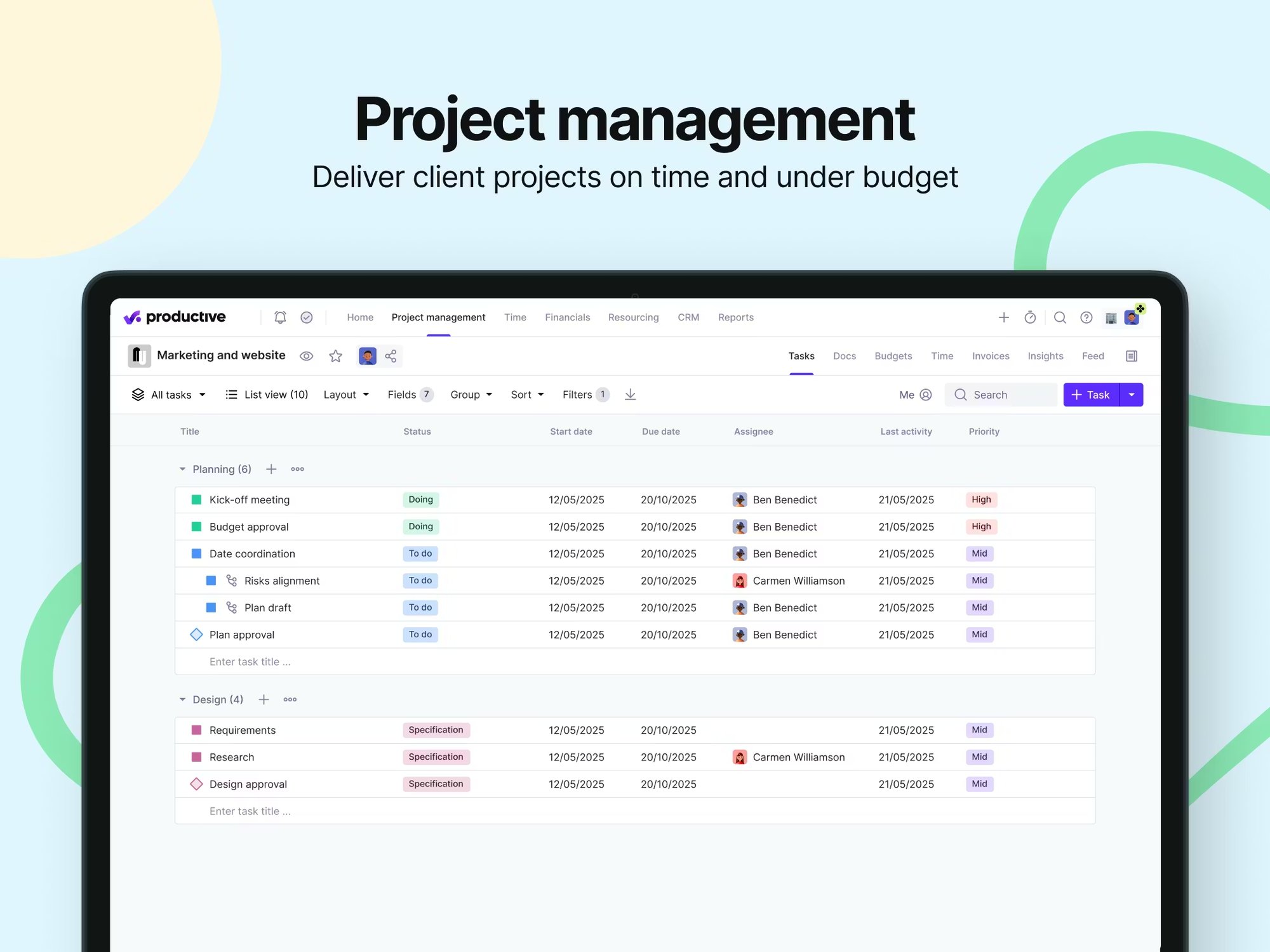
Productive is an all-in-one professional services automation (PSA) platform designed for agencies, consultancies, and service-based teams. It combines project management, resource planning, budgeting, time tracking, and reporting into a single system—helping teams run projects, finances, and operations from one place.
Key features
- All-in-one operations platform: Combines project management, resourcing, budgeting, and reporting in one system for full business visibility.
- Resource planning & scheduling: Allocate work based on availability, skills, and capacity to balance workloads effectively.
- Budgeting & profitability tracking: Track budgets, billable hours, and margins in real time to keep projects financially on track.
- Time tracking & automation: Flexible time tracking with automation to reduce admin and improve accuracy.
Pricing
|
Plan |
Price (per user/month) |
|
Essential |
~$10 |
|
Professional |
~$25 |
|
Ultimate |
~$33 (also custom pricing) |
Where Productive shines
- All-in-one depth: Combines projects, resources, and financials into one platform, reducing the need for multiple tools and improving decision-making.
- Strong financial control: Budgeting, forecasting, and profitability tracking give teams clear insight into performance and margins.
- Scalability for agencies: Built to support growing teams with more complex workflows, reporting needs, and operational oversight.
Struggling to get the insights you need from your current tool?
Discover how Resource Flow’s dashboards and reporting help you track utilisation, forecast demand, and make more informed decisions.
Where Productive falls short
- Steeper learning curve: The breadth of features can make onboarding and setup more complex, especially for smaller teams.
- Navigation & UX friction: Some users report that moving between budgets or projects can feel less intuitive.
- Higher cost: Compared to simpler tools, pricing can be higher—especially as team size increases.
Customer Reviews
"The most helpful thing for us as an agency is the visibility we have over everything that is going on in the business. From an initial quote/budget, through the life of a project and into invoicing, the tight integration of relevant data makes errors far less likely. Being able to see all of our resourcing and utilisation (did I mention you can pull a report for just about anything?) all in one dashboard is really useful."
—Mark S., Operations Director
Who Productive is best for
- Agencies & consultancies: Teams needing project, financial, and resource management in one platform.
- Scaling teams: Organisations moving beyond simple scheduling tools and needing deeper operational insight.
5. Kantata
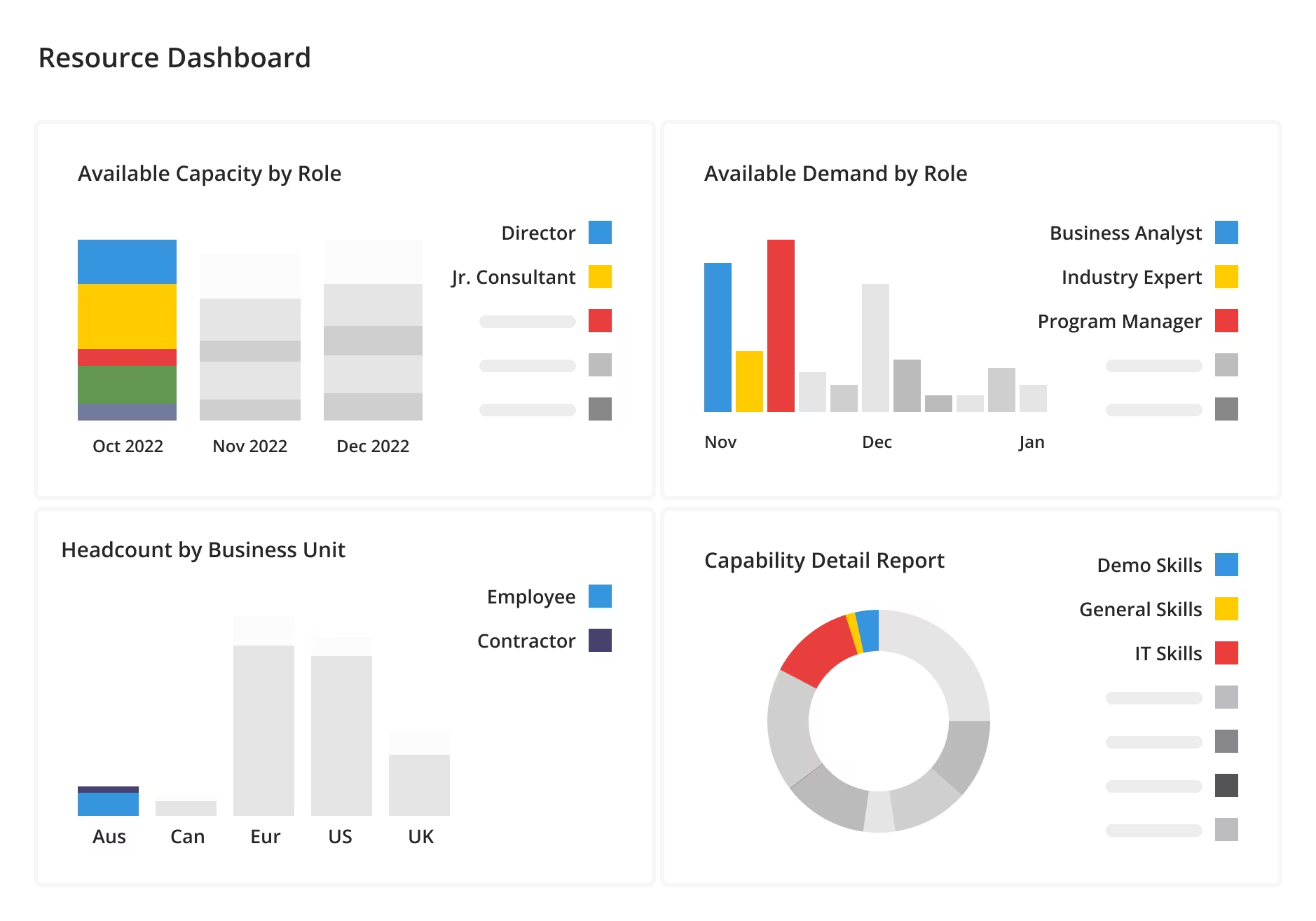
Kantata is a professional services automation (PSA) platform designed to help organisations plan, allocate, and optimise resources across complex project portfolios. It combines resource management, capacity planning, and financial oversight into one system, giving teams visibility into demand, utilisation, and project performance. Compared to simpler tools like Float, Kantata is built for organisations that need deeper forecasting, reporting, and operational control.
Key features
- Capacity planning & forecasting: Plan future resource demand, compare supply vs demand, and identify gaps or overcapacity across projects.
- Resource scheduling & optimisation: Match people to projects based on skills, availability, and role requirements, with real-time updates.
- Skills inventory & staffing insights: Track team capabilities and surface best-fit recommendations to improve project delivery and utilisation.
Pricing
|
Plan |
Price (per user/month) |
|
Kantata |
Custom pricing |
For a breakdown of what custom pricing typically involves, see this overview of Kantata pricing and what teams actually pay.
Where Kantata shines
- Advanced forecasting capabilities: Built for forward-looking teams, with strong tools for demand planning, utilisation tracking, and scenario modelling.
- End-to-end visibility: Combines resource planning, project data, and financial insights in one platform, reducing the need for multiple tools.
- Enterprise-ready functionality: Supports large teams, complex project structures, and detailed reporting requirements across global operations.
Where Kantata falls short
- Slower data refresh in reporting: Some users report delays in real-time updates, with dashboards taking time to fully refresh.
- Steeper learning curve: The platform can feel complex, with more setup and training required compared to lightweight tools.
- Performance at scale issues: Larger projects or heavy usage (e.g. scheduler loading, mobile app) can impact speed and usability.
Who Kantata is best for
- Enterprise and large professional services teams: Ideal for organisations needing advanced forecasting, detailed reporting, and full operational visibility across multiple projects.
Looking for a project management system built for architects and engineers? Explore Project Flow, designed for both growing and large teams.
Reasons to consider an alternative to Float
Float is a great entry point for visual scheduling, but as teams grow, resource management becomes less about simple timelines and more about visibility, forecasting, and control. If you’re managing multiple projects, teams, or regions, these are the common gaps that push organisations to explore alternatives.
Limited capacity planning and forecasting
Float is built for short-term scheduling, but it lacks the depth needed for long-term capacity planning and demand forecasting. As pipelines grow, teams often struggle to confidently plan months ahead or model different scenarios.
Platforms like Resource Flow go further, with dedicated capacity planning tools that surface availability, utilisation, and future demand in real time.
Reporting that doesnt scale with complexity
As projects and teams expand, reporting becomes critical, but Float’s reporting capabilities can feel limited for organisations needing deeper insights into utilisation, profitability, or performance across teams. Many end up exporting data into spreadsheets.
With Milient Resource Flow, reporting is built in and configurable, giving teams real-time visibility without relying on manual workarounds.
Lack of control across teams and permissions
Float works well for smaller, collaborative teams, but larger organisations often need more control over who can see and edit data. As teams scale across departments or regions, limited permission structures can create friction.
Milient Resource Flow addresses this with granular roles and permissions, ensuring the right people see the right information, without compromising visibility.
Finding your perfect Float alternative
Choosing the right alternative to Float comes down to one key question: how complex is your resource planning today, and where is it heading?
For smaller teams or those just moving away from spreadsheets, tools like Runn or Resource Guru can offer a simple, low-cost way to get started with scheduling and basic forecasting.
But as your organisation grows, with more projects, more people, and more demand for visibility, the limitations of lightweight tools tend to show. Reporting depth, access control, and the ability to confidently plan capacity across teams become critical.
This is where more advanced platforms come in.
If you’re managing multiple teams, need clearer insight into utilisation, or want to move beyond manual workarounds, Milient Resource Flow is designed to handle that next level of complexity. With configurable reporting, real-time capacity planning, and granular permissions, it gives you the structure and visibility needed to scale resource management effectively.
Ultimately, the best tool is the one that fits not just where your team is today, but where it’s going next.
Next steps
If you're still exploring your options, it may help to understand how different tools compare. Learn more about this in our blog on Spreadsheets Vs Resource Scheduling Software.
Or, if you'd rather see Resource Flow in action, take a look below.
 Andrea Neeve
Marketing Associate
Want more content like this? Follow Milient:
/Finances_graphs.png?width=1024&height=1024&name=Finances_graphs.png)
/roles_2.jpg?width=1024&height=1024&name=roles_2.jpg)