
Key takeaways
 Airtable handles resource management at a basic level using linked records, timeline views, utilisation summaries, and automations
 The setup starts with three core tables: People, Projects, and Assignments, then uses rollups, lookup fields, and a timeline view to surface workload
 Airtable works well for small teams that need flexible capacity tracking and project scheduling, especially when templates can speed up setup
 Choose Milient Resource Flow if you need a purpose-built resource scheduling platform for IT consultancies and departments, or professional services teams that need faster staffing decisions and clearer utilisation control
You've outgrown spreadsheets, so it's time to move to a more capable planning platform. If our Airtable vs Smartsheet comparison helped you decide on Airtable, this guide is your next step.
We'll show you how to use Airtable for resource management and scheduling, then explain the limitations that lead many growing teams to purpose-built resource scheduling platforms like Milient Resource Flow.
Can You Use Airtable for Resource Management?
Yes. You can use Airtable for resource management. Its mix of databases, project views, and no-code automation gives you a central workspace for planning, assigning, and tracking work.
At a basic level, Airtable supports this through:
-
-
- Linked records that connect team members, skills, availability, projects, and clients in one base
- Timeline, Gantt, Calendar, and Grid views to visualise schedules and workloads
- Utilisation summaries that turn assignments into capacity percentages, so you can balance work across the team
- Automations that notify people and update records when assignments change
- Forms and integrations that capture resource requests and connect to Slack, Microsoft Teams, Google Workspace, and Jira
-
These features give you the components to build a project resource management system tailored to your team's workflows. The steps below show the assembly.
How to Set Up Resource Management in Airtable
Airtable resource management starts with a simple structure: people, projects, and assignments.
Here's how to set it up step by step.
Step 1: Build the People, Projects, and Assignments Tables

Start from Airtable's home screen, which gives you different ways to start building:
-
-
- With Omni, which generates a custom base from a plain-language prompt
- Templates open a pre-built structure you customise as you go
- Quickly upload converts an existing spreadsheet into tables
- Building an app on your own lets you create tables from a blank slate
-
To use Omni, type "Create three tables for People, Projects, and Assignments" into the chat panel, and it builds all three with starter fields like Name, Email, Role, and Notes.
Or, build manually by clicking the + button beside Table 1, add two tables, and rename all three.
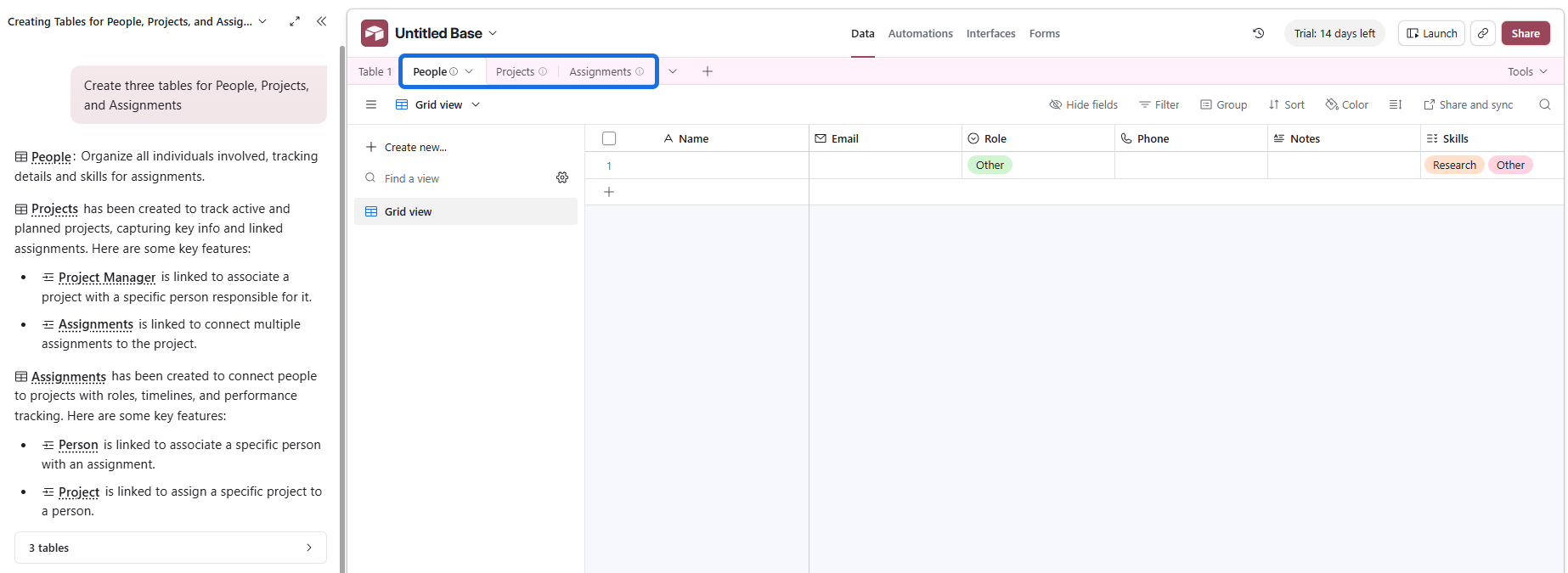
Then adjust the fields.
-
-
- The People table should store each team member’s name, role, weekly capacity, and skills
- The Projects table should hold project name, dates, status, and priority
- The Assignments table should link a person to a project and record the hours or percentage allocated
-
Step 2: Link Records Between Tables
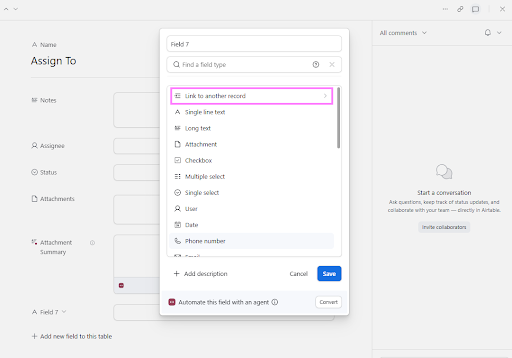
Add two linked record fields to the Assignments table: one to People, one to Projects. Airtable creates the reciprocal fields automatically, so each person's record now lists their assignments.
-
-
- Turn off "allow linking to multiple records" on the People link, as one assignment should go to one person. If two consultants share a task, create two records with their own hours, keeping every hour attributable.
- Next, add lookup fields to Assignments. Pull each person's weekly capacity from People and the project status from Projects. Lookups display connected data without duplicating it, so a capacity change flows through everywhere.
- Now enter real assignments: linked person, linked project, start and end dates, and honest weekly hours.
-
Step 3: Add Rollups to Total Assigned Hours
Create a rollup field on the People table. Point it at the linked Assignments records, select the hours field, and choose SUM. Every person now shows total committed hours in one column.
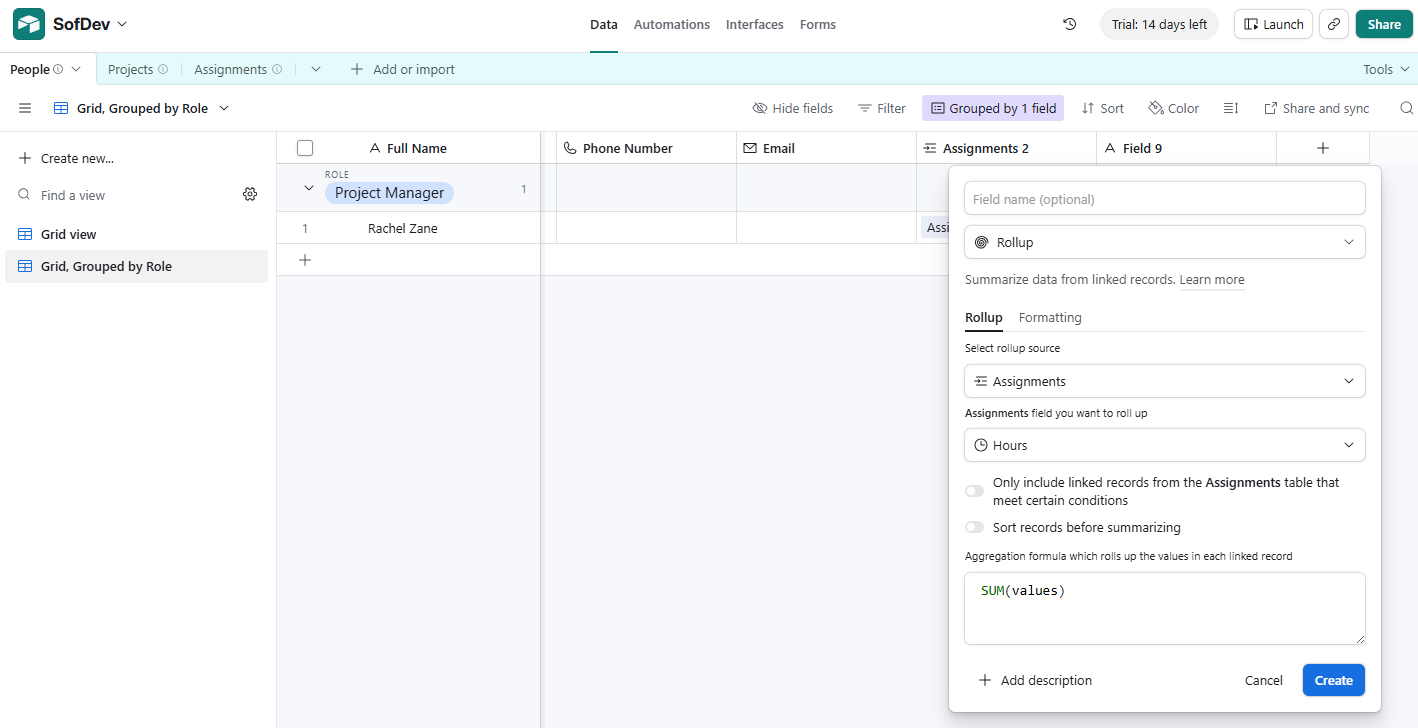
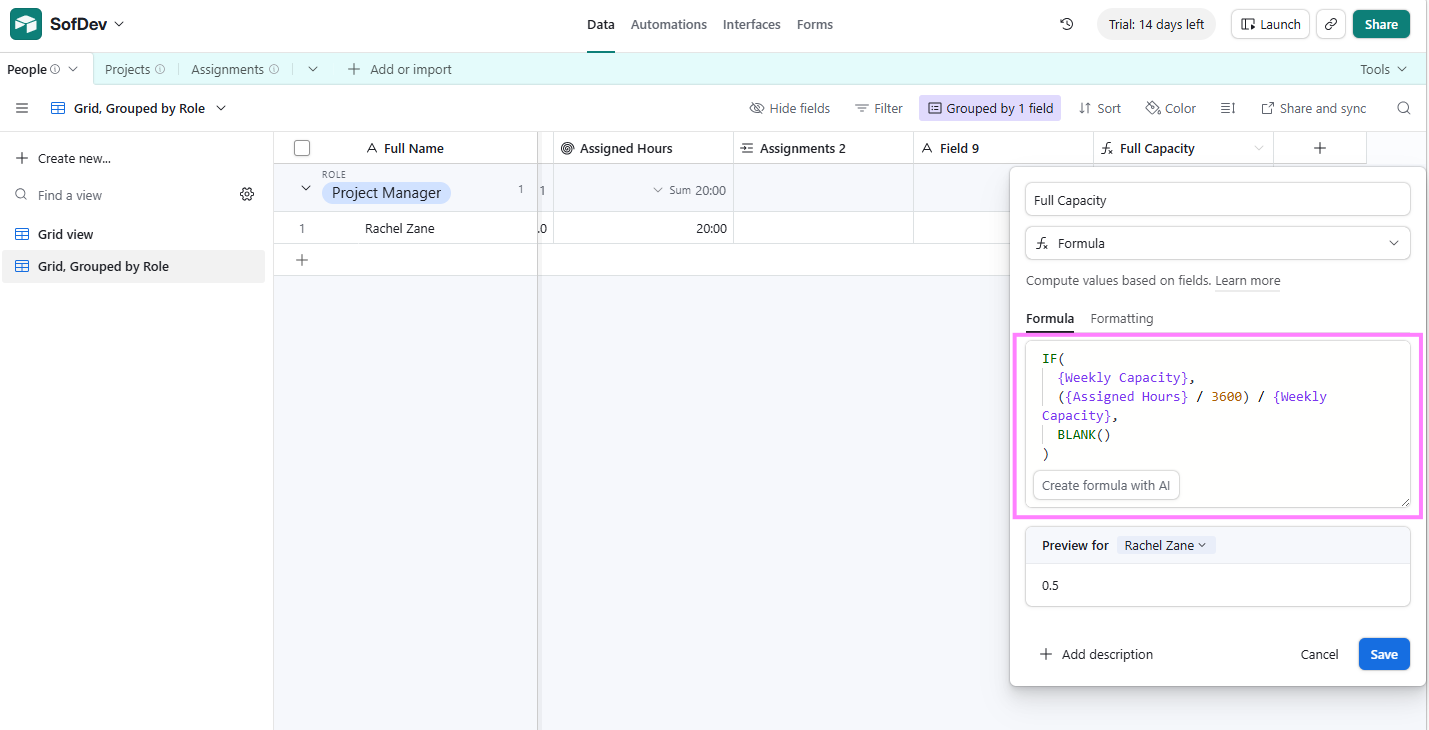
Add a formula field next: assigned hours divided by weekly capacity, formatted as a percentage. That's your first utilisation number, and it works in the grid view on any plan, including the free tier.
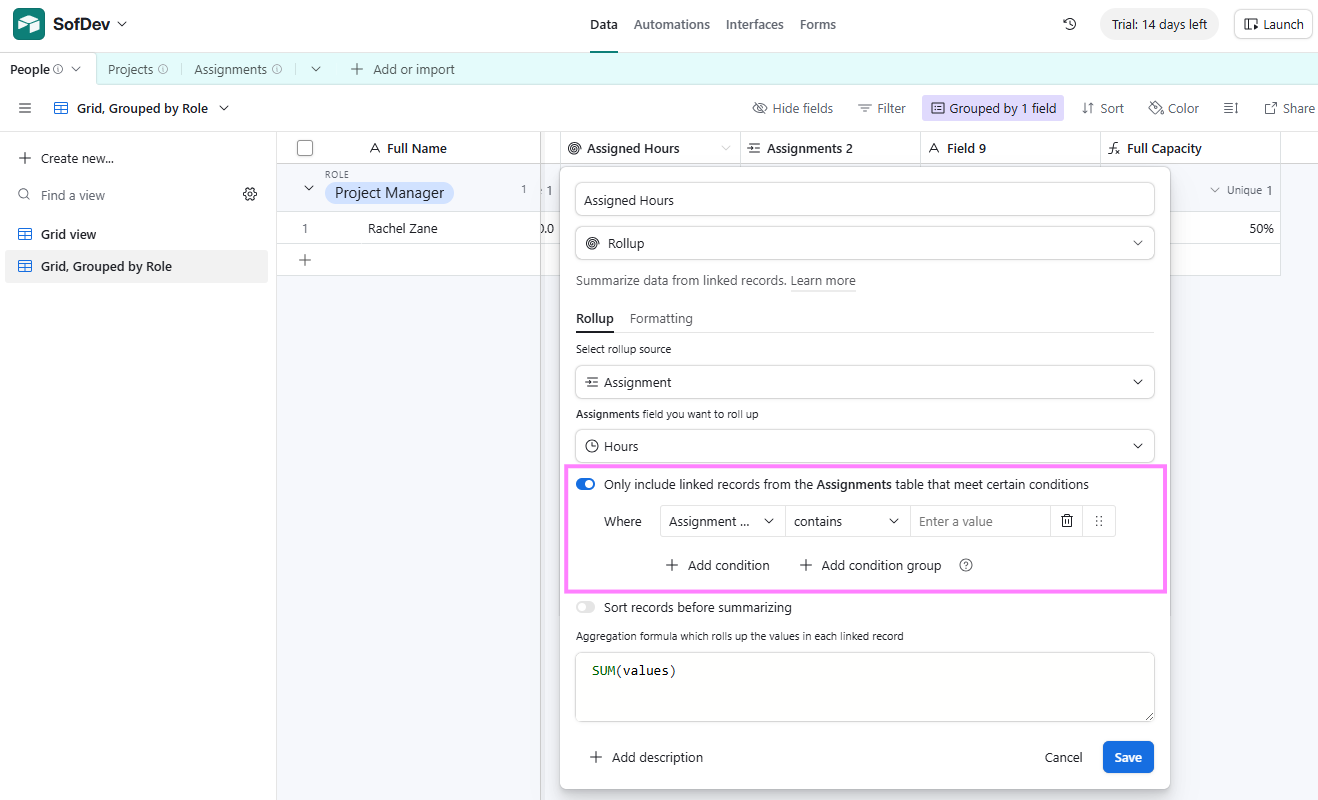
Refine the rollup with a condition so it counts only assignments on active projects, and so that completed work does not inflate current workload.
Step 4: Build a Timeline View With the Utilisation Summary
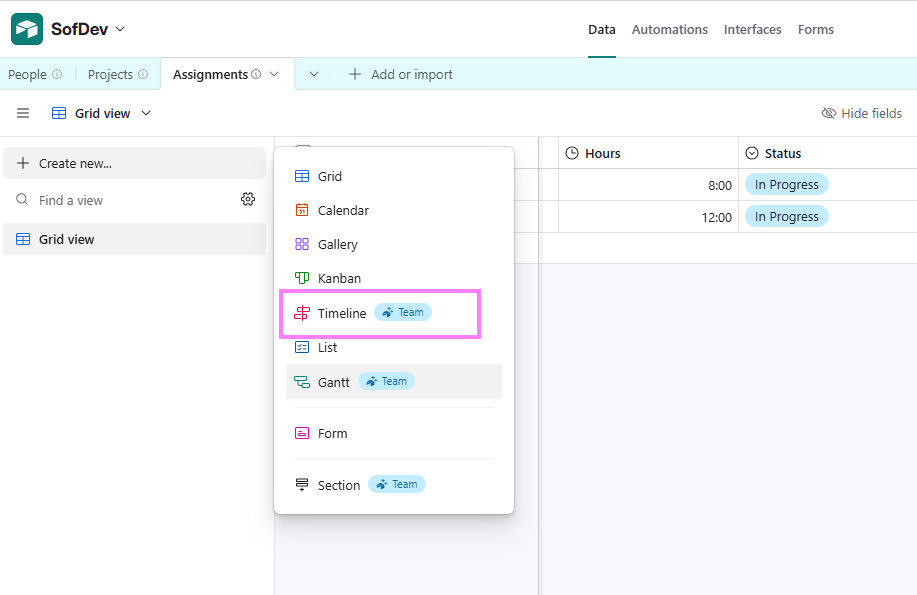
Create a Timeline view on the Assignments table and group it by person so that each team member gets their own swimlane of assignment bars.
Open the summary bar (click Summarise in the view menu) and enable the Utilisation function. It needs three inputs: Allocated hours come from your number field, the resource from the linked People field, and available hours through the capacity lookup from Step 2.
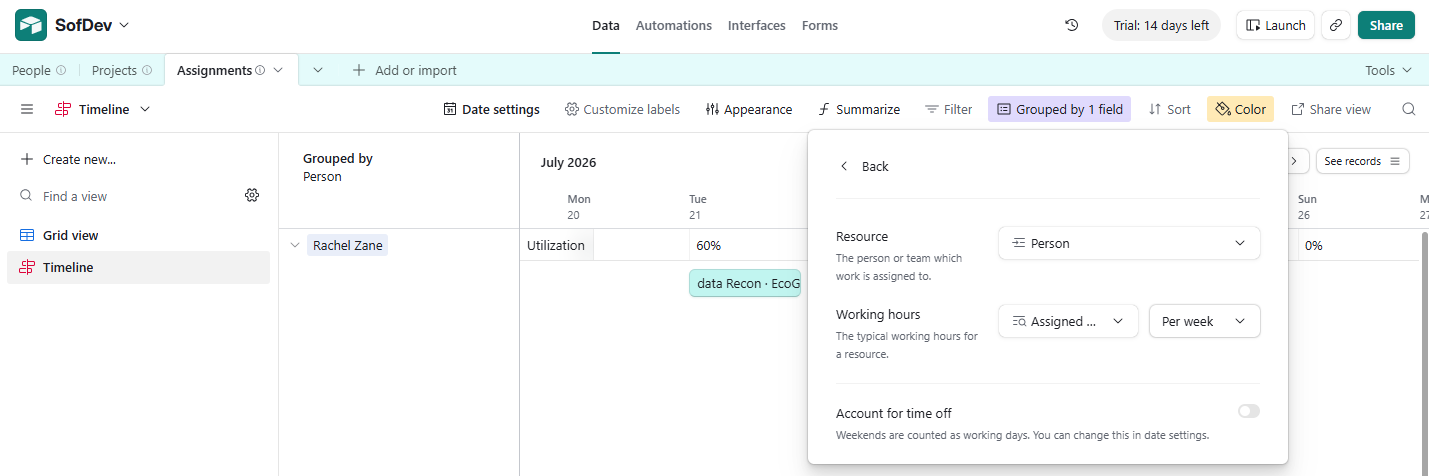
Set the allocation to repeat weekly rather than totalling across the whole event, then switch on the days-off option to read leave dates from People.
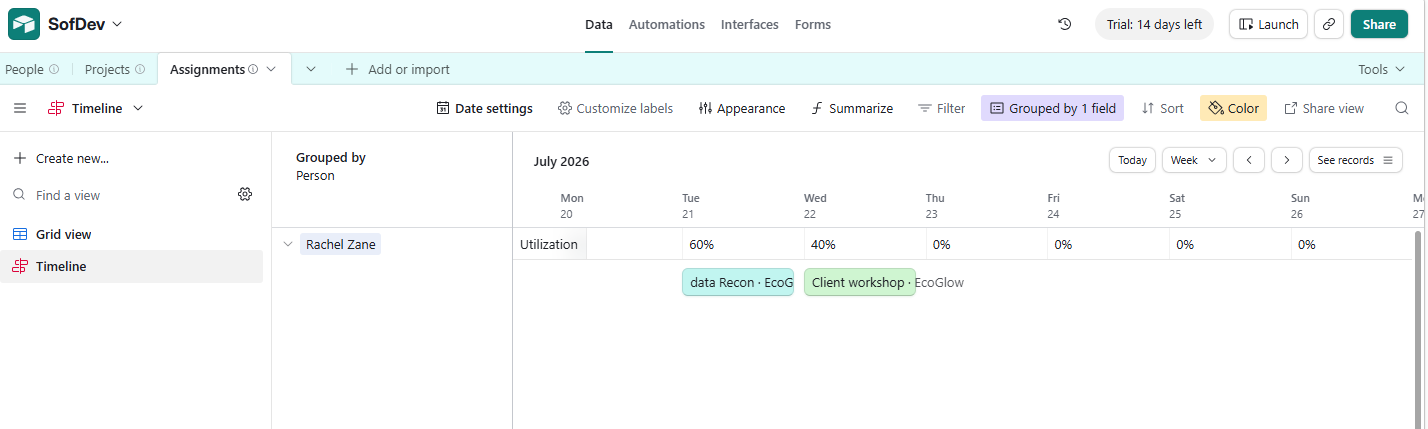
The summary bar now prints a utilisation percentage per person, per week. Anyone above 80% is overbooked that period, as recommended by Gartner analyst Robert Handler.
Step 5: Automate Alerts for Assignment Changes
Airtable won't warn anyone about overbooking on its own, but you can build a basic alert.
Open the Automations tab and create a new automation.
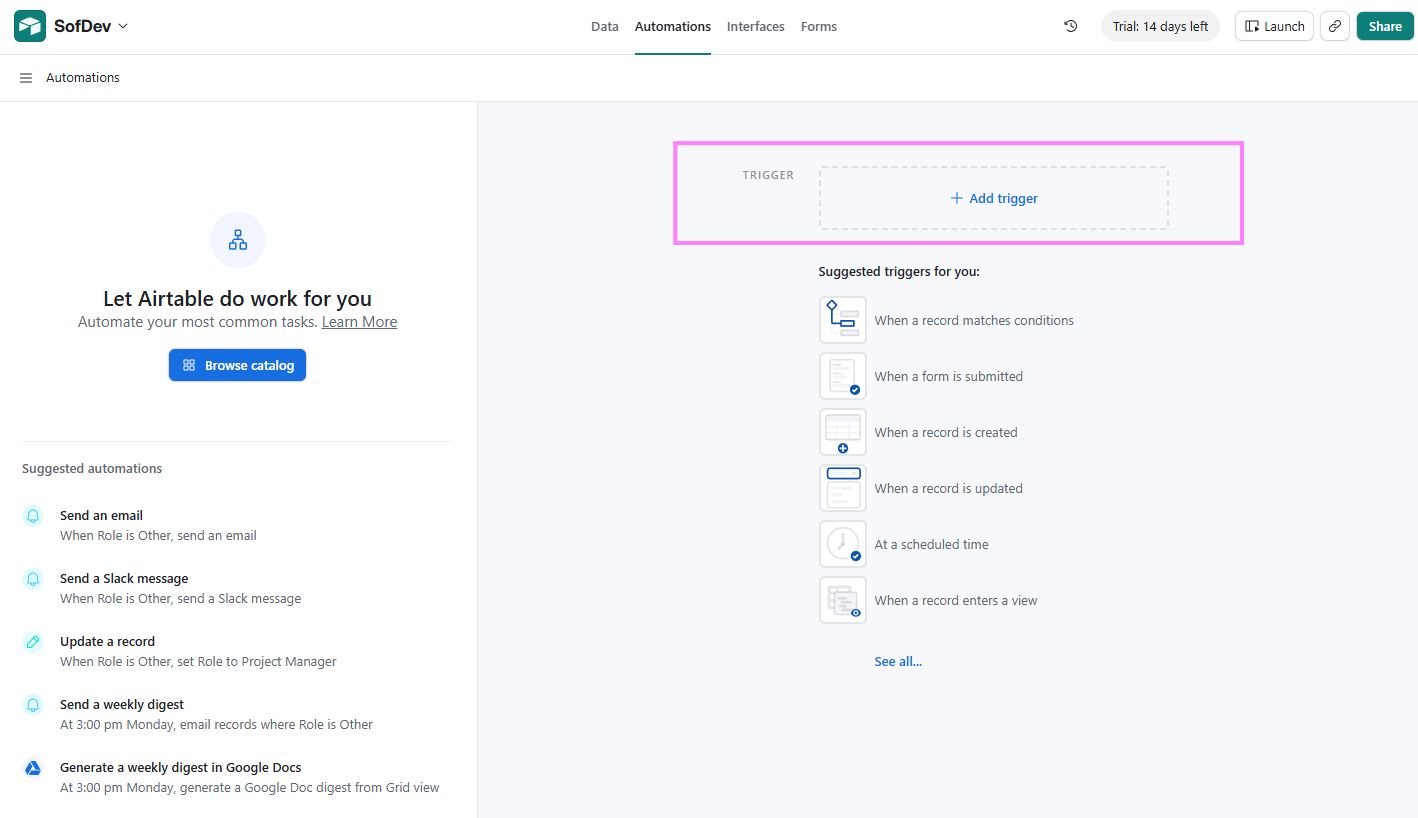
Choose the "when record matches conditions" trigger, select the People table, and set the condition to fire when utilisation exceeds 80%.
Next, click Add advanced logic or action and pick the alert: a Slack message, a Teams message, or an email to whoever runs resourcing.
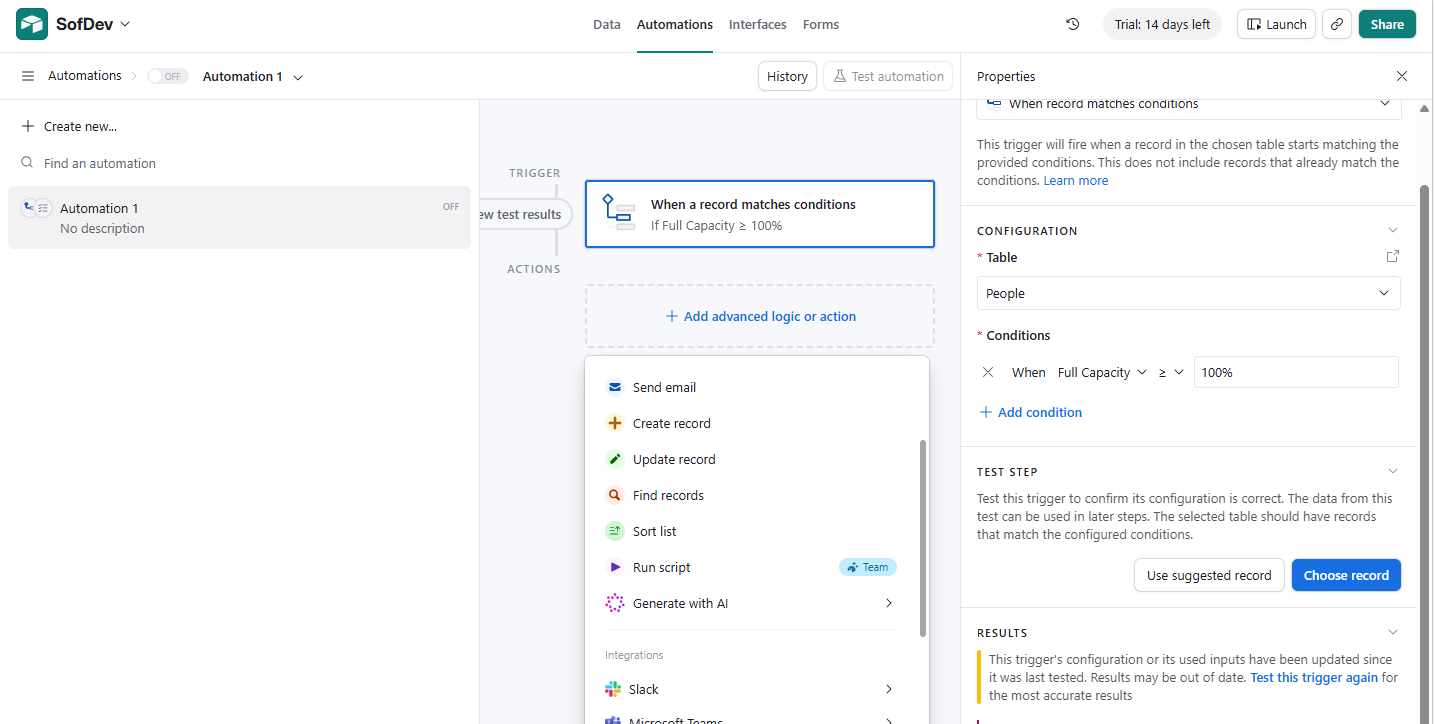
Airtable Resource Management Templates
If you want to move fast, start with a template instead of building everything from scratch.
Airtable's template library covers hundreds of use cases, with several built for resource management.
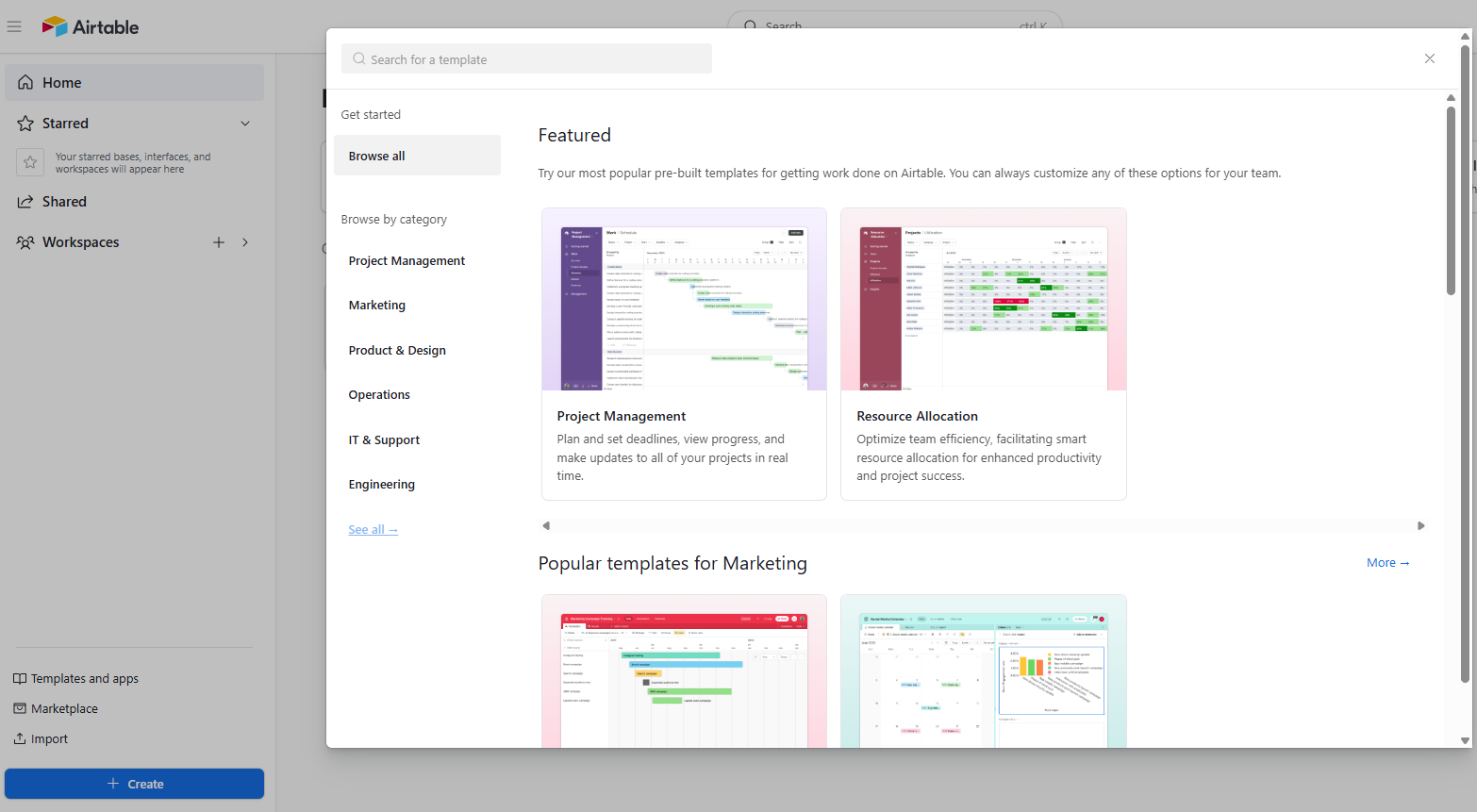
Two fit this guide directly:
-
-
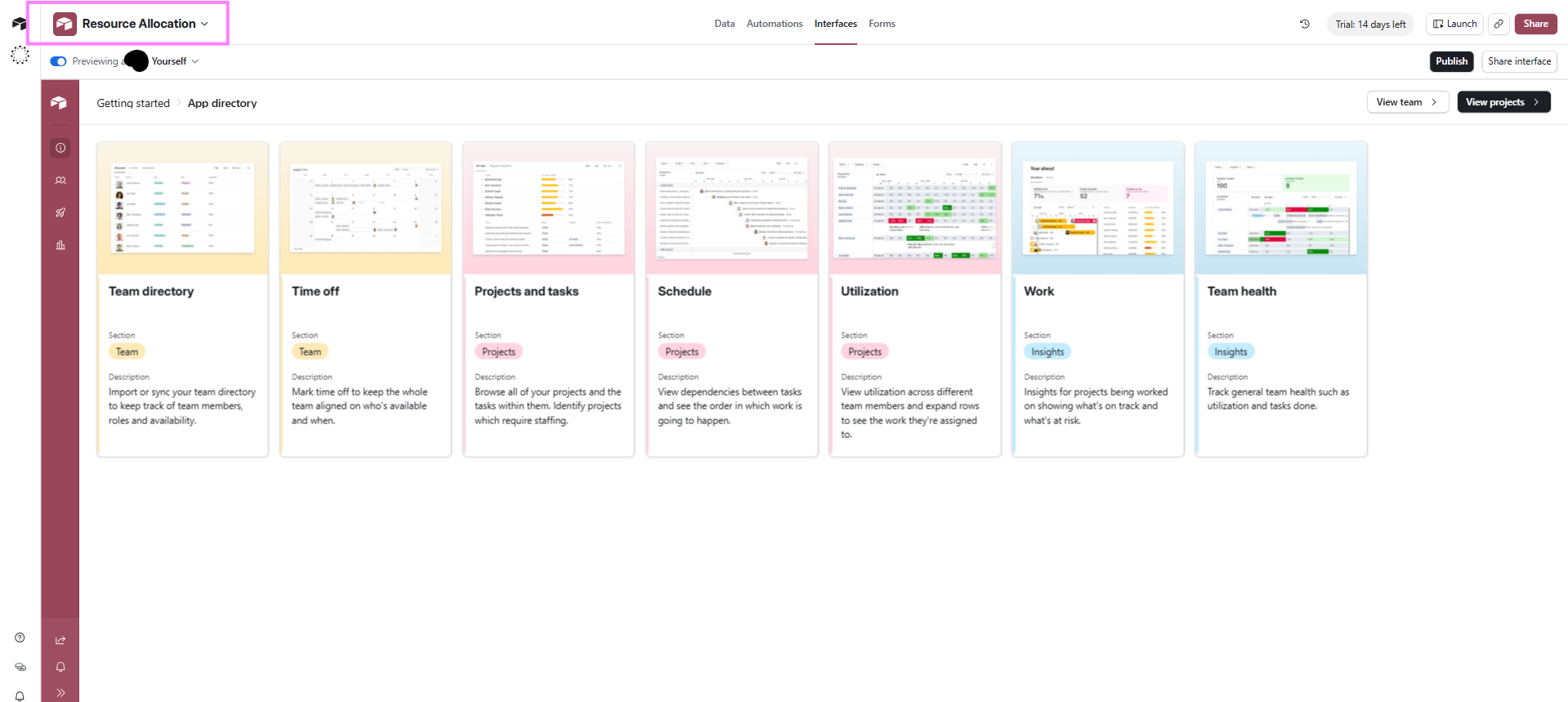
- Resource Allocation ships with a team directory, a time-off calendar, a project planning workspace, and a utilisation view, so the three-table structure from Step 1 arrives pre-linked.
- Project Resource Management leads with workloads instead. Pre-built formulas track capacity in real time, and you assign work from a live list of who's available, with Gantt and grid views alongside.
-
Where Airtable Works Well for Resource Management
Airtable is a strong fit when a team needs a flexible, lightweight way to track people, projects, and assignments without buying a full resource planning suite.
It works best when the main goal is visibility and coordination rather than advanced forecasting or billing-connected scheduling.
In those cases, Airtable can centralise the work and give managers a clear view of who is doing what, when, and for which project. It suits teams that need:
-
-
- Simple capacity tracking across a small or mid-sized team.
- Project-based scheduling where work is assigned in blocks, phases, or campaigns.
- Creative teams that want to manage changing briefs, client work, and approvals in one place.
- Operations teams that need a shared workspace for assignments, handoffs, and deadlines.
- A fast setup using templates, linked records, and timeline views instead of a complex implementation.
-
You can use Airtable if your team already likes working in a database-style tool and wants something more adaptable than spreadsheets.
Where Airtable Falls Short for Resource Management
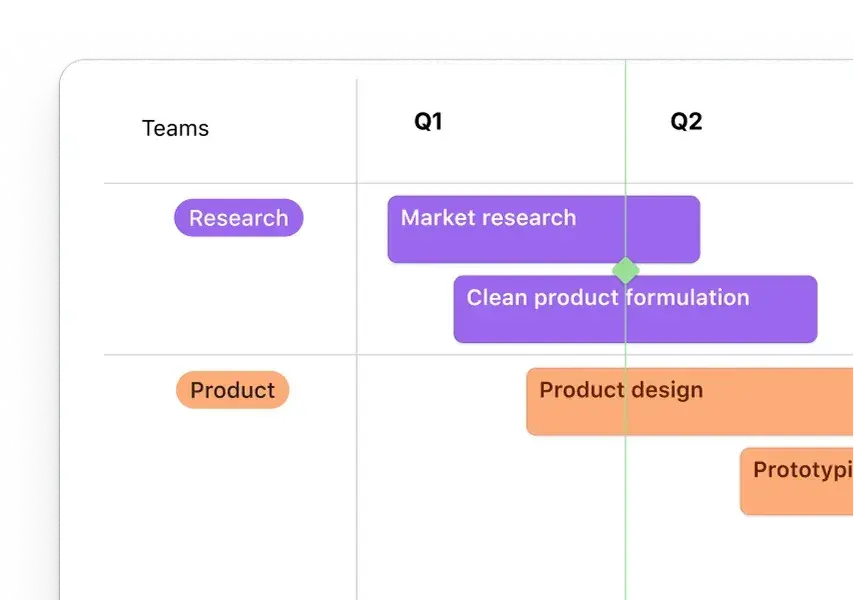
Airtable is flexible, but that becomes a burden once a team starts scaling. The gaps show up in three places:
-
-
- The amount of manual upkeep required
- The limits of what the built-in view can actually calculate
- The fact that it does not behave like a true resource planning system.
-
For small teams, those gaps are manageable. But for growing teams, they start costing time and billable hours.
Manual Upkeep With No Overallocation Alerts
Airtable depends on people keeping data clean, current, and consistent.
That means someone has to update assignments, adjust dates, recalculate capacity assumptions, and keep fields aligned as projects change. If a task moves, a person leaves, or a client changes scope, the base does not intelligently rebalance the work for you.
This creates a hidden admin load. The more projects and people you add, the more often someone has to check whether the records still reflect reality. Over time, this can turn the base into a maintenance task instead of a planning tool.
Key Planning Features are Limited
Airtable can show assignments and basic utilisation, but it does not give you the deeper planning controls that resource managers usually need.
It does not natively handle capacity targets, demand forecasting, skills-based matching, or resourcing scenarios that compare one staffing plan against another.
You need to answer questions like: do we have enough people for next quarter, which consultants should be assigned to which jobs, or what happens if a project slips by two weeks?
Unfortunately, Airtable can store the data, but it does not make those decisions for you. Some of the more advanced visualisation and automation capabilities also sit behind higher plans, which adds cost as the workflow becomes more serious
No Billable Targets, Forecasting, or Billing Connection
Airtable is also not built to connect resourcing directly to revenue, utilisation targets, or billable hours in the way a dedicated resource platform can. You can track hours in a base, but you still have to stitch together the relationship between allocation, delivery, and profitability yourself.
That’s a problem for IT departments, IT consultancies, or professional services teams that need to protect margin. They need to see whether the work is billable, whether the right skills are booked, and whether the schedule supports revenue goals.
When to Move to Purpose-Built Resource Management Software
If your team is spending too much time checking capacity, fixing allocation data, and piecing together who is available next week, the base has become a workaround rather than a planning system.
/Capacity%20Analyzer%20Hub%20Planner.png?width=1540&height=1656&name=Capacity%20Analyzer%20Hub%20Planner.png)
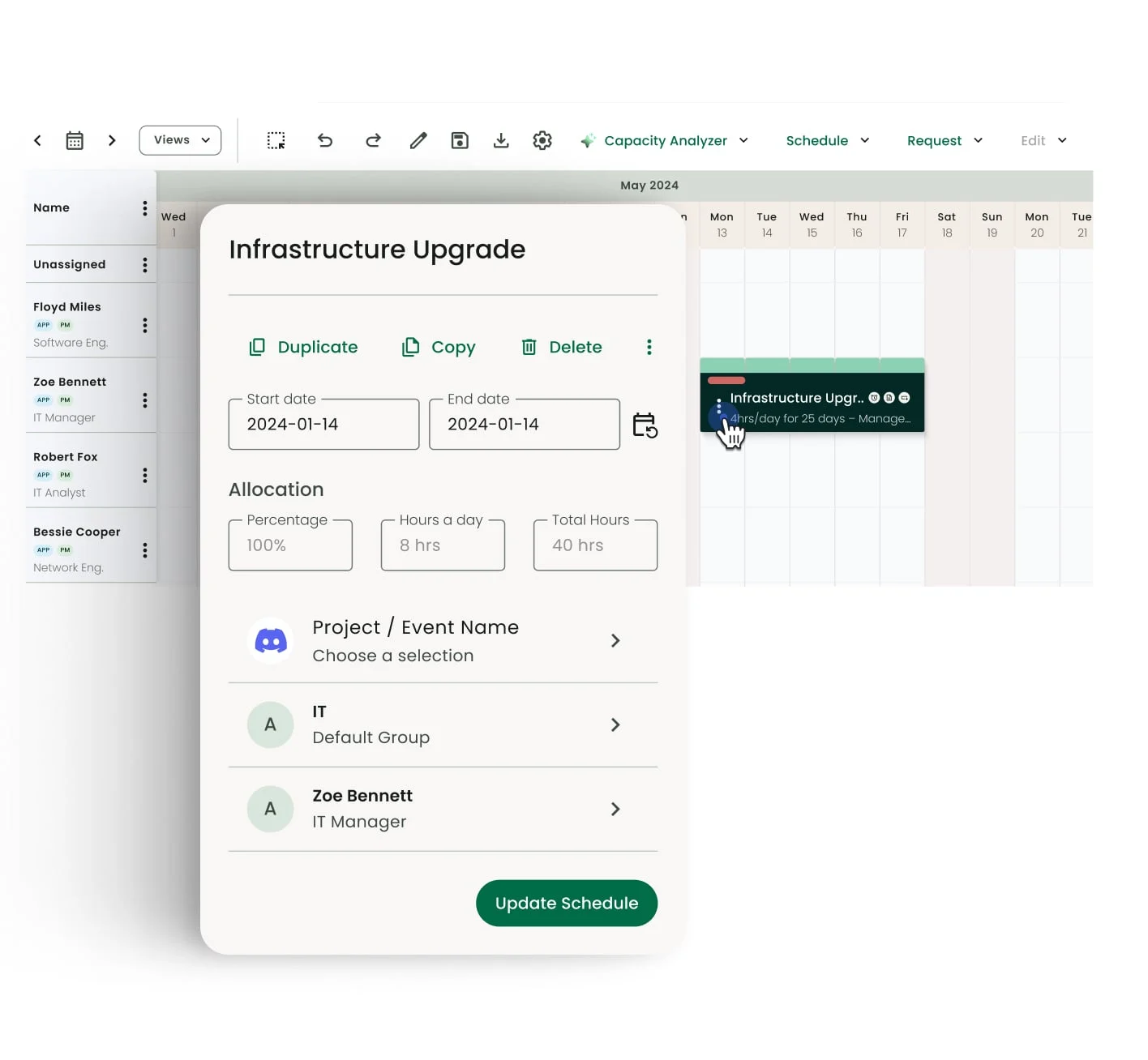
You need a purpose-built option like Milient Resource Flow when capacity decisions need to be fast, accurate, and tied to delivery and profitability. Resource Flow offers:
-
-
- Capacity Finder filters the full team by utilisation percentage, available hours, skills, and location in real time, so the right person surfaces in seconds instead of through cross-referenced tables.
- Heat map reports show utilisation gaps across teams at a glance, making overloads and underused capacity easier to spot before they affect delivery.
- Report builder brings availability, budget, and profitability into one place, so managers can review resourcing without exporting data into another tool.
- Granular permissions keep client schedules private without hiding availability, which is essential for consultancies running client work alongside internal teams.
-
Outgrow the Workaround Before It Costs You Billable Hours
Airtable earns its place for small teams tracking assignments and basic capacity. It stops being effective when resourcing turns billable: no overallocation alerts, no utilisation targets, no link between schedules and revenue.
FAQs
 Andrea Neeve
Marketing Associate
Want more content like this? Follow Milient:
/Hub-Planner_Resource-Request_Hero.png?width=1024&height=1024&name=Hub-Planner_Resource-Request_Hero.png)