
Key takeaways
 Best for: Mid-to-large digital agencies and IT consultancies needing visual capacity planning and "what-if" scenario modeling
 Main limitations: 20-seat minimum raises the cost floor; base reporting often pushes teams back to spreadsheets; task management is shallow
 Who Milient Resource Flow suits better: Mid-sized and large IT consulting and professional services teams needing a more customisable, feature-heavy resource management tool.
 Bottom Line: Runn is a great source of truth for high-level PMs, but Milient provides a more integrated flow for the whole firm.
The moment your team hits a certain size, "winging it" stops working.
Projects overlap, people get double-booked, and nobody has a clear view of what's actually deliverable next month. If you're researching tools to fix that, this Runn review is your shortcut.
Runn excels at tentative project planning but it's not exactly a complete system for every project-based team. Below, we break down its standout features, where it falls short, how the pricing stacks up, and whether Milient's Resource Flow is a better fit for your firm.
Runn vs. Milient: At a Glance
|
Runn |
Milient (Resource Flow) |
|
|
Best For |
IT consultancies and agencies needing capacity visibility |
Mid-sized and large IT consulting and professional services teams needing a more customisable, feature-heavy resource management tool built to scale across global teams. |
|
Standout Feature |
Tentative Projects scenario modeling |
Advanced capacity planning with skills-based matching and configurable reporting across teams and projects |
|
Price |
From $9/resource seat/month (min. 20 seats) |
From $7/resource seat/month.14-day free trial, no credit card needed |
|
Pros |
Clean UI, visual utilization charts, solid forecasting |
End-to-end resource management: scheduling, time tracking, approvals, and reporting in one platform. |
|
Cons |
Minimum seat floor; limited reporting on base plans |
More feature depth than needed for very small teams; advanced features may require setup. |
|
Customer Support |
Standard hours |
24/7 on Premium; dedicated rep on Business Leader |
|
Skills Matching |
Tags only |
Full skills matching with filters (skills, role, availability, seniority) |
|
Free Trial |
30-day |
14-day (Resource Flow) |
Who Is Runn Best For?
Runn works well for teams that need a clear, visual view of workload management without a heavy setup process.
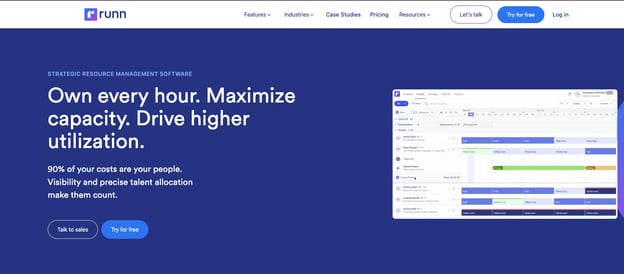
- Digital agencies juggling multiple client projects who need team availability at a glance
- IT consultancies tracking billable utilization across ongoing projects
- Mid-to-large teams (20+ people) that have outgrown spreadsheets and need structured project resource management
Key Features
Rather than manage the entire project lifecycle, Runn focuses more on forecasting and scheduling.
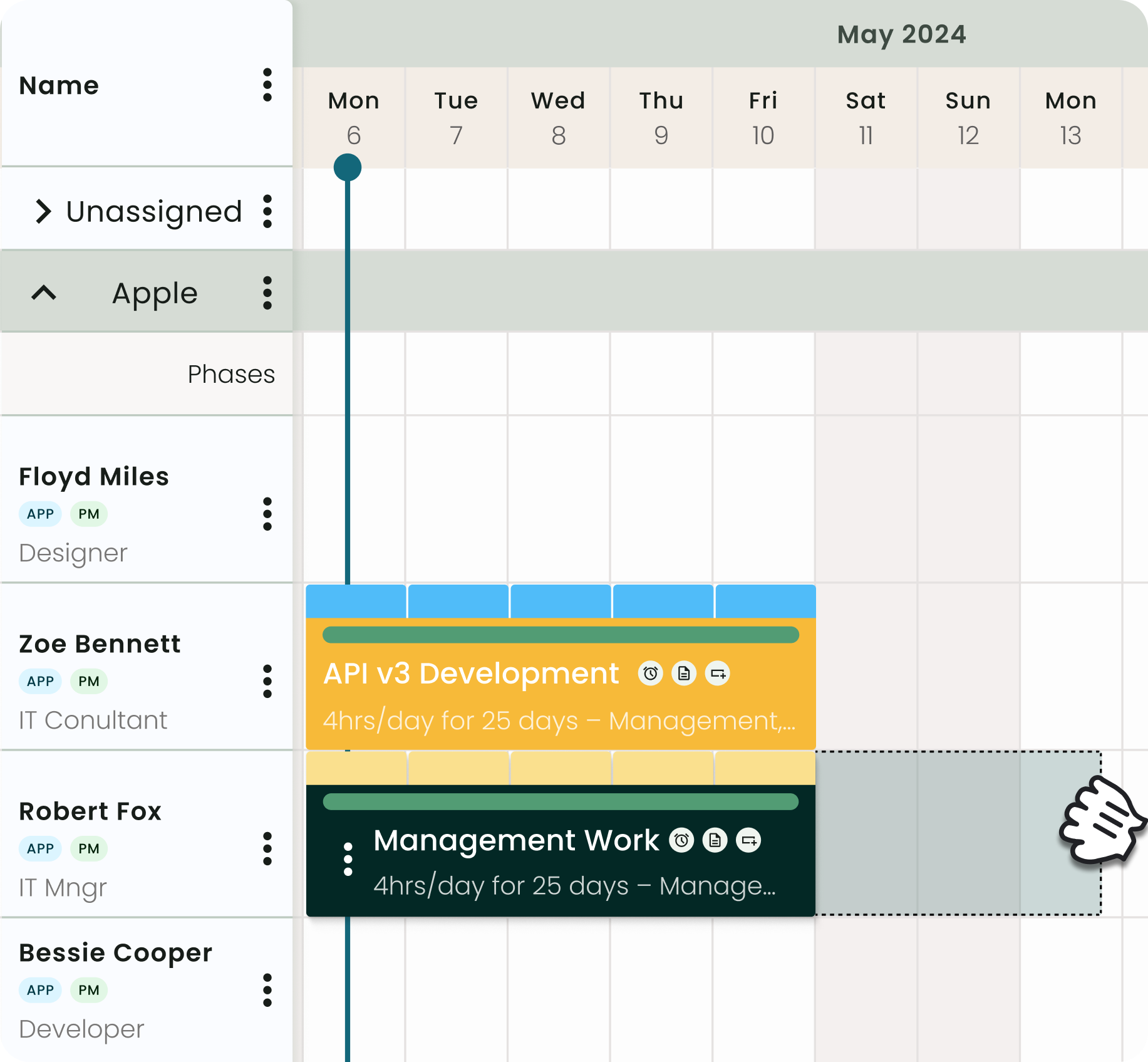
Drag-and-Drop Resource Scheduler
You can assign people to project phases, adjust allocations by dragging and dropping, and see the impact update live.
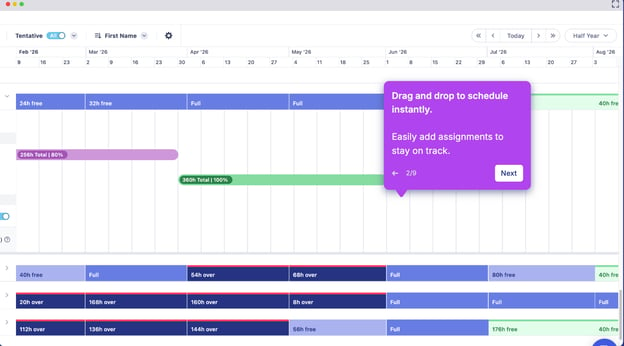
This visual timeline means you see the ripple effect on your team's capacity before you even sign the deal, helping you avoid over-promising to clients.
Tentative Projects (Scenario Modeling)
This is Runn's most distinctive feature. Say you're deciding whether to take on a new client. With Tentative Projects, you model the impact (who gets stretched, which timelines shift) before committing to anything.
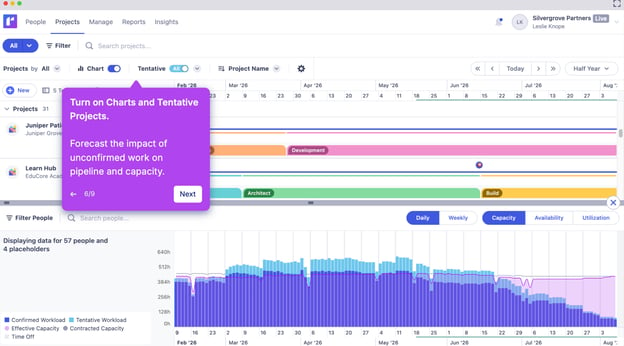
For professional services teams managing a live pipeline, this moves decisions from gut feel to actual capacity data.
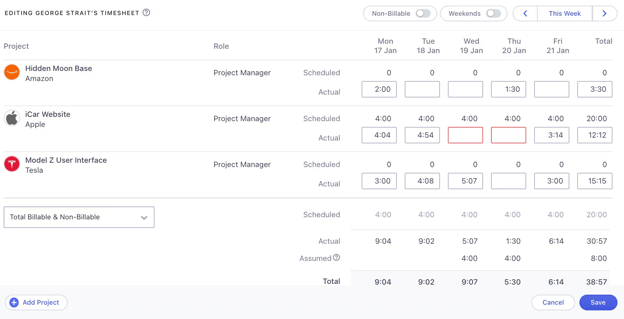
Built-In Timesheets
To reduce admin/busywork, Runn pre-fills timesheets based on what was scheduled. Users just confirm their hours, which helps keep time tracking data from lagging weeks behind.
Utilization and Capacity Charts
Leadership gets a high-level view of utilization across the team, who's under or overloaded, filtered by role or project.
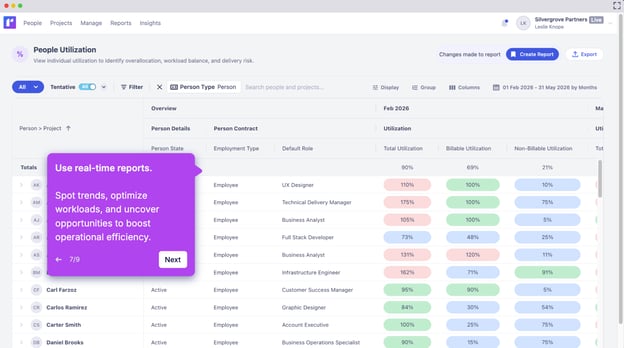
This provides a clear bird's-eye view of workload management across the entire organization.
Runn Positives
- Clean, intuitive UI: Most teams get up and running without formal training. The visual timeline makes resourcing problems visible before they escalate
- Scenario planning : Tentative Projects is genuinely useful for teams managing a mix of confirmed and pipeline work
Runn Negatives
- Minimum seat requirement: All plans start at 20 resource seats. A team of 10 still pays for 20, which matters when evaluating cost and plans
- Base reporting has gaps: Teams with complex analytics needs often export to spreadsheets, the exact behavior most people switch tools to avoid
- Shallow task management: Runn handles high-level scheduling well, but teams needing granular task execution typically run it alongside time tracking tools
Customer Reviews
“This tool was so simple to implement, and it's easy to use to track what projects our resources are working on now and in the future.” – Verified Capterra review
“The biggest area of improvement I see for Runn would be more security profiles. We could benefit from more flexibility than what they provide.” Verified Capterra review
“Certain exports to Excel are difficult, and the current API call limit is frustrating.“ Verified Capterra review
The pattern: Users get up and running fast but the tool starts to feel restrictive once they need more control.
Runn Pricing
Runn's plans start at a minimum of 20 resource seats, priced per resource seat per month.
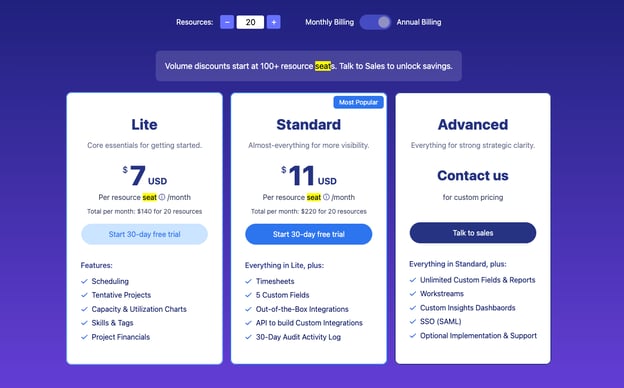
|
Plan |
Monthly Price |
What's Included |
|
Lite |
$9/resource seat/month |
Scheduling, Tentative Projects, Capacity Charts, Skills & Tags, Project Financials |
|
Standard |
$13/resource seat/month |
Everything in Lite + Timesheets, integrations, API, 30-day audit log |
|
Advanced |
Custom |
Everything in Standard + unlimited custom reports, SSO, SmartMatch AI |
Milient: An Alternative
Resource Flow is a dedicated resource management platform built for mid-sized to large IT consulting and professional services teams that need their resource planning to connect directly to project and utilisation data, not sit beside it.
/resource-management-badges-small.png?width=1200&height=675&name=resource-management-badges-small.png)
Key reasons project-driven teams choose Resource Flow:
- Real-time capacity view with full skills matching; find the right person by skills, role, or availability without guesswork
- Built-in timesheets with approval workflows, linked directly to the scheduler
- Vacation time, public holidays, and time off tracked in the same place as project scheduling
- Advanced reporting and dashboards for utilisation, availability, project spend, and profitability
- Granular roles and permissions to control who sees what across teams and projects
Key Features
Runn isn’t built for projects that run in phases, change scope mid-flight, and need to stay profitable from kickoff to invoice. Resource Flow was and here's what sets it apart.
Skills-Based Capacity Finder
The Capacity Finder gives you a real-time view of your team’s availability, filtered by utilisation percentage or available hours across any date range.
The wrong person on a project slows things down and eats into your margins. Resource Flow's skills matching lets you filter by skills, role, and real-time availability before you make the call.
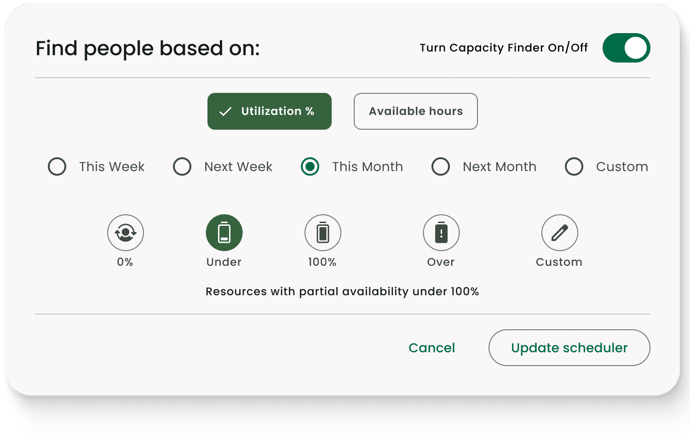
For larger teams, this removes manual searching and enables faster, more accurate resource allocation at scale.
Custom Report Builder
Resource Flow’s reporting engine aggregates data across all teams and projects through an intuitive, fully configurable builder.
Reports are generated in real time and give you visibility into utilisation, availability, project spend, and overall performance, going far beyond the basic reporting available in simpler planning tools.
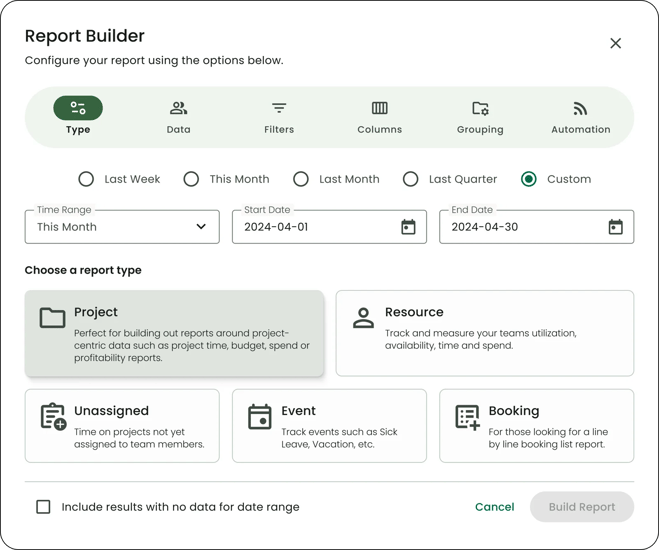
- Fully configurable columns where you can add, reorder, and group data as needed
- Heat maps to highlight utilisation gaps at a glance
- Track budget and profitability across projects and resources
- Export reports to Excel or CSV, or save and share across your team
- Conditional formatting to surface the metrics that matter most
Roles and Permissions
Roles and Permissions let you set up resources under different categories to distinguish levels of access. Each role comes with a default set of permissions out of the box, controlling access to projects, events, resource groups, and unassigned work. Critical for larger organisations where security and data separation across departments matter, permissions can be customised at the role level or adjusted per individual user.
- Default permissions set at the role level, adjustable per individual
- Granular control across projects, events, resource groups, and unassigned work
- Private content masking hides booking details without removing availability visibility
Where Milient Shines
- Built for complex, multi-team environments
Resource Flow is designed for organisations managing multiple projects across teams, departments, or regions. With advanced capacity planning, detailed permissions, and flexible reporting, teams can scale operations while maintaining full visibility. - Strong fit for utilisation-focused businesses
For professional services teams, resource management directly impacts profitability. Resource Flow provides clear insight into utilisation, project spend, and performance, helping teams make more informed, margin-driven decisions. - Granular access control across teams
Role-based permissions ensure each user only sees what’s relevant to them. This is particularly valuable for consultancies balancing client work with internal projects, where data visibility needs to be tightly managed.
Where Milient Falls Short
- May be too advanced for very small teams: For teams with fewer than ten people and simple scheduling needs, the platform’s depth can be more than necessary. Lighter, more visual tools may be a better fit.
- Capacity Finder comes as an add-on: The Capacity Finder is available as a paid extension across all plans, so it’s worth factoring this into overall costs when comparing solutions.
Customer Reviews
“it offers great tools for management of our resources, it allows us me to have know the expertise available a cross the company so that i can filter the resources according to the needs we have during planning and resource management increases our budget awareness and provides us with safety net since it allows to compare the estimate with the actual resource use” – Verified Capterra review
"Milient Resource Flow has significantly improved our resource management, but the major advantage for our business is the ability to report on resource utilisation in relation to project budgets." — Andy T., Communication Services Delivery Director, Mid-Market — Verified G2 Review
The recurring theme is confidence: Milient’s users do less guesswork during planning, see fewer surprises on the budget side, and get a system straightforward enough that the whole team can use.
Who Milient Resource Flow Is Best For
- IT consultancies and professional services teams: Mid-sized to large organisations managing complex project portfolios across multiple teams, departments, or locations
- Resource and operations managers: Teams that need clear visibility into utilisation, project spend, and performance across a growing organisation
- Businesses with structured access requirements: Where different roles, from team leads to senior leadership, require controlled access to scheduling, resource, and financial data
Pricing
|
Plan |
Price/month |
|
Plug & Play |
$7 |
|
Premium |
$18 |
|
Business Leader |
$54 |
Try Resource Flow free for 14 days
Runn Review: What's Our Verdict?
Runn earns its place for forecasting. If your main need is seeing who's available and modeling pipeline impact, it does that well.
But most project-based teams need more than a scheduling layer. They need time tracking, approvals, and reporting connected to the same data. That's where Milient's Resource Flow pulls ahead.
For architecture, engineering, and consulting firms that need resource scheduling, skills matching, time tracking, and project financials to work as one, Milient's Resource Flow is a closer fit.
Take Control of Your Resources with Milient
There's a version of Runn that works beautifully and it's the one you see in the first month. Fast to implement, easy to navigate, a genuine step up from spreadsheets. The friction comes later: limited security profiles, export headaches, API constraints that slow down teams trying to connect Runn to the rest of their stack.
For firms that need resource management to scale with them, Milient's Resource Flow is the more complete answer. Built for project-based teams, it connects scheduling, time tracking, capacity, and utilization in one place, from day one.
FAQs
 Andrea Neeve
Marketing Associate
Want more content like this? Follow Milient:

/hubplanner_resource.png?width=1024&height=1024&name=hubplanner_resource.png)