Key takeaways
 Project performance measures how successfully a project is progressing against objectives such as time, budget, resources, quality and profitability.
 Project performance management involves continuously tracking these areas to identify delays, overspending, capacity issues and margin erosion before they become bigger problems.
 Performing in project management requires visibility into KPIs such as fee/budget burn, actual vs planned hours, schedule variance, resource utilisation and project margin.
 Project management software can centralise this data, helping teams monitor performance and make faster, evidence-based decisions.
Want to find out more about managing project performance, and knowing whether a project is truly on track? Project performance measures success against key objectives such as time, budget, resources and profitability. This guide covers the metrics, tools and strategies needed to monitor and improve it.
What Is Project Performance Management?
/Centralised-data_Project2.png?width=1058&height=1072&name=Centralised-data_Project2.png)
Project performance management is the process of measuring, monitoring, and improving how effectively a project is progressing towards its objectives. It gives project managers and stakeholders a clearer view of whether work is on schedule, within budget, appropriately resourced, and delivering the expected outcomes.
Rather than looking at one metric in isolation, project performance management typically considers several areas, including:
- Time: Whether milestones and deadlines are being met.
- Budget: How actual costs compare with planned expenditure.
- Resources: Whether people and capacity are being used effectively.
- Quality: Whether deliverables meet agreed standards and requirements.
- Profitability: Whether projects are delivering the expected financial return.
Using a project management software can help bring this information together, making project performance easier to monitor throughout the project lifecycle.
Why Project Performance Management Matters
Even well-planned projects can move off track. Deadlines change, costs increase, resources become stretched, and project scope can evolve. Project performance management helps teams identify these issues early rather than discovering them once they have already affected delivery or profitability.
Effective performance management can help organisations:
- Improve project outcomes: Regular monitoring helps teams identify risks and take corrective action sooner.
- Increase efficiency: Visibility into time, budgets and resources can highlight where processes or capacity need adjusting.
- Protect project profitability: Tracking actual performance against forecasts can help prevent unexpected cost overruns and margin erosion.
- Improve stakeholder satisfaction: Reliable performance data makes it easier to communicate progress and manage expectations.
- Make better future decisions: Historical project data can inform more accurate budgets, schedules and resource plans.
Without consistent performance monitoring, problems such as overspending, missed deadlines and resource bottlenecks can remain hidden until they become more difficult and costly to resolve.
Key Metrics & KPIs to Track
For architecture and engineering firms, project performance is closely tied to time, fees, resources and profitability. Tracking the right KPIs helps project managers see whether each project phase is progressing as planned while identifying budget pressure, resource constraints and scope changes early.
Schedule Performance
Architecture and engineering projects often move through defined phases, from concept and detailed design to documentation and delivery. Tracking milestones alongside schedule variance helps project managers identify when drawings, calculations, reviews or other deliverables are falling behind programme.
Schedule Variance (SV) = Earned Value (EV) − Planned Value (PV)
A negative schedule variance indicates that completed work is behind what was planned, giving the project manager an opportunity to adjust resources or timelines before delays affect later phases.
Fee and Budget Performance
For A&E firms, staying within the agreed fee can be just as important as meeting the project schedule. Comparing fee burn, planned hours and actual hours shows whether the team is consuming the project budget faster than expected.
Fee Burn = Fee or Budget Used ÷ Total Project Fee or Budget × 100
For example, if a project has consumed 75% of its fee budget but is only 55% complete, the project manager can investigate which phases or disciplines are exceeding their estimates before the remaining margin is eroded.
For projects using earned value management, teams can also monitor:
Cost Performance Index (CPI) = Earned Value (EV) ÷ Actual Cost (AC)
A CPI below 1.0 indicates that the project is costing more than the value of the work completed.
Resource Utilisation
Architecture and engineering projects rely on the availability of people with specific skills, from architects and structural engineers to technicians and project managers. Resource utilisation helps firms understand how effectively that capacity is being used.
Resource Utilisation = Productive or Billable Hours ÷ Available Hours × 100
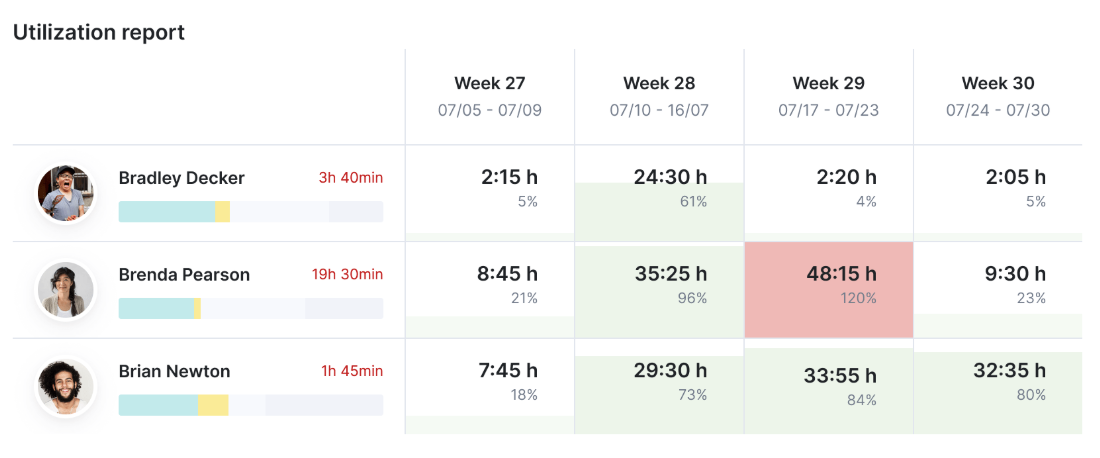
Tracking planned versus actual utilisation can also reveal when an individual, discipline or project team is becoming overloaded, helping managers redistribute work and plan future project demand more effectively.
Scope and Quality
Client revisions, additional design requirements and changes to specifications can quickly increase the amount of work required on an A&E project. Tracking scope changes, rework hours, change requests and quality issues helps teams understand where unplanned work is affecting schedules and budgets.
Where additional work falls outside the agreed scope, recording it early also makes it easier to assess the impact on project fees, resources and delivery dates.
Project Profitability
A project can meet its deadline and still underperform financially. Architecture and engineering firms should therefore monitor project margin, labour costs, billable hours and actual versus forecast profitability throughout delivery.
Project Margin = (Project Revenue − Project Costs) ÷ Project Revenue × 100
Monitoring margin as the project progresses can reveal whether extra hours, scope changes or resource costs are reducing the expected return, allowing teams to take corrective action before project close.
Tools and Software Project Performance Management
1. Milient Project Flow
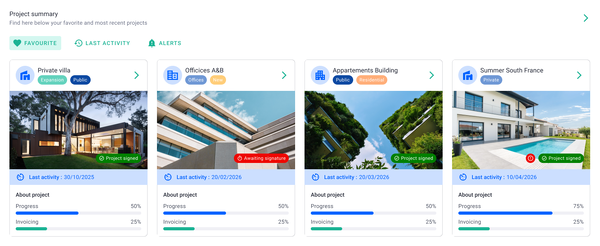
Milient Project Flow is a project management software built for architecture, engineering and consulting firms that need to connect project delivery with financial performance. It brings project planning, time and budget tracking, resource allocation, invoicing and reporting into one platform, providing live visibility into how projects are progressing and performing financially.
For project performance management, particularly useful features include:
- Real-time time and budget tracking: Compare current, expected and budgeted hours to identify potential overruns before they affect project profitability.
- Project progress dashboards: Monitor project status, fees, budget consumed and invoiced percentage across individual projects or the wider portfolio.
- Resource allocation: Assign people by project role and hourly rate while monitoring billable and non-billable allocation.
- Phase-level planning: Use Gantt scheduling to plan and monitor phases such as concept, coordination and technical design across multiple projects.
- Financial visibility: Track project fees and invoicing alongside delivery data, helping project managers and firm leaders understand performance without relying on separate spreadsheets
Find out more about Project Flow’s features here
Pros
- Designed specifically around the needs of AEC and professional services firms.
- Combines project and financial performance data in one system.
- Provides live visibility into budgets, hours, fees and project progress.
- Supports phase-based planning and invoicing.
- Intuitive interface, with verified users highlighting its ease of use.
Cons
- Timesheet submission and approval status could be clearer.
- Logged project hours currently lack a calendar-style view.
- Some administrative workflows, including certain invoicing functions, have room for improvement.
Best for: Growing and mid-sized architecture, engineering and consulting firms that have outgrown basic project management tools or spreadsheet-based processes and want greater control over project performance and profitability.
Project performance advantage: Milient Project Flow connects operational metrics such as project progress, hours and resource allocation with financial information such as fees, budgets and invoicing. This makes it easier to spot projects consuming too much time or budget and take action before margins are significantly affected.
2. Deltek Ajera
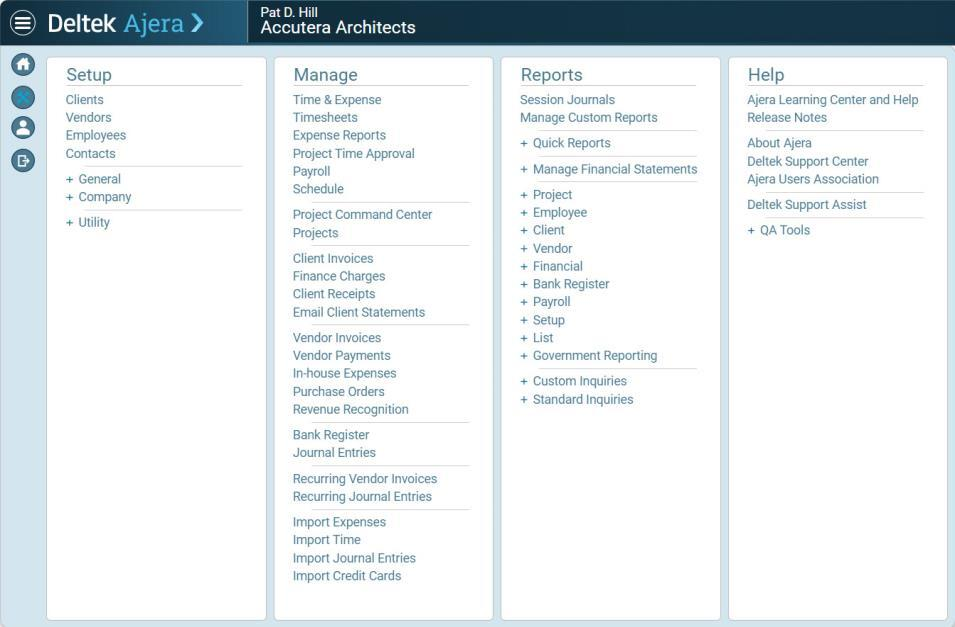
Deltek Ajera combines project management and project-based accounting in a platform designed specifically for small architecture and engineering firms. By connecting project delivery with financial information, Ajera can help firms monitor project progress, understand financial performance and make more informed decisions throughout the project lifecycle.
For project performance management, particularly useful features include:
- Project and financial management: Project management and accounting data are connected, helping teams understand project delivery alongside financial performance.
- Time and expense tracking: Timesheets and expense information help firms capture the labour and costs associated with individual projects.
- Dashboards and reporting: Dashboards and custom widgets can surface project and financial information, giving managers greater visibility into performance.
- Invoicing and accounting: Built-in project accounting and invoicing help firms manage billing alongside the work being delivered.
- AI and automation: Ajera's Dela AI assistant can surface project, client and financial information, while automation supports processes such as timesheets, expenses and invoice approvals.
Pros
- Purpose-built for small architecture and engineering firms.
- Combines project management and project accounting in one platform.
- Provides visibility into project and financial information through dashboards and widgets.
- Includes automation and AI capabilities designed to reduce repetitive administrative work.
- Some reviewers describe Ajera as user-friendly and easy to learn, while others highlight its adaptability and customer support.
Cons
- Reporting flexibility can be limited for teams that need highly specific or customised reports, according to some reviewers.
- While some users find Ajera easy to learn, others report that becoming comfortable with the wider platform can take time.
- Some users identify particular workflows, including invoice review and timesheet administration, as areas that could be improved.
- Recent changes to support and newer functionality such as Dela have caused confusion for at least some existing users.
Best for: Small architecture and engineering firms that want project management and project accounting in the same system, with visibility into project delivery, time, billing and financial performance.
Project performance advantage: Ajera connects project management with accounting data, allowing A&E firms to evaluate project progress alongside financial performance. Dashboards, time and expense data, invoicing and financial information can help managers identify performance issues and make decisions based on both project delivery and commercial outcomes.
3. Scoro
Scoro is an all-in-one work management platform that combines project management, resource planning, time tracking, budgeting, invoicing and reporting. For project performance management, its strength lies in connecting project delivery with financial data, helping professional services teams monitor how time, costs and resources affect project profitability.
For project performance management, particularly useful features include:
- Project planning and tracking: Gantt charts, project phases and task management help teams structure delivery, monitor timelines and keep track of work as projects progress.
- Resource planning: Visual bookings show who is working on each project and for how long, while utilisation data can help identify overbooking and capacity issues.
- Time tracking: Structured and autofilled timesheets allow teams to compare time spent on projects against scheduled work and project budgets.
- Quoted vs actuals: Teams can compare quoted hours and costs with actual performance, making it easier to identify where projects are consuming more time or budget than anticipated.
- Financial management: Budget, billing, invoicing and purchase order information can be tracked alongside project delivery to provide greater visibility into costs and margins.
Pros
- Brings project, resource and financial information into one system.
- Strong visibility into quoted versus actual time and costs.
- Flexible reporting and dashboards for monitoring business and project performance.
- Resource planning and utilisation data are connected with project delivery.
- Reviewers particularly highlight its reporting, dashboards, budgeting and project tracking capabilities.
Cons
- The breadth of features and configuration options can make the platform feel complex or overwhelming, particularly for new users.
- Some reviewers identify project management and aspects of the interface as areas that could be improved.
- Teams that only need straightforward project tracking may find the wider CRM, quoting, budgeting and financial functionality more than they require.
Best for: Professional services firms and agencies that want to connect project management, resource planning and financial performance within one comprehensive work management platform.
Project performance advantage: Scoro's quoted vs actual functionality is particularly relevant to project performance management. Teams can compare the original budget with hours and costs as they are consumed, helping identify overruns while there is still time to adjust delivery, resources or client expectations.
How to Improve Project Performance
Improving project performance starts with having clear goals and enough visibility to identify problems before they affect deadlines, budgets or profitability. Rather than waiting until project completion, teams should continuously monitor performance and adjust plans when necessary.
- Set clear performance targets: Establish realistic budgets, timelines, resource requirements and profitability targets from the outset.
- Track performance regularly: Monitor actual versus planned hours, budget consumption, milestones and margins throughout delivery.
- Use repeatable project processes: Project templates can standardise workflows, reduce setup time and help teams apply lessons from previous projects.
- Act on problems early: Investigate budget overruns, delays or resource bottlenecks as soon as performance begins to deviate from the plan.
- Centralise project data: Tools such as Milient can bring time, budget, resource and project data together, reducing manual reporting and giving teams analytics-based insights to support faster decisions.
Case Studies & Examples
Case Study 1: Using Project Data to Protect Margins
One AEC consultancy uses Milient to improve visibility across project performance and commercial data. Bringing these insights together helps the firm better understand where margins may be under pressure, make more informed pricing decisions and use previous project performance to support future bids.
Case Study 2: Improving Visibility Into Fees and Capacity
/employees_dashboard.png?width=1200&height=645&name=employees_dashboard.png)
A growing architecture practice adopted Milient to replace disconnected spreadsheets and improve project visibility. Real-time timesheet, fee and capacity data now helps the team identify when projects are consuming budget too quickly, understand workloads and make more informed decisions about resourcing and future hiring.
Case Study 3: Using Time Data to Improve Project Profitability
/Expense%20report.png?width=898&height=506&name=Expense%20report.png)
A small architecture practice adopted Milient to gain clearer visibility into project time, fees and invoicing. By comparing timesheet data with project income, the team identified less profitable project types, improved fee discussions and made more informed decisions about which work to take on.
Try Milient: Track Metrics, Improve KPIs, and Deliver On Time
/planning_team.png?width=1578&height=1122&name=planning_team.png)
Effective project performance management comes down to having the right information at the right time. Milient Project Flow brings project progress, time, budgets, resources and financial data together, helping architecture, engineering and consulting firms identify issues earlier and make more informed decisions.
Ready to improve visibility across your projects?
Start a free trial of Milient Project Flow or book a demo to see how it could fit your workflows.
FAQs
 Andrea Neeve
Marketing Associate
Want more content like this? Follow Milient: