
Microsoft Project is a project management platform that helps project managers develop schedules, assign resources, track progress, and manage budgets.
However, Microsoft Project pricing can be a bit confusing. There are two separate purchasing tracks, multiple tiers, and add-ons that are easy to miss until you're already committed.
So, this article covers every current pricing plan, where Microsoft Project earns its cost, where it falls short, and how Milient Project Flow is a more cost-effective fit for project-based AEC teams that need everything in one place.
How Much Does Microsoft Project Cost?
Microsoft Project pricing splits into two tracks: subscription-based plans sold under the Planner brand, and perpetual licences sold under the Project 2024 brand.
Milient Project Flow: A Simpler Alternative for AEC Firms That Need One Platform for All Project Needs
/project_dashboard.png?width=1200&height=645&name=project_dashboard.png)
Milient Project Flow is an alternative project management software built specifically for architects, engineers, and consultancy firms.
With more advanced features compared to Microsoft Project, the Grow/Professional plans start at only £20/user/month, and include:
- Project planning with timelines, milestones, and phases
- Time tracking for projects built into the same system
- Efficient invoicing and offer builder connected directly to project data
- Reports and analytics covering project profitability, health, and team performance
 Explore Milient Project Flow pricing and see how the features compare to Microsoft Project.
Microsoft Project Pricing Plans Explained
Let’s break down the actual pricing for each subscription and licence below:
Microsoft Planner (In Microsoft 365)
.png?width=1278&height=543&name=Microsoft%20Planner%20(In%20Microsoft%20365).png)
The base Planner experience is included in any active Microsoft 365 subscription. It covers task creation and assignment, board and grid views, basic templates, and real-time collaboration inside Microsoft Teams.
It is suitable for simple task tracking across a team, but does not include Gantt/Timeline views, dependencies, sprint management, or portfolio tracking. Teams with structured project delivery needs will hit limits quickly.
Planner Plan 1
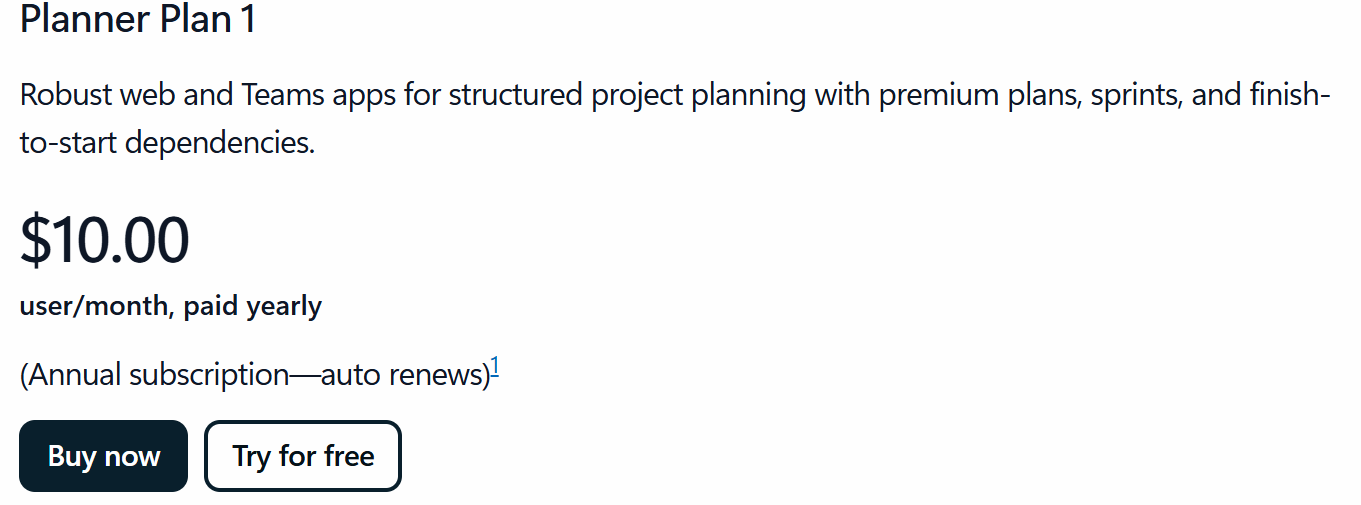
Planner Plan 1 has the features most project managers consider standard: Timeline (Gantt) view, task dependencies, sprint and backlog management, milestones, project goals, and portfolio viewing (read-only). Custom task fields and People view for workload management are also included.
This plan suits small teams managing structured projects that need more than basic task lists. However, it does not include portfolio creation, baselines, critical path, or the Project desktop application.
Planner and Project Plan 3
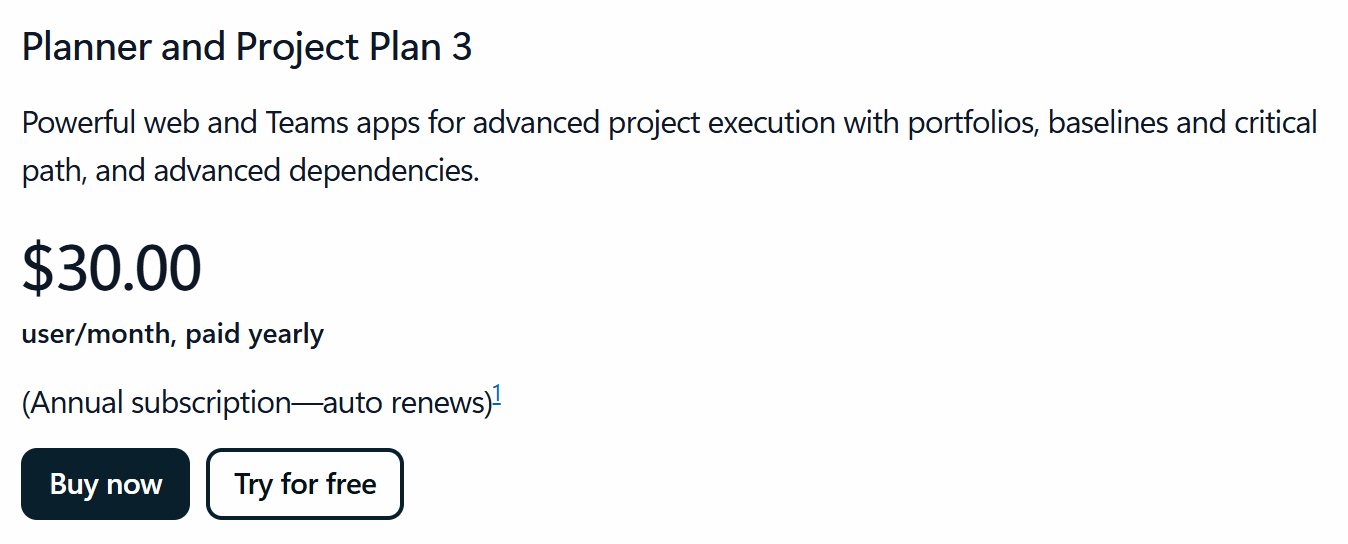
Plan 3 is where full project management capability begins.
The plan includes everything in Plan 1, plus portfolio creation, baselines, critical path, advanced dependencies with lead and lag, and an assignments view for resource tracking. You also get access to the Project desktop application and Project Online (until September 2026 when Project Online is retired).
This is the tier most teams evaluating "Microsoft Project" are actually considering, but the jump from Plan 1 to Plan 3 is $20/user/month, which adds up fast for teams of 10 or more.

Project Standard 2024 is a desktop application purchased once per user, per PC.
It includes Gantt charts, task scheduling, dependencies, resource levelling, baselines, milestones, calendar views, and pre-built reports. It does not include generic resource management, timesheets, or connectivity to Project Server.
While the licence does not expire, it is tied to one PC and does not receive new feature updates over time.
Project Professional 2024
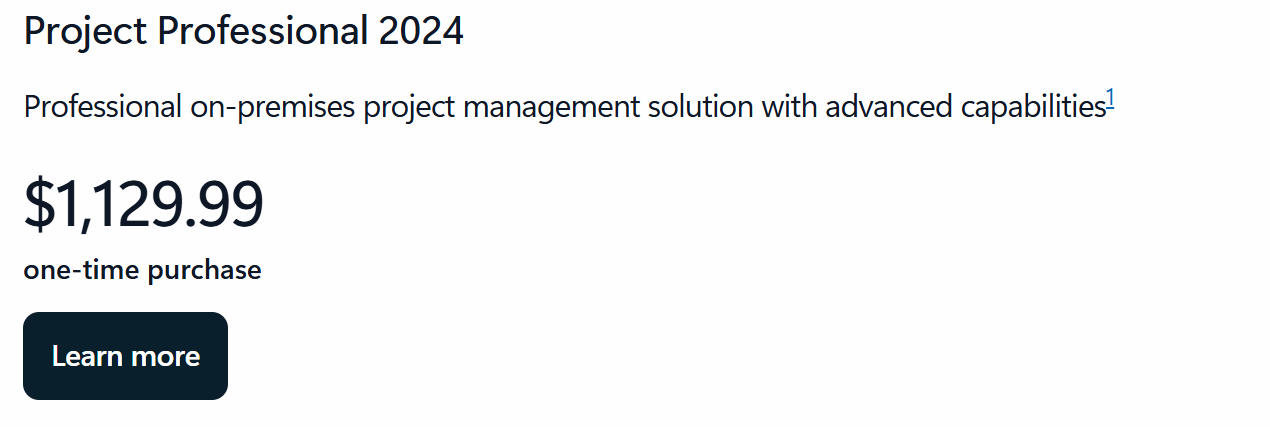
Project Professional 2024 adds everything Standard lacks at the resource level: timesheets for time and payroll tracking, generic and non-generic resource management, Team Planner for capacity visibility, and the ability to connect to Project Server Subscription Edition.
It is the desktop option for teams that need advanced resource management alongside project scheduling, without a cloud subscription.
However, it still requires Project Server separately for any multi-user or enterprise portfolio use.
Project Server Subscription Edition
Project Server is the on-premises enterprise option for organisations that need portfolio management, demand and resource management, cost performance tracking, issue and risk management, and business intelligence reporting within their own infrastructure.
It is built on SharePoint Server Subscription Edition, which must be installed separately, and you must engage a Microsoft partner to quote and deploy it.
Microsoft Project Hidden Costs
The licence or subscription is only part of the total Microsoft Project cost. Here is what most buyers discover after signing up:
-
-
- Microsoft 365 is not included. The Planner subscription plans do not bundle Microsoft 365. If your team also needs Word, Excel, Teams, and SharePoint, that’s a separate subscription. Microsoft 365 Business Basic starts at $6/user/month, with fuller plans costing more
- Power BI is also not included anywhere. Plan 3 does not include advanced reporting or business intelligence dashboards. Teams that need portfolio-level reporting beyond Planner's built-in charts typically require Power BI Pro, which costs $14/user/month, separately
- Project Server requires a SharePoint licence. Project Server Subscription Edition cannot be installed without the SharePoint Server Subscription Edition already in place. That is a separate infrastructure cost
- Perpetual licences are per PC. Project Standard and Professional 2024 are each licensed for one user on one PC. Any additional machine requires an additional purchase
- Onboarding and governance take significant time. Microsoft Project requires substantial initial configuration. For teams without a dedicated project management office, that setup time has a real cost in staff hours or external consultancy
- Copilot AI is a paid add-on. AI-assisted planning in Planner requires a Microsoft 365 Copilot licence at $18/user/month on top of your Planner subscription.
-
Microsoft Project Pros & Cons
Microsoft Project is suitable for most project-based teams, although the trade-off is complexity and cost. Both show up fast once you move beyond basic project tracking.
Pros
-
-
- Scheduling depth: Gantt charts, critical path, baselines, lead and lag dependencies, and automated task logic give project managers fine-grained control over complex delivery plans
- Microsoft 365 integration: Plan 3 and the desktop clients connect natively with Teams, Excel, SharePoint, and Outlook, useful for teams already standardised on Microsoft
- Portfolio management: Plan 3 and Project Server both support multi-project portfolio tracking, which matters for PMOs managing several concurrent programmes
- Perpetual licence option: For teams that prefer a fixed, one-time cost over recurring subscription spend, Project Standard and Professional 2024 offer that flexibility
- Template library and structured planning: Pre-built project templates and standardised planning workflows help teams establish consistency across projects
-
Cons
-
-
- Steep learning curve: The platform has significant configuration overhead. Governance structures, custom fields, and project modelling must be set up before the tool delivers value, which takes time and often requires dedicated admin support
- Fragmented cost structure: Getting a complete project management setup requires assembling and paying for multiple Microsoft products separately
- Limited out-of-the-box reporting: Meaningful cross-project analytics typically require Power BI, which is not included in any Planner subscription tier
- Not built for professional services workflows: Microsoft Project is a general-purpose scheduling tool. It does not include invoicing, offer management, profitability tracking, or quality assurance, features that AEC and professional services teams need alongside project delivery
- Perpetual licences are static: Project Standard and Professional 2024 are fixed at their feature set at the time of purchase. They do not receive new features through updates over time
-
Need dedicated software?
See our take on the best architecture software, architecture firm management software, plus time tracking software for architects.
Who Is Microsoft Project Best For (And Who It's Not)?
According to 6sense, Microsoft Project has a market share of 1.29% in the project collaboration category and is trusted by 44,572 companies.
The teams that get value from it run large, multi-phase projects where precise scheduling, dependency mapping, and portfolio-level oversight are daily requirements. Some include:
Enterprise PMOs and Corporate Teams
Microsoft Project is well-suited to organisations running formal programme management offices across multiple departments, with dedicated project management administrators who can handle the configuration overhead. Plan 3 and Project Server are built for this context.
For IT departments already operating inside a large Microsoft 365 environment, the integration benefits compound.
Professional Project Managers in Construction, Engineering, and Defence
These are industries where Work Breakdown Structures, critical path modelling, and exact resource allocation are non-negotiable. Microsoft Project's scheduling engine handles mathematical precision at a level that lighter tools cannot.
That said, these teams often also need time tracking, project financials, and invoicing, which Microsoft Project does not cover natively. So, they also pay for additional tools.
If you’re evaluating it for end-to-end project delivery, account for the full stack before committing.
Microsoft 365-Standardised Organisations
If your organisation has already standardised on Microsoft 365, Teams, and SharePoint, Plan 3's integration into that environment reduces friction. Teams, Outlook, and Loop connectivity mean project tasks surface where people already work.
Who Should Look Elsewhere
Agile teams, startups, and small to medium businesses with simpler workflows will find Microsoft Project over-engineered and expensive for their needs.
Microsoft's own lighter tools (Planner Plan 1 or Microsoft Lists) cover those use cases at a fraction of the cost.
Professional services firms that need project management connected to time tracking, resource planning, and invoicing in one system are better served by a purpose-built alternative like Milient Project Flow.
Microsoft Project Customer Reviews
Here is what users say about the experience across independent review platforms.
Positives
The scheduling engine is the most consistently praised feature. Users running multi-phase projects with clear dependency structures get real value from the automation and critical path tracking.
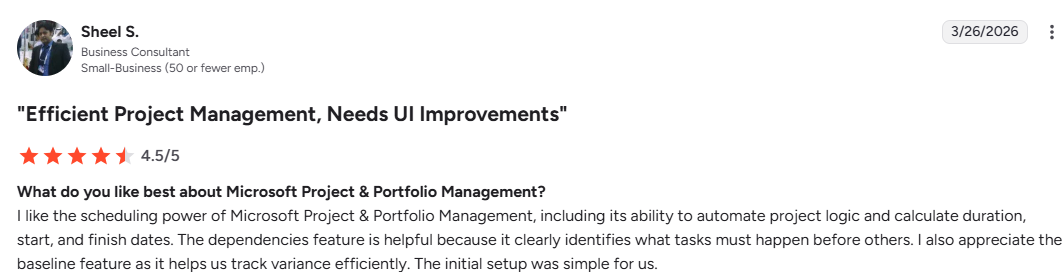
On G2, Sheel S, says:
"I like the scheduling power of Microsoft Project & Portfolio Management, including its ability to automate project logic and calculate duration, start, and finish dates."
Complaints
Complexity and cost are the two recurring themes in critical reviews. Teams without a dedicated admin to configure and maintain the platform, and without the budget to cover the full Microsoft stack, frequently find the Microsoft Project cost hard to justify.
Antonio H says:
“Its interface is complex as it has a lot of options, which implies an important initial task of governance and project modeling. I understand that its price is not accessible for everyone.”

Alternative to Microsoft Project: Milient Project Flow
/planning_team.png?width=1578&height=1122&name=planning_team.png)
Milient Project Flow is not a general-purpose scheduling tool that can be configured to fit professional services. Unlike Microsoft Project, it is designed around how AEC firms run projects: from offer to invoice, with every phase tracked in one system.
Project Management
/Centralised-data_Project2.png?width=1058&height=1072&name=Centralised-data_Project2.png)
Project Flow gives firms structured project plans with phases, milestones, timelines, and budget tracking running in parallel.
Project managers see actual versus planned spend in real time without exporting to a separate tool, and quality assurance checklists and non-conformity management are built into the same system, connected directly to the project.
Financial Planning
/finances_dashboard.png?width=1200&height=645&name=finances_dashboard.png)
With Project Flow, you can convert offers to projects with a single click.
Registered hours feed directly into invoices and project financials, so budgets, costs, and margins are visible at the project and portfolio level without leaving the platform.
Resource Planning
/schedule.png?width=1200&height=645&name=schedule.png)
Project Flow also gives team leaders a live view of capacity across the practice: who is available, what skills they have, and where gaps exist. You assign resources directly from the project plan.
Milient Project Flow Pricing
Is Microsoft Project Worth the Cost?
Microsoft Project is worth the cost for enterprise PMOs with a dedicated admin resource and a full Microsoft 365 stack already in place.
But for AEC and professional services teams, a purpose-built alternative is actually cheaper and easier to set up.
Milient Project Flow starts at £20/user/month and includes the project management, resource planning, time tracking, and invoicing you would otherwise pay for separately with Microsoft Project.
FAQs
 Andrea Neeve
Marketing Associate
Want more content like this? Follow Milient:

/hubplanner_resource.png?width=1024&height=1024&name=hubplanner_resource.png)