Key takeaways
 Project time tracking helps teams monitor working hours, budgets and productivity. By recording time against specific projects and tasks, businesses can improve billing accuracy, identify inefficiencies and make better project decisions.
 The right project time tracking tools depend on your team's needs. Toggl Track and Clockify suit straightforward time tracking, Harvest combines time tracking with invoicing, while Milient Project Flow connects time tracking with project management and financial reporting for AEC firms .
 Effective time tracking requires consistent habits. Clear project structures, regular time entries and accurate reporting help teams reduce missed hours and improve project visibility.
 Tracking the right metrics improves profitability. Monitoring billable hours, resource utilisation and budgeted versus actual hours helps project managers identify overruns and plan future projects more accurately.
Struggling to understand where your team's project hours are going or why projects keep exceeding their budgets?
Project time tracking is the process of recording and monitoring time spent on specific projects, tasks and phases. It helps businesses manage workloads, improve billing accuracy and keep project costs under control.
With the right project management time tracking approach, teams can move beyond basic timesheets and gain clearer insights into project performance.
This guide explores the benefits of time tracking, compares popular project time tracking tools and explains how to implement an effective system to improve productivity and profitability.
Best Project Time Tracking Tools Compared: Features, Pricing, and Fit
Choosing the right project time tracking software depends on your team's size, budget and project management needs. Some tools focus on simple timesheets, while others connect time tracking with project budgets, resource planning and invoicing.
Here's how four popular options compare:
1. Milient Project Flow – Best for Architecture & Engineering Teams Managing Multiple Projects
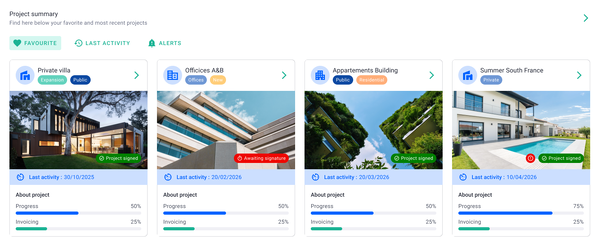
Milient Project Flow is a project management platform designed for architecture, engineering and consulting (AEC) firms that need more than basic timesheets.
Unlike standalone time tracking tools, Project Flow connects recorded hours with project budgets, resource planning and invoicing. This helps project managers understand not only how much time teams spend on projects, but also how those hours affect costs and profitability.
Key features
Standout Feature #1: Project and Phase-Level Time Tracking
Project Flow allows employees to record time against specific projects, tasks and phases, helping firms understand exactly where working hours are spent.
Rather than relying on separate spreadsheets, teams can manage their timesheets within one platform, with daily and weekly views to make time registration easier.
Employees can also log time and expenses on the go through the mobile app, while project managers gain a more consistent overview of recorded hours across the team.
For architecture and engineering firms, this makes it easier to understand how much time is spent on different project stages, identify where work is taking longer than expected and maintain more accurate records for client invoicing.
Standout Feature #2: Time and Budget Tracking
Recording hours is only useful when teams can understand how that time affects project performance.
Milient Project Flow connects time entries with project budgets, allowing managers to compare actual hours worked against expected and budgeted hours.
This gives firms a clearer picture of how much time has been consumed throughout a project and whether work is progressing within the allocated budget.
For example, if a technical design phase starts taking more hours than originally planned, project managers can identify the difference before it becomes a larger financial problem.
By connecting time tracking with project financial data, Project Flow helps architecture and engineering firms spot potential budget overruns, make more informed decisions and maintain better control over project profitability.
Standout Feature #3: Timesheets Connected to Resource Planning
Milient Project Flow brings time tracking and resource planning together, giving project managers a clearer understanding of team capacity and workload.
Managers can assign employees to projects, define roles and compare planned hours against actual time recorded. This makes it easier to identify workload imbalances and understand whether projects require more time or resources than expected.
For firms managing several projects at once, this connection is particularly valuable. Instead of reviewing timesheets and resource schedules separately, managers can use the information together to make more informed staffing decisions.
Project Flow also supports role-specific hourly rates and billable versus non-billable allocation, helping firms understand how resource usage affects project costs.
This helps teams plan future workloads more accurately while reducing the risk of overallocating employees or underestimating project requirements.
Pricing
Milient Project Flow offers pricing designed for architecture, engineering and consulting firms looking to bring time tracking, project management and financial reporting into one platform.
Rather than paying for separate tools to manage timesheets, budgets and resources, firms can access these functions within a single solution.
Where Milient Shines
- Time tracking designed for AEC workflows: Unlike general-purpose time tracking tools, Project Flow allows architecture and engineering teams to record hours against specific projects, tasks and phases. This provides a more detailed understanding of where time is spent throughout the project lifecycle.
- Connecting timesheets with project profitability: Recorded hours feed into project financial data, helping managers compare actual time against budgets, identify potential overruns and make better decisions before project costs escalate.
- Reducing reliance on spreadsheets: By combining timesheets, resource planning, expense tracking and reporting, Project Flow reduces the need to manually transfer information between multiple systems. Teams gain a more consistent view of project performance.
- Log time from your phone: Timesheets can be added and created directly from the mobile app
Where Milient Falls Short
- More functionality than basic time tracking users may need: Project Flow is designed for firms that need time tracking alongside project management, budgeting and resource planning. Freelancers or very small teams simply looking to record hours may find a lightweight tool such as Toggl Track or Clockify more suitable.
- Some timesheet usability limitations: Users have reported that timesheet submission and approval statuses are not always clear. The lack of approval notifications and a calendar-style view of logged hours may also be inconvenient for teams that prefer these workflows.
Customer Reviews
Milient Project Flow has received positive feedback from users on Capterra, particularly for its intuitive interface, reduced spreadsheet dependency and responsive customer support.
Two user reviews highlight these strengths:
Review 1 – Ease of Use
Capterra
"Very user friendly. The display is easy to understand and I can change my operating language. I like the visualisation and the blog, which helps me and my colleagues communicate on our project progress."
- Verified user, Capterra
Review 2 – Time Savings
Capterra
"Project Flow allowed me to stop relying on endless Excel spreadsheets. Updating the billable forecast is the feature that has saved me a huge amount of time. The support team is very responsive."
- Verified user, Capterra
“Recording time against specific project stages has given us much better visibility into where our time is going and how our projects are performing."
- Ian Blake, Founder and Managing Director, IB Architects.
Who Milient Is Best For
Milient Project Flow is particularly suitable for small to mid sized architecture, engineering, and consulting practices, based on their existing clients. Many of the smaller companies are those who are looking to move from spreadsheets to a more comprehensive platform for project and time management. Those who are mid-sized are those moving away from their existing platforms that do not provide enough in terms of efficient project or time tracking features.
2. Toggl Track – Best for Simple Time Tracking
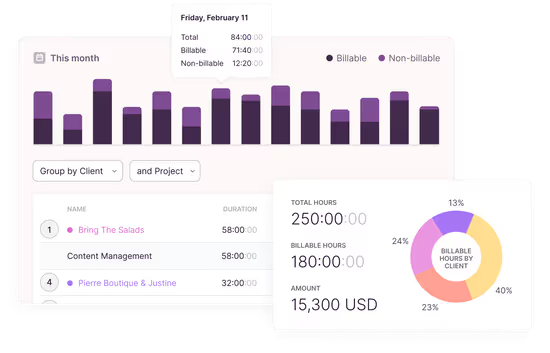
Toggl Track is a time tracking tool designed for freelancers, small businesses and teams looking to monitor working hours and productivity. It combines easy-to-use timers, project reporting and capacity planning to help businesses understand where time is spent and make better project decisions.
Key Features
Toggl Track offers manual and automated time tracking across desktop, mobile and browser extensions. It also provides project reporting, billable hour tracking and integrations with popular workplace tools such as Asana, Jira and Slack.
Standout Feature #1: Automated Time Tracking
Toggl allows employees to record working hours using one-click timers or background tracking, reducing the need for manual timesheet entries.
Time can be assigned to specific projects, clients and tasks, giving managers a clearer picture of how employees spend their working hours.
Standout Feature #2: Project Performance Reporting
Toggl connects time tracking data with project performance, allowing teams to compare estimated and actual hours, monitor billable time and identify projects that are exceeding their budgets.
Its reporting features help managers understand project costs, profitability and productivity without relying on separate spreadsheets.
Standout Feature #3: Capacity Planning and AI Insights
Toggl combines time tracking with workload planning, helping managers identify available capacity, overbooked employees and potential scheduling conflicts.
Toggl AI also allows users to ask questions about recorded hours, project budgets and billable time, making it easier to analyse project performance.
Pricing
Toggl offers a free plan alongside paid subscriptions for businesses requiring more advanced reporting, billing and capacity management.
Prices are in USD, based on Toggl's displayed pricing, and may vary depending on billing terms.
Where Toggl Shines
-
-
- Simple time tracking: One-click timers, automated tracking and browser extensions make recording working hours straightforward without disrupting daily workflows.
- Detailed reporting: Teams can analyse billable hours, project costs and productivity to understand where time is spent.
- Wide range of integrations: Toggl connects with popular project management and collaboration tools, allowing businesses to incorporate time tracking into existing workflows.
-
Where Toggl Falls Short
-
-
- Advanced features require paid plans: Although Toggl offers a free version, features such as profitability reporting, labour costs and more detailed capacity management are available on higher-tier plans.
- Less specialised for AEC project management: Toggl offers general time tracking and project planning features, but firms requiring architecture-specific workflows, phase-based invoicing and detailed project financial management may prefer a specialised platform.
-
Customer Reviews
Toggl Track receives positive feedback for its straightforward time tracking and reporting capabilities, although some users highlight pricing concerns as their teams grow.
Positive review – Capterra, 30 September 2026 (4/5 stars)
"Dead simple time tracking that gets out of your way, but gets pricey for teams."
Positive review – Capterra, 13 October 2025 (4/5 stars)
"Toggl Track offers a wide variety of tools and features, so it is hard not to find something that will meet your needs and requirements. The data insights it provides is also impressive."
Critical review – Capterra, 4 April 2025 (3/5 stars)
"It's very simple and requires appending other Toggl services to get the best out of it."
Who Toggl Is Best For
-
-
- Freelancers and independent consultants: Professionals looking for a straightforward way to record billable hours across multiple clients and projects.
- Small and growing teams: Businesses that need accessible time tracking, productivity reports and basic project planning without a complex setup.
- Agencies and service-based businesses: Teams managing client work that want to monitor project hours, compare estimates against actual time and improve billing accuracy.
-
3. Clockify - Best for Budget-Friendly Time Tracking
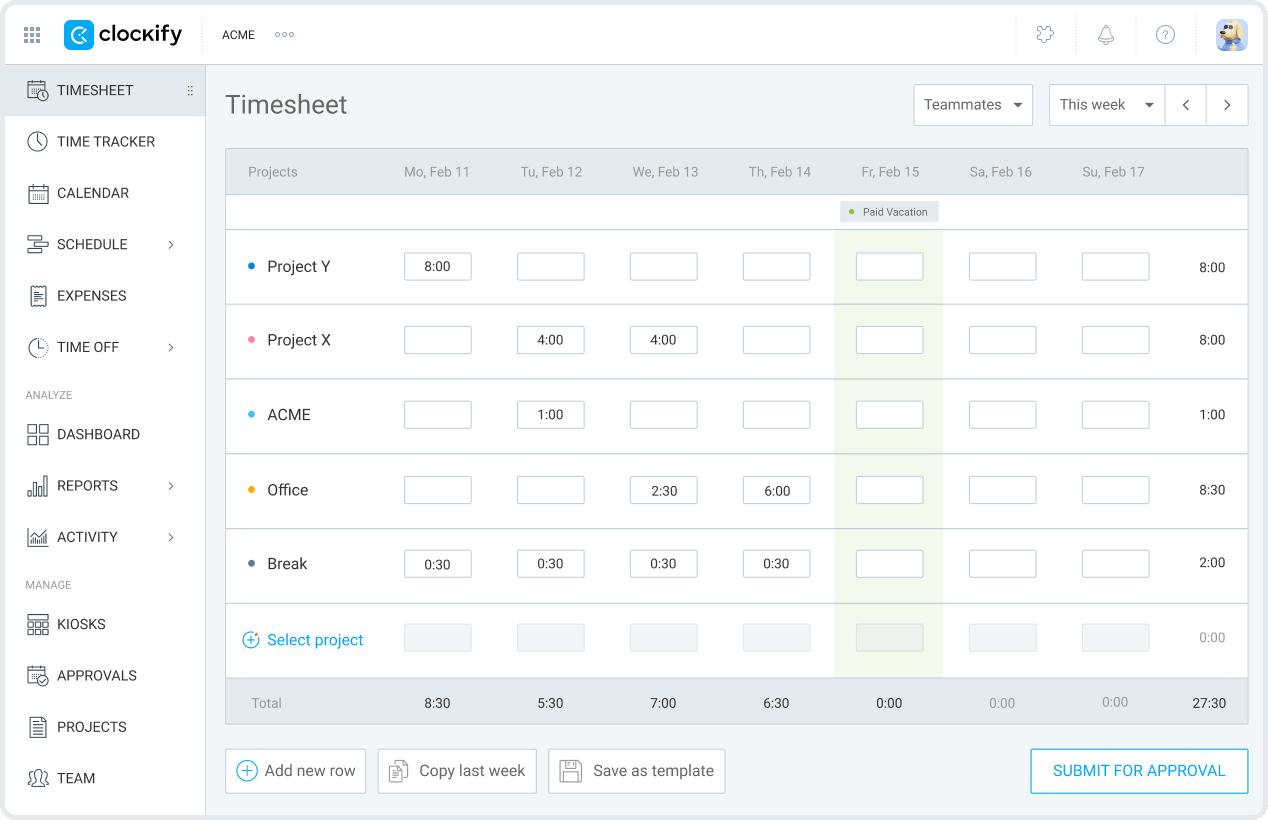
Clockify is a time tracking and timesheet software designed for freelancers, small businesses and teams looking for an affordable way to monitor working hours across projects.
Its main advantage is its free plan, which allows teams to get started with basic time tracking without committing to a paid subscription. Clockify also offers reporting, project budgeting, scheduling and invoicing features for businesses needing more control over their time and costs.
Key Features
Standout Feature #1: Flexible Time Tracking
Clockify allows employees to track working hours using real-time timers, manual timesheets or calendar-based time entries.
Teams can record hours against specific projects and tasks, while the automatic tracker helps capture time spent using different applications and websites. Clockify also offers a shared kiosk for employees who need to clock in and out from a central device.
Standout Feature #2: Project Reporting and Budget Tracking
Clockify provides reports that help businesses understand how much time employees spend on different projects, clients and tasks.
Managers can distinguish between billable and non-billable hours, monitor project estimates and budgets, and analyse costs and earnings. Reports can also be exported for further analysis or client billing.
Standout Feature #3: Team Scheduling and Timesheet Approvals
Clockify offers additional management features, including employee scheduling, time-off management and timesheet approvals.
Managers can schedule assignments, review employee availability and approve submitted timesheets. Higher-tier plans also include invoicing and expense tracking, helping teams connect recorded hours with client billing.
Pricing
Clockify offers a free plan and several paid subscriptions. The following prices are per user per month, billed annually, based on the pricing shown in October 2026.
Monthly billing costs more. Clockify also offers a cake.com bundle starting at €12.99 per user/month, billed annually.
Where Clockify Shines
-
-
- Affordable time tracking: Clockify's free plan makes it accessible for freelancers and teams that need to record working hours without paying for additional features they may not use.
- Multiple ways to record time: Employees can use timers, weekly timesheets, calendar entries or automatic tracking depending on their preferred workflow.
- Useful reporting capabilities: Teams can monitor billable hours, analyse time spent across projects and export reports to support productivity reviews and client billing.
-
Where Clockify Falls Short
-
-
- Limited project management capabilities: Although Clockify includes project budgets and scheduling, businesses requiring more advanced project management, detailed project financial control or industry-specific workflows may need additional software.
- Advanced features require paid plans: Features such as invoicing, scheduling, forecasting and timesheet approvals are available through paid subscriptions, increasing costs as teams grow.
- Some billing limitations: Certain users report needing higher-tier subscriptions for specific features and having to manually compare tracked hours against billing targets.
-
Customer Reviews
Clockify receives positive feedback for its ease of use and straightforward time tracking, although some reviewers highlight limitations in its broader project management capabilities.
Positive review – G2, 22 September 2026 (4.5/5 stars)
"I find the UI/UX very intuitive, which has made it easier for the whole team to adapt to the tool. It’s also very useful for tracking time cards and for identifying bottlenecks and understanding the team’s bandwidth."
— Verified User in Marketing and Advertising
Critical review – G2, 5 October 2026 (3.5/5 stars)
"What I dislike about Clockify is that it feels more focused on basic time tracking than broader project management. Since we mainly use it for tracking time, we sometimes find ourselves relying on other tools for task management, progress tracking, and team collaboration."
— Ketan M., Sr. UI/UX Designer | Team Lead
Read more reviews here
Who Clockify Is Best For
-
-
- Freelancers and independent consultants: Individuals looking for an affordable way to track billable hours across clients and projects.
- Small businesses on a budget: Teams that need reliable time tracking and basic reporting without investing in expensive software.
- Growing service-based teams: Businesses wanting to introduce timesheet approvals, scheduling and invoicing as their operations become more complex.
-
4. Scoro - best for small teams or agencies looking for a basic time tracking tool.
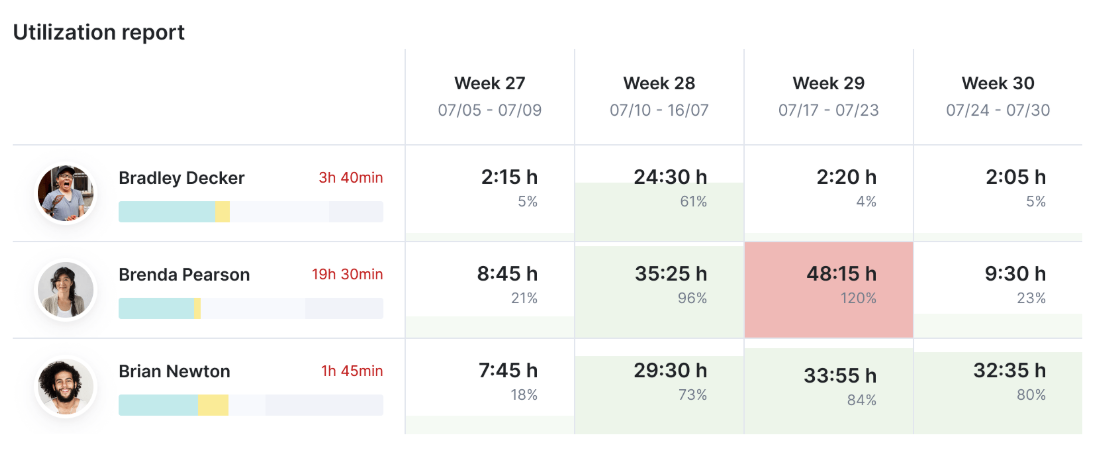
Scoro is best known for its time tracking tool which has key features such as time reporting, budget charts, time sheets and more. Based on customer reviews, the platform is best for smaller teams and agencies only looking for a time tracking tool as some customers have pointed out that their project management and reporting features aren’t in depth.
Key features
Time reporting: track time spent on billable vs non billable work with useful dashboards
Timesheets: enables you to prefill timesheets with individual to-do lists
Budget Charts: enables you see how much your team spends on project delivery through tracking labour costs, as well as generate invoices
Log time from phone: the app enables you to log time from wherever you are
Pricing
Scoro provides a free 14 day trial and a minimum of 5 users is required for any plan.
Where Scoro shines
-
-
- Directly tie feedback insights to trackable operational tasks and project progress
- Organising internal operational feedback
- Customisable dashboards that enables practices to their weekly check ins more efficient
- MCP connector with Claude
-
Where Scoro falls short
-
-
- Importing survey data in bulk can be clunky
- Reporting tool can be lacking where clients have to export raw data and build their own visual summaries
- Project Management feature is not in depth, such as limited views for overseeing projects and lack of customisable timelines.
-
Customer reviews
“I think what stands out the most about Scoro is the MCP connector with Claude. It allows us to hold all our data and analyze it in real time, in any way we like. Additionally, the reporting and dashboards in Scoro provide us with a pulse on the business. But I find project management a sticking point. We used Asana previously, which is really best in class in that area, so we knew that it would be harder for the team, but we potentially underestimated how much of a difference it would be. Having lots more different views to oversee projects, customisable timelines for whichever view a client wants, and fewer clicks on the system for a nicer UX/UI would make it better.”
“I love that Scoro rolls every single piece of my financial operations workflow into one single platform, it completely eliminates the messy tool-switching. It’s also game-changing for organizing our internal operational feedback. The biggest issue I run into is how clunky it is to import survey data in bulk. After I finish running client or internal feedback surveys, I need to bring those responses into Scoro to create corresponding tasks and log pain points. The CSV import tool doesn’t handle custom fields very well.”
Who Scoro is best for
- Small teams or agencies who need more of a ‘basic’ time tracking tool. Some existing clients are those who are in financial services, engineering, sales, marketing and advertising and more.
5. Harvest – Best for Time Tracking and Invoicing

Harvest is known for its time tracking features which is best for smaller teams and agencies. It provides various features such as reporting and analysis, invoicing, forecasting and more. Many customers praise it for being easy and intuitive to use; however, recent price hikes have unsettled many existing customers.
Key features
Time tracking: track time with start and stop timers, also enabling you to create custom reminders as well as track billable and non billable hours through personal reports
Reporting & Analysis: enables you to track budget and costs with alerts for your team, as well as analyse time spent though visual reports.
Invoicing & Payments: enables you to create invoices from timesheets and integrate with Stripe and Paypall ensuring easy online payments are hassle free.
Harvest Forecast: it is an additional module with a 30 day free trial, which offers resource management features
Pricing
Where Harvest shines
-
-
- Easy and straightforward to use
- Customers have praised the ‘expense module’ for logging your receipts
- The range of integrations
-
Where Harvest falls short
-
-
- Doesn’t work very efficiently if a company has a lot of projects
- Many customers have complained about the jump in prices with very little notice
- Somewhat limited customisation
- Primarily focused on time tracking therefore, businesses looking for more comprehensive project management and resource planning may find a more specialised platform suited better to their needs.
-
Customer reviews
Positive:
“Very positive, very easy to understand and we all used it for a small company for a long time, as we grew it was harder to use.”
“Harvest is a fantastic piece of software and I recommend it to any other web developers who are considering getting into freelancing. It simplifies my time tracking and invoicing so I can focus on building applications.”
Negative:
“In September 2026 we were told our subscription was going up from USD1,000 to around USD12,000 a year - a rise of 1200%. That's because it has been bought by Bending Spoons, which buys tech companies and astronomically hikes up subscription costs. The only problem with taking your data out of Harvest is that Harvest tries to hide the 'software user ID' you need to extract your data, but it's there - you just have to google how to get hold of it. The cost of Harvest makes it totally uneconomical. Their advertised prices are completely disingenuous as they don't include the usage-based additional costs (which they don't publish!). Having used Harvest for over a decade, we were able to transition all our data to Keito within 24 hours. A total no-brainer.”
“Unfortunately there's other products out there that offer multiple additional features, Harvest is just time tracking whereas others offer billing etc.”
Who Harvest is best for
Best for small companies who work in advertising, architecture, construction, law firms, accounting and finance, consulting, design and software development who are only looking for a time tracking platform.
How to Implement Project Time Tracking in Your Team: A Step-by-Step Guide
Effective project time tracking requires a clear process to ensure accurate data, consistent reporting and better project decisions. Follow these five steps to get started:
-
-
- Define your project stages: Depending on the industry, different companies will have different requirements when planning and organising projects. For instance, architects are more in depth when it comes to recording hours against specific project stages, whereas smaller marketing agencies may only need to track time against individual tasks.
- Choose the right software: This is where software comes in as some software only provide basic time tracking, which won’t be beneficial for those in a medium engineering firm for instance. Its worth signing up for a free trial or a click through demo if available.
- Introduce your team: When doing live demo’s with different time tracking platforms, its worth considering having one or two colleagues who’ll work directly with the product to see if its something they’ll find easy to use e.g. UX design, in depth of features and more.
- Review and optimise: Finally, once the software is implemented, ensure to analyse recorded hours against project budgets to identify inefficiencies and improve future planning.
-
Common Project Time Tracking Mistakes That Cost Teams Time and Money
Even with time tracking software in place, small mistakes can lead to lost revenue, inaccurate budgets and poor project decisions. Here are five common mistakes to avoid:
-
-
- Underestimating billable hours: Failing to capture all time spent on client work can lead to undercharging and lost revenue
- Overlooking non-billable work: Internal meetings, revisions and administrations still affect project profitability.
- Ignoring scope creep: Additional client requests can gradually increase hours without corresponding fee adjustments.
- Relying on outdated data: Making decisions using incomplete timesheets can hide potential budget overruns.
- Not using historical data: Without analysing past project hours, team risk repeating inaccurate estimates and fee proposals.
-
Real-world example: For architecture practices, understanding where project hours are spent can make a significant difference when preparing future fee proposals. See how iB Architects improved visibility into time spent across projects and gained better insights into their project performance.
Project Time Tracking Metrics Every Project Manager Should Monitor
Recording project hours is only the first step. The real value comes from understanding what those hours tell you about your team’s productivity, project budgets and overall profitability.
Here are three important project time tracking metrics every project manager should monitor.
Key Project Time Tracking Metrics at a Glance
1. Billable Utilisation Rate
Billable utilisation rate measures how much of your team’s available working hours spent on billable client work. It helps project managers understand whether resources are being used effectively and where capacity may be going unused.
Formula:
Billable Utilisation Rate = (Billable Hours divided Available Working Hours) x 100
Tracking this metric can help businesses:
-
-
- Identify underutilised team members or available capacity
- Understand how much time is spent on billable versus non-billable activities
- Make better resource allocation decisions across multiple projects.
- Plan future workloads more accurately.
-
However, a higher utilisation rate doesn’t always mean better performance. Teams also need sufficient time for internal meetings, training and other non-billable responsibilities
2. Estimated vs Actual Project Hours
Comparing estimated hours against actual recorded hours helps project managers understand whether projects are progressing according to plan.
For example, an architecture firm may estimate 100 hours for the concept design stage of a project. However, if the team records 140 hours, this indicates that the stage has exceeded its original estimate by 40%.
One common challenge for growing project-based businesses is having time tracking, budgets and financial information spread across multiple systems. Manually combining this data can make it difficult to identify budget overruns early.
Monitoring estimated versus actual hours in one place helps project managers recognise potential scope creep, understand which project stages consume more time than expected and improve the accuracy of future project estimates.
3. Project Profitability
Project profitability helps businesses understand whether the revenue generated from a project is sufficient to cover the costs of delivering it.
For architecture and engineering firms, a common challenge is understanding whether projects are actually profitable while work is still underway. A project may appear to be progressing according to plan, but additional hours and labour costs can gradually reduce profit margins.
Formula:
Project Profit Margin = ((Project Revenue − Project Costs) ÷ Project Revenue) × 100
By connecting recorded hours with employee cost rates, charge-out rates and project revenue, managers can identify potential profitability issues earlier.
For example, if an architecture practice consistently spends more hours on technical design than originally budgeted, this could indicate that future fee proposals need adjusting.
Monitoring project profitability throughout delivery helps businesses make more informed decisions about budgets, resources and pricing, rather than discovering financial issues after a project is completed.
Project Time Tracking for Remote and Distributed Teams
Managing project time across different locations and time zones can make it harder to maintain accurate, up-to-date records
For remote and distributed teams, a few simple practices can help:
-
-
- Encourage asynchronous time tracking: Allow employees to log hours in their own time zones without waiting for team-wide updates
- Keep project data connected: Use a centralised platform to avoid duplicate entries across timesheets, project management and accounting systems
- Set clear reporting expectations: Agree on consistent timesheet submission deadlines, accounting for different working hours.
- Maintain real-time visibility: Use shared dashboard to monitor recorded hours, project budgets and workloads without relying on manual updates
-
Track Project Time Accurately with Milient
Tracking project hours across multiple teams and projects can become challenging, particularly when relying on spreadsheets or disconnected systems. Missed entries, manual reporting and limited viability into time spent can affect billing accuracy and project profitability
Milient Project Flow helps architecture, engineering and consulting firms manage time tracking, resource planning and project finances in one platform
By recording hours against specific projects and phases, teams can monitor utilisation, compare actual hours against budgets and gain clearer insights into project performance. This reduces manual admin and helps project managers make more informed decisions.
FAQs
 Andrea Neeve
Marketing Associate
Want more content like this? Follow Milient: