Key takeaways
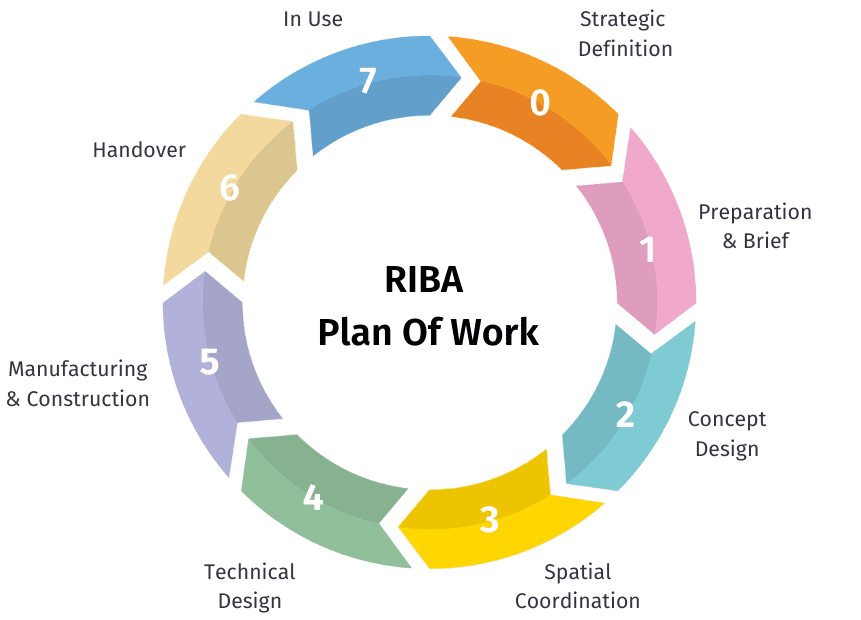
- The RIBA Plan of Work 2020 splits a project into eight stages, 0 to 7. Most UK fee proposals already follow them, so your time tracking and invoicing platform should too.
- Give every stage its own fee budget, and log time against the stage, not just the project.
- Check fee burn per stage every week. A stage that has used 80% of its fee at 50% complete needs a conversation now, not at the final invoice.
- Invoice per stage: a percentage of the stage fee as work progresses, a milestone at stage completion, and hourly for additional services.
- Keep variations and additional services as separate lines, so they are agreed and billed instead of quietly absorbed.
Most architecture practices agree their fees stage by stage. Then many of them track time against one project code and invoice in round numbers when it feels about right. The result is familiar: a stage that quietly ran over, an invoice that went out late, and a director who only finds out a job lost money once it has closed.
Running time tracking and invoicing per RIBA stage fixes that. This guide shows how to set it up, what to watch at each stage, and the mistakes that cost practices the most margin.
The RIBA Plan of Work stages at a glance
The RIBA Plan of Work 2020 is the framework most UK practices use to structure a project, from the first conversation to the building in use. These are the eight stages, with what is worth tracking at each.
| Stage | What happens | What to track |
|---|---|---|
| 0 Strategic Definition | The client's business case and strategic brief | Time spent before a fee is agreed, so you know what winning the work really costs |
| 1 Preparation and Briefing | Project brief, feasibility studies, budget and programme | Feasibility hours against the stage fee; surveys and other disbursements |
| 2 Concept Design | Concept options agreed with the client | Design iterations: this is where extra rounds of changes eat the fee |
| 3 Spatial Coordination | The design is coordinated with engineers and other consultants | Coordination time, and planning work if your appointment includes it |
| 4 Technical Design | Detailed design and information for construction | Usually the largest share of hours; watch burn by grade, not just total |
| 5 Manufacturing and Construction | Building on site | Site visits, queries and inspections; long programmes need monthly billing |
| 6 Handover | The building is handed over and the contract concluded | Close-out time and any defects work |
| 7 Use | The building in use, including post-occupancy evaluation | Aftercare, often billed hourly as an additional service |
Why track time and fees per stage
A project-level total only tells you how much time went in. Stage-level tracking tells you where it went, while you can still act on it.
- You see overruns early. If Concept Design has used most of its fee before the client has signed off, you know before Technical Design starts, not at the final account.
- You price the next job better. After a few projects, you know what each stage really costs for a house, a school or a fit-out, instead of quoting from memory.
- You invoice on time. When each stage has a fee and a progress figure, the invoice is a calculation, not a judgement call made at month end.
- You can talk to the client with numbers. "Stage 2 is complete and we've had three extra rounds of changes" is a much easier fee conversation than "the project is over budget".
How to set it up, step by step
1. Split the fee into stage budgets
Take the fee from your appointment and divide it across the stages you have been appointed for. Base the split on your own past projects where you can. For example, a practice might split a £100,000 fee across Stages 2 to 6 like this: Stage 2 £15,000, Stage 3 £20,000, Stage 4 £35,000, Stage 5 £25,000, Stage 6 £5,000. That split is only an illustration: yours should reflect the type of project and how your practice works.
For each stage, also note the hours that fee pays for at your blended rate. That is the number your team will actually manage against.
2. Log time against the stage, not just the project
Set up each stage as a phase in your timesheet system, so staff pick the project and the stage in one step. Keep it to the stages and a small number of activities: if people have to choose from 40 codes, they will pick the first one.
Make sure it is quick. Timesheets that take a few clicks a day get filled in; timesheets that take twenty minutes on a Friday get guessed.
3. Check fee burn every week
Fee burn is the share of the stage fee you have used, compared with how far through the stage you are. Once a week, look at every live stage:
- Fee used: time logged (at cost or charge-out rate) plus expenses, against the stage budget.
- Progress: the project lead's estimate of how complete the stage is.
- Gap: 70% of fee used at 70% complete is fine. 70% used at 40% complete needs action: a scope conversation, a change in who is doing the work, or a variation.
4. Invoice per stage
Most practices use one of three methods, and many use all three on the same project:
- Percentage complete: each month, invoice the stage fee times its progress, minus what you have already billed. This suits long stages such as Technical Design and Construction.
- Milestone: invoice the full stage fee, or a fixed part of it, when the stage is signed off. Simple, but it can leave you funding months of work.
- Hourly: for additional services, Stage 7 aftercare and work outside the appointment, bill the hours logged at the agreed rates.
Add disbursements and expenses to the same invoice, so they are not forgotten or billed months later.
5. Handle variations and additional services
Client changes after sign-off are where stage fees leak most. When work falls outside the agreed scope, give it its own line, agree it with the client, and log time against it separately. That way it is billed, and your stage figures stay honest for the next fee proposal.
6. Report WIP across all live jobs
Work in progress (WIP) is the value of work done but not yet invoiced. Look at it across every live project each month: high WIP on one job usually means an invoice is overdue or a stage has run over. Directors should be able to see this without asking someone to build a spreadsheet.
Common mistakes
- One code for the whole project. You can see the job is over budget, but not which stage caused it.
- Progress set by hours spent. If progress is just hours used divided by hours budgeted, an overrun always looks like progress. Ask the project lead for a real estimate.
- Variations absorbed into the stage. The work gets done, the fee does not change, and next year's quotes are based on the wrong numbers.
- Invoicing only at stage end. On a nine-month Technical Design stage, you are funding the client's project.
- Time and invoicing in separate systems. Someone ends up re-typing numbers between them every month, and the two never quite agree.
How Milient Project Flow handles RIBA stages
Milient Project Flow is built for architecture and engineering practices that work on fixed fees and stages. You can:
- Set up projects by RIBA stage, with a fee budget for each stage
- Let your team log time against the right project and stage in a few clicks, and approve timesheets by project or team
- See time and cost against fee, by stage, as it happens, along with WIP across all live projects
- Invoice by percentage complete, by milestone or hourly, with disbursements and expenses on the same invoice
That means one place for the stage plan, the timesheets and the invoices, instead of a timesheet tool, a spreadsheet and your accounts package that have to be reconciled by hand.
FAQs
 Andrea Neeve
Marketing Executive