
Key takeaways
 Choose Milient Project Flow as it tracks billable hours against project phases, connects time directly to budgets and expenses, and is built in collaboration with architects and engineers. Best for mid-size European and international practices wanting a dedicated architecture timesheet software.
 Use BQE Core if your firm wants time tracking connected directly to accounting, billing, and back-office financial workflows
 Pick Harvest if your team mainly needs simple billable hour tracking with lightweight invoicing and minimal setup
 Choose Monograph if your architecture or A/E studio tracks time against project phases and fee schedules visually
You need a solution for untracked or misattributed hours that create admin headaches and often translate directly into lost revenue and project overruns. So, we curated this list of seven engineering time tracking software for you.
Some platforms focus on lightweight billable hour tracking, while others are specialised engineering software that connect logged hours to project pipeline, resources, and billing workflows.
Best 7 Engineering Time Tracking Software in 2026: A Quick Look
1. Milient Project Flow: Best for Engineering Firms That Need Time Tracking Plus Project Financial Control
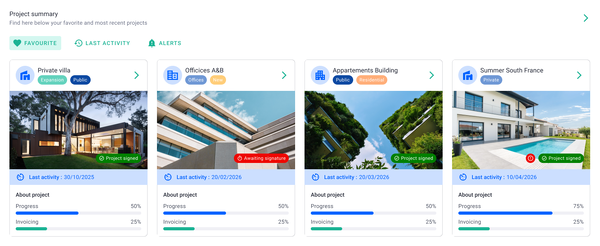
Milient Project Flow is a project management and time tracking platform built specifically for architecture, engineering, and consulting firms. While many time tracking tools focus solely on recording hours, Project Flow connects timesheets directly to project budgets, resource planning, invoicing, and profitability reporting.
For engineering teams managing multiple projects, phases, and fee structures, this provides greater visibility into where time is being spent and how it impacts project performance.
Key Features
You can use these dedicated time tracking features with your entire firm:
1. Integrated Time & Budget Tracking
/timesheets.png?width=1200&height=645&name=timesheets.png)
Project Flow tracks current, expected, and budgeted hours side-by-side for every project. Managers can quickly identify projects that are consuming more time than planned and take action before budgets are exceeded.
This creates a clearer link between time tracking and project profitability than standalone timesheet tools.
2. Role-Based Resource Planning
/employees_dashboard.png?width=1200&height=645&name=employees_dashboard.png)
Engineering projects often involve multiple disciplines and billing rates. Project Flow allows firms to assign project roles, set role-specific hourly rates, and allocate resources across projects.
Teams can see who is available, track billable utilisation, and ensure the right people are assigned to the right work.
3. Automated Phase-Based Invoicing
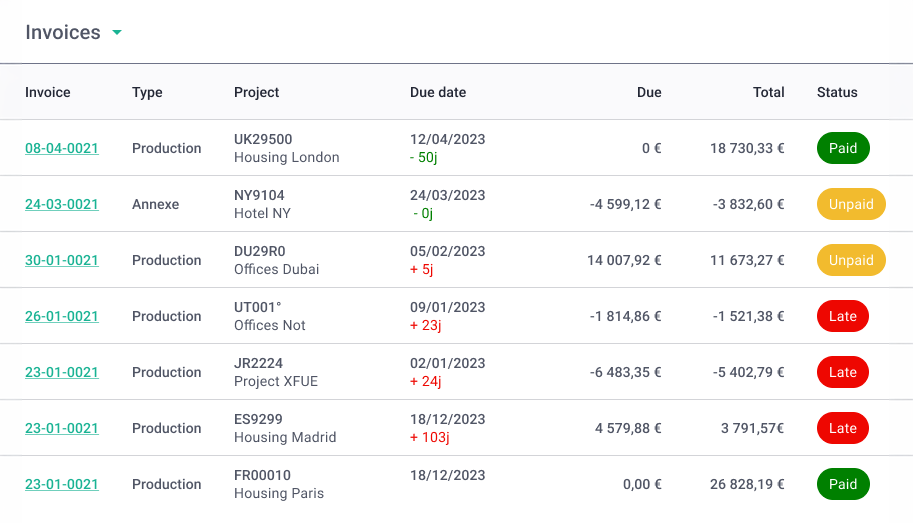
Unlike standalone time tracking tools, Project Flow links recorded hours directly to project billing. Firms can automate invoicing by project phase, calculate fees, and generate invoices from work already completed.
This reduces manual administration while helping ensure billable time is accurately captured and invoiced.
Milient Project Flow Pricing
Where Milient Project Flow Shines
-
-
- Built specifically for engineering and consulting firms: Unlike generic time tracking tools, Project Flow is designed around project-based businesses that need to balance budgets, resources, and profitability.
- Connects time tracking to project financials: Time entries feed directly into budget monitoring, invoicing, and reporting, providing a more complete picture of project performance.
- Reduces spreadsheet dependency: Centralised project information, dashboards, and automated reporting help eliminate manual tracking and improve visibility across projects.
-
Where Milient Project Flow Falls Short
-
-
- More comprehensive than simple timesheet tools: Teams looking only for basic clock-in and clock-out functionality may find Project Flow offers more features than they need.
- Timesheet workflow could be improved: Some users have noted that timesheet submission and approval statuses could be more clearly communicated.
- Limited calendar-style timesheet views: Users looking for a calendar-based display of logged hours may find current options more project-focused.
-
Customer Reviews
"Very user friendly. The display is easy to understand and I can change my operating language. I like the visualisation and the blog, which helps me and my colleagues communicate on our project progress."
- Verified user, Capterra
"Project Flow allowed me to stop relying on endless Excel spreadsheets. Updating the billable forecast is the feature that has saved me a huge amount of time. The support team is very responsive."
- Verified user, Capterra
"The ease of use, it's intuitive enough."
- Verified user, Capterra
Who Milient Project Flow Is Best For
-
-
- Engineering consultancies: Firms managing multiple projects, phases, and fee structures that need more than basic time tracking.
- Growing project-based businesses: Teams that want to connect timesheets with budgets, invoicing, and profitability reporting.
- Practice leaders and project managers: Organisations seeking greater visibility into project performance and resource utilisation.
-
2. BQE Core: For Mid-Sized Engineering Firms and Professional Services Teams
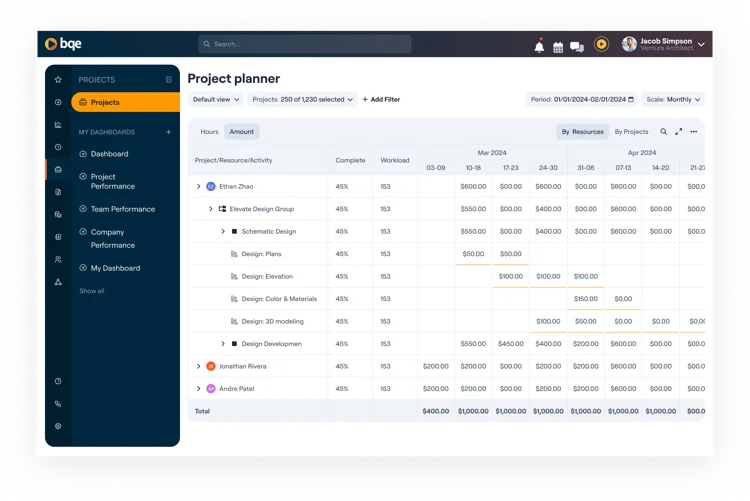
BQE Core is a project management and accounting software for professional services firms, including engineering and architecture practices.
For mid-sized firms where time tracking and accounts receivable involve different people, BQE Core reduces the handoff friction between project delivery and finance.
Key Features
-
-
- Time and Expense Entry: Engineers log billable and non-billable hours by project, phase, or activity via browser or mobile. Expenses attach to the same project record as time entries
- Integrated Invoicing: Logged hours feed directly into invoice generation. Billing rules, markup, and retainer management are handled within the platform without exporting data.
- Project Budget Dashboards: Managers see budget versus actual hours and fee utilisation at the project level, with burn rate visible in real time
- Configurable Approval Chains: Time and expense entries route through approval steps before hitting billing or reporting, supporting firms with formal review requirements
-
Pricing
Where BQE Core Shines
-
-
- Phase-level budget tracking across contract types: BQE Core tracks time against individual project phases rather than just project totals, which gives project managers early visibility into phase-level overruns before they affect the overall fee
- HR and payroll connections within the same platform: BQE Core extends into HR, payroll, and benefits administration for firms that want to consolidate employment and project financial data
-
Where BQE Core Falls Short
-
-
- Limited resource scheduling: Scheduler-to-timesheet workflows, where planned hours suggest what gets logged, are not built into the product in the same way as purpose-built resource management platforms
- Navigation complexity from broad feature set: The platform spans time tracking, billing, HR, and accounting in a single interface, which creates a steeper adoption curve for teams who only need time tracking and project oversight
-
Customer Reviews
G2:
“I’ve been using BQE for managing my projects and tracking time, and it’s been a game-changer. The interface is intuitive, and the reporting tools are very detailed, which makes monitoring progress and budgets easy,” shares Camilo R, an architect.
Capterra:
“Very slow, cumbersome at times to run reports and navigate. Custom reports need to be created by BQE (for a fee). Not really geared for project/task management. Somewhat complex and not intuitive user interface. Pricing isn't exorbitant, but not the most budget-friendly,” shares a Principal in an Architecture firm.
Who BQE Core Is Best For
-
-
- Mid-sized engineering and architecture firms whose primary driver is connecting logged hours to invoices and financial reporting within a single platform
- Mid-sized engineering and architecture firms whose primary driver is connecting logged hours to invoices and financial reporting within a single platform
-
3. Harvest: Best for Small Engineering Consultancies Tracking Billable Hours
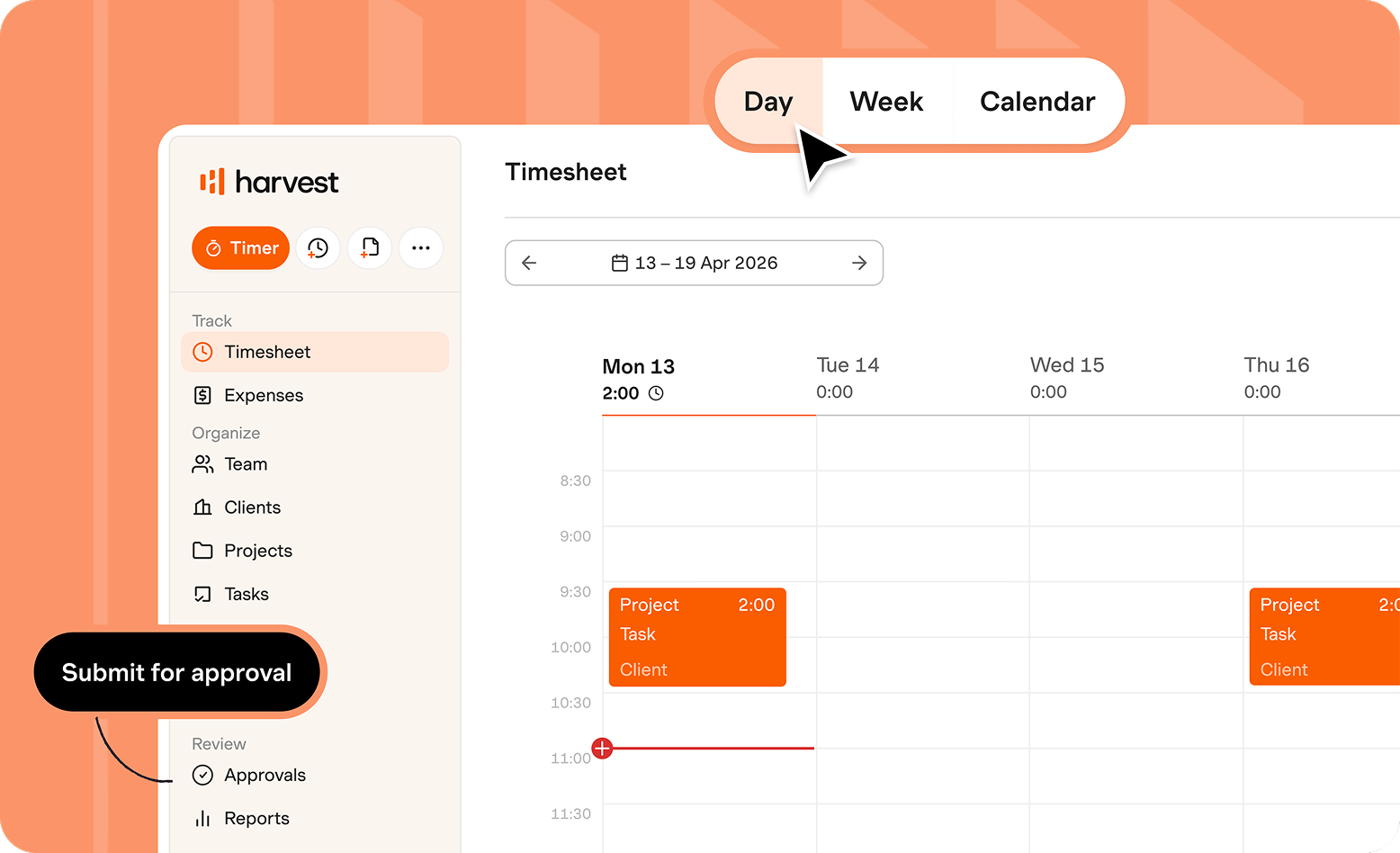
Harvest is a lightweight time tracking and invoicing platform used widely by small teams and consultancies. Engineers can start timers from a browser, desktop app, or mobile device and tag entries to clients and projects.
Setup is minimal, and the interface is deliberately simple, with no project management layer or configuration overhead, too.
Key Features
-
-
- One-Click Timers: Start and stop time from any device; switch between projects without navigating multiple screens
- Billable vs. Non-Billable Separation: Each entry is marked billable or non-billable, and reports separate the two for invoicing and internal cost tracking
- Invoice Generation from Time Entries: Logged hours convert to invoices with partial or full invoice support and automated payment reminders
- Integration Layer: Harvest connects with 50+ project management and accounting tools, allowing it to sit on top of an existing workflow rather than replace it
-
Pricing
Where Harvest Shines
-
-
- Cross-platform timer availability: Harvest's timer works from a browser extension, desktop app, and mobile, so time syncs across devices without manual entries
- Lightweight client reporting: Harvest generates client-facing reports showing hours by project and person, formatted for sharing
-
Where Harvest Falls Short
-
-
- No resource scheduling or capacity planning: Harvest logs time, but there is no scheduler, no comparison of planned versus actual hours at a team level, and no visibility into upcoming capacity
- No project phase or fee schedule tracking: Does not support phase-based billing or the project hierarchy common in engineering and AEC contracts
- Approval workflows are limited: Time can be reviewed, but formal multi-step approval chains are not a native feature
-
Customer Reviews
G2:
“This product is great for time tracking and invoicing. The interface is simple but still effective. Our team really appreciates how easy it is to use, and as an engineering consultant who tracks time to bill clients, that matters a lot—this is how we get paid, so it’s crucial that the team actually likes using it,” says Timothy D.
Capterra:
“What I liked least about Harvest was its limited customisation options, particularly in reporting and invoice design. Additionally, some features felt basic for more complex project management needs, and pricing can become relatively high as teams scale,” shares this verified reviewer.
Who Harvest Is Best For
-
-
- Small engineering consultancies or independent engineers billing clients by the hour, who need a low-admin time tracking solution with basic invoicing included
-
4. Monograph: Best for Small Architecture and Engineering (A/E) Studios Tracking Time by Phase
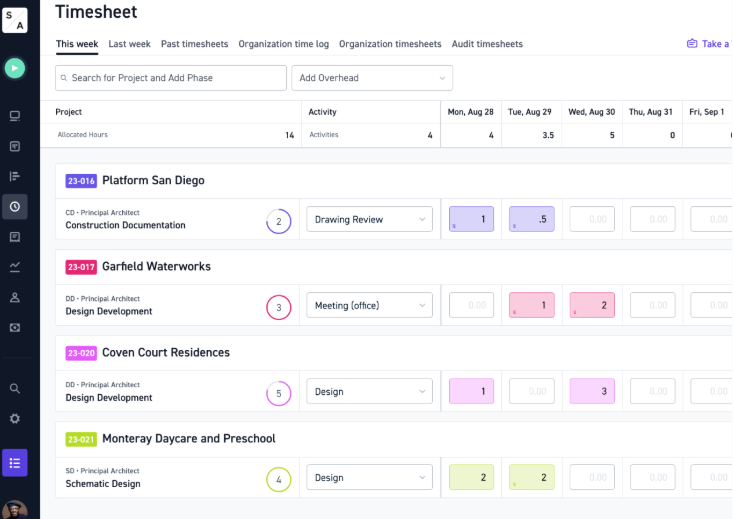
Monograph is purpose-built for architecture and A/E studios, with time tracking organised around project phases and fee structures. It lets studios define fee budgets per phase, and team members log time against those phases directly.
Key Features
-
-
- Phase-Based Fee Tracking: Structure projects with defined phases and fee allocations, then log time against each phase updates budget
- Team Timesheet Submission and Review: Engineers submit weekly timesheets reviewed and approved by project leads
- Role-Based Time Entry and Billing Rates: You can log time and report by role, and thus, track hours against different billing rates within the same project
-
Pricing
Where Monograph Shines
-
-
- Simultaneous hour and fee consumption tracking: When an engineer logs time against a phase, Monograph updates both the hour count and the fee consumed based on the assigned billing rate
- Principal dashboard for multi-project oversight: Monograph surfaces fee consumed versus the remaining budget per phase across all active projects in a single view, making it easier for studio principals to assess which projects are at financial risk without opening individual records
-
Where Monograph Falls Short
-
-
- Optimised for small studios: Monograph's interface and feature depth are designed for practices of up to a few dozen staff
- Architecture-specific phase model can constrain engineering workflows: The phase and fee structure works well for design projects, but can feel limiting for engineering firms running time-and-materials contracts, multi-discipline delivery, or project structures that don't map neatly to design phases
-
Customer Reviews
G2:
“It's really great at tracking both past and future hours. The staffing feature showing how busy everyone will be for the next weeks/months is really helpful for assigning future work,” shares a verified user.
G2:
“I don't like when it automatically filters the date to be the last one you used when searching a specific time frame. It should always just start with the current year or current month, not backdate it.” Ellynn B.
Who Monograph Is Best For
-
-
- Small architecture and A/E studios that organise work around design phases and fee budgets, and need a purpose-built platform for that workflow
-
5. Toggl Track: Best for Engineering Teams That Prioritise Speed of Logging
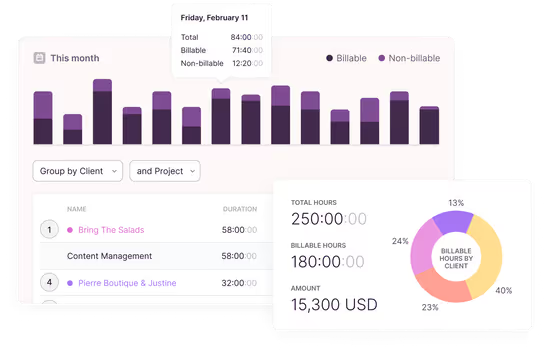
Toggl Track is a widely used time tracking app built around speed and simplicity. For an engineering firm, it lets team members start a timer, tag it to a project or client, and stop it when done with tasks.
However, there are no project management tools, but it suits teams that need accurate time logs with minimal disruption to their existing workflow.
Key Features
-
-
- One-Click Timers with Project Tagging: Start and stop timers and tag entries to a project, client, or task
- Custom Date Range Reports: Time is reported by project, person, tag, or client across any date range. Exports available in CSV and PDF for billing or internal review
- Free Plan for Small Teams: The free tier supports up to five users with core tracking and reporting included, making it viable for early-stage teams without a budget commitment
-
Pricing
Where Toggl Track Shines
-
-
- Deep integration with developer and engineering tools: Beyond the browser extension, Toggl Track connects natively with development and project tools used widely in engineering teams
- Flexible raw data export for external billing: Toggl Track's export options allow time data to be filtered by any combination of team member, project, client, and date range before exporting
-
Where Toggl Track Falls Short
-
-
- No resource or capacity planning: No scheduler, planned-versus-actual comparisons, and no capacity forecast for upcoming work
- No engineering project structure: Toggl Track does not support phase-based billing, fee schedules, or the project hierarchy common. All analysis of project health happens outside the platform
-
Customer Reviews
Capterra:
“The interface is super intuitive, and the timer starts with just one click.” Dakota L.
G2:
“Sometimes I forget to start the timer when I switch tasks, so I have to add time entries manually later. The desktop app and web version also feel slightly different in a few places, so it takes a little time to get used to.” Ishan S.
Who Toggl Track Is Best For
-
-
- New engineering teams or small consultancies that primarily need accurate time logs for billing or payroll and have no requirement for project scheduling, capacity planning, or approval chains.
- Smaller firms evaluating engineering time tracking for the first time, who want a low-commitment starting point
-
6. Deltek Replicon: For AI-Powered Timesheets For Global Engineering Teams
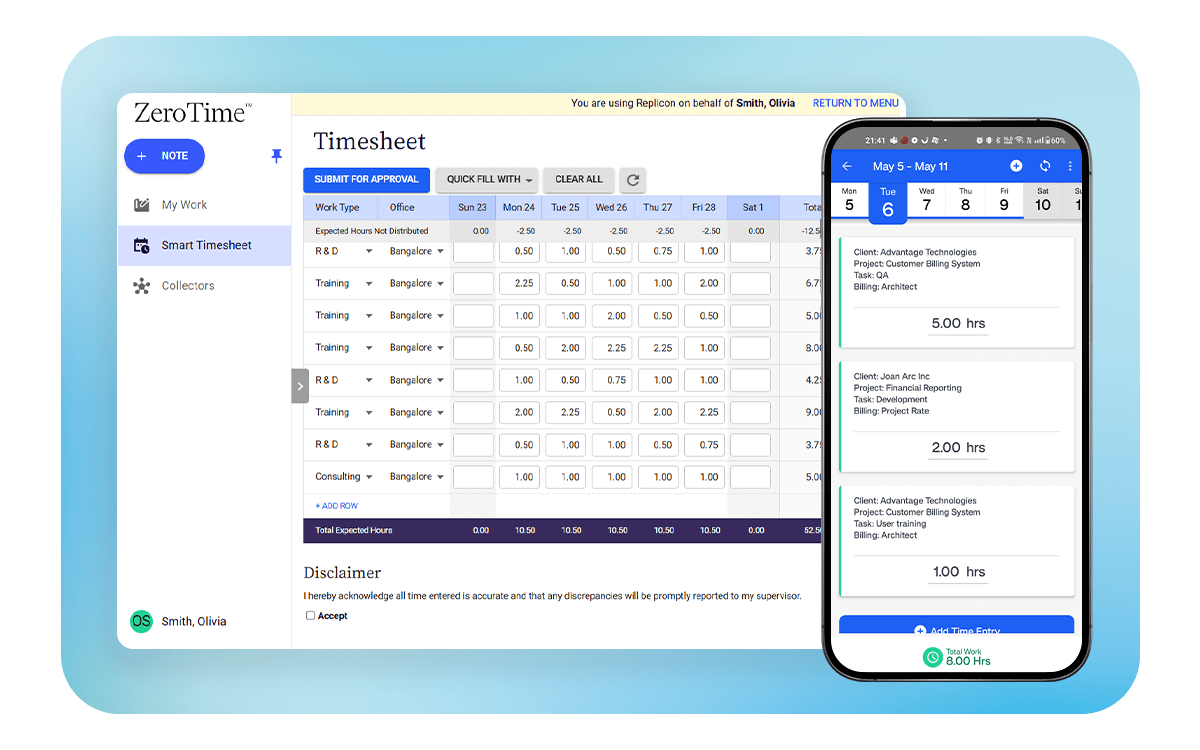
Deltek Replicon is an automated time tracking platform built for project-based businesses with distributed or international workforces.
Its ZeroTime feature automatically captures time from 100+ work applications, reducing manual entry. It also handles project billing, workforce scheduling, leave management, and labour compliance across 145+ jurisdictions in 75+ countries, making it practical for global engineering firms.
7. Clockify: Best for Smaller Engineering Firms Moving Away From Spreadsheet Shuffle
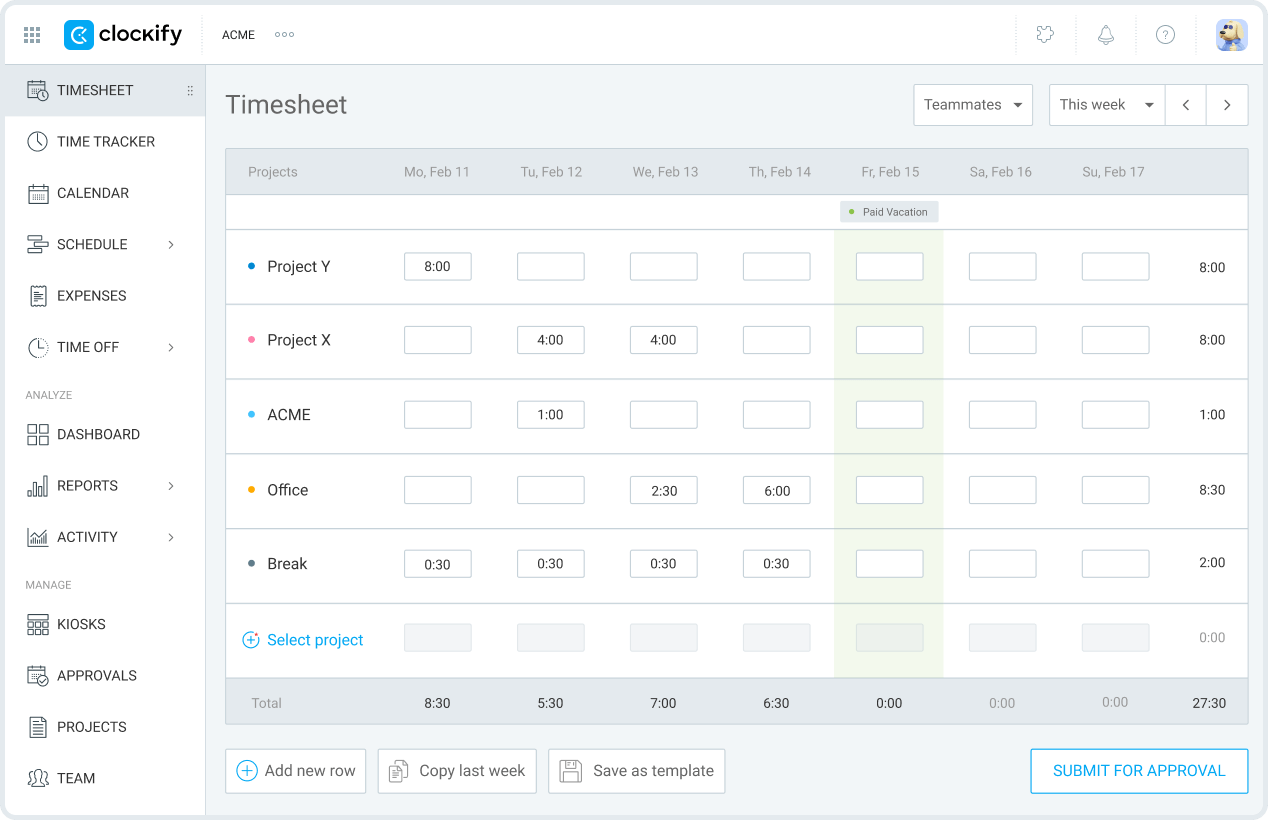
Clockify is a free time tracking tool that lets teams log time manually or with timers. You can assign entries to projects and clients and generate basic reports. On paid tiers, you get timesheet approvals, project budgeting, and expense tracking.
For engineering firms currently managing hours in spreadsheets, Clockify offers a structured first step without an upfront cost commitment.
It does not offer the engineering-specific workflows found in AEC-focused platforms, but as an entry point away from manual tracking for smaller teams, it covers the fundamentals effectively.
How to Choose the Best Engineering Time Tracking Software
The right engineering time tracking software should do more than record hours. Look for a platform that helps you understand project performance, improve resource utilisation, and protect profitability as projects become more complex.
Can It Connect Time Tracking to Project Budgets?
Many tools can tell you how many hours were worked. Fewer can show how those hours affect project budgets in real time. The best engineering time tracking software allows project managers to compare actual, expected, and budgeted hours so overruns can be identified before they become costly.
Project Flow does this particularly well by connecting timesheets directly to project budgets and financial performance.
Explore how engineering firms approach time and resource management from different Milient's webinars and events.
Does It Help You Manage Resource Utilisation?
Engineering firms need visibility into who is available, who is overloaded, and where future capacity exists. Resource planning capabilities help prevent burnout, improve forecasting, and ensure the right people are assigned to the right projects.
Project Flow combines time tracking with role-based resource allocation, making it easier to balance workloads across teams and projects.
/planning_team.png?width=1578&height=1122&name=planning_team.png)
Can It Turn Logged Time into Accurate Billing?
For many engineering consultancies, time tracking is directly tied to revenue. Software that links timesheets to invoicing reduces administrative work and helps ensure billable hours do not fall through the cracks.
Project Flow connects recorded time to phase-based invoicing, helping firms streamline billing while maintaining visibility into project profitability.
/time%20management.svg)
Make Time Tracking at Your Engineering Company Easy with Milient Software
The best engineering time tracking software depends on your firm's size, workflows, and reporting requirements. Lightweight tools such as Harvest, Toggl Track, and Clockify can work well for basic time recording, while platforms like BQE Core and Deltek Replicon offer stronger financial and compliance capabilities.
However, if your firm needs to connect timesheets with project budgets, resource planning, invoicing, and profitability tracking, Milient Project Flow is worth considering. Built specifically for architecture, engineering, and consulting firms, it helps teams move beyond simply recording hours and gain a clearer understanding of project performance.
 Andrea Neeve
Marketing Associate
Want more content like this? Follow Milient:

/roles_2.jpg?width=1024&height=1024&name=roles_2.jpg)