
Key takeaways
 Milient Resource Flow is best for IT consulting and professional services teams that need more than time tracking, with resource planning, utilisation reporting, capacity management, and project visibility in one platform.
 Scoro is best for professional services businesses looking for an all-in-one solution that combines project management, CRM, quoting, invoicing, and reporting.
 Kantata is best for larger consulting firms and enterprise service organisations that require advanced resource management, forecasting, and Professional Services Automation (PSA) capabilities.
 Toggl Track is best for freelancers and small teams seeking a simple, user-friendly time tracking and reporting tool without the complexity of broader project operations software.
Blikk is best for Swedish-based companies that want to connect time tracking, project management, invoicing, payroll, and reporting within a single business platform.
Why Look for a Harvest Alternative?
Harvest has long been a popular choice for teams that need straightforward time tracking, timesheets, and invoicing. But in 2026, many businesses are taking a closer look at whether Harvest still gives them the right balance of simplicity, functionality, and predictable pricing.
Recent reports of sharp price increases have made the question more urgent for some teams. If your company manages many projects, clients, tasks, or invoices, it may be time to compare Harvest with alternatives that better match the way your project-based business works.
August 2026 update: Harvest pricing changes
Many teams are reassessing Harvest ahead of upcoming renewals in September 2026.
Recent reporting by the BBC has highlighted substantial price increases for some Harvest customers following changes to the company’s pricing structure. For annual customers, the impact may only become clear when their subscription comes up for renewal.
If your Harvest renewal is coming up, now is a good time to compare alternatives. Not just on monthly seat price, but on how well each system supports time tracking, resource planning, project visibility, approvals, and predictable growth.
Harvest Alternatives: Quick Comparison
1. Milient Time Management: Best for IT Consulting & Professional Services Teams
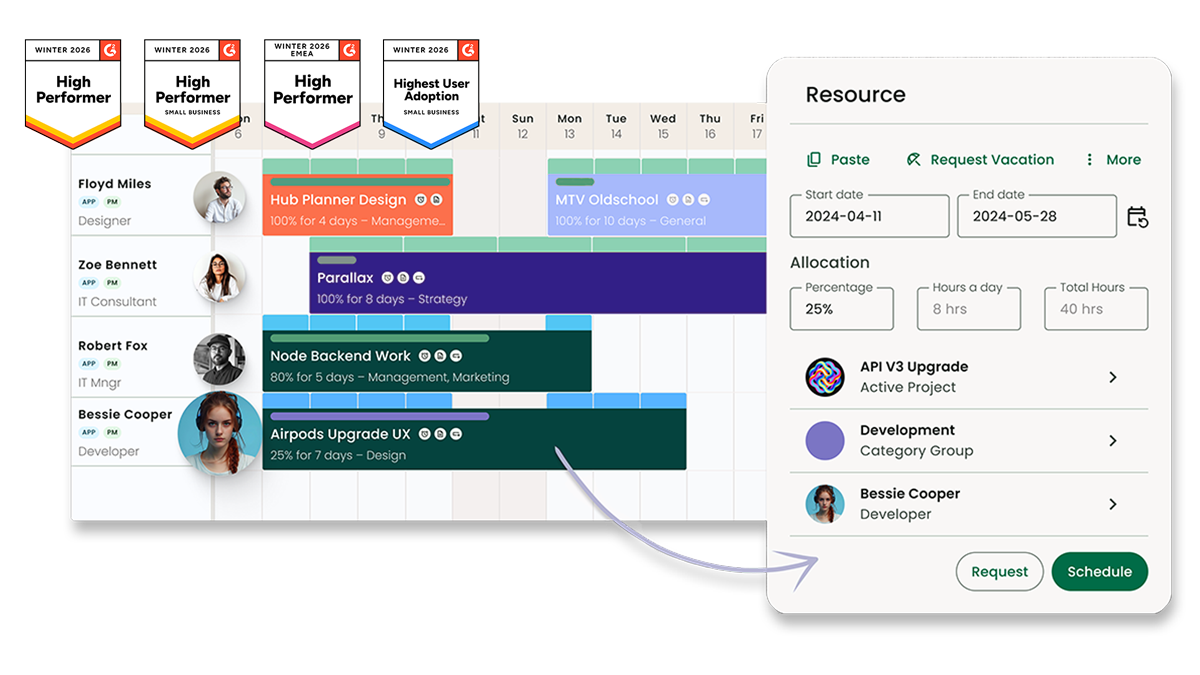
Milient Resource Flow is a time tracking and resource management platform designed for IT consulting and professional services organisations managing multiple projects, teams, and clients. Alongside timesheets and approvals, it provides visibility into utilisation, resource capacity, project workloads, and team performance.
Unlike standalone time tracking tools, Resource Flow helps growing organisations connect time data with resource planning and operational reporting, making it easier to allocate the right people, balance workloads, and improve project profitability.
Key features
Time tracking is only useful if it helps you make better operational decisions. Milient connects timesheets with resource management, utilisation reporting, and project planning so firms can see the bigger picture behind every hour recorded.
-
-
-
Integrated Timesheets & Approvals
-
-
/resources_rf.png?width=1200&height=645&name=resources_rf.png)
Milient makes it easy for employees to log time while giving managers greater control over approval workflows. Timesheets can be reviewed, approved, and linked directly to project allocations, helping firms maintain accurate records for billing and reporting.
Unlike simpler tools focused primarily on time entry, Milient connects recorded hours with resource schedules and project workloads, reducing the need for manual reconciliation between systems.
-
-
-
Capacity Planning & Utilisation Visibility
-
-
/Capacity%20Analyzer.jpg?width=1500&height=1500&name=Capacity%20Analyzer.jpg)
One common limitation of basic time tracking tools is that they show where time has already been spent, but not where future capacity exists. Milient's Capacity Finder helps managers identify available resources based on utilisation levels, skills, location, or role.
This enables teams to proactively balance workloads, avoid overallocation, and improve utilisation before project issues emerge. Saved views and custom filters make it particularly valuable for firms managing multiple projects simultaneously.
-
-
-
Real-Time Reporting & Profitability Insights
-
-
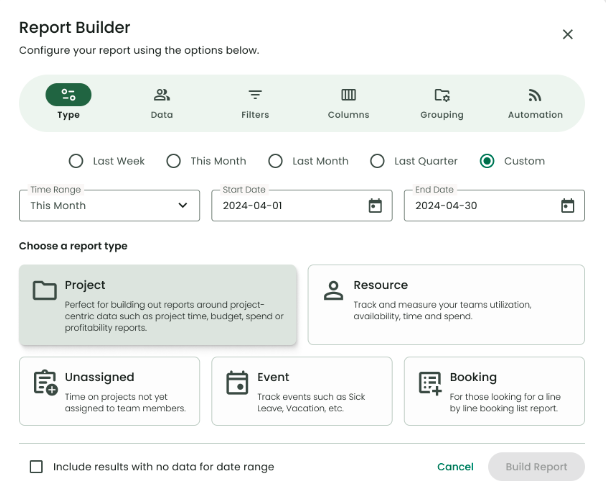
Milient includes a configurable reporting engine that brings together timesheet, utilisation, project, and resource data in one place. Managers can create reports covering availability, project spend, profitability, and resource performance without exporting data into spreadsheets.
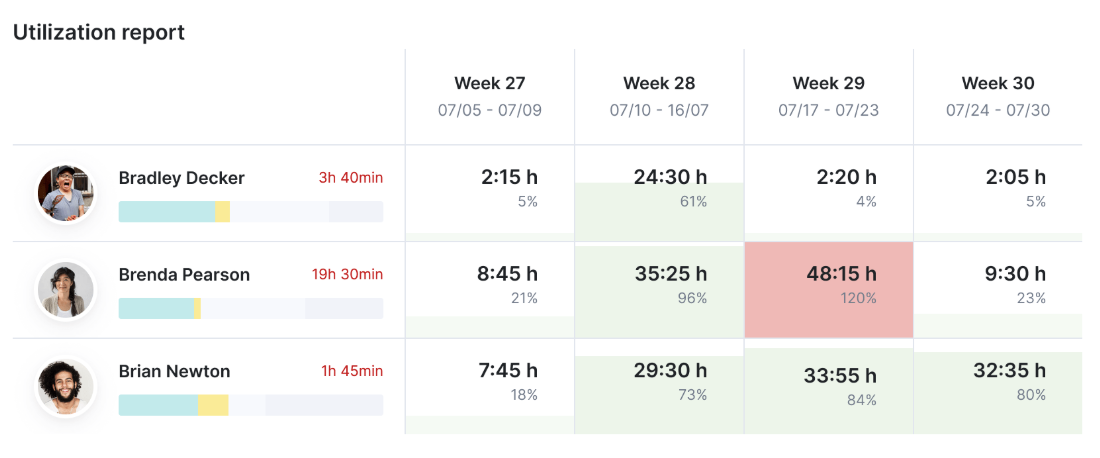
Heat maps, conditional formatting, and custom reporting views provide greater visibility than basic time tracking dashboards, helping firms make faster staffing and commercial decisions.
Pricing
Where Milient Shines
-
-
- Combines time tracking with resource management: Unlike Harvest, Milient goes beyond recording hours by providing visibility into capacity, utilisation, and future resource availability.
- Built for project-based firms: Architecture, engineering, consulting, and professional services organisations can connect timesheets directly to project planning and operational reporting.
- Strong reporting capabilities: Configurable dashboards, heat maps, utilisation reports, and profitability tracking reduce reliance on Excel and manual reporting processes.
-
You can also explore our detailed guide on time tracking tools for architects to see how specialized platforms compare.
Where Milient Falls Short
-
-
- May be more than smaller teams need: Very small businesses looking solely for basic time tracking and invoicing may find the platform more comprehensive than necessary.
- Advanced functionality comes with a learning curve: Features such as capacity planning, permissions, and custom reporting require more setup than lightweight time tracking tools.
- Some advanced features are add-ons: Capabilities such as Capacity Finder may increase overall costs depending on requirements.
-
Customer Reviews
Recent users highlight the platform's ease of use and reporting capabilities:
"Resource Flow has been an incredible step up from our previous resource management tool. Scheduling work and updating schedules is very simple, and the user interface is very intuitive."
"I use Resource Flow to fill in my weekly timesheets. It prevents me from having the headache of maintaining it manually and makes the user journey more satisfying."
Who Milient is best for
-
-
- IT consulting and professional services teams: Mid-sized and large organisations managing complex project portfolios across multiple teams, locations, or clients.
- Resource and operations managers: Teams needing visibility into utilisation, resource allocation, project spend, and overall operational performance.
- Organisations with structured access requirements: Businesses where executives, project managers, and team leaders require different levels of visibility into scheduling, utilisation, and financial data.
-
2. Scoro: Best for Professional Services Businesses Needing an All-in-One Management Platform
Scoro combines project management, time tracking, quoting, budgeting, invoicing, CRM, and reporting in a single platform. While Harvest focuses primarily on time tracking and invoicing, Scoro is designed for businesses that want to manage the entire project lifecycle in one place.
It's particularly popular among agencies, consultancies, and professional services firms looking to reduce the number of tools they use across operations.
Key features
-
-
- Project and task management: Manage projects from quote through delivery with task boards, project templates, dependencies, and workload planning.
- Integrated time tracking and billing: Track billable hours, approve timesheets, and convert tracked time into invoices without switching systems.
- Reporting and profitability insights: Monitor utilisation, project budgets, team performance, and profitability through configurable dashboards and reports.
-
Pricing
Where Scoro shines
-
-
- All-in-one platform: Project management, CRM, quoting, budgeting, invoicing, and time tracking sit within a single system, reducing the need for multiple tools.
- Strong operational visibility: Detailed reporting helps managers track utilisation, project performance, and financial metrics across the business.
- Supports growing organisations: Extensive customisation and workflow capabilities allow teams to adapt the platform as operational complexity increases.
-
Where Scoro falls short
-
-
- Steeper learning curve: Several users report that the breadth of functionality can make onboarding and day-to-day administration more complex than simpler tools.
- Setup requires investment: Getting the most value from Scoro often requires configuration, training, and internal ownership.
- Can become expensive: Costs can add up as businesses move into higher-tier plans and adopt more advanced functionality.
-
Customer Reviews
“This product is great for time tracking and invoicing. The interface is simple but still effective. Our team really appreciates how easy it is to use, and as an engineering consultant who tracks time to bill clients, that matters a lot, this is how we get paid, so it’s crucial that the team actually likes using it. We absolutely love the app, just not at $20k per year that the price increased to for a team of 20 users.”
“The number one thing is the recent private equity acquisition of Harvest increased the price by 600%. It increased 6x overnight for us without warning. The minimum to use the product now with "unlimited" usage of the app is $1,500 per month, plus $14/mo/user. So unless you're ready to spent $20k+ per year on time tracking and invoicing, look elsewhere”
Who Scoro is best for
-
-
- Professional services firms: Businesses wanting project management, CRM, finance, and time tracking in one platform.
- Growing agencies and consultancies: Teams looking to replace multiple disconnected systems with a single operational hub.
- Operations-focused organisations: Businesses that value detailed reporting, profitability tracking, and workflow customisation.
-
3. Kantata: Best for Professional Services Automation (PSA)
Kantata is a Professional Services Automation (PSA) platform designed for consulting firms, agencies, and service organisations that need more than basic time tracking. Alongside timesheets, it offers resource management, project financials, forecasting, capacity planning, and business intelligence tools.
It's best suited to larger organisations managing complex project portfolios and billable teams across multiple departments.
Key features
-
-
- Resource management and capacity planning: Allocate resources based on availability, skills, and project demand while monitoring utilisation across teams.
- Project financial management: Connect timesheets, budgets, forecasting, and project accounting to gain visibility into project profitability.
- Business intelligence and reporting: Track project performance, delivery metrics, and operational KPIs through custom dashboards and reports.
-
Pricing
For a closer look at what these quotes actually involve, including seat minimums and hidden fees, see this breakdown of Kantata pricing.
Where Kantata shines
-
-
- Built for large services organisations: Handles complex project portfolios, resource planning, and financial management at scale.
- Strong resource management capabilities: Skills matching, capacity forecasting, and utilisation tracking help improve resource allocation decisions.
- Comprehensive PSA functionality: Combines project delivery, financial management, reporting, and resource planning within one platform.
-
Where Kantata falls short
-
-
- Can be expensive for smaller teams: Custom pricing and enterprise-focused deployments may put it beyond the budget of smaller consultancies.
- Steeper learning curve: The platform's extensive feature set often requires training, onboarding, and ongoing administration.
- Potentially more functionality than needed: Teams primarily looking for time tracking may find the platform overly complex compared to dedicated time management tools.
-
Customer reviews
Pros:
“Love the features such as task management and the fact it is useful for business of any size”
“Designed specifically for professional services and benefits are measured over time”
Cons:
“Expensive! And mobile app sucks which didn't work for me and the site is layed out difficult to navigate on”
“The application could be more up to date and visıually simplified”
All reviews are verified from Capterra: read more reviews
Who Kantata is best for
-
-
- Enterprise consulting firms: Organisations managing large numbers of billable resources and complex project portfolios.
- Professional services businesses: Teams needing resource planning, project accounting, and financial forecasting in one system.
- Operations and PMO leaders: Businesses that require detailed reporting, utilisation tracking, and portfolio-level visibility.
-
4. Toggl: Best for Simple Time Tracking and Reporting
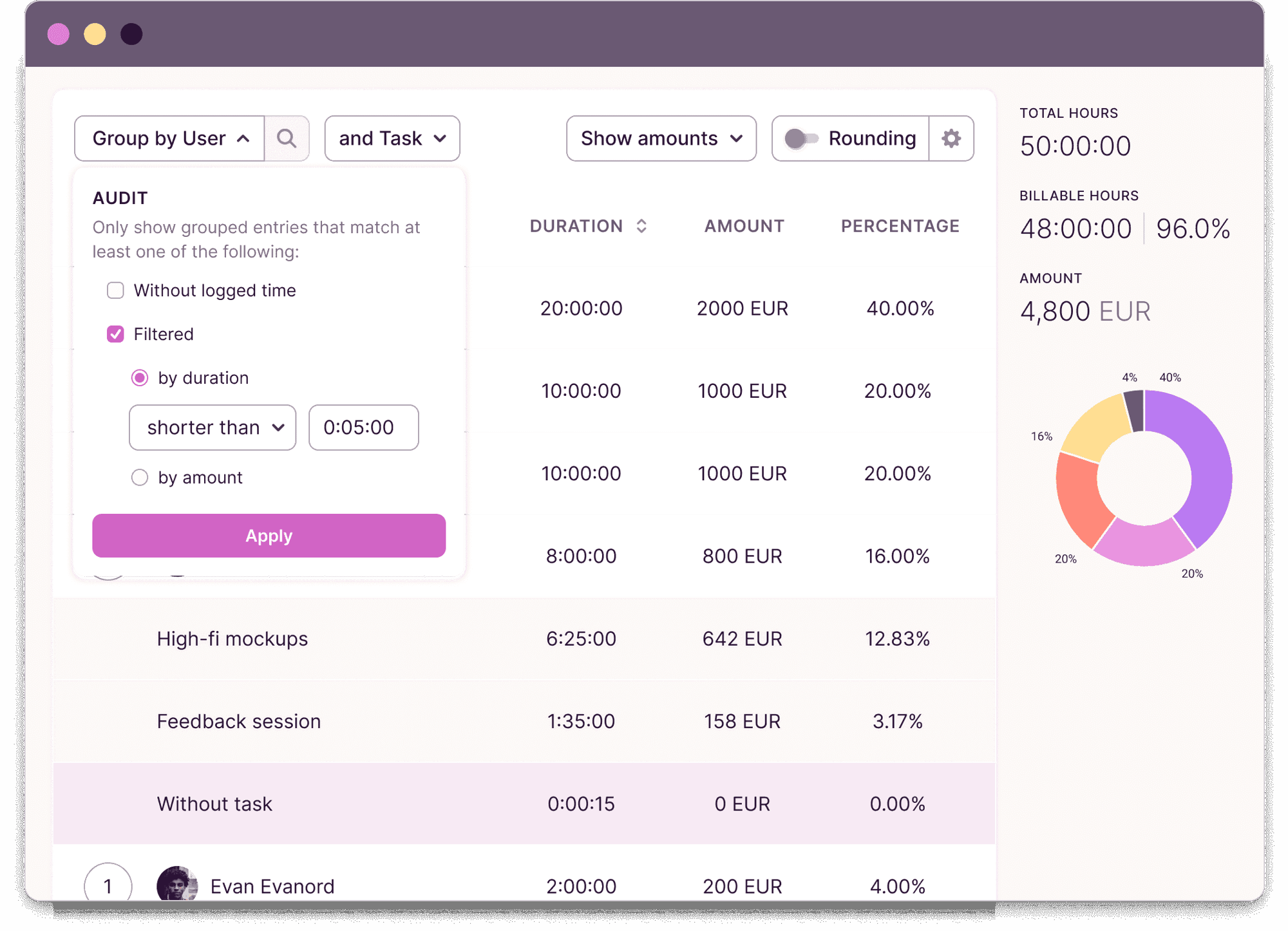
Toggl Track is a straightforward time tracking tool designed for freelancers, consultants, and small teams. It helps users log hours, track billable time, generate reports, and gain visibility into how time is spent. Its simplicity and ease of use make it a popular alternative to Harvest for teams focused primarily on time tracking.
Key features
-
-
- Time tracking: Track time across desktop, web, mobile, and browser extensions to capture billable and non-billable work from anywhere.
- Reporting and analytics: Generate reports that provide visibility into team productivity, billable hours, and project performance.
- Project tracking: Monitor time spent against projects and tasks to understand resource allocation and project progress.
- Integrations: Connect with over 100 popular tools, including calendars, project management platforms, and productivity apps.
-
Pricing
Where Toggl shines
-
-
- Ease of use: Toggl's intuitive interface makes it easy for teams to start tracking time with minimal training or setup.
- Flexible tracking options: Users can record time across multiple devices and platforms, helping teams capture work wherever it happens.
- Useful reporting: Provides clear visibility into billable hours, productivity trends, and project performance.
-
Where Toggl falls short
-
-
- Limited resource management: Toggl focuses on time tracking and reporting rather than advanced resource planning and capacity management.
- Basic project oversight: While it includes project tracking, it lacks the broader project operations capabilities offered by dedicated project management platforms.
- Advanced features on higher plans: Some reporting, profitability, and forecasting features require premium subscriptions.
-
Customer Reviews
“Easy to use but feature-rich, free plan available for smaller business, good reporting views making easy to see how I spend my time on a granular level. Some of the deeper functionality can be a little buried, but the help articles generally make sense”
“Helped us analyse performance across team on projects but has limited reporting functionality, would've been nice to visualise data more easily.”
Read the Capterra verified reviews here
Who Toggle is best for
-
-
- Freelancers: Individuals looking for a simple way to track billable hours and client work.
- Small businesses: Teams that need straightforward time tracking without the complexity of a larger project management system.
- Consultants and agencies: Service-based businesses that want visibility into time usage and project profitability.
-
If you are a freelancer evaluating lightweight platforms, you can also explore our Hello Bonsai alternatives guide to compare top options for smaller operations.
5. Blikk: Best for Swedish-Based Companies
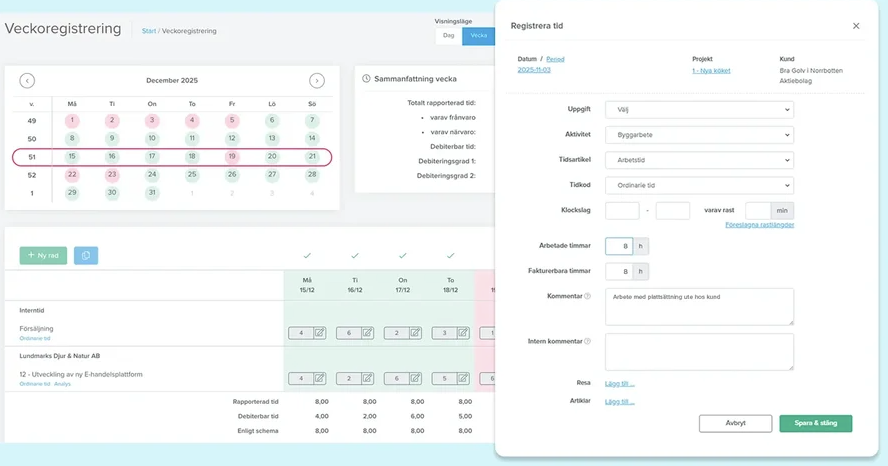
Blikk is a business management platform designed for service-based businesses that want to bring time tracking, project management, invoicing, payroll, and reporting together in a single system. Popular among Swedish companies, Blikk focuses on reducing administrative work and creating a connected workflow from sales and project planning through to invoicing and payroll.
Key features
-
-
- Time tracking and reporting: Record working hours, expenses, travel time, and project activities from desktop or mobile devices.
- Project management: Plan projects, monitor budgets, track project performance, and manage key project metrics in one place.
- Invoicing and payroll: Generate invoices and payroll documentation directly from project and time tracking data to reduce manual administration.
- Resource planning: Allocate resources, manage workloads, and improve visibility into team capacity across projects.
-
Pricing
Where Blikk shines
-
-
- All-in-one workflow: Combines project management, time reporting, invoicing, payroll, and reporting within a single platform.
- Strong Swedish business integrations: Works closely with popular Swedish accounting and payroll systems, helping streamline financial processes.
- Simple user experience: Customers frequently praise the platform for being easy to learn and requiring minimal training.
-
Where Blikk falls short
-
-
- Regional focus: Many of its integrations and workflows are designed specifically for Swedish businesses, which may limit suitability for international organisations.
- Less advanced resource management: While resource planning is available, organisations with complex capacity planning requirements may need more specialised functionality.
- Dependency on third-party systems: Some financial and payroll processes still require updates across connected systems rather than being fully managed within Blikk.
-
Customer reviews
"It is easy to use and contains what we need. The connection to Fortnox works without any disruptions."
"Blikk is very easy to understand and use. It is probably the programme that has needed the least training and support to get started and use."
"That you have to update the articles in Fortnox and companies in Blikk, would have preferred to be able to do everything in Blikk."
"I wish it was easier to adjust and customise the payroll file from Blikk to Visma Lön; to more easily create links between article to payroll type."
Who Blikk is best for
- Swedish service businesses: Companies looking to manage projects, time tracking, invoicing, and payroll from a single platform.
- Professional services firms: Teams that want to reduce administrative work and improve visibility across projects and finances.
- Growing SMEs: Businesses seeking an easy-to-use business management system without the complexity of enterprise software.
Reasons to consider an alternative to Harvest
Harvest is a popular time tracking platform, but it may not be the right fit for every business. As teams grow, many organisations require stronger resource planning, project visibility, and operational reporting than a standalone time tracking tool can provide.
-
-
-
Limited Resource Planning
-
-
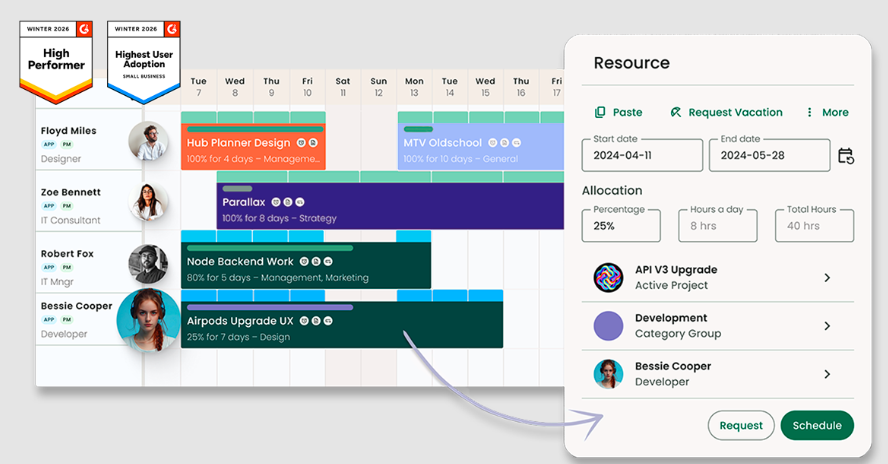
Harvest provides visibility into tracked time, but it offers fewer capabilities for managing team capacity and future workload. For growing businesses, understanding who is available, overallocated, or underutilised is essential for maintaining profitability and delivery performance.
Milient Resource Flow combines time tracking with capacity planning and resource management, helping teams balance workloads before issues impact project delivery.
-
-
-
Basic Project Visibility
-
-
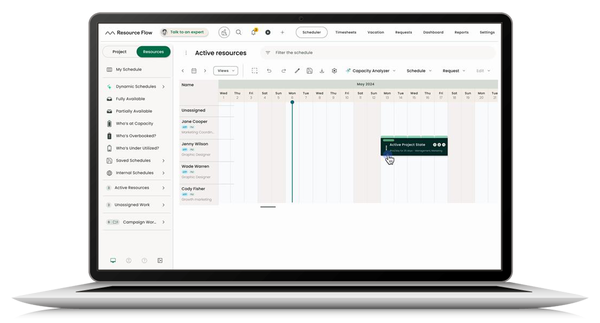
While Harvest helps teams track hours and budgets, organisations often need broader oversight of project performance. Monitoring project progress, resource allocation, utilisation rates, and financial health from a single view can become difficult when data is spread across multiple systems.
Milient brings project data, resources, timesheets, and reporting together in one platform, giving teams a clearer view of project performance.
-
-
-
-
Reporting That Supports Better Decisions
-
-
-
Harvest offers reporting features, but businesses with more complex operational requirements may need deeper insights into utilisation, capacity, profitability, and future demand. As teams scale, reporting often becomes a critical tool for improving efficiency and forecasting growth.
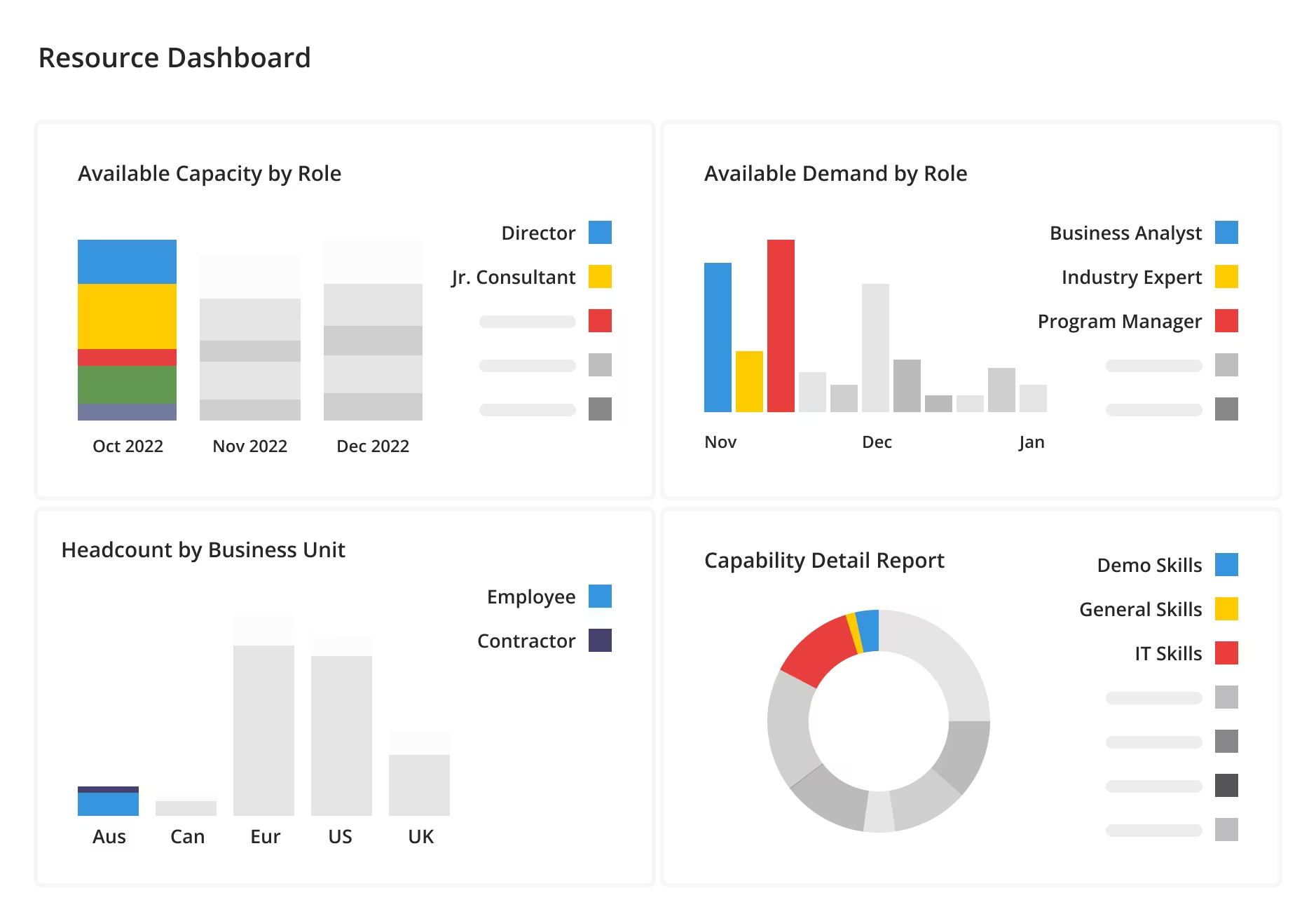
Milient Resource Flow provides real-time reporting and custom dashboards that help leaders make informed decisions using live operational data.
Finding Your Perfect Harvest Alternative
The best Harvest alternative depends on your business requirements. If you're a freelancer or small team focused primarily on time tracking, tools like Toggl Track may provide the simplicity you're looking for. Businesses seeking all-in-one operational workflows may prefer solutions such as Kantata, Scoro, or Blikk.
However, for organisations that need to combine time tracking with resource planning, capacity management, utilisation reporting, and project visibility, Milient Resource Flow offers a more comprehensive solution.
Engineering firms in particular may also find our dedicated guide to engineering time tracking software useful for comparing tools built around AEC workflows.
Explore Milient to see how connected project operations can help your team improve efficiency, forecasting, and profitability.
Frequently Asked Question
 Andrea Neeve
Marketing Associate
Want more content like this? Follow Milient:

/roles_2.jpg?width=1024&height=1024&name=roles_2.jpg)