If you’re researching CMap alternatives, the right choice often depends on whether you need project management, resource planning, or workflow automation. Here are the key options covered in this guide:
Key takeaways
 Milient Project Flow - Best for growing and mid-size AEC firms that need real-time profitability, phase-based invoicing, and full project financial control in one platform
Deltek Vantagepoint - Best for large enterprise A&E firms with complex ERP needs and dedicated operations teams to manage it
 Monograph - Best for small architecture studios (under 20 staff) already on QuickBooks Online wanting a simple step up from spreadsheets
Total Synergy - A practice management option for smaller AEC firms needing broad coverage across timesheets, invoicing, and budgets
 Fresh Projects - Worth considering for UK-based architecture practices needing RIBA stage support, though still maturing as a platform
Best CMap Alternatives Compared
| Tool | Best For | Standout Feature | Starting Price | Rating |
| Milient Project Flow | Growing & mid-size AEC firms | Real-time budget & profitability tracking | From £20/mo/collaborator | ⭐⭐⭐⭐⭐ |
| Deltek Vantagepoint | Large enterprise A&E firms | Full ERP with AI-assisted financials | Custom pricing | ⭐⭐⭐⭐ |
| Monograph | Small architecture firms on QuickBooks | Phase-based Gantt + QBO integration | From $450/mo (annual) | ⭐⭐⭐⭐ |
| Total Synergy | Small AEC firms needing broad practice managemen | Timesheets, invoicing & budgets in one tool | Custom pricing | ⭐⭐⭐⭐ |
| Fresh Projects | UK architecture firms needing RIBA support | Real-time margin tracking by project & team | Custom pricing | ⭐⭐⭐ |
1. Milient Software - Best for AEC Firms Wanting Full Project & Financial Control
/Blocs%20Project%20Cards.png?width=1529&height=628&name=Blocs%20Project%20Cards.png)
Milient is purpose-built professional services automation (PSA) software for architecture, engineering, and consulting firms. While simpler tools work fine when you're starting out, Milient is the solution for when you've outgrown "simple" combining real-time project financials, phase-level planning, resource management, and automated invoicing into one platform built specifically for design and AEC firms.
Key features
Milient goes far beyond basic task management. It brings together project planning, time and budget tracking, resource allocation, automated invoicing, and reporting into one tightly integrated platform
1. Project Progress Dashboard
/project_progress.png?width=1169&height=750&name=project_progress.png)
Milient's all-projects dashboard gives every stakeholder a live, filterable view of project health across the entire portfolio such as, status, fees, budget consumed, invoiced percentage, and revision history, all in one place. Unlike CMap, where users report that standard reports can feel limiting and often require exporting to Excel to get a full picture, Milient keeps everything surfaced and actionable without leaving the platform.
2. Time and Budget Tracking
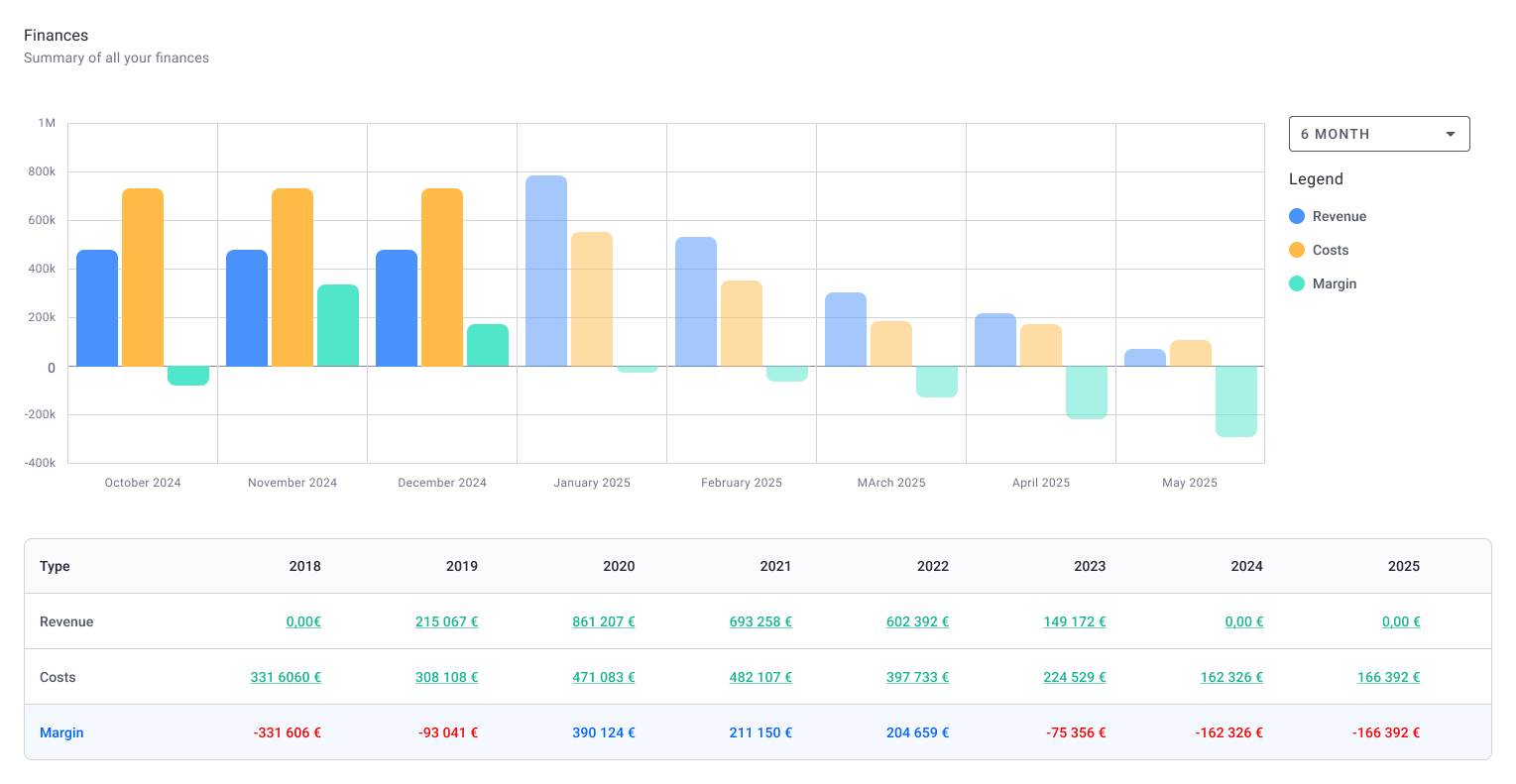
Milient tracks current hours, expected hours, and budgeted hours side-by-side at the project level, so you can see budget burn in real time, not after the fact.
The platform flags when a project is running ahead or behind budget instantly, helping project managers course-correct before overruns happen. Cmap users have flagged that its external cost tracking lacks the same monthly projection depth as its invoicing module, Milient addresses this gap with unified time and budget visibility from day one.
3. Phase-Level Planning (Gantt)
/planning_team.png?width=1578&height=1122&name=planning_team.png)
Milient's built-in Gantt planner lets you visualise project schedules across multiple projects and phases such as: Concept, Coordination, Technical Design, Manufacturing, and more on a single timeline.
This makes it easy to anticipate future workloads, spot scheduling conflicts, and plan resourcing ahead of time. CMap users have noted that getting data in and out for visualisation tools like Power BI can be tricky; Milient keeps this planning visibility native and real-time within the platform.
Pricing
| Plan | Price | Best For | Includes |
| Professional ⭐ Most popular | £20/mo* | Companies balancing multiple projects and growing ambitions | Everything from Grow, Flexible Reports, Quality & Compliance |
| Enterprise | Custom pricing | Large organisations with specialised needs and scalability | Tailored features, contact for details |
Where Project Flow Shines
-
-
- Genuinely easy to use: Reviewers consistently highlight how intuitive Project Flow is, the interface is clean, the display is easy to understand, and multi-language support means it works for international teams without friction.
- Purpose-built for AEC firms: From phase-based fee structures to role-level hourly rates and Gantt planning by project stage, every feature is designed around how architecture and engineering firms actually run projects, not adapted from a generic PM tool.
- Kills the spreadsheet habit for good: Users specifically call out the billable forecast feature as a game-changer, one reviewer noted it saved them "a huge amount of time" after years of relying on endless Excel files.
- Responsive, human support: Multiple reviewers praise the support team's speed and quality, a meaningful differentiator for firms that need help during onboarding or when things get complex.
-
Where Project Flow Falls Short
-
-
- Learning curve: Milient's depth and configurability means there's more to set up and learn upfront compared to lighter tools, teams may benefit from dedicated onboarding time to get full value quickly.
- Minor admin gaps: A couple of users note that invoice numbering based on accounting period dates and the word processing section could use further refinement, small friction points in an otherwise strong platform.
-
Customer Reviews
“Very user friendly. The display is easy to understand and I can change my operating language. I like the visualisation and the blog, which helps me and my colleagues communicate on our project progress." - Verified user, Capterra ⭐⭐⭐⭐⭐
"Project Flow allowed me to stop relying on endless Excel spreadsheets. Updating the billable forecast is the feature that has saved me a huge amount of time. The support team is very responsive, congratulations to the whole team." - Verified user, Capterra ⭐⭐⭐⭐⭐
"The ease of use, it's intuitive enough. It would be nice to integrate working hours spent on a project in the calendar, for a general view of them." -Verified user, Capterra ⭐⭐⭐⭐
Who is Project Flow Best For
-
-
- AEC firms of all sizes needing full visibility across projects, resources, fees, and overall performance.
- Project-based organisations looking for a connected system to manage schedules, financials, utilisation, and profitability.
- Firms scaling their operations: Studios growing headcount, managing multi-phase projects, or needing a scalable PSA platform that won't require a tool switch as they grow.
-
2. Monograph: Best for Small Architecture Firms Moving Away from Spreadsheets
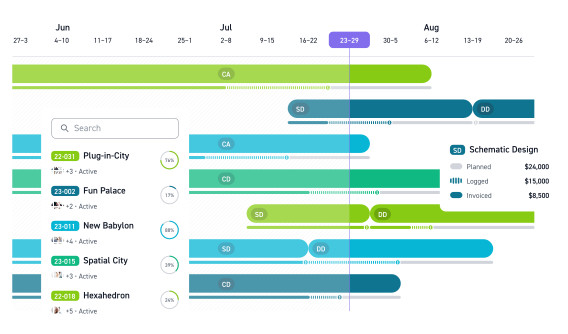
Monograph is project management software built exclusively for architecture firms. Used by 1,500+ firms, it focuses on the core pain points of smaller practices, budget overruns, admin overhead, and slow invoicing, in a clean, easy-to-use interface. It's a solid step up from spreadsheets, but firms with more complex needs will find it starts to show its limits.
Key features
Monograph keeps things focused: project tracking, staff scheduling, time tracking, invoicing, and QuickBooks Online integration. It's deliberately lightweight, which is a strength for smaller firms, but a constraint for those managing multi-entity or more complex project portfolios.
1. Project Tracking & Gantt Planning
Monograph gives architecture firms visibility over project phases on a simple Gantt timeline, with budget and invoiced amounts shown at the top. It's clean and easy to use, though limited in depth compared to more advanced platforms.
2. Staff Scheduling & Utilisation Tracking
Managers can plan hours, auto-assign timesheets, and track utilisation and billable hours per team member. Functional for small teams, but lacking the role-level rate management and resourcing depth growing firms need.
3. Invoicing & QuickBooks Integration
Monograph consolidates project data to generate invoices by phase and syncs with QuickBooks Online. Useful for firms already on QBO, though users flag that the invoicing process requires navigating multiple tabs and isn't as streamlined as it should be.
Pricing
| Plan | Price |
| Annual | $450–$600/mo (paid annually, based on ~10 staff) |
| Monthly | Higher rate - contact Monograph |
Where Monograph Software Shines
-
-
- Simple and architecture-specific: Immediately familiar to architects with no steep learning curve.
- QuickBooks integration: A genuine time-saver for firms already using QBO for accounting.
-
Where Monograph Software Falls Short
-
-
- Not a true all-in-one: Reviewers consistently flag needing additional tools to fill the gaps, particularly from estimate through to billing.
- Support has declined: Multiple users report support becoming slower and harder to reach over time, with no community forum for help.
- Reliability concerns: Users report billing errors and basic function bugs with slow resolution, a significant risk for small firms with no room for downtime.
-
Customer Reviews
"The QuickBooks integration and Gantt chart are useful, but I need to subscribe to other tools to make it complete. If it offered an all-in-one suite from estimate to billing, I'd highly recommend it." - Verified user, Capterra
"Functional and easy to use, but a work in progress. Support has become much slower and invoicing requires reviewing multiple tabs, we've suggested improvements but nothing has changed." - Verified user, Capterra
Who is Monograph Software Best For
-
-
- Small architecture firms (under 20 staff) already using QuickBooks Online who need a simple step up from spreadsheets.
- Practices that prioritise ease of use over depth, resourcing, or advanced financial analytics.
-
3. Deltek Vantagepoint: Best for Large Enterprise A&E Firms
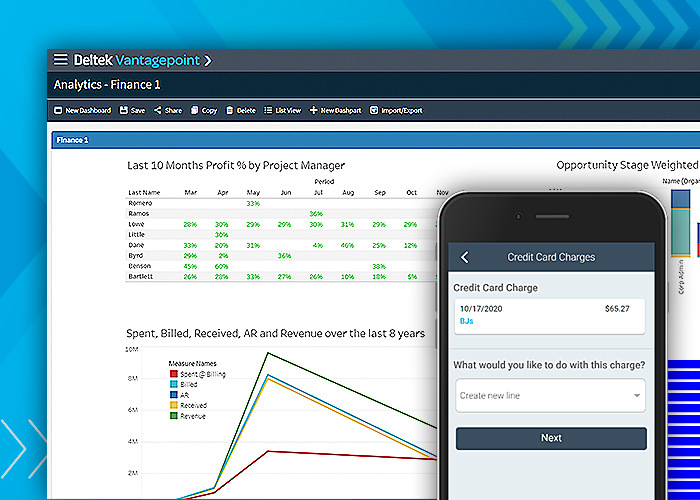
Deltek Vantagepoint is a full-suite ERP platform built for architecture, engineering, and consulting firms. It covers the entire project lifecycle, from pipeline and CRM through to project delivery, financials, and billing. It's a powerful system, but one that's built and priced for large, complex organisations rather than growing studios looking for agility.
Key features
Vantagepoint goes deep on enterprise-grade functionality. Its core strengths sit across four areas: business development and CRM, resource management, project delivery, and financial management, all underpinned by its AI assistant, Deltek Dela.
1. Pipeline & Client Relationship Management
Vantagepoint includes a built-in CRM with AI-generated client smart summaries (via Deltek Dela), pipeline tracking, and activity management. For large firms managing a heavy volume of bids and client relationships, this is genuinely useful, though for most AEC studios, this level of CRM complexity is more than they need day-to-day.
2. Resource & Staffing Management
The platform lets you assign the right people to the right roles, spot workload imbalances before they become problems, and shift team allocations as project demands change. Staffing forecasts give visibility ahead of upcoming project needs. It's thorough, but the depth of configuration required makes it better suited to firms with dedicated operations staff.
3. Project Delivery & Monitoring
Vantagepoint centralises project planning, task tracking, and KPI monitoring. Automation and workflows help teams move faster, and project-specific dashboards give managers a real-time health check. Solid functionality, though users often note the interface feels dated compared to more modern platforms.
Pricing
| Plan | Price |
| Vantagepoint | Custom pricing, contact Deltek for a quote |
Where Deltek Vantagepoint software shines
- Hyper-focused on the engineering space: Vantagepoint is purpose-built for professional services and consulting engineers, tracking revenue recognition, WBS structures, and project progress in ways generic tools simply can't match.
- Customisable for complex firms: Users praise how adaptable the platform is for specialist engineering workflows, and the customer ideas portal gives firms a direct line to influence the product roadmap.
- Strong project visibility on launch: Teams that invest in a proper implementation report good dashboard visibility and intuitive interfaces for day-to-day project tracking once fully set up.
Where Deltek Vantagepoint software falls short
- Dated interface: Users consistently flag that entering time and data requires too many clicks, approvals are hard to locate, and the UI hasn't kept pace with modern platforms, making everyday use feel slow.
- AI tools underdeliver: The built-in AI agent (Deltek Dela) is flagged as inconsistent, slow to respond, and not useful enough to replace manual workflows, a notable gap given how heavily it's marketed.
- Documentation and bug fixes lag behind: Users report that help documentation is often outdated, the ideas portal rarely leads to action despite years of requests, and known defects take a long time to be resolved.
Customer reviews
"The dashboards give great visibility into projects. However, a lot of help documentation is outdated, the ideas portal rarely leads to action despite years of requests, and known defects take a long time to be resolved." - Verified user, G2
"Hyper-focused on the engineering space and highly customisable for professional services. Well designed for revenue recognition and time tracking into WBS structures. The interface is a little dated and not as intuitive, entering data requires numerous clicks and can be cumbersome." - Verified user, G2
Who is Deltek Vantagepoint software Best for
-
-
- Large A&E and consulting firms: Organisations with 50+ staff, complex multi-project portfolios, and dedicated operations or finance teams to manage the system.
- Firms needing full ERP coverage: Businesses that require CRM, project delivery, resourcing, and financial management all in one enterprise platform.
- Firms with IT resource to support implementation: Vantagepoint rewards investment in setup and configuration, it's not a plug-and-play solution.
-
4. Total Synergy: Best for AEC Firms Needing Basic Practice Management
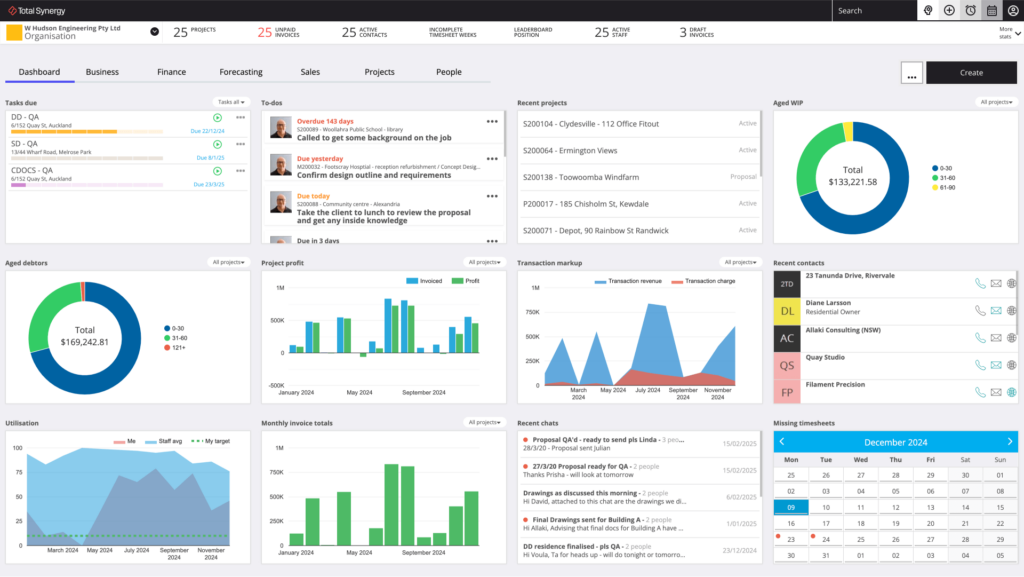
Total Synergy is project management software built for architects and engineers, covering timesheets, invoicing, resource allocation, budgeting, and project tracking in one platform.
It's a solid practice management tool, particularly for Australian and New Zealand firms, but users note the reporting is complex and some areas of the interface feel clunky compared to more modern alternatives.
Key features
Total Synergy covers the core needs of AEC practice management: time tracking, invoicing, resource allocation, budgets and quotes, and project monitoring, all under one roof.
1. Time Tracking & Invoicing
Total Synergy simplifies timesheet entry and ties invoicing directly to project milestones, helping firms reduce admin time and chase fewer payments. It works, though users flag that timesheets don't total as clearly as they should and the invoicing process has room for improvement.
2. Project & Risk Management
The platform offers real-time project insights, budget and quote tools, and phase-level planning to help firms stay on time and on budget. Functional for day-to-day project oversight, though reporting is flagged by multiple users as complicated and not particularly user-friendly.
3. Resource Allocation
Total Synergy gives managers visibility over who's working on what and helps balance team workloads. Users note, however, that the resource planning page lacks a clear link between project timing and people availability, a gap that limits its usefulness for forward planning.
Where Total Synergy software shines
-
-
- Broad practice management coverage: Client details, timesheets, budgets, invoicing, correspondence, and project health checks all in one platform, users describe it as keeping "the practice's engine running."
- Strong onboarding and support: Reviewers consistently praise the service from sign-up through onboarding and beyond, with the AI assistant "Blue" noted for resolving queries quickly.
-
Where Total Synergy software falls short
-
-
- Reporting is complex and unfriendly: Multiple users flag that reports are difficult to use and need significant development, a real gap for firms that rely on data to make decisions.
- Clunky cloud interface: Users who migrated from the desktop version note that some features feel less intuitive in the cloud app, with certain areas described as running "a little clunky."
- Resource planning gaps: The link between project timing and people availability in the resource planning view isn't clear enough, limiting effective forward resourcing.
-
Customer reviews
"The software takes care of so many aspects of our business, timesheets, financial controls, project budgets, invoicing, and correspondence. It's a daily health check. However, some features are not as intuitive as the original desktop app and the cloud version feels a little clunky in places." - Verified user, Capterra
"Ease of use, the AI assistant answers most queries quickly, and customer service is great. Project managers can see project performance with clarity. Merging was not easy and support around uploads was not enough." - Verified user, Capterra
Who Total Synergy is best for
-
-
- Small to mid-size architecture and engineering firms looking for broad practice management in one tool.
- Firms prioritising invoicing and timesheet simplicity over advanced analytics or resource depth.
-
Pricing
| Plan | Price |
| All plans | Contact Total Synergy for a quote |
5. Fresh Projects
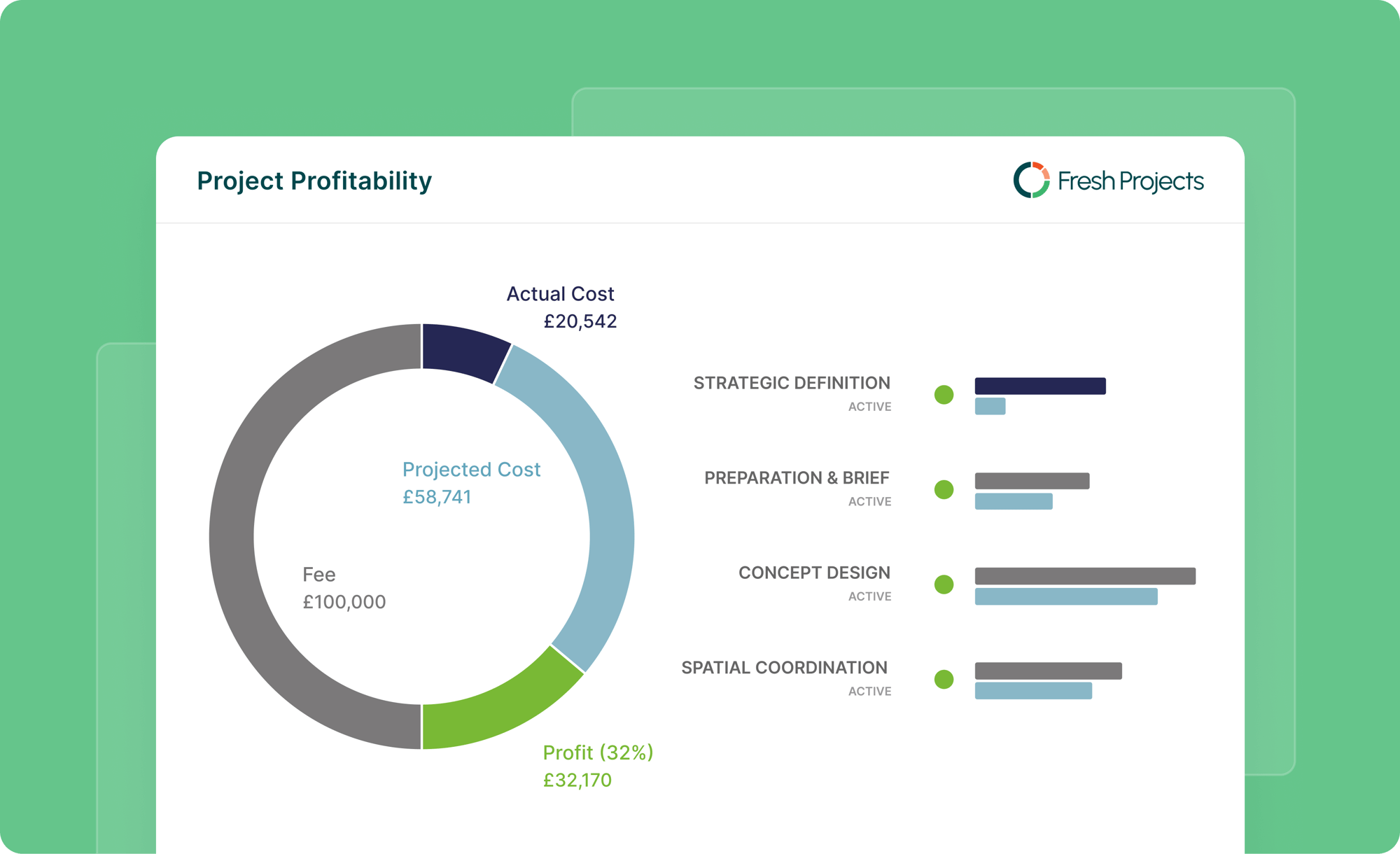
Fresh Projects is an A&E-focused practice performance platform covering project profitability, timesheets, invoicing, and reporting. It's built for the built environment and positions itself around real-time margin visibility. That said, it's a newer, less established platform and user reviews flag limitations around multi-office communication and integrations.
Key features
Fresh Projects focuses on three core areas: real-time profitability tracking, consolidated project and finance data, and firm-wide reporting, all aimed at helping A&E leaders make faster decisions.
1. Real-Time Profitability Tracking
Tracks margin performance across projects, teams, and disciplines in real time, helping firms spot write-offs before they compound.
2. Consolidated Reporting
Brings project and finance data into a single reporting model, with LiveSheet functionality that pushes updates into Excel automatically.
3. RIBA Stage & Fee Structure Support
Handles RIBA stages, mixed fee structures, and variations, making it relevant for UK architecture practices in particular.
Where Fresh Projects software shines
-
-
- Built for A&E: RIBA stage support and built-environment workflows make it immediately familiar.
- Real-time margin visibility: Strong focus on firm-wide profitability tracking for practice leaders.
-
Where Fresh Projects software falls short
-
-
- Limited multi-office support: Users flag that communication across satellite offices isn't well supported.
- Integrations need work: More connectivity with other productivity tools is flagged as a gap by reviewers.
- Still maturing: Newer to market, firms with complex or immediate needs may find it not quite ready.
-
Customer reviews
"Helps coordinate and designate responsibilities to get projects done on time. However, with satellite offices in different countries, future versions need to improve remote communication." - Verified user, Capterra
"Good for most project types. More integrations with other tools expected in future versions and the UI could be better." - Verified user, Capterra
Who Fresh Projects is best for
-
-
- UK-based architecture firms needing RIBA stage support and real-time fee tracking.
- Single or small multi-office practices without complex cross-entity needs.
-
Pricing
| Plan | Min Seats | Best For |
| Core | 5 | Growing practices needing reliable project control |
| Pro Popular | 5 | Established firms needing forecasting and resourcing |
| Ultimate | 5 | Large firms with multiple offices and entities |
4 Reasons to consider an alternative to CMap
CMAP users report having to wait for overnight database extractions before data refreshes, meaning by the time issues are visible, it's often too late to act. For fast-moving project environments, delayed data is a serious operational risk.
1. Reporting feels limited and requires too much excel
CMAP users consistently flag that standard reports don't go far enough. Combining data across projects often means exporting to Excel and finishing the work manually, adding time and increasing the risk of errors. For firms that rely on accurate, timely reporting to make decisions, this is a real bottleneck.
2. External Cost Tracking Lacks the Same Depth as Invoicing
One of CMAP's most-cited pain points is that external costs can't be monitored with the same monthly projection detail as invoicing. This means firms are working with an incomplete financial picture, making it harder to protect margins and forecast accurately.
/invoices.png?width=913&height=523&name=invoices.png)
3. Real-time data updates are too slow
CMAP users report having to wait for overnight database extractions before data refreshes, meaning by the time issues are visible, it's often too late to act. For fast-moving project environments, delayed data is a serious operational risk.
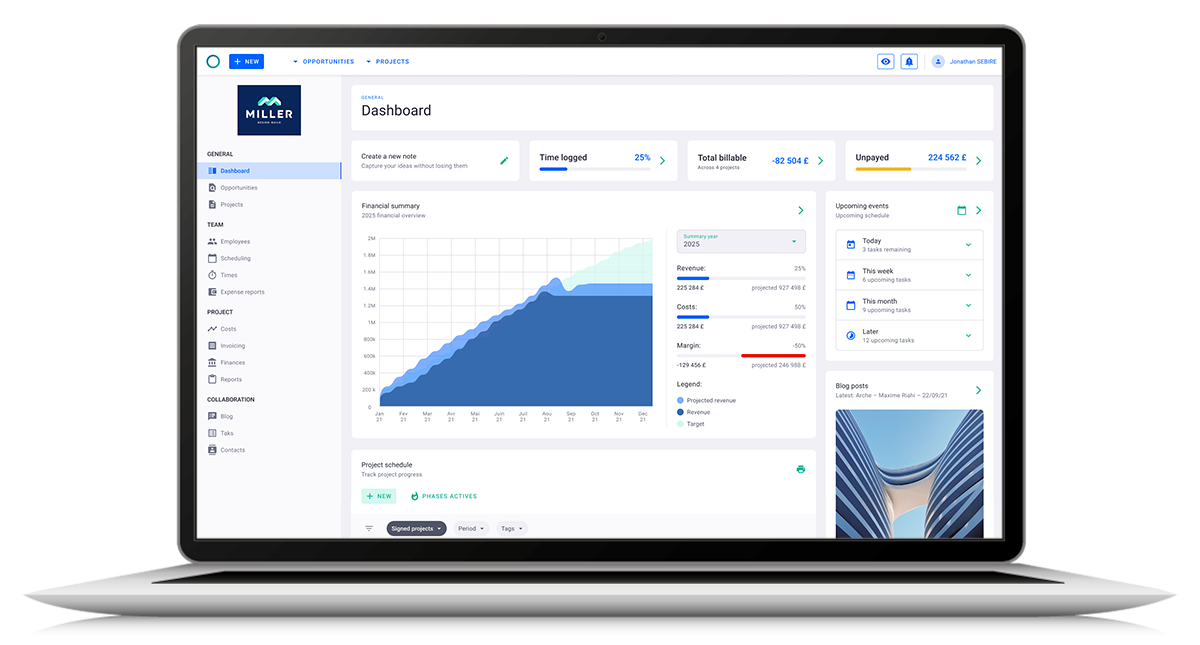
Milient keeps project data live and up to date across your entire portfolio, so your team is always working from the same current picture.
4. Pricing feels high for the functionality used
Multiple CMAP users note that the cost of the platform feels disproportionate to the features they actively use day-to-day. For firms that aren't using the full suite, that's budget that could be better spent elsewhere.
You can read more about how performance stacks up against cost in our detailed CMap review breakdown.
Get the Best CMap Alternative: Milient Software
Choosing the right project management platform comes down to what your firm actually needs. For solo practitioners or very small studios, simpler tools like Monograph may be enough to get started. For large enterprises with complex ERP requirements, Deltek Vantagepoint covers that territory.
But for growing AEC firms that want real-time profitability, phase-based invoicing, and genuine project financial control, without enterprise complexity or price tags, Milient Project Flow is the clear choice. It's purpose-built for architecture, engineering, and consulting firms that have outgrown "simple" and need a platform that scales with them.
 Andrea Neeve
Marketing Associate
Want more content like this? Follow Milient: