Key takeaways
 CMap is a powerful, feature-rich platform best suited to mid-size to large AEC firms with straightforward fee-for-service billing and the budget to match, but pricing is quote-only and reporting flexibility has real limits.
 Milient Project Flow is the stronger alternative for growing AEC practices (1–20+ staff) that need transparent pricing, flexible billing workflows, and a system the whole team will actually use, starting from £13 per user per month.
 If you're switching from spreadsheets and want a single source of truth for projects, resourcing, and invoicing, Milient is the more accessible and adaptable choice for most practices.
CMap Review: Is It the Right AEC Platform for Your Firm?
This CMap review covers everything you need to know: what it does well, where it falls short, how its pricing works, and what real users say. We'll also look at the best CMap alternative for practices that need something more flexible, Milient Project Flow, so you can make a genuinely informed decision without booking five sales calls first.
CMAP vs Milient Software: At a Glance
Who is CMAP best for?
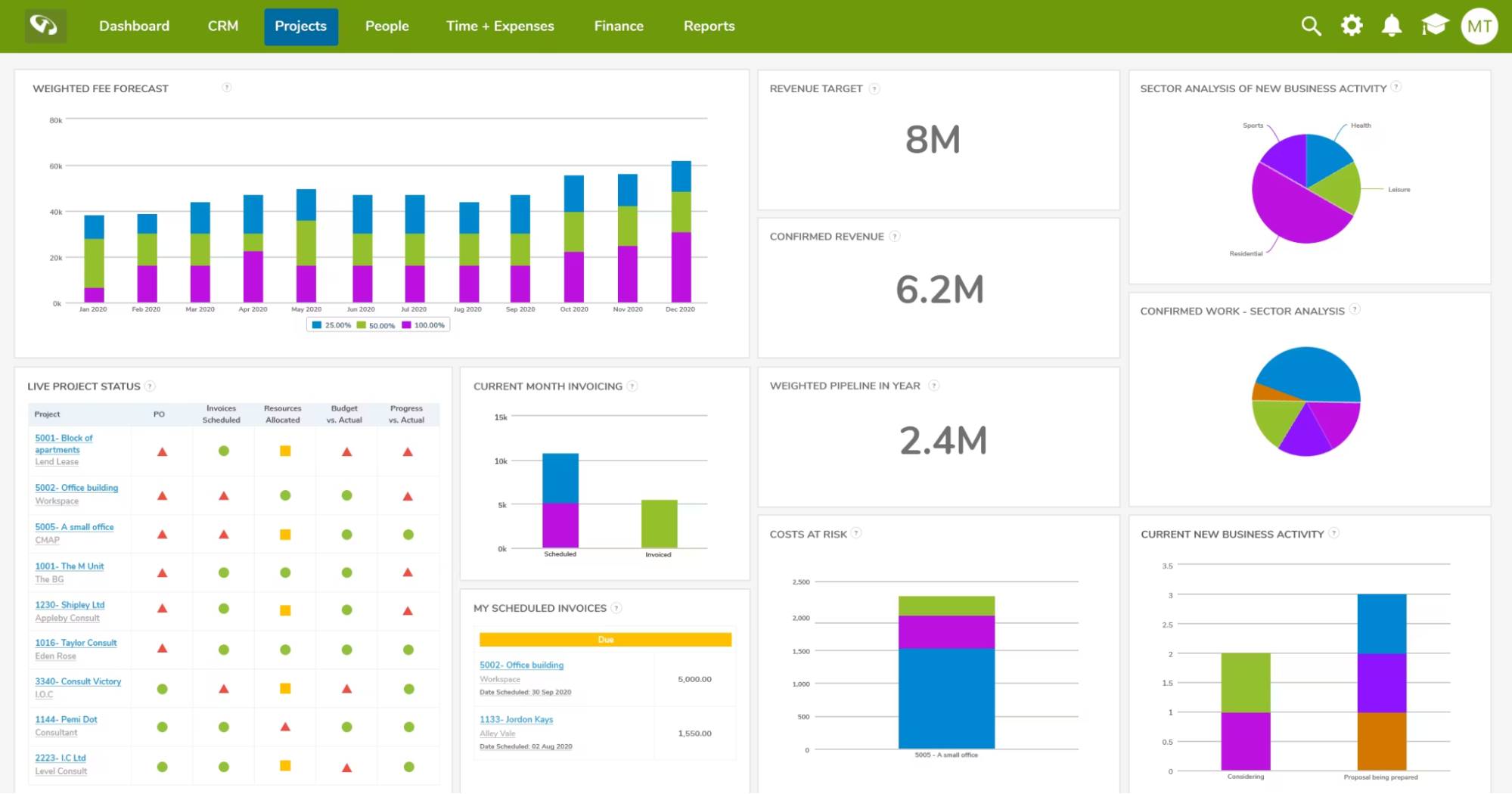
CMap is a purpose-built practice management platform aimed squarely at architecture, engineering, and consulting (AEC) firms. It's well-suited to organisations that have outgrown spreadsheets and want a single system to connect their pipeline, delivery, and finance data.
CMAP Key features
CMap covers the full project lifecycle, from winning work to getting paid. Below are the standout modules that set it apart from generic project management tools.
- Job Costing & CRM
CMap combines CRM and job costing into a single workflow, letting teams generate accurate fee proposals using historical project data and an AI-powered fee estimator. Budgets can be built directly from resource profiles, reducing guesswork at the proposal stage.
- Resourcing
The resourcing module gives managers a heatmap view of team availability and workload, with a staffing prediction report to flag upcoming demand. An AI-powered suggestion engine recommends the best-fit person for a project based on skills, availability, and role.
- Task Management
Tasks are tied directly to project stages and budgets, keeping delivery progress and financial data in sync. A native Kanban board removes the need for third-party tools, and a My Tasks dashboard gives each team member a clear view of their workload.
- Invoicing & Revenue
CMap centralises timesheets, expenses, and budgets so invoicing becomes a matter of hours rather than days. A clear invoice calendar shows the full schedule of future billing, and integrations with Xero, Sage, and QuickBooks mean data flows straight into your accounting software.
CMAP Positives
-
-
- Genuinely AEC-specific: Unlike generic PM tools, CMap is built around how architecture and engineering firms actually work, stages, fee types, resourcing by discipline, and invoice calendars are all native concepts, not bolt-ons.
- Single source of truth: Connecting CRM, projects, timesheets, and finance in one system means data updated in one place flows everywhere. Less re-keying, fewer reconciliation headaches.
- AI-powered features built in: CMap Intelligence adds AI-driven fee estimation and resourcing suggestions directly into everyday workflows, without requiring a separate tool or prompting.
-
CMAP Negatives
-
-
- Cost: CMap is a significant financial investment, particularly for smaller organisations. Pricing is not published and requires a sales conversation, which can make budgeting difficult upfront.
- Designed around fee-for-service billing: The platform assumes a traditional consultancy model, quote, deliver, invoice. Organisations funded through grants or retainers may find the workflow awkward and somewhat retrospective.
- Reporting limitations: Some users report difficulty producing the exact reports their firm needs, particularly around external cost tracking and monthly projections. Custom reporting helps, but not all gaps are covered out of the box.
- Learning curve: While the platform is described as intuitive, the breadth of functionality means initial setup and staff adoption require dedicated time and effort.
-
Customer reviews
POSITIVE REVIEW
"Very handy to have so many elements of the business connected in one piece of software. Updating one piece of data updates throughout the system. The link with Xero and with our document control in CMap PIM strengthens this. Support is also generally very quick to come back and resolve."
CRITICAL REVIEW
"CMAP is really geared toward traditional consultancies, where you create a quote for the client and then the client pays. With funded work, it tends to be the other way around, so we end up creating a quote in CMAP almost retrospectively."
CMAP Pricing
CMap does not publish pricing publicly. All plans are quote-based and tailored to firm size and requirements. It is widely described by users as a premium-priced product. Expect a sales process before getting to a number.
Milient Project Flow: An Alternative
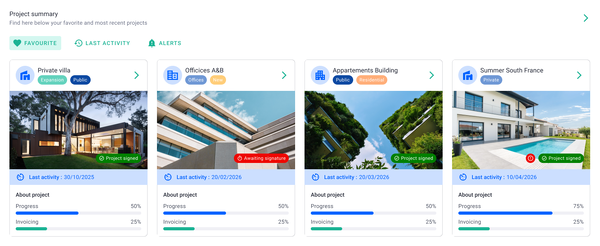
If CMap's pricing opacity, fee-for-service workflow assumptions, or reporting limitations raised some concerns, Milient Project Flow is worth a close look.
Project Flow covers the same AEC essentials, timekeeping, resourcing, invoicing, reporting but, with published pricing, a more flexible billing workflow, and a platform built for growing practices that need real control without the overhead of an enterprise system.
Key features
Project Flow covers the full project lifecycle from proposal to invoice. Here are the three features that most directly address the pain points CMap users commonly report.
Real-time project performance & reporting
Project Flow gives every project its own live dashboard, surfacing budget vs actuals, resource consumption, and billing status in real time, not at month-end. Pre-built reports are designed specifically for AEC firms, and the finances module gives teams full control over budget, costs, and profitability across every project. Users on Capterra specifically call out the WIP reports as a highlight for their accuracy and clarity.
/project_dashboard.png?width=1200&height=645&name=project_dashboard.png)
-
-
- Live budget vs. actuals on every project
- Financial KPIs on the homepage dashboard
- Reports and follow-up tools to spot trends and track key figures
- See what drives profitability with real-time data
-
Resource planning with skills & capacity filters
The resourcing module lets managers filter availability by competence, seniority, location, or custom tags, so finding the right person for a project takes minutes rather than a morning. A staffing overview shows capacity across the whole company in a single view, making it easy to balance workloads before overruns happen rather than after. Custom tags let you create groups like "junior engineers" or "UX leads" and plan at that level.
/planning_team.png?width=1578&height=1122&name=planning_team.png)
-
-
- Filter by skill, seniority, location, or custom tag
- Company-wide capacity view with forward planning
- Create custom groups - e.g. junior engineers, UX leads
- Resourcing data feeds directly into project budgets
-
Integrated billing & invoicing
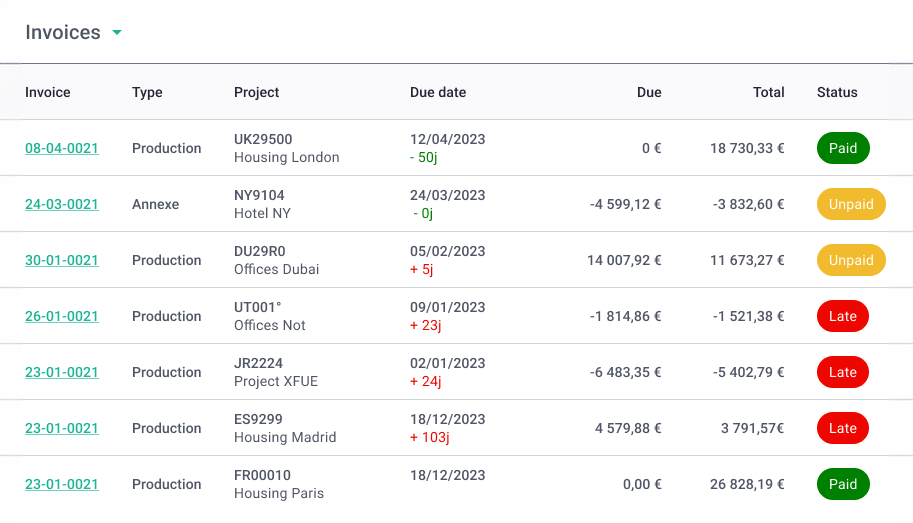
Timesheets, expenses, and project budgets sit in the same system, so invoicing is a matter of pulling together data that's already there rather than reconciling across platforms. Accurate invoices can be created in minutes based on hours and expenses already logged, and direct integrations with accounting software mean approved invoices flow straight through without re-entry. This is the same benefit CMap claims, but Project Flow offers it with more billing model flexibility.
-
-
- Create accurate invoices in minutes from hours already in the system
- Full control over budget, costs, and profitability across all projects
- Quote-to-invoice in a single workflow
- Accounting integrations eliminate double data entry
-
Where Milient shines
-
-
- Kills the spreadsheet habit: Users consistently report that Project Flow replaced their reliance on Excel entirely, particularly for billable forecasting and time tracking, which previously required constant manual updates across multiple files.
- Easy to pick up across the team: The interface is designed to be accessible for all users, not just project leads, meaning less time spent on training and fewer excuses for late timesheet submissions.
- Financial visibility in one place: The summary view and cross-analysis tools give managers a clear picture of profitability, hour tracking, and client financials without having to pull data from multiple sources.
-
Where Milient falls short
-
-
- Timesheet validation feedback: Some users flag that it isn't always clear when a timesheet has been submitted or approved, and would benefit from clearer notifications at each stage.
- Proposal and template editing: A few users find the proposal template tools less intuitive than the rest of the platform, layout options are limited and text editing within templates can feel clunky compared to the core project management experience.
-
Customer reviews
"I like that it is very user friendly. For the typical user, the display is easy to understand and I can change my operating language as well. I like the visualization and the blog, which helps me and my colleagues communicate on our project progress."
- Verified reviewer, Capterra (5.0 ★)
"The ease of use, it's intuitive enough. It would be nice to integrate the working hours spent on a project in the calendar, in order to have a general view of them."
- Verified reviewer, Capterra (4.0 ★)
Who Milient is best for
-
-
- Growing AEC practices (up to 19 staff): The Grow plan sweet spot, teams that have outgrown spreadsheets and need proper project oversight without an enterprise price tag.
- Scaling consultancies (20+ staff): The Pro plan is built for firms where projects span departments, teams, or multiple companies, with more advanced reporting and compliance tools.
- Practices with non-standard billing: Firms working on retainers, grants, or hybrid billing models that don't fit CMap's fee-for-service assumptions.
-
Pricing
Project Flow has published pricing across three tiers, a meaningful advantage over CMap's quote-only model. Prices are per user per month.
CMap Review: What's Our Verdict?
CMap is a capable platform for mid-size AEC firms that operate on a traditional fee-for-service model and have the budget to match.
The depth of functionality is genuine. Resourcing, invoicing, project performance, and reporting are all well thought through, and the support quality stands out. But the lack of pricing transparency, the assumption that every project follows a quote-then-invoice pattern, and recurring user complaints around external cost reporting and custom reporting gaps mean it isn't the right fit for every firm.
If you're a growing practice watching your margins, there are more accessible alternatives worth considering.
Take Control of Your Projects, Resources, and Profitability with Milient
CMap works well for larger, established consultancies with deep pockets and straightforward billing.
But if you're a growing AEC practice, managing multiple projects, keeping a close eye on profitability, and needing a system that adapts to how you actually work, Milient Project Flow is built for you. Transparent pricing, flexible billing, and a platform your whole team will actually use.
/DO%20not%20use%2c%20old%20-%20Fees%20and%20Project%20Members.png?width=1080&height=1080&name=DO%20not%20use%2c%20old%20-%20Fees%20and%20Project%20Members.png)
FAQs
 Andrea Neeve
Marketing Associate
Want more content like this? Follow Milient: