Key takeaways
 Pick Milient Project Flow for workloads tied to phase budgets: Best for growing architecture, engineering, and consulting (AEC) firms that have outgrown staffing spreadsheets to plan people against phase fees.
 Choose Monograph or CMap for AEC staffing with a regional fit: Monograph suits small US architecture practices that staff phase by phase. CMap suits UK practices that forecast staff demand from their sales pipeline.
 Consider Deltek Vantagepoint or Projectworks for finance-led resourcing: Deltek Vantagepoint puts skills-based resourcing inside a full enterprise resource planning (ERP) system for large firms. Projectworks pairs resourcing with utilization and margin forecasting for engineering consultancies.
 Use Asana or Kantata when workload sits outside AEC delivery: Asana shows task-level workload for cross-functional teams. Kantata staffs large professional services teams by skill across regions.
A 2025 Royal Institute of British Architects (RIBA) survey found that 90% of architecture practice staff work beyond contracted hours. Workload management software shows that overload early, while the phase fee can still absorb a fix.
7 Best Workload Management Software: A Quick Overview
1. Milient Project Flow: Best for AEC Firms Balancing Workloads Against Phase Budgets
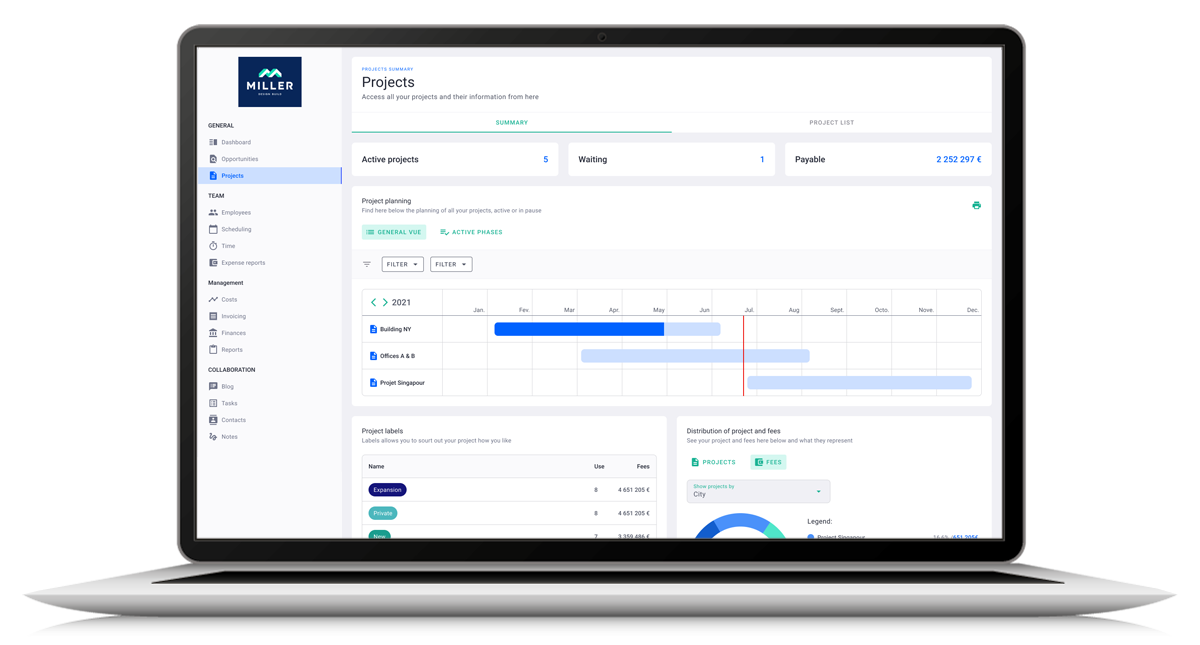
Milient Project Flow is project management software built for AEC firms. Staff planning shares one project record with phases, budgets, and invoices, so managers can assess staffing changes against the project budget.
Project Flow Key Features
These features help managers check availability, assign work, and track hours against the budget.
Live Capacity and Workload Across Every Project
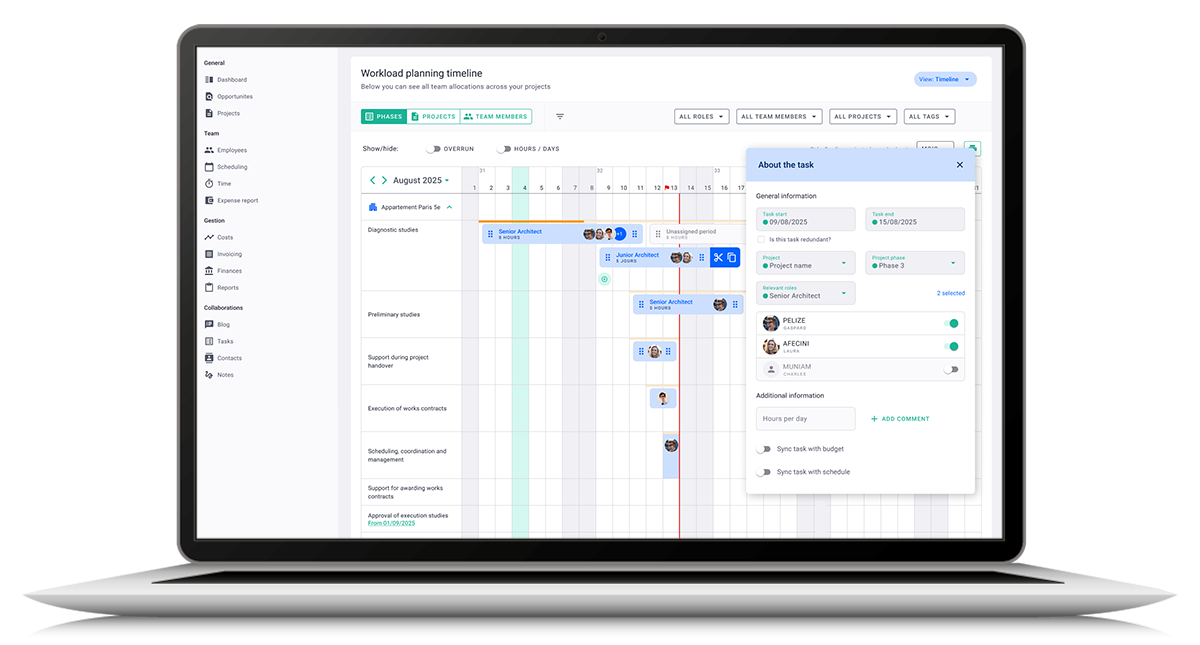
The Project Flow resource planner shows each person's capacity, availability, and workload across every live project. Allocations sit in a calendar-based view, and a live view tracks utilization as schedules change.
That replaces the spreadsheet most practices bring to the Monday resources meeting. A practice director sees the project architect is booked across three jobs next week before agreeing a new start date.
Role-Based Allocation With Hourly Rates

Each project carries roles such as project manager, architect, economist, or intern, each with its own hourly rate. Project Flow tracks allocation at role level and splits it between billable and non-billable time.
That shows what a staffing choice costs the phase, at the billing rate you set for each role. Move drawing work from a senior architect to an intern, and the role view shows the change in fee burn.
Planned Versus Actual Hours Against Phase Budgets

Staff log time against projects, phases, and budgets, and the planner compares actual hours with planned hours. Current, expected, and budgeted hours sit side by side, and Project Flow flags overruns as they happen.
If a Stage 4 package uses hours faster than planned, the project manager can investigate while work is still underway. Depending on the cause, the response might be to reassign work or review the remaining scope.
Project Flow Pricing
Where Project Flow Shines
-
-
- Built around AEC delivery: Projects carry phases, roles, fees, and invoices on one record, from offer to invoice. Workload decisions use the same structure your practice already bills by.
- Ends spreadsheet dependency: The billable forecast feature replaces the Excel forecast many practices keep beside their project tool.
- Plan around overlapping project phases: The Gantt planner shows phases across multiple projects on one timeline. Managers can spot overlapping delivery periods and check staffing before those commitments become next week’s overload.
- See project pressures across the portfolio: The all-projects dashboard brings status, fees, and budget consumed into one view. When several projects need attention, managers can review their progress and financial position alongside the resource plan before deciding where to assign available staff.
-
Where Project Flow Falls Short
-
-
- Timesheet status isn't always clear: It's not always obvious when a timesheet is submitted or validated, and there are no approval-status notifications. Project managers who rely on fresh actuals check status by hand.
- No calendar view for logged hours: Staff can’t see their recorded project hours laid out across the week, making it harder to review how they spent their time at a glance.
-
Project Flow Customer Reviews
"Very user-friendly. The display is easy to understand, and I can change my operating language. I like the visualisation and the blog, which helps me and my colleagues communicate on our project progress." Verified user, Capterra
"Project Flow allowed me to stop relying on endless Excel spreadsheets. Updating the billable forecast is the feature that has saved me a huge amount of time. The support team is very responsive." Another verified user, Capterra
“Recording time against specific project stages has given us much better visibility into where our time is going and how our projects are performing." Ian Blake, Founder and Managing Director, IB Architects.
Who Project Flow Is Best For
-
-
- Practices staffing from a spreadsheet: Firms that struggle to keep allocations current as project schedules change.
- Engineering consultancies juggling phases: Teams on many concurrent jobs who need to compare staffing commitments with remaining budgets.
-
2. Monograph: Best for Small US Architecture Practices Staffing Phase by Phase

Monograph plans staff phase by phase, with each person's hours, role, and rate set per phase.
While Total Synergy acquired Monograph on August 10, 2026, Monograph told customers there are no immediate changes to the product or contracts.
Monograph Key Features
-
-
- Phase-level staffing with roles and rates: Each phase carries its own team, roles, rates, and budget, and one person can hold different roles on different phases.
- Utilization targets and rebalancing: Each person gets a utilization target, and planned hours show against their capacity. People and Project views show over- and under-allocation by week, month, quarter, or year.
- Capacity forecasting against leads: Staffing commitments sit beside the workload of prospective leads. Principals check whether the team has room before saying yes to a new project.
-
Monograph Pricing
Where Monograph Shines
-
-
- Free consultant collaboration: Outside consultant firms join a shared workspace for any project or phase at no added cost. Milestones, deliverables, and timelines stay visible to both sides from day one.
- QuickBooks Online connection: Time tracking flows into draft invoices, with invoice export, contact syncs, and real-cost imports for profit forecasting in QuickBooks Online.
-
Where Monograph Falls Short
-
-
- Invoicing on migrated projects: A February 2026 Capterra reviewer reported that previously billed amounts didn't carry over on projects started before migration. Practices switching mid-project carry the most risk.
- Pipeline sold separately: Pipeline management sits outside the core plan as a paid add-on. Practices that want sales pipeline and staffing under one subscription pay for an extra module.
-
Monograph Customer Reviews
G2:
“I like that Monograph integrates time tracking, billing, and project planning into one platform. I also like that it has a visual display of information to help understand projects at a glance,” shares Ming T.
Capterra:
“The fact that I need to subscribe to other tools to make it complete. If Monograph could offer an all-in-one suite (from estimate to billing), I would highly recommend it,” says Marc G.
Who Monograph Is Best For
-
- US studios staffing by phase: Practices on QuickBooks Online that staff by phase and want outside consultants in the same workspace.
3. CMap: Best for UK Practices Forecasting Staff Demand From the Pipeline
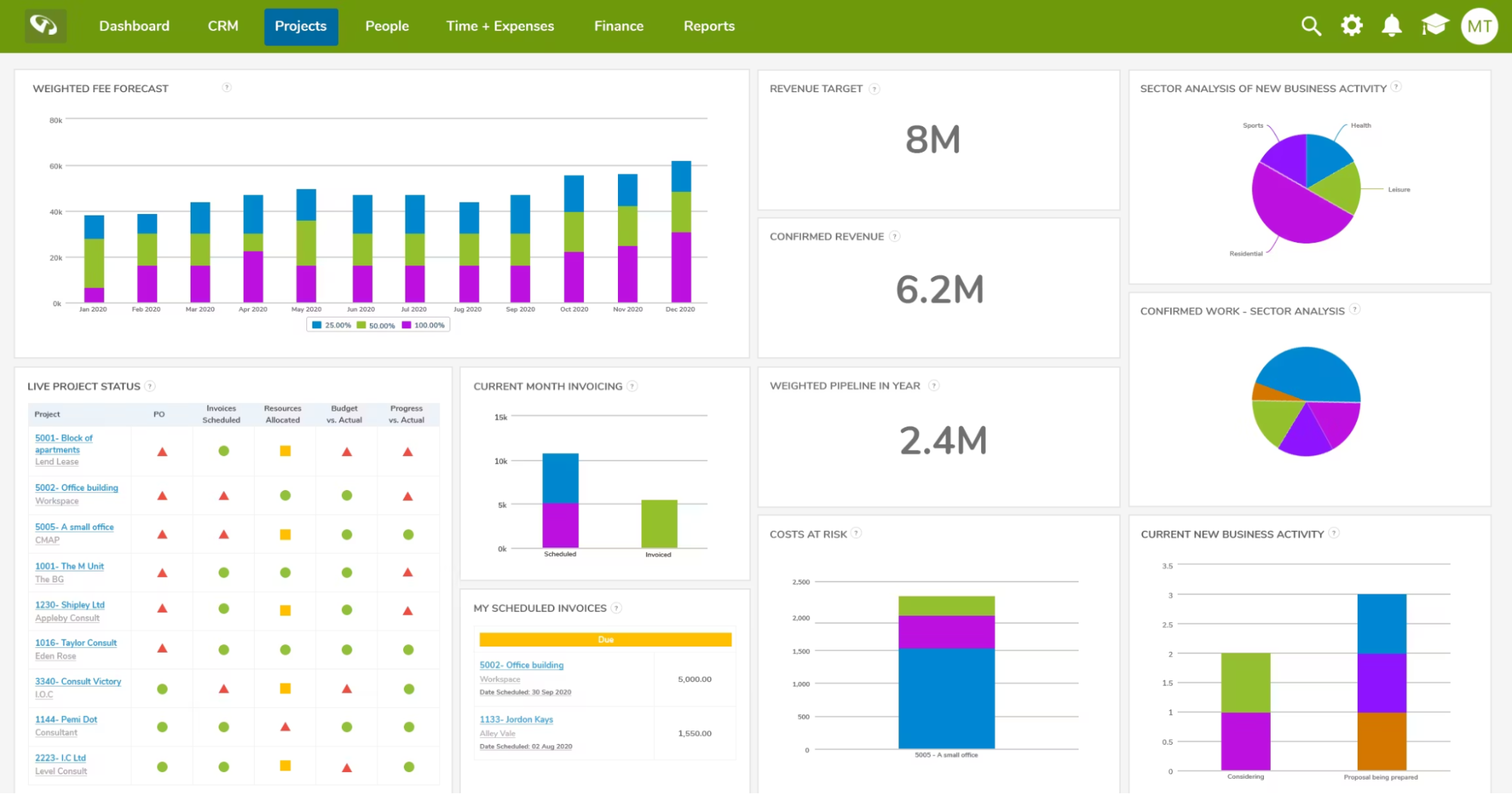
CMap combines customer relationship management (CRM), job costing, resourcing and invoicing, with an AEC Edition for architects and engineers. Staffing forecasts start from the pipeline, so tentative work shapes hiring plans before it's won.
CMap Key Features
-
-
- Staffing prediction report: The report separates short spikes in demand from sustained increases that need extra capacity.
- Skills and competencies on people records: Custom fields hold skills such as languages or sector experience, and they flow into resourcing reports. Growth includes five custom fields, and Pro and Enterprise are unlimited.
- Utilisation targets and reports: Productivity targets sit on each person, with utilization and productivity reports built in. Resourcing changes update project budgets as they happen.
-
CMap Pricing
Where CMap Shines
- Accounting integrations: CMap connects to Xero and QuickBooks, with invoicing, purchase orders, and revenue forecasting with work in progress (WIP) included.
- Timesheets from Outlook and mobile: Every plan includes the CMap for Outlook add-in and the CMap Go mobile app for timesheets and expenses. Staff log time where they already work.
- Fee Estimator for job costing: The Fee Estimator builds fees from rate cards on every plan. Pro and Enterprise also auto-estimate fees from resourcing plans.
Where CMap Falls Short
-
-
- Workload schedule sits on Pro: The drag-and-drop workload and resource schedules, plus advanced staffing reports, start on the Pro plan. Growth lets you plan staff through reports instead.
- Implementation lead time: G2 reviewers report an average of three months to implement CMap. If your practice has an urgent need for staffing visibility, confirm the rollout schedule and which features become available first.
-
CMap Customer Reviews
Capterra:
“I like how quickly and efficiently I can use it for putting in my time sheets, using it for expenses and putting in my annual leave. The whole process for doing these tasks in particular can be very easy once you know what and how to do it,” says Evan P., an Architectural Technologist.
G2:
“There is quite a big lag problem, and sometimes it's very slow,” shares Riley N., a Structural Engineering Degree Apprentice.
Who CMap Is Best For
-
-
- UK practices led by the pipeline: Architecture and engineering firms that want CRM, resourcing and job costing in one system and plan hiring from forecast demand.
-
4. Deltek Vantagepoint: Best for Large A&E Firms Wanting Resourcing Inside an ERP
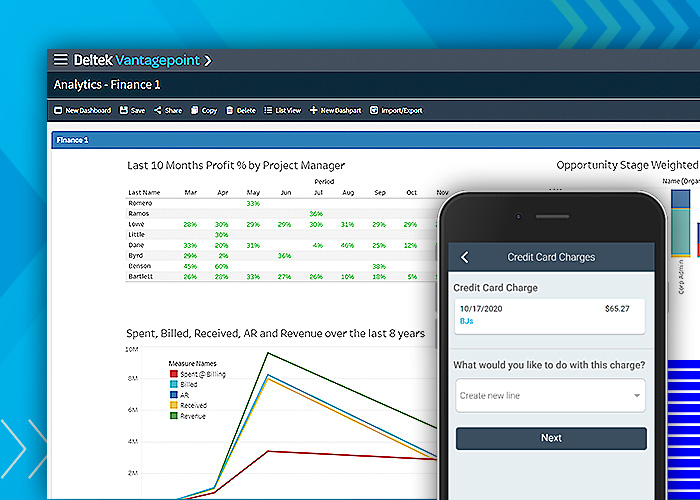
Deltek builds Vantagepoint as an ERP for architecture and engineering (A&E) firms, with resource management as one module. Staffing decisions run on the same data as accounting, CRM, and project management.
Deltek Vantagepoint Key Features
-
-
- Skills search and visual assignments: Resource managers search staff by skill and availability, then assign people through visual team views and scope-based plans.
- Workload balancing and demand forecasting: Workload tools flag underused and overworked staff so managers can reassign projects or tasks. Demand forecasting covers future projects as well as current ones.
- Capacity forecasting from pursuits: Pursuit pipeline insights line people up with work the firm is chasing. Staffing gaps appear before the project starts.
-
Deltek Vantagepoint Pricing
Where Deltek Vantagepoint Shines
- Accounting in the same platform: Accounting and financial management run inside Vantagepoint. Staffing plans and company financials share one system, which suits firms with an in-house finance team.
- Payments automation: Vantagepoint Payments automates inbound and outbound payments. Finance teams cut manual payment admin and see cash arrive sooner.
- CRM and pursuit management: CRM and pipeline tools track clients and pursuits with AI-supported insights. Business development and resourcing work from the same pursuit list.
Where Deltek Vantagepoint Falls Short
- Six-month implementation: Vantagepoint takes six months to implement on average, according to G2 reviewer data. That's a long wait for a practice whose staffing gaps already cost fees.
- Multi-step navigation: In 2025, Shawna S found basic tasks take several steps in a dated interface. Smaller practices without a system administrator feel this most.
Deltek Vantagepoint Customer Reviews
Capterra:
“It is great for business management, time tracking, and document management. It is a very secure service, and the customer support is great,” shares an Administrative Director.
G2:
“The lack of capturing project scheduling, Labour Detail not capturing dates, and distinction of Project and Project Review under Projects (these might be JLR company issues),” according to Anton F., a Senior Architectural Designer.
Who Deltek Vantagepoint Is Best For
-
-
- Large A&E firms with finance teams: Firms that want resourcing, accounting, and CRM in one ERP and have staff to run it.
-
5. Projectworks: Best for Engineering Consultancies Forecasting Utilization and Margin
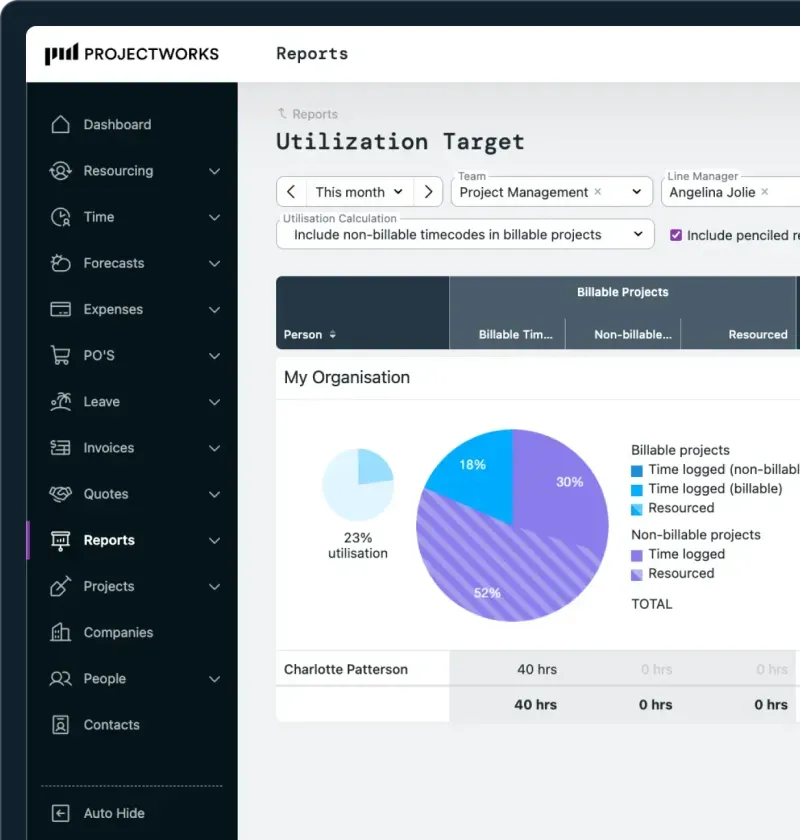
Projectworks connects time, resourcing, invoicing, and financial reporting for consulting firms, with industry pages for architecture and engineering. Resourcing and forecasting come on every plan, including the entry Build plan.
Projectworks Key Features
-
-
- Resourcing with forecasting on every plan: Build, the entry plan, includes resourcing, forecasting, leave and holiday calendars alongside timesheets. Small consultancies plan capacity without moving up a tier.
- Scheduling linked to resourcing: Project schedules connect to resourcing, so people assigned in a schedule appear in the resource plan. Project managers skip the re-entry between the two.
- Margin and utilization reporting: Reports track margin and utilization in real time. Scale adds five custom reports, and Unleash makes custom reports unlimited.
-
Projectworks Pricing
Where Projectworks Shines
-
-
- Xero and QuickBooks on every plan: Accounting integrations with Xero and QuickBooks come with Build, so invoices reach the books from the first month.
- Managed data migration: Standard onboarding starts at $1,000 and covers data migration plus training for system admins and project managers. Projectworks says most firms go live in four to six weeks.
-
Where Projectworks Falls Short
-
-
- Ten-user minimum: Plans start at 10 users and grow in bands of five. That means a seven-person practice pays for seats it won't use.
- Limited reporting customization on Build: Custom reports start on Scale, and workflow customization is limited.
-
Projectworks Customer Reviews
G2:
“Managing resourcing, project forecasting, and profitability is straightforward. All project leaders can manage their own project resourcing and finances, which brings clear visibility across the overall practice. It also makes it easy to spot and address any over- or under-resourcing, as well as handle any budget overruns.” Vicki E., a Finance Operations Director.
G2:
“Projectworks does have some performance issues, especially with slowdowns when handling a lot of timesheet data and generating invoices, which can really slow us down,” shares Janelle S., an Executive Business Partner - Operations.
Who Projectworks Is Best For
-
-
- Engineering consultancies on Xero or QuickBooks: Firms of 10 or more people that forecast utilization and margin together and want accounting sync from day one.
-
6. Asana: Best for Cross-Functional Teams Needing a Task-Level Workload View
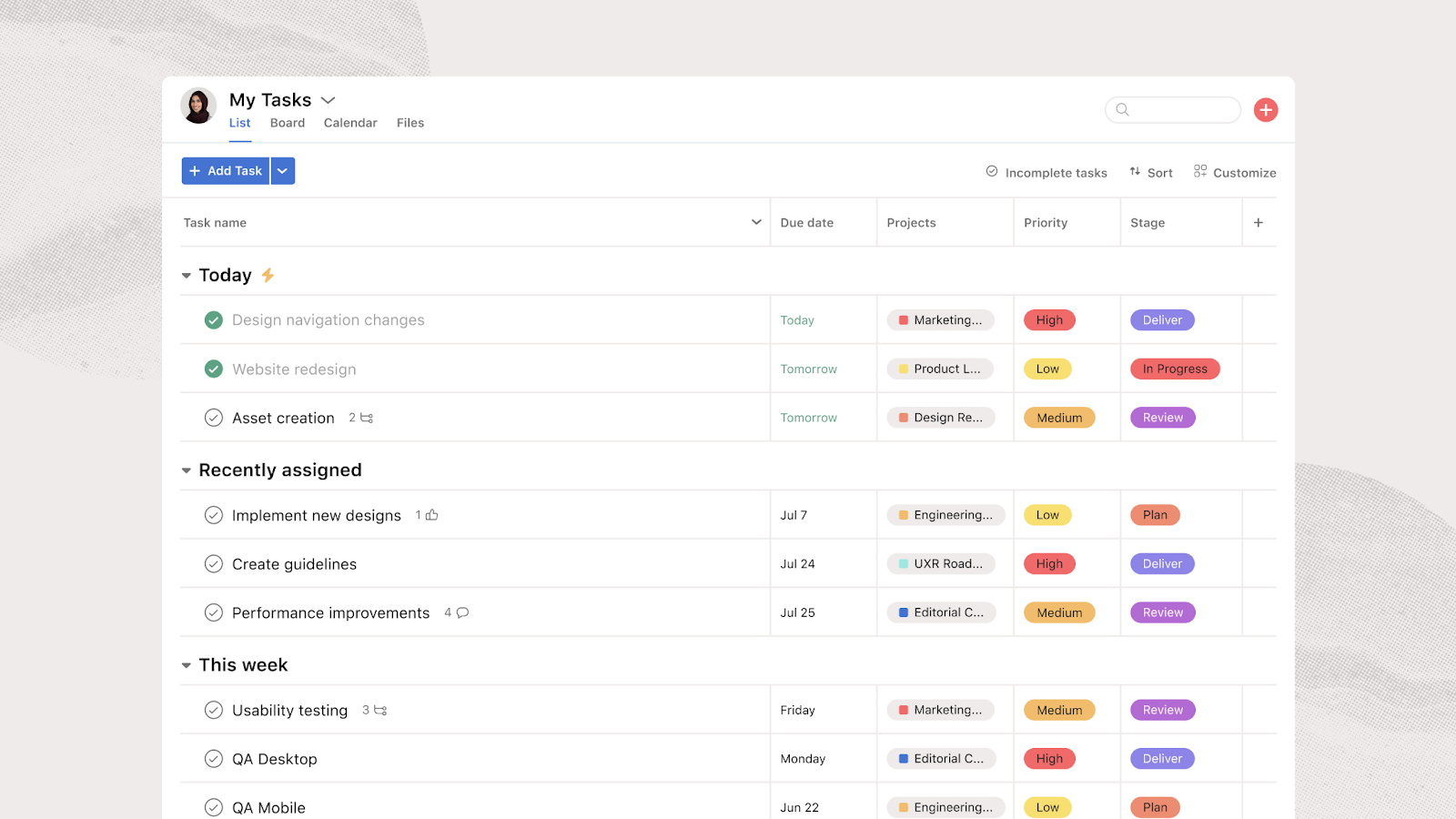
Asana measures workload by task, so it fits teams whose work runs on assignments and deadlines rather than phase fees. Resource management on the Advanced plan ($24.99/user/month billed annually) shows who's overloaded within one portfolio.
Organization-wide workload and capacity planning sit on the Enterprise plan. Timesheets, user rates, and project budgets need the paid Timesheets and Budgets add-on.
-
-
- Portfolio workload view: Advanced shows who's overloaded and who has room across the projects in one portfolio, with drag-and-drop rebalancing.
- Estimated versus actual time: Time tracking on Advanced compares estimated and actual time per task to support staffing forecasts.
-
Best for: Cross-functional teams outside AEC delivery that plan work by task and deadline.
7. Kantata: Best for Large Professional Services Firms Staffing by Skill

Kantata's professional services automation (PSA) platform staffs projects by scope, schedule, skills, and availability. Its forecasting plans for demand in the project pipeline and compares several resource plans at once.
Kantata tailors pricing to company size, so every deal runs on a custom quote.
-
-
- Skills inventory: Skill-based staffing shows resource gaps before they affect projects and clients.
- Talent network: External contractors carry roles, rates and availability alongside employees in the same resource view.
-
Best for: Large services organizations staffing global teams by skill rather than by project phase.
How to Choose the Best Workload Management Software for Your Firm
Use these four checks to narrow your shortlist. Each one ends with a test you can run in any vendor demo.
Can It Plan Staff Months Ahead by Phase?
Weekly views help identify immediate overload, while longer-term phase plans show when future commitments may exceed capacity.
Mark Zweig warns that pushing utilization alone "will result in budget overruns", which is a reason to assess planned hours alongside the available budget.
So, ask each vendor to staff RIBA Stage 4 (construction documents for American Institute of Architects (AIA) firms) three months out.
With Milient Project Flow, you can plan phases across every project on one Gantt timeline.
Does It Count Leave and Non-Billable Time Against Capacity?
Treating all contracted hours as available project time overstates capacity. Holidays, training, and bid work all come out of the same week.
In the demo, book two weeks of leave for a senior architect and watch the workload view change.
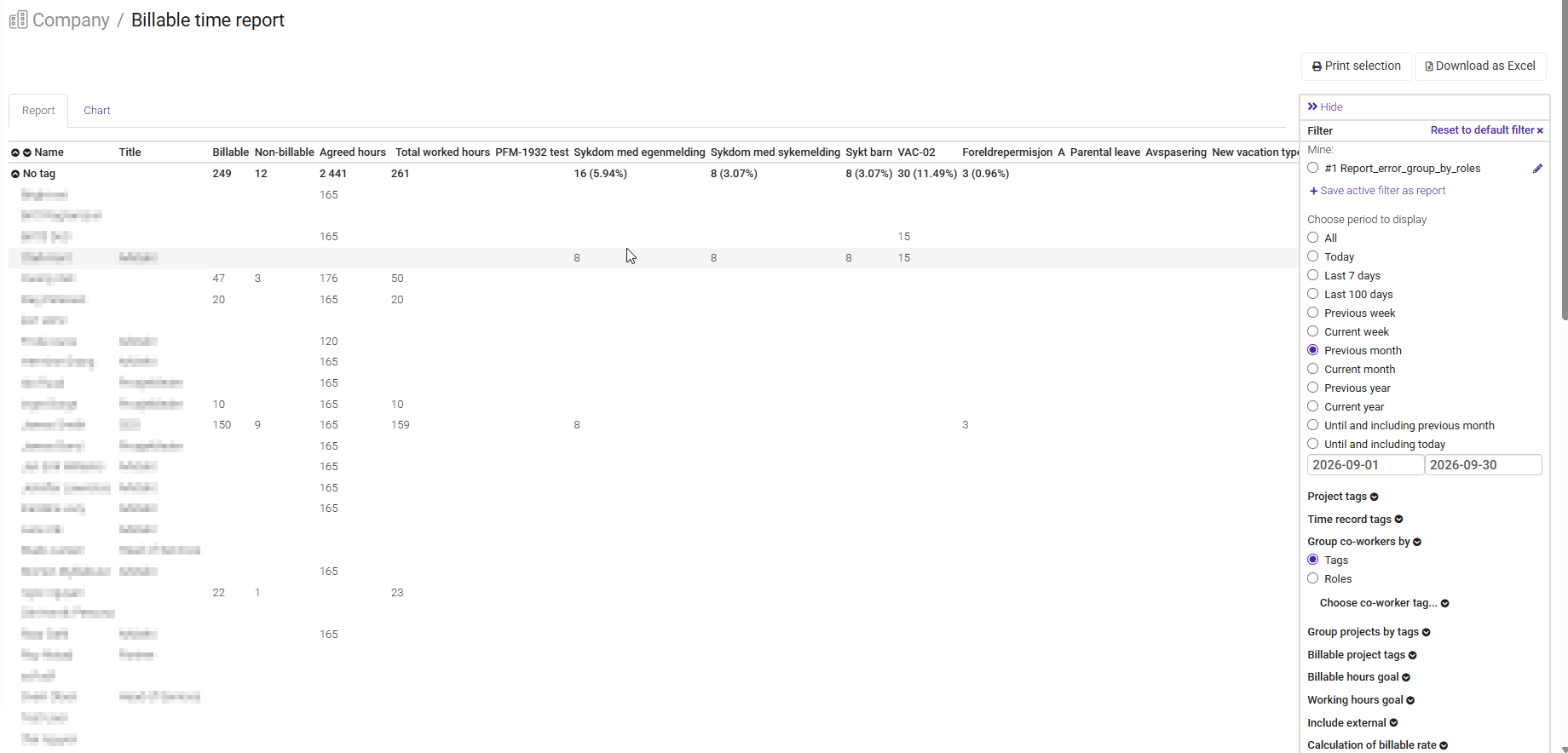
Milient Project Flow tracks leave requests alongside allocations in the resource view.
Will Your Team Log Time Without Chasing?
Without current actuals, managers can't tell whether work is taking longer than planned. Late timesheets delay that comparison. Ask a junior team member to log a day on a phone during the demo.

In Project Flow, staff record hours and expenses in the mobile app against the same projects and phases they're planned on.
Do Logged Hours Flow Straight Into Invoices?
For time-based billing, logged hours should carry through to invoicing without being entered again. On fixed-fee work, those hours help managers track delivery against the agreed fee.

Log billable hours in the demo, then check how they appear on a draft invoice. That’s why Project Flow creates invoices from the hours and expenses already in the system.
Balance Workloads and Phase Fees With Milient Project Flow
Pick Monograph for a small US studio that staffs each phase in detail. CMap fits when hiring starts from the pipeline, and Deltek Vantagepoint when resourcing must sit inside an ERP.
But if your team is overloaded and phase fees keep slipping, you need a platform built for growing AEC firms. That's Milient Project Flow, where project managers pin live jobs to a dashboard showing progress and invoiced percentage.
FAQs

Want more content like this? Follow Milient: