If you’re comparing Deltek alternatives, chances are you’re feeling the weight of Deltek’s complexity, costly implementations, and frustrating user experience. The good news? You don’t need expensive consultants to run your projects efficiently in 2026.
This guide ranks the best Deltek competitors, including Milient, Monograph, CMAP, Total Synergy, and Notion, so you can find a platform with enterprise-level capability without the steep learning curve.
Many firms compare Deltek Vision pricing to newer cloud alternatives to reduce cost and consulting dependency.
Before we dive in, here’s a quick comparison of leading Deltek competitors:
Deltek Alternatives Comparison Table
| Tool | Best For | Standout Feature | Starting Price |
|
Milient Project Flow |
AEC practices |
Designed for AEC workflows with stage-based planning, budgeting & forecasting |
£20/user/month (public pricing) |
|
Monograph |
Architecture firms |
MoneyGantt for forecasting & fees |
£34/user/month (public pricing) |
|
CMAP |
Professional services & consultancies |
Robust forecasting & job costing |
Pricing varies; user-reported ranges £25–£45/user/month |
|
Total Synergy |
AEC practices |
Flexible stage-based project control |
£30/user/month (region dependent; user-reported) |
|
Notion |
Small teams & startups |
Highly flexible workflows & templates |
Free-£13/user/month (public pricing) |
1. Milient's Project Flow: Best Software for AEC and Project-Based Teams
Milient’s Project Flow is a dedicated project and resource management system designed specifically for architects, engineers, consultants, and project managers. It brings together everything teams need to deliver profitable, well-managed projects, without the complexity often associated with Deltek.
Used by AEC firms across the UK and beyond, Milient’s Project Flow provides visibility across every stage of project delivery, from forecasting and resourcing to invoicing and business intelligence. It gives teams a single, reliable workspace to plan work, monitor performance, and make informed decisions in real time.
Key Features
Simplified Project Costs
/billing.png?width=1200&height=645&name=billing.png)
Milient’s Project Flow connects CRM data with project financials, bringing time, expenses, and fees into a single costing view. This helps teams maintain accurate project costs and gain clearer visibility across projects and clients.
- Time and expenses linked directly to projects
- Cost and fee visibility throughout delivery
- Reduced risk of missed or unbilled work
Intelligent Dashboards for Project Costs
/invoicing_dashboard.png?width=1200&height=645&name=invoicing_dashboard.png)
Milient’s Project Flow provides role-based dashboards that surface key project and client metrics in one place. Teams can stay informed on project progress, conversations, and performance without relying on complex report configuration.
- At-a-glance access to key client and project metrics
- Visibility into updates and ongoing conversations
- Supports faster, more informed decision-making
Multi-Project Oversight
/general_dashboard.png?width=1200&height=645&name=general_dashboard.png)
Milient’s Project Flow offers a consolidated view across all active projects, helping leadership and operations teams monitor progress, identify issues early, and maintain consistent quality standards at a portfolio level.
- Portfolio-level visibility across projects
- Easier identification of risks or non-conformance
- Supports consistent delivery standards
Key Evaluation Criteria
Together, these features address the core questions AEC firms typically ask when evaluating Deltek alternatives:
- Can we control project costs and fees?
- Can teams easily see what’s happening across projects?
- Can leadership maintain oversight at a portfolio level?
Pricing
Milient’s Project Flow is priced based on your organisation’s size, region, and requirements. Pricing is tailored to ensure teams get the functionality they need without unnecessary complexity.
| Module | Starting price* |
|
Milient’s Project Flow |
£20/user/month (public pricing) |
*Pricing depends on region, team size, and configuration.
Where Milient Shines (Project Flow)
- Designed for AEC professionals: Created specifically for architects, engineers, and project managers.
- Strong project costing and fee control: Integrated time tracking and expense management provide a clear costing view, helping firms maintain accurate project finances and protect margins.
- Clear visibility across projects: Intelligent dashboards and multi-project views give teams and leadership real-time insight into performance, progress, and portfolio-level oversight.
- Hands-on onboarding and responsive support: Milient provides dedicated onboarding and in-house customer support, helping teams get up and running quickly, a key reason firms move away from consultant-heavy platforms like Deltek and CMAP.
For architecture teams focused on reducing admin and improving day-to-day efficiency, Milient explores this further in its guide to time-saving project management for architects.
Where Milient Falls Short
- Not suited for basic task tracking: Project Flow is built for full project lifecycle management, not lightweight to-do lists.
- Pricing isn’t public: Teams need a tailored quote to understand exact costs.
- Advanced reporting may require setup: Larger organisations benefit from onboarding support.
"The project management tool gathers all project functions in the system in our company so that I can get an overview of the progress of all projects which has helped me asses the projects on time and spend less time on administrative work and focus on other services like our customers, has greater flexibility with all different types of workflow being entered to one similar system"
Software Advice Reviewer
Who Milient Is Best For
- AEC firms of all sizes needing full visibility across projects, resources, fees, and performance.
- Project-based organisations wanting a connected system to manage schedules, financials, utilisation, and profitability.
2. Monograph
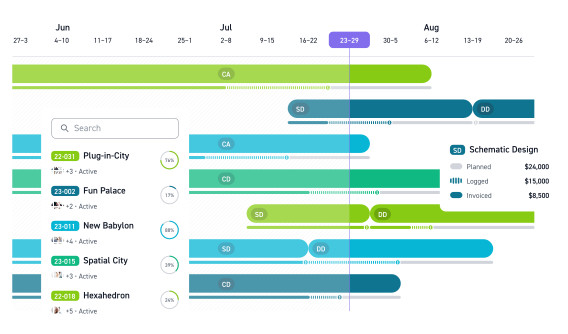
Monograph is a Deltek alternative built specifically for architecture firms, with a strong focus on fee tracking, forecasting, and visual project planning. Its clean, design-led interface appeals to studios looking for a more intuitive alternative to traditional ERP systems. Monograph is best known for MoneyGantt, a visual planning tool that helps practices forecast fees, track budgets by phase, and understand projected profitability early in a project lifecycle.
Rather than aiming to be a full operational ERP, Monograph prioritises clarity and simplicity, making it popular with small to mid-sized architecture studios. However, firms requiring deeper operational controls often evaluate Monograph alternatives to move away from spreadsheets without adopting overly complex systems.
Key Features
Visual Fee Planning and Forecasting (MoneyGantt)
Monograph is best known for MoneyGantt, a visual approach to fee planning that contrasts with Deltek’s more traditional financial reporting. By mapping budgets and forecasts by project phase, it helps architects understand financial performance earlier and communicate fee expectations more clearly, though it lacks deeper operational controls.
- Visual fee planning by phase
- Early insight into budget and profitability
- Clear forecasting for design-led workflows
Time Tracking Built For Architects: Fast, Simplified Timesheet Entry
Unlike Deltek’s more complex time-entry workflows, Monograph offers fast, simplified timesheets designed around how architects work. This lowers friction for design teams, though time tracking is primarily focused on supporting fee visibility rather than detailed operational management.
- Quick, low-friction timesheet entry
- Designed specifically for architectural workflows
- Supports fee and budget tracking
Project Dashboards: High-Level Visibility Into Project Performance and Budgets
Monograph provides high-level project dashboards that surface budget and performance information in a clean, design-friendly interface. It also supports multiple billing rates per employee, offering flexibility for different roles, although reporting and export options remain limited compared to more operationally focused platforms.
- High-level project performance dashboards
- Support for multiple billing rates and roles
- Basic reporting and financial visibility
Pricing
| Plan | Price |
| Monograph | $45/user/month |
Where Monograph Shines
- Design-led, AEC-specific interface: Easy for architects and design teams to adopt with minimal training.
- Strong fee forecasting: MoneyGantt is widely recognised for making budgets and projections more visual and accessible.
- Simple onboarding: Projects, fees, and phases can be set up quickly without heavy configuration.
Where Monograph Falls Short
- Limited depth for day-to-day project delivery: User feedback frequently notes gaps in task management, invoicing workflows, and operational project control, meaning teams often rely on additional tools.
- Reporting limitations: Reporting and export options are basic, with limited ability to generate PDFs or presentation-ready outputs beyond invoicing.
- Resource planning constraints: Planned hours and resource forecasting can feel inflexible or unrealistic for fixed-fee architecture projects, particularly for larger or more complex practices.
- Admin scalability challenges: While intuitive for everyday users, administrators report difficulties managing more advanced configurations as firms grow.
- Higher price point: At around $45 per user per month, Monograph is more expensive than many alternatives with broader functionality.
As teams grow and projects become more complex, platforms built for larger project teams can offer more complete operational control.
Customer Review
“Monograph falls short in the day-to-day tasks, invoicing, and real-life management of a project.”
Who Monograph Is Best For
- Small to mid-sized architecture firms that prioritise visual fee management and forecasting, and want a simple, design-friendly alternative to traditional ERP tools, but do not require deep operational project control in a single system.
- Firms that need stronger day-to-day project delivery alongside fee forecasting often look to alternatives like Milient’s project management approach
3. CMAP
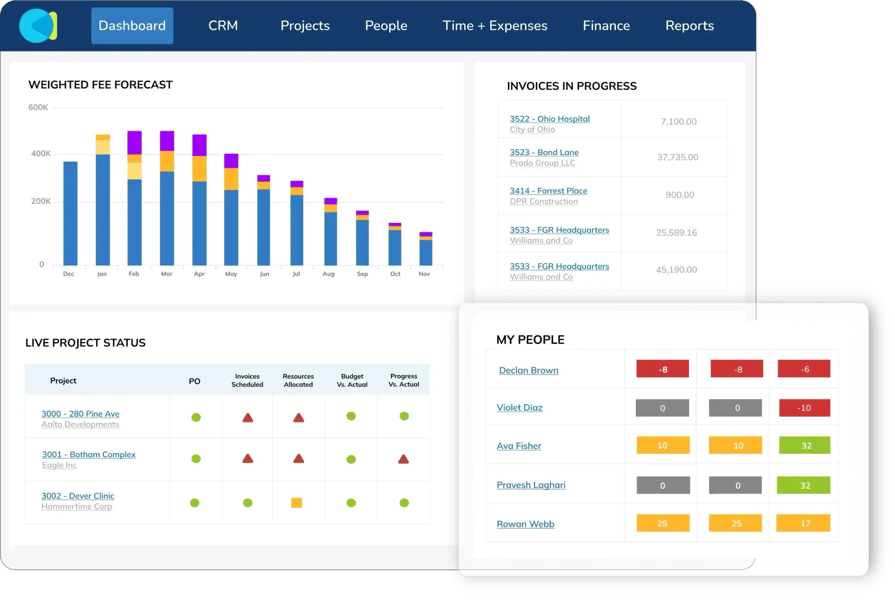
CMAP is a project and financial management platform widely used by consultancies, engineering firms, and professional services organisations. It is often compared to Deltek Costpoint due to its strong focus on financial forecasting, utilisation, and job costing, particularly for fee-driven, consultancy-style operations.
CMAP is designed to connect project planning, resourcing, and financial data, making it appealing to firms that want detailed operational and financial insight, even if that comes with added complexity.
Key Features
Revenue Forecasting and Profitability Analysis
CMAP is often compared with Deltek Costpoint for its strong focus on forecasting, utilisation, and profitability. It brings financial and resourcing data together to help consultancy and engineering firms understand performance across projects, though unlocking its full value typically requires careful configuration.
- Revenue forecasting and profitability tracking
- Utilisation and capacity planning
- Financial insight across multiple projects
Job Costing and Fee Estimation
Compared to Deltek’s ERP-style job costing, CMAP offers flexible fee estimation tools that can be tailored to different project and billing models. This supports more detailed cost planning, but firms often need to invest time in setup to align estimators with real-world workflows.
- Support for multiple billing models
- Cost tracking against planned fees
Customizable Reporting and Workflows
CMAP provides extensive reporting and workflow customisation, offering depth similar to Deltek’s reporting capabilities. While powerful, the breadth of options can feel overwhelming without onboarding support, particularly for teams new to the platform.
- Large library of report templates
- Workflow and process customisation
- Detailed performance reporting
Pricing
CMAP does not publicly list pricing. User-reported estimates indicate:
| Plan | Estimated Starting Price |
| CMAP PM Suite | £25–£45/user/month* |
*Pricing based on publicly shared estimates and customer reviews; exact amounts vary.
Where CMAP Shines
- Strong financial and utilisation forecasting: Particularly effective for consultancy and engineering firms focused on billable utilisation and profitability.
- Highly configurable platform: Offers flexibility to adapt workflows, fee models, and reports to complex professional services operations.
- Operational depth: Helps connect resourcing, forecasting, and financial data across projects.
Where CMAP Falls Short
- Complex setup and onboarding: Getting full value often requires significant configuration and a well-planned onboarding process.
- Reporting complexity: While powerful, the volume and flexibility of reports can be overwhelming without additional guidance or support.
- Less intuitive user experience: The interface feels more functional than modern, which can slow adoption compared with newer tools.
- Limited knowledge and QA workflows: Lacks structured knowledge management or QA/QC capabilities for project learning and governance.
For larger teams that need scalable visibility without heavy configuration, tools designed specifically for larger project teams can offer a more streamlined alternative.
Customer Review
“CMAP is easy for day-to-day tasks, but the report builder is complex and takes time to master.”
Who CMAP Is Best For
- Consultancies and engineering firms that prioritise financial forecasting, utilisation tracking, and profitability analysis across projects. CMAP is well suited to organisations with complex billing models and a strong focus on resource efficiency, and that are willing to invest time in configuration and onboarding to tailor the system to their operational processes.
- Firms looking for a clearer balance between financial insight and day-to-day project delivery often consider alternatives like Milient’s project management approach.
4. Total Synergy

Total Synergy is a project and financial management platform built specifically for architects, engineers, and construction design teams. It follows a structured, stage-based project framework that mirrors how many AEC firms plan, deliver, and govern projects, making it a common Deltek alternative for compliance-driven environments.
Key Features
Stage-based Product Delivery
Total Synergy is built around a structured, stage-based project framework that closely mirrors how many AEC firms plan and deliver work. Compared to Deltek’s more modular ERP structure, Synergy provides a clearer, linear project flow, which supports compliance-driven and process-heavy environments, though it can feel rigid for teams running many small projects.
- Stage-based project setup aligned to AEC workflows
- Clear project structure from start to completion
- Supports compliance and governance requirements
Invoicing & Financial Controls
Total Synergy combines timesheets, invoicing, purchase orders, and cost tracking in a single system, making day-to-day financial administration straightforward. This centralisation appeals to firms looking for stability and reliability, although more advanced forecasting features are often locked behind higher-tier plans.
- Integrated timesheets and invoicing
- Purchase order and cost tracking
- Reliable financial controls for project delivery
Resource Planning Tools
Total Synergy includes resource planning and scheduling tools to help teams allocate work across projects. While suitable for structured project environments, user feedback suggests this functionality can become time-consuming for firms managing a high volume of smaller or fast-moving projects.
- Resource allocation across projects
- Scheduling to support delivery planning
- Better suited to structured, predictable workflows
Pricing
Pricing varies by region and modules. User-reported pricing suggests:
| Plan | Estimated Starting Price |
| Total Synergy | ~$40/user/month* |
*Pricing based on publicly available ranges; exact amounts vary.
Where Total Synergy Shines
- Well-suited to compliance-driven AEC workflows: Total Synergy’s stage-based structure aligns closely with common architectural and engineering standards, making it easier for firms to follow consistent processes and meet governance requirements.
- Clear, structured project delivery: Projects move through clearly defined stages, which supports predictable delivery and suits teams that prefer a linear, process-led approach to managing work.
- Straightforward invoicing and financial controls: Integrated timesheets, invoicing, and cost tracking make day-to-day financial administration reliable and easy to manage within a single system.
Where Total Synergy Falls Short
- More complex for new users: While familiar to experienced AEC professionals, new users can face a steeper learning curve compared with more modern, intuitive platforms.
- Dated user interface: The interface feels more functional than contemporary, which can impact adoption and day-to-day usability when compared with newer tools like Milient.
- Limited knowledge and QA workflows: Total Synergy lacks a centralised knowledge repository or structured QA/QC equivalent, making it harder to capture lessons learned or standardise quality across projects.
Customer Review
“Total Synergy works well, but reporting setup takes time"
Who Total Synergy is Best For
- Small to mid-sized AEC firms that prefer a structured, stage-based approach to project delivery, particularly those operating in compliance-heavy environments. Total Synergy is well suited to teams that value clearly defined project stages, integrated timesheets and invoicing, and predictable financial controls, and are comfortable trading flexibility and modern UI for consistency and governance.
- Teams that need more flexibility and real-time visibility alongside structured delivery often look to alternatives like Milient’s project management approach.
5. Notion
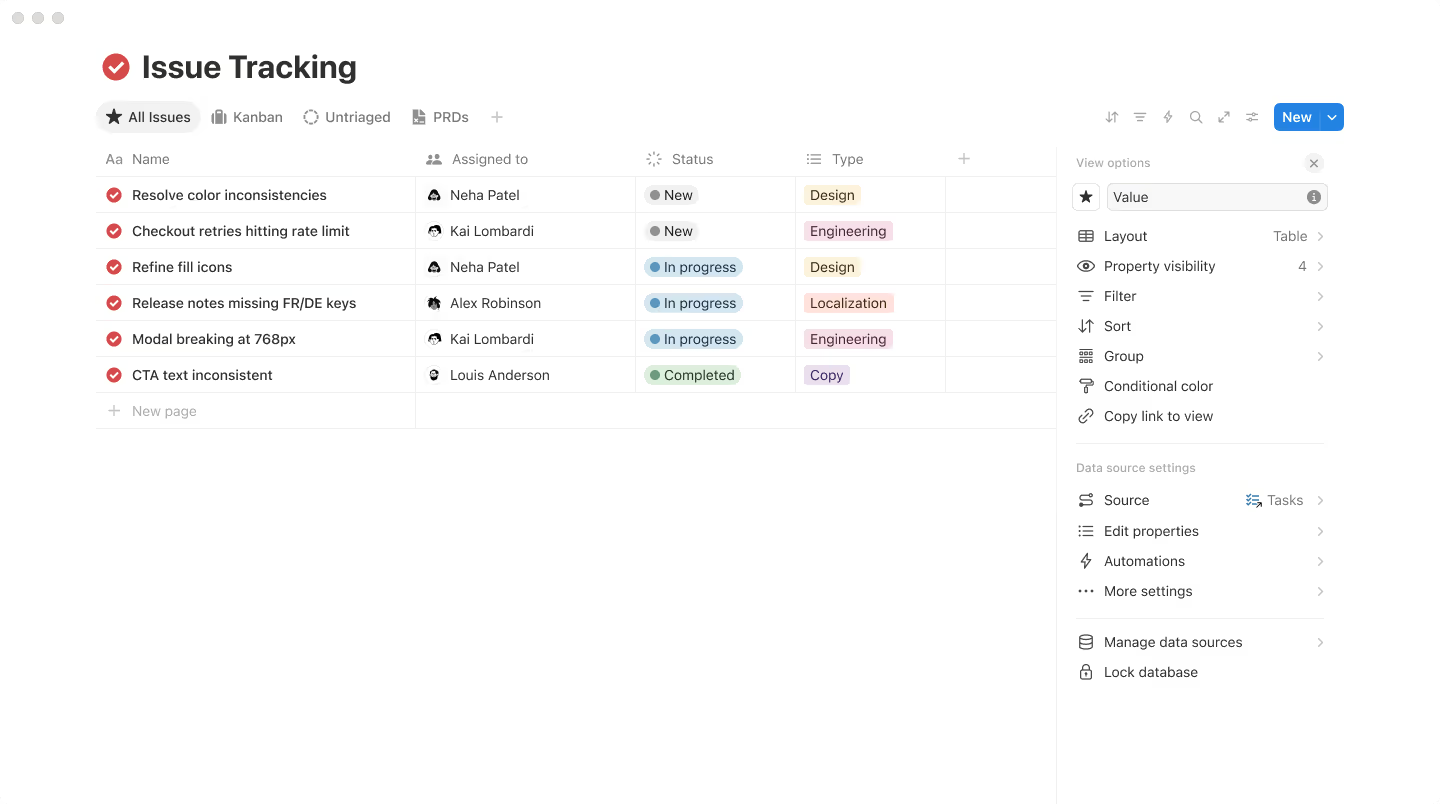
Notion is a flexible workspace platform used for documentation, task management, and lightweight project tracking. While it isn’t a direct Deltek competitor, some small teams and solo practitioners adopt it when Deltek feels too rigid, expensive, or fragmented for their needs.
Tools like Notion are often adopted as a more flexible alternative to spreadsheets, but as discussed in our guide to Excel project management systems, this approach can become difficult to scale as projects and teams grow.
Rather than offering structured project or financial management, Notion acts as a customisable “single source of truth”, allowing users to build their own systems for organising work, often replacing spreadsheets, documents, and ad-hoc tools.
Key Features
- Customisable templates and databases: Users can create bespoke project trackers, task lists, and databases tailored to their workflows.
- Collaboration and documentation tools: Pages, comments, and shared workspaces support team collaboration and internal documentation.
- Lightweight task and time tracking: Tasks and basic time-tracking setups can be built using custom databases and automations.
Pricing
Notion publicly lists its pricing:
| Plan | Price |
| Free | $0 |
| Plus | $10/user/month |
| Business | $18/user/month |
Where Notion Shines
- Highly flexible and customisable: Almost any workflow can be built, making it appealing for users who want full control over how information and tasks are organised.
- Affordable entry point: Low pricing makes it accessible for individuals and very small teams experimenting with lightweight project tracking.
- Strong documentation hub: Particularly useful for notes, SOPs, reference material, and internal knowledge bases.
Where Notion Falls Short
- Not purpose-built for AEC or consultancies: Lacks industry-specific concepts such as project phases, fees, utilisation, or compliance workflows.
- No native financial or fee management: Budgets, invoicing, and cost control must be handled outside the platform or manually recreated.
- Limited resource and capacity planning: Planning workload across multiple projects and longer time horizons is difficult without heavy customisation.
- Integration friction: Users often report duplication when Notion sits alongside company systems (e.g. Microsoft tools), leading to parallel task tracking.
- Scalability and usability concerns: As workspaces grow, some users experience performance issues, complexity, and a steeper learning curve.
Customer Review
“Great for organising information, not ideal for complex projects"
Reasons to Consider an Alternative to Deltek
1. Steep Learning Curve
Deltek implementations are widely reported as complex and consultant-led. According to reviews on platforms like G2 and Software Advice, users frequently describe Deltek as “hard to onboard” and “overly complex for everyday project teams”, with some firms reporting weeks or months of training before full adoption.
Milient’s Project Flow is designed to be intuitive for project teams, giving PMs clear visibility over projects, resources, and financials without needing specialist training or accounting expertise.
2. High Total Cost of Ownership
Beyond licensing, Deltek’s total cost of ownership is frequently driven by implementation fees, customisation, and ongoing consultant support. User reviewsnote that Deltek’s modular pricing and consultancy reliance make it harder for small and mid-sized AEC firms to control long-term costs.
Milient’s Project Flow offers a more straightforward, purpose-built alternative focused on project and resource management, helping firms avoid unnecessary complexity and reduce reliance on external consultants.
3. Limited Modern Collaboration Tools
While Deltek is recognised for strong accounting and compliance, many users report that its project management and resource planning tools feel dated and difficult to use. As a result, project managers often revert to spreadsheets, email, or separate planning tools to manage day-to-day work, increasing duplication and admin time.
Project Flow brings project planning, resourcing, forecasting, and performance visibility into one connected workspace, supporting real-world project delivery without reverting to spreadsheets.
Finding Your Perfect Deltek Alternative
The right Deltek alternative depends on your team’s size, workflows, and level of required project control.
- If you want a purpose-built system for managing projects, resources, and profitability, Milient’s Project Flow is a strong fit for AEC and project-based teams looking for clarity without Deltek’s complexity.
- If you’re a small architecture studio, Monograph might be enough.
- If you need heavy financial forecasting, CMAP or Synergy may suit your needs.
- If you’re a small team wanting maximum flexibility, Notion is a low-cost starting point.
To explore more, try Milient today or view our guides on time tracking, billing rates, and project management best practices.
 Andrea Neeve
Marketing Associate
Want more content like this? Follow Milient:

/roles.png?width=1024&height=1024&name=roles.png)