Key takeaways
If you're searching for the best Kantata alternatives, here’s the quick breakdown based on your needs:
 Resource Flow by Milient – Best for project-based professional services teams that need structured resource management tied directly to profitability, forecasting, and delivery performance.
Float – Best for agencies and consultancies prioritising intuitive visual scheduling and lightweight margin tracking.

Runn.io – Best for growing professional services firms focused on utilisation forecasting and revenue projections.
Monday.com – Best for cross-functional teams that value flexible task boards over specialist resource planning.
 Resource Guru – Best for small to mid-sized teams seeking simple, easy-to-implement scheduling.
Kantata is known for strong project tracking, timesheets, and revenue management. But some teams find it complex to use, difficult to customise, or reliant on advanced knowledge for reporting.
If you’re exploring Kantata competitors, you’re likely looking for:
-
-
- A more intuitive user experience
- Easier, more flexible reporting
- Stronger forecasting and capacity planning
- Better scalability as you grow
- A more intuitive user experience
-
In this guide, we compare the top alternatives, including Resource Flow by Milient, Float, Runn.io, Monday.com, and Resource Guru, to help you find the right fit for your team.
Kantata Alternatives Comparison Table (2026)
| Tool | Best For | Standout Feature | Starting Prics* |
| Resource Flow (Milient) | Project-based professional services teams needing profitability-driven resource management | Integrated capacity planning + financial forecasting | From £7 / user / month |
| Float | Agencies wanting intuitive scheduling | Drag-and-drop visual planning with margin tracking | From $7 / scheduled person / month |
| Runn.io | Professional services firms forecasting revenue | Capacity vs. demand forecasting dashboards | From $7 / resource / month |
| Monday.com | Cross-functional teams managing tasks visually | Customisable boards & automation ecosystem | From $8 / user / month |
| Resource Guru | Small to mid-sized teams seeking simple scheduling | Easy UX + booking clash prevention | From $4.16 / person / month |
1. Resource Flow by Milient
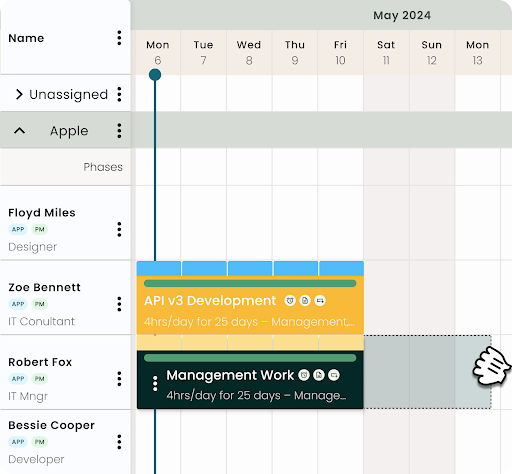
Resource Flow by Milient is purpose-built resource management software designed for consultancies managing complex, multi-project environments. Unlike heavier enterprise platforms like Kantata, Resource Flow focuses on clarity, usability, and fast adoption—without compromising on forecasting depth. It brings capacity planning, utilization tracking, reporting, and integrations into one intuitive platform, giving growing teams real-time visibility without spreadsheet chaos.
If your team is currently deciding between a spreadsheet-style setup and a dedicated database, our breakdown of Smartsheet vs Excel highlights why manual tracking often hits a limit as projects scale.
Key Features
Resource Flow combines powerful forecasting with an intuitive user experience—making it easy for teams to adopt and scale.
Capacity & Utilization Management
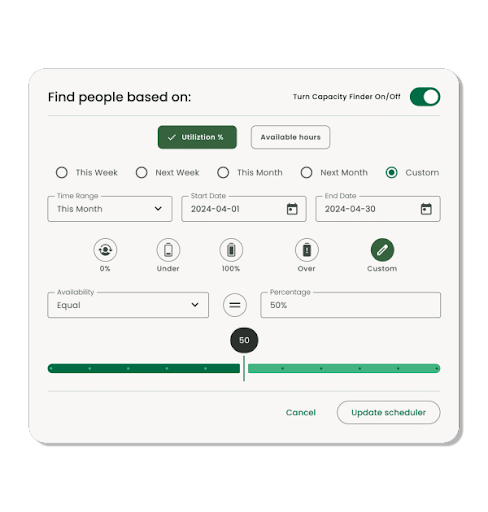
Resource Flow provides a real-time view of team availability, utilization rates, and workload distribution. Managers can instantly identify over- or under-utilised resources and rebalance work before bottlenecks occur. Unlike manual tracking or rigid systems, planning is dynamic and adjusts as projects shift.
Advanced Scheduling & Forecasting
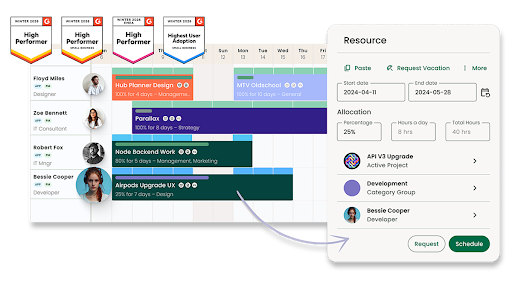
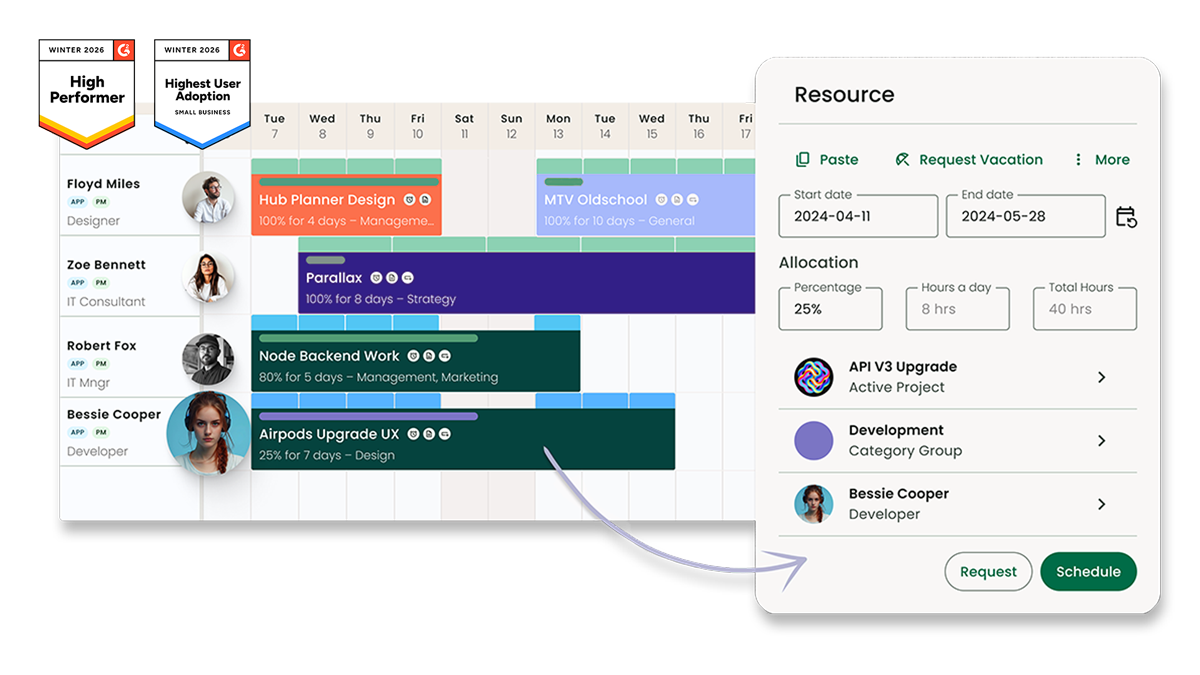
The interactive scheduler allows you to allocate resources by hours per day, percentage allocation, or total hours. You can forecast months ahead, model different scenarios, and plan around real project timelines—not vague weekly blocks. This is particularly valuable for consultancies juggling billable work across multiple clients.
Customizable Reporting & Open API
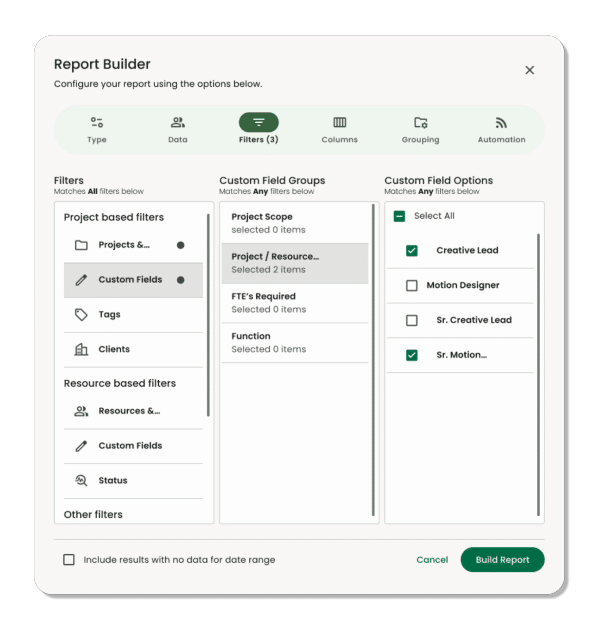
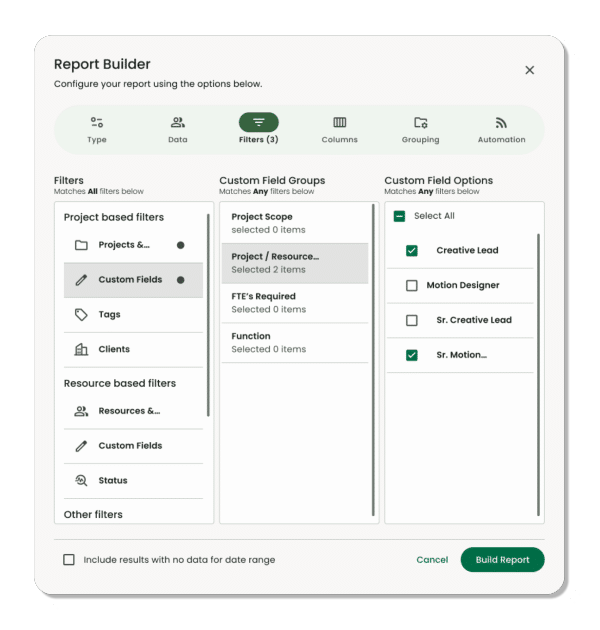
The powerful report builder enables real-time reporting on utilization, capacity, project time, and spend. Reports are fully customisable and built from live data. Resource Flow also offers an open API with no limits or hidden integration costs—making it easier to connect to accounting tools, CRM systems, and project management platforms.
Where Milient shines
- Purpose-built for structured resource management: Unlike spreadsheet-based tools, Milient Resource Flow is designed specifically for capacity planning, scheduling, and utilisation tracking. Features like Capacity Finder, skills matching, and live availability views make it easier to allocate the right people without manual cross-sheet tracking.
- Real-time visibility into utilisation and forecasting: Built-in dashboards and a configurable report builder allow teams to monitor over/under utilisation, forecast resourcing needs, and track performance without complex formulas. This is particularly valuable for project-based teams managing billable time and profitability.
- Integrated project and resource data: Resource Flow connects scheduling, dependencies, fixed costs, and reporting in one platform. That reduces double handling across spreadsheets and provides the essential visibility you would expect from dedicated job costing software as projects scale.
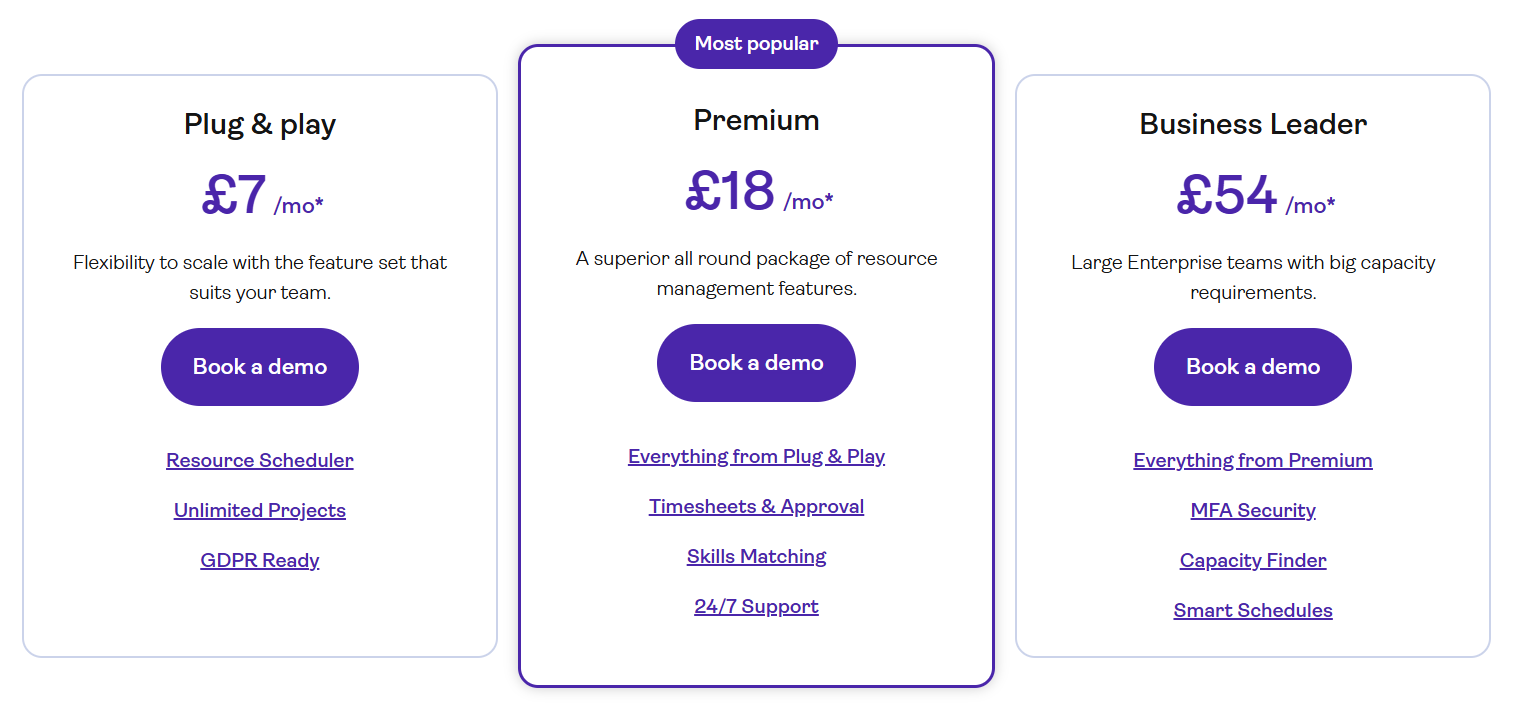
- Scalable feature tiers: With plans ranging from Plug & Play to Business Leader, teams can start simple and add features such as timesheets, approvals, skills matching, and advanced capacity planning as they grow.
Where Milient falls short
- More structured than flexible spreadsheet tools: Teams that prefer highly custom, open-ended grid layouts (like Smartsheet) may find Milient more process-driven and structured in comparison.
- Advanced reporting can require configuration: While there are many built-in reports, customising reporting beyond standard templates may require some setup, particularly for teams with very specific reporting needs.
- Best suited to project-driven organisations: Milient is designed for professional services and resource-heavy teams. Organisations looking for a general-purpose collaboration tool may find it more specialised than necessary.
- Complexity increases with scale: As some reviews note (e.g., around categories and large project volumes), managing very high numbers of ongoing projects can require thoughtful setup to maintain clarity.
Milient Customer Reviews
“Resource Flow makes scheduling work very simple, and the user interface is intuitive. Their customer service is top-notch.” – G2 Review
“PMs save a lot of time visualising resource planning and can quickly decide who to move and where.” – Capterra Review
Whos is Milient best for
- Growing consultancies: Project-based teams that need clear capacity planning, utilisation tracking, and forecasting — without the complexity of a full PSA suite.
- Operations & resource managers: Leaders who need real-time visibility of team availability to make faster staffing decisions.
- Multi-project organisations: Businesses managing billable work across multiple clients, locations, and time zones
Pricing
Resource Flow offers flexible per-user pricing depending on your organisation’s needs:
| Plan | Price (per user / month) | Best For |
| Plug & Play | £7 | Small teams needing core scheduling |
| Premium | £18 | Growing consultancies needing timesheets & skills matching |
| Business Leader | £54 | Large enterprise teams with advanced capacity needs |
All plans are scalable, with higher tiers unlocking advanced features like Capacity Finder, Smart Schedules, and enhanced security.
2. Float
Key Features
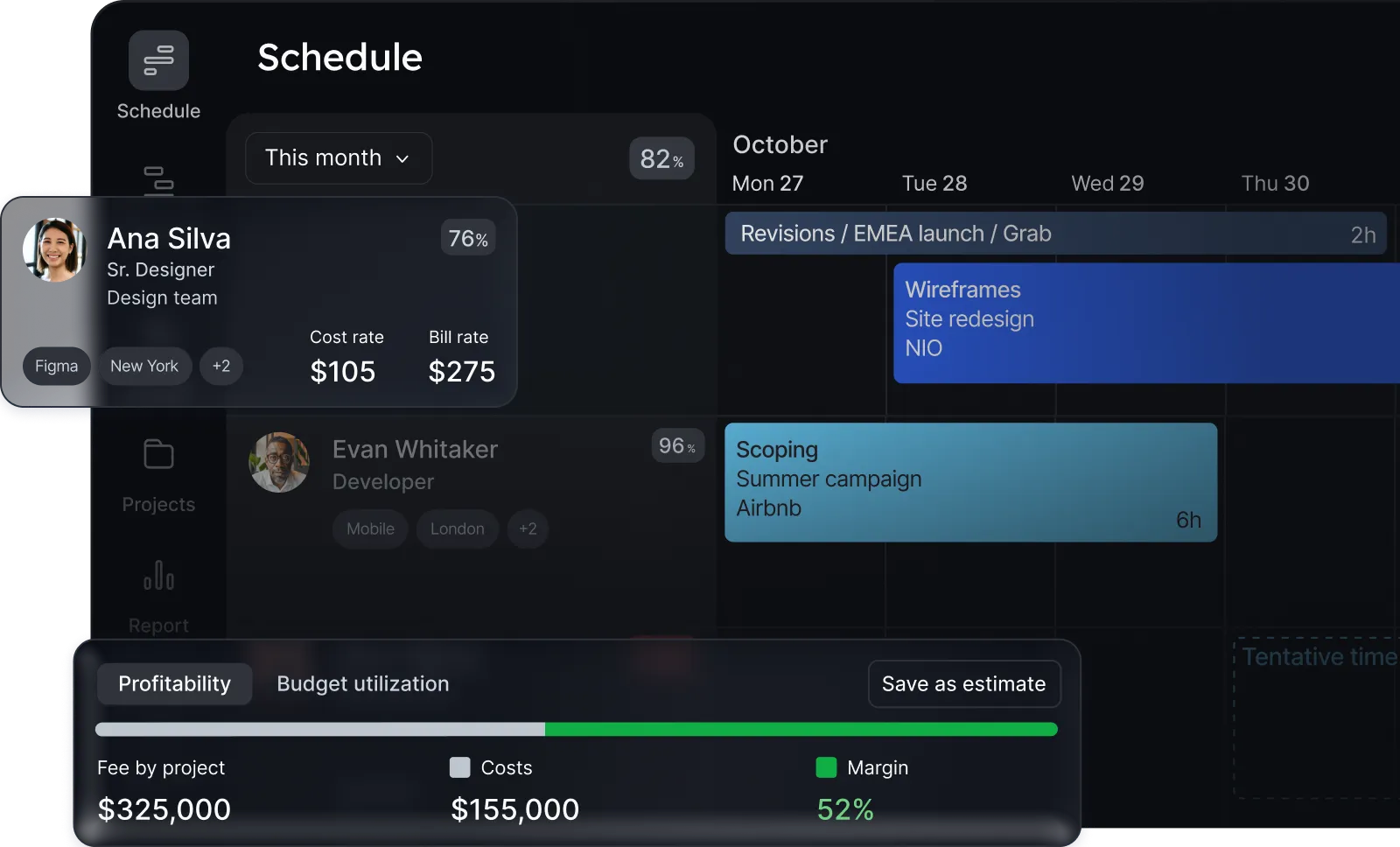
- Visual resource scheduling: Drag-and-drop scheduling across people and projects with clear visibility into availability, overbooking, and team utilisation.
- Capacity planning & forecasting: Real-time view of who’s available, upcoming workload, and future hiring needs.
- Project scoping & estimates: Create budget estimates and compare planned vs. actual hours to protect margins.
- Profitability tracking: Monitor billable value, costs, and margin performance directly within the project view.
Where Float Shines
- Intuitive user experience: Users frequently praise how easy it is to navigate, especially when switching between people and project views.
- Strong visibility across teams: Clear overview of team workloads and timesheets in one place improves coordination.
- Profitability integration: Real-time insight into project margins helps teams connect resourcing decisions with financial performance.
Where Float Falls Short
- Learning curve at setup: Some users report the Schedule page can feel overwhelming at first, especially for new users.
- Limited flexibility in synced items: Calendar-synced meetings cannot always be repositioned within the schedule view.
- Reporting depth: While helpful, reporting is sometimes described as lacking detailed, customisable insights for advanced analysis.
Float Customer Reviews
Float receives strong ratings on G2 and Capterra for ease of use and implementation.
“It’s intuitive and easy to use… I can quickly move between projects and people and get what I need.” (G2)
However, some users note UI limitations:
“The interface is basic, and the colour combinations can make it confusing to find what you need.” (Capterra)
Who Float is best for
- Best for: Small to mid-sized agencies and consultancies that prioritise visual scheduling, straightforward capacity planning, and lightweight profitability tracking without heavy ERP-level complexity.
Pricing
| Plan | Price (Annual Billing) | Includes |
| Starter | $7 per scheduled person/month | Core scheduling & capacity |
| Pro | $12 per scheduled person/month | Estimates & actuals tracking |
| Enterprise | Custom pricing | Advanced support & rollout |
Float offers a 30-day free trial on Starter and Pro plans
 Looking specifically for architecture-focused tools? See our guide to the best project management software for architects.
3. Runn.io
Runn.io is a strategic resource management and capacity planning platform designed for professional services organisations. It focuses heavily on real-time utilisation tracking, forecasting, and financial visibility. Unlike lightweight scheduling tools, Runn positions itself as a forward-looking planning platform, helping teams balance capacity vs. demand, forecast revenue, and connect resourcing decisions to profitability and business strategy.
Key features
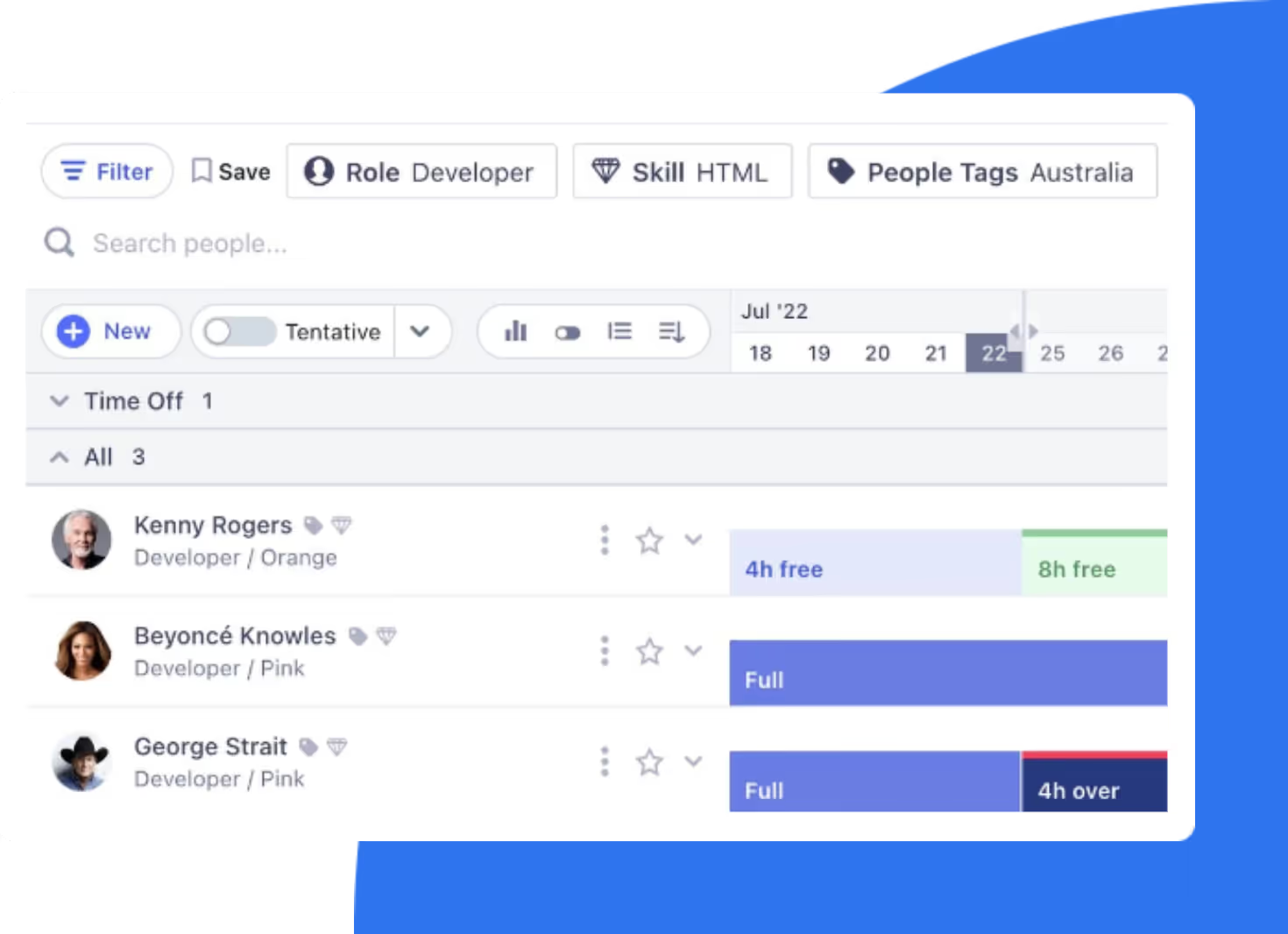
- Real-time capacity planning: Instantly compare capacity vs. demand across teams and projects to avoid overbooking or idle time.
- Utilisation & forecasting insights: Track billable utilisation and forecast revenue months ahead using built-in projection tools.
- Project & tentative planning: Model pipeline work with tentative projects to assess hiring and resource needs.
- Skills & resource management: Centralised skills tracking and resource profiles improve allocation accuracy.
Where Runn.io shines
- Revenue forecasting clarity: Users praise Runn’s ability to project future billings, making it valuable for strategic planning.
- User-friendly implementation: Frequently described as simple to set up and easy to navigate.
- Responsive customer support: Reviews highlight proactive, helpful support teams that resolve issues quickly.
Where Runn.io falls short
- Reporting depth limitations: Some users would like more advanced or customisable reporting without exporting to spreadsheets.
- Integration complexity: While APIs are available, teams with complex tech stacks may need custom integrations.
- Feature flexibility: Certain customisation requests (e.g., security profiles, colour adjustments, notes functionality) are limited.
Runn.io Customer Reviews
“Runn is great at providing a projection of what the billings of a professional services organisation will be in months to come. It's an essential part of running an effective business which isn't as commonplace as it should be! However, With a lot of pre-existing tools (time-keeping, invoicing, business intelligence), it took a bit of time to get everything integrated nicely. While they do have out-of-the-box integrations that might suit your needs well, we found our needs too specific and needed to make custom integrations. That said, their APIs have meant that we could do this integration reasonably easily.”
Overall, Runn is rated highly for usability and customer support.
Who Runn.io is best for
Best for: Growing professional services firms that prioritise utilisation tracking, revenue forecasting, and forward-looking capacity planning over deep ERP-style project management.
Pricing
| Heading | Heading | Heading |
| Lite | $7 per resource/month | Core scheduling & utilisation |
| Standard | $11 per resource/month | Timesheets, integrations & API |
| Advanced | Custom pricing | Strategic insights & onboarding |
Runn offers a 30-day free trial on paid tiers.
For a more granular look at its features and limitations, check out our in-depth Runn review.
Choosing the right Kantata competitor depends less on features — and more on how your organisation plans to scale.
4. Monday.com
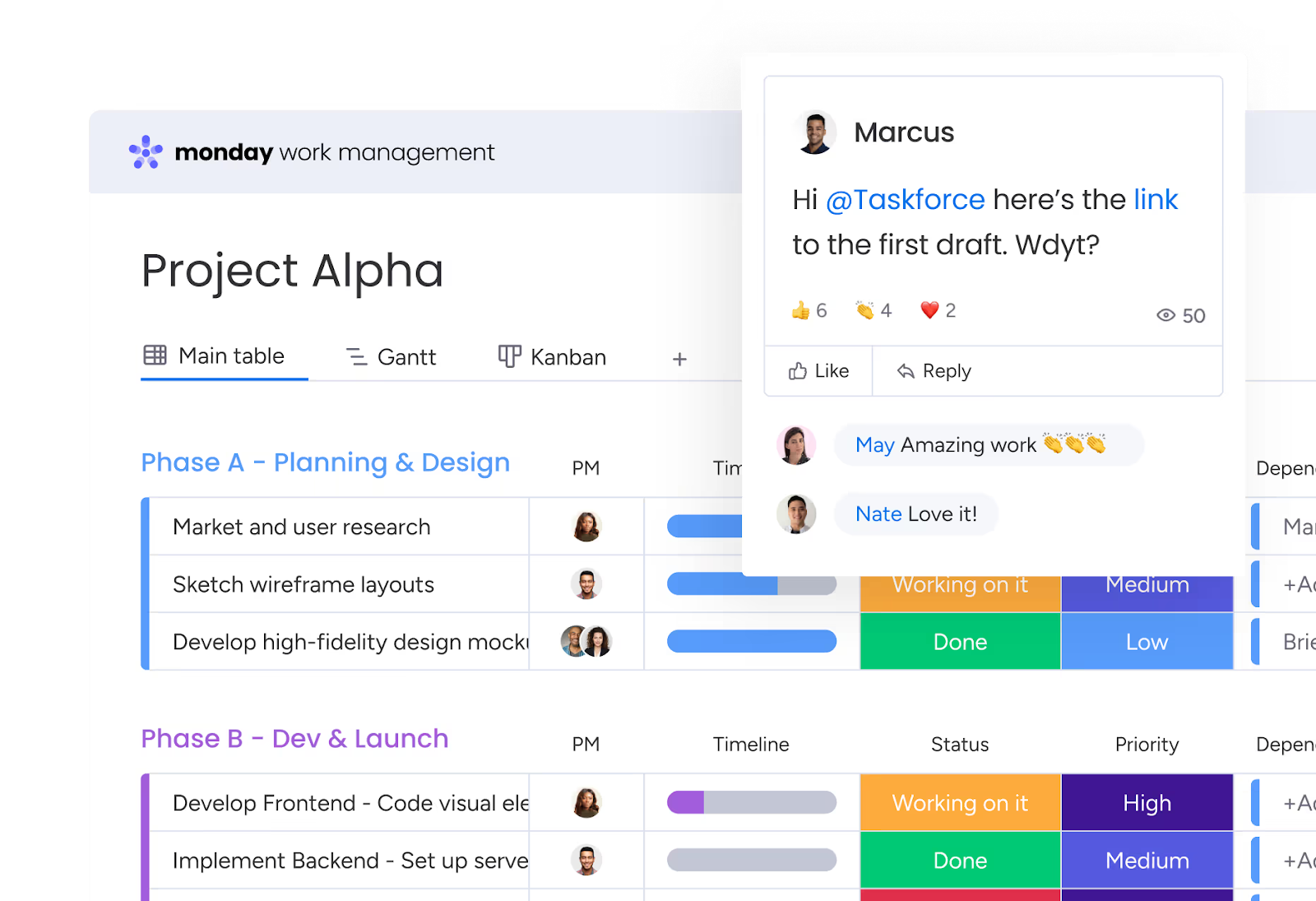
Monday.com is a highly visual work management platform used by teams across marketing, operations, IT, and professional services. Unlike specialist resource management tools, Monday.com offers flexible boards that can be customised for task tracking, project planning, CRM, and light resource management. Its main USP is adaptability — teams can build workflows that match their processes without rigid templates.
While it includes workload and timeline views, its strength lies in visual collaboration rather than deep financial forecasting or strategic resource optimisation.
Key features
- Customisable project boards: Build workflows using Kanban, timeline, Gantt, or calendar views.
- Workload & capacity view: Visualise team availability to prevent over-assignment.
- Automation & integrations: Automate repetitive tasks and integrate with tools like Slack, HubSpot, and Google Workspace.
- Dashboards & reporting: Create real-time dashboards to track progress, KPIs, and team performance.
Where Monday.com shines
- Highly visual interface: Users consistently praise its clean design and intuitive boards.
- Flexibility across teams: Can be adapted for marketing, HR, operations, and more.
- Strong automation ecosystem: Extensive integrations and automation options reduce manual admin work.
Where Monday.com falls short
- Not purpose-built for resource management: Advanced capacity planning and profitability forecasting require configuration or add-ons.
- Cost scales quickly: Pricing increases as teams grow or require advanced features.
- Complex setups for advanced use: Deep customisation can become difficult to manage without admin oversight.
Monday.com Customer reviews
“What I like most about monday Work Management is how easy it makes it to see the work at a glance. I can open a board and, within a few seconds, understand what’s in progress, what’s waiting on the client, and what’s late. What I dislike about monday Work Management is that I sometimes feel limited by the automations. For certain boards or specific request types, I’d really like to create more custom rules and logic, for example: if this field has X value and the client is Y, move it here and notify this person.”
- G2 Reviewer
Who Monday.com is best for
- Best for: Cross-functional teams seeking a flexible, visual project management tool rather than specialised resource planning or financial forecasting software.
Pricing
| Plan | Starting Price (USD) | Includes |
| Basic | From $8 per user/month | Core boards & collaboration |
| Standard | From $10 per user/month | Timeline & automation |
| Pro | From $16 per user/month | Workload & advanced reporting |
| Enterprise | Custom pricing | Advanced security & governance |
Pricing varies based on seat volume and feature requirements.
If structured reporting and deeper visibility are a priority, explore Milient’s resource management templates and reporting tools.
5. Resource Guru
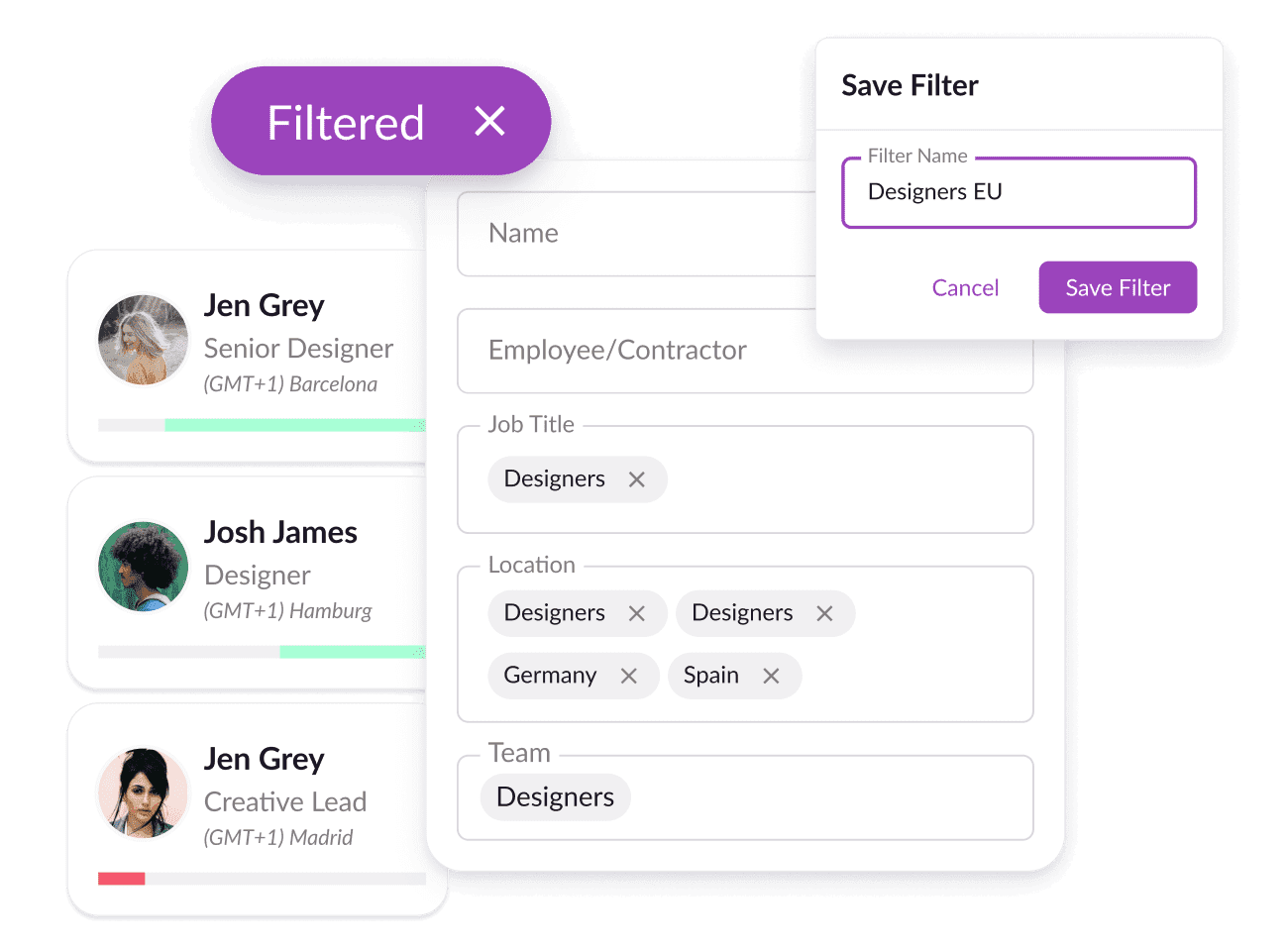
Resource Guru is a lightweight resource scheduling and team planning tool designed to keep projects on track without overwhelming complexity. Positioned as “blissfully simple” resource management software, it focuses on visual scheduling, booking clash prevention, and forecasting. Its main USP is ease of use — enabling teams to quickly allocate work, track utilisation, and manage availability without the heaviness of full project management or ERP systems.
While it includes reporting and forecasting tools, Resource Guru is primarily built for straightforward resource planning rather than end-to-end project or financial management.
Key features
- Visual team scheduling: Drag-and-drop scheduling with booking clash alerts to prevent over-allocation.
- Resource directory & filtering: Search by skills, location, role, and availability to find the right person for the job.
- Forecasting tools: Interactive forecasting views help project future capacity and utilisation.
- Utilisation & reporting: Track billable hours, overtime, and scheduled time across teams and projects.
Where Resource Guru shines
- Ease of use: Users consistently describe the UX as smooth, intuitive, and quick to implement.
- Strong forecasting tools: Interactive forecasting features are praised for helping teams plan ahead.
- Simple, clean scheduling: Clear project and client organisation makes day-to-day planning straightforward.
Where Resource Guru falls short
- Limited scalability: Some users report it becomes less effective as businesses grow or complexity increases.
- Not a full project management tool: Lacks deeper PM functionality for managing full project lifecycles.
- Time-off tracking limitations: Holiday and appointment tracking features could be more robust.
Resource Guru Customer Reviews
“It is very easy to plan time for creatives and strategists, and the UX is extremely smooth. I also like how I can add a lot of project and clients so the plannings are super organized.Overall the tool is great and easy to use, but it lacks some more detailed project management features. Currently, we use it just to plan resources”
- Capterra Reviewer
Who Resource Guru is best for
Best for: Small to mid-sized teams seeking a simple, easy-to-implement resource scheduling tool without the complexity of full project or financial management systems.
Pricing
| Plan | Price (USD) | Includes |
| Grasshopper | $4.16 per person/month | Core scheduling (no reports) |
| Blackbelt | $6.65 per person/month | Reports, timesheets & milestones |
| Master | $10 per person/month | Advanced security & approval workflows |
For teams that need both structured resource planning and integrated project management, explore how Milient connects project delivery and resource forecasting in one platform
Reasons to Consider an Alternative to Kantata Software
While Kantata is powerful for project tracking and revenue management, some organisations find that complexity, reporting limitations, and usability challenges slow adoption and decision-making. If your team spends more time navigating the system than acting on insights, it may be time to explore a more streamlined alternative.
1. Steep Learning Curve & Training Dependency
Several users report that Kantata can feel challenging for new users and requires proper training before teams can work confidently in the system. When software adoption depends heavily on structured onboarding, it can slow implementation and reduce engagement across delivery teams.
Milient is built with usability in mind, helping teams plan resources and track performance without extensive training requirements.
2. Reporting & Configuration Complexity
- While Kantata offers strong custom reporting, modifying or building reports often requires a high level of experience. For leadership teams needing fast, flexible insights, this can create friction and delay decision-making.
- Milient provides built-in dashboards and real-time reporting views designed for quick visibility without heavy configuration.
3: Cost Can Be a Barrier for Growing Teams
- Some users mention that Kantata can feel expensive for smaller or growing businesses. As teams scale, licensing and implementation costs can quickly add up, especially when additional training or configuration is required.
- Milient offers scalable pricing designed for professional services firms that need structure and forecasting without enterprise-level overhead.
Best Alternative to Kantata - Milient
If your organisation values structured resource planning, clear profitability forecasting, and intuitive reporting without heavy complexity, Milient stands out as a strong alternative to Kantata.
Built for project-based professional services teams, Milient connects project delivery, resource planning, and financial performance in one unified platform, helping leaders make confident, data-driven decisions.
 Andrea Neeve
Marketing Associate
Want more content like this? Follow Milient:

/roles.png?width=1024&height=1024&name=roles.png)