
Key takeaways
 Resource Guru offers three pricing plans: Grasshopper ($4.16/person/month), Blackbelt ($6.65/person/month), and Master ($10/person/month)
 Extra resources make each plan more expensive: every non-human resource (meeting rooms, equipment, vehicles) is billed separately on top of your per-person subscription
 Consider Milient Resource Flow as an alternative for IT departments, IT consulting, and professional services teams that need more than visual scheduling
 Milient Resource Flow pricing starts from £7/resource/month and includes real-time capacity planning, skills matching, granular permissions, and utilisation reporting in a single platform
Resource Guru is a resource management and scheduling tool used by agencies, consulting teams, and project-based firms. If you're evaluating it, you want to know exactly what you'll pay for your entire team.
This article breaks down all Resource Guru pricing plans, hidden costs, and when an alternative like Milient Resource Flow is the better choice for IT teams and professional services firms.
How Much Does Resource Guru Cost?
Here are the main Resource Guru pricing tiers per person in 2026:
Pro tips
 You get a 30-day free trial with full feature access. If you subscribe to an annual plan immediately, you get 2 months free.
Milient Resource Flow: An Alternative for IT and Professional Services
/hubplanner_resource.png?width=1200&height=645&name=hubplanner_resource.png)
Milient Resource Flow is a dedicated resource management platform built for mid-sized to large IT consultants and professional services teams.
Resource Flow starts at £7/resource/month, putting it in the same ballpark as Resource Guru's entry plan. But for that price, you get significantly more:
-
-
-
- Real-time capacity visibility: Filter your resource pool by utilisation %, available hours, skills, and location
- Skills matching: Tag and search your team to assign the right person instantly, without manual cross-referencing
- Configurable report builder: Utilisation, availability, budget, and profitability reports in one place
- Granular permissions: Control who sees what at role or individual level, including private content masking that hides booking details without removing availability visibility
- Heat map reports: Visualise utilisation gaps across teams at a glance
-
-
Resource Guru's top-tier Master plan at $10/person still doesn't include skills matching or real capacity forecasting.
If you're still building the case internally, see why resource management matters.
Resource Guru Pricing Plans: A Breakdown
Resource Guru offers three tiers: Grasshopper, Blackbelt, and Master, with each building on the last. Here's what you actually get at each level.
Grasshopper Plan

The Grasshopper plan is the lightest tier. It covers the core scheduling workflows: unlimited projects and clients, drag-and-drop bookings, tentative and repeat bookings, leave management, clash management, and calendar sync with Google and Outlook.
It includes 1 free placeholder resource and a 7-day activity log. For small teams that only need a visual schedule and availability overview, it's a solid starting point.
Blackbelt Plan

The Blackbelt plan is where Resource Guru becomes useful for project-driven teams.
It adds timesheets, customizable reports, report exports, project dates and milestones, project rates and budgets, Gantt charts, heatmap views, and up to 10 custom fields. The activity log also extends to 90 days.
This tier is what most agencies and consulting firms will land on if they need to track billable hours and report on project performance.

The Master plan is designed for larger teams and organisations with compliance or security requirements.
You get everything in Blackbelt plus an approval workflow for bookings, SSO (Single Sign-On), unlimited custom fields, unlimited activity history, and phone support via a dedicated number.
Data import (for accounts with 30+ resources) and access to Customer Success Gurus during defined support hours are also included.
Resource Guru Hidden Costs
The listed per-person price isn't your total bill. Here's what drives costs up:
-
-
-
- Pay-per-resource billing for non-human assets: Meeting rooms, equipment, vehicles, and any other non-human resource are billed separately, on top of the per-person subscription
- Per seat, not per active user: You're billed for every person in your account, whether they log in or not. Guest users and admin-only accounts count too
- Gated feature tiers: Core features like timesheets, reports, Gantt charts, and project budgets are locked behind Blackbelt. If your team starts on Grasshopper and later needs reporting, you'll need to upgrade everyone's plan
- Placeholder limits by plan: Grasshopper includes 1 placeholder resource, Blackbelt 5, and Master 10. Additional placeholders beyond these limits are billed at the full per-person rate for your plan
- No monthly discount for large teams: Resource Guru doesn't offer volume pricing or negotiated rates. Cost scales linearly with headcount
-
-
Resource Guru Pros & Cons
While Resource Guru is one of the best resource scheduling tools, here's an honest look at what it delivers and where it falls short.
Pros
-
-
-
- Long free trial: 30 days on a full-featured trial with no credit card required. If you subscribe to an annual plan, you get 2 months free
- Highly visual and intuitive: The drag-and-drop schedule is one of the cleanest in the market, meaning teams typically get up and running within hours
- Clash management: Resource Guru flags double-bookings in real time and prevents you from scheduling someone unavailable.Plus, the "waiting list" feature queues tentative bookings when a resource is at capacity.
- Non-human resource scheduling: Meeting rooms, vehicles, equipment, etc, can be scheduled alongside people
- Calendar integration: Two-way sync with Google Calendar and Outlook keeps Resource Guru bookings visible across the tools your team already uses
- SOC 2 Type II and GDPR compliant: Security and compliance on all plans
- Zapier integration: Connects to 1,500+ apps for automating workflows outside the tool
-
-
Cons
-
-
-
- No dedicated mobile app: Resource Guru does not have a native mobile app available for download in the App Store or Google Play Store
- Reporting is limited on the Grasshopper plan: Zero reporting capability at the entry tier. Even on Blackbelt, reporting is less flexible than dedicated analytics tools
- Per-user scaling cost: Cost grows linearly with every person added, including inactive users and view-only accounts
- Limited project management depth: Gantt charts and project milestones appear on Blackbelt and above, but Resource Guru is not a full project management tool. Task management and dependency tracking are lightweight
- Activity history locked by tier: Grasshopper only retains 7 days of activity history. Blackbelt gives you 90 days. Unlimited history requires the Master plan
-
-
See how Resource Guru compares to other resource scheduling tools: Best Resource Scheduling Software.
Who is Resource Guru Best For?
Resource Guru is a focused scheduling tool. Here's who gets the most value from it.
Project Managers and Operations Leads
Project managers who need a clear, always-current view of who's available and when will find Resource Guru useful.
The schedule view gives a live read across the whole team, and clash management means double-bookings surface immediately.
The Blackbelt plan also adds project budgets and milestones, making it viable for PMs to track billable utilisation across multiple projects at once.
Consultants and Agency Leadership
Resource Guru's dashboard and utilisation views do the job for principals and directors who need high-level visibility across the team without getting into the weeds of individual task management.
The Blackbelt tier adds the reporting depth needed for client billing conversations: project rates, budget tracking, and forecast vs. actuals on timesheets.
Creative Teams
Designers, copywriters, and production teams working to studio schedules benefit from Resource Guru's visual layout and non-human resource management.
Scheduling a shoot that requires a camera, a location, and a specific director in one booking is straightforward, while setting custom availability hours per resource also handles freelancer and part-time scheduling without manual workarounds.
Who Isn't a Good Fit for Resource Guru?
Here are a few personas who may not benefit much from Resource Guru features:
Teams Needing Deep Project Management
Resource Guru includes lightweight Gantt charts and project milestones from the Blackbelt plan upward, but it's not a full project management platform. You can't manage task dependencies, track deliverables against a WBS, or run complex multi-phase projects end-to-end.
Teams that need resource scheduling integrated with true project delivery workflows will find the project management layer too thin.
Milient Resource Flow includes built-in project management: budgets, timelines, task dependencies, and scheduling, so resource and project planning stay connected in one platform.
Enterprise and Matrixed Organisations
Larger organisations running matrix structures across multiple business units, geographies, or P&Ls will run into the ceiling quickly.
Resource Guru's permissions are functional but not granular enough for complex org charts. Activity history is capped unless you're on Master, and the linear per-seat pricing model becomes expensive at scale.
Milient Resource Flow is built for this complexity, with multi-region support, role-level permissions, and enterprise-grade capacity reporting.
Resource Guru Customer Reviews
Reviewers most often praise Resource Guru's visual clarity and ease of use, while the most consistent complaints cluster around reporting limitations and pricing.
Positives
“We implemented Resource Guru across our entire team and hardware resources, and it has completely transformed our approach to resourcing. The platform makes scheduling incredibly easy and efficient, ensuring that everyone has a clear understanding of their workload and upcoming tasks.” G2 review.
Complaints
“The worst part about Resource Guru is the guest access. I keep accidentally providing clients with full seats. Way overpriced. Clunky. The items marked as “Required” on the Home page are junk,” says Peter B on Capterra.
Will R also shares, “ It can feel a bit limited with reporting and customization, especially for more detailed tracking.”
Alternative to Resource Guru: Milient Resource Flow
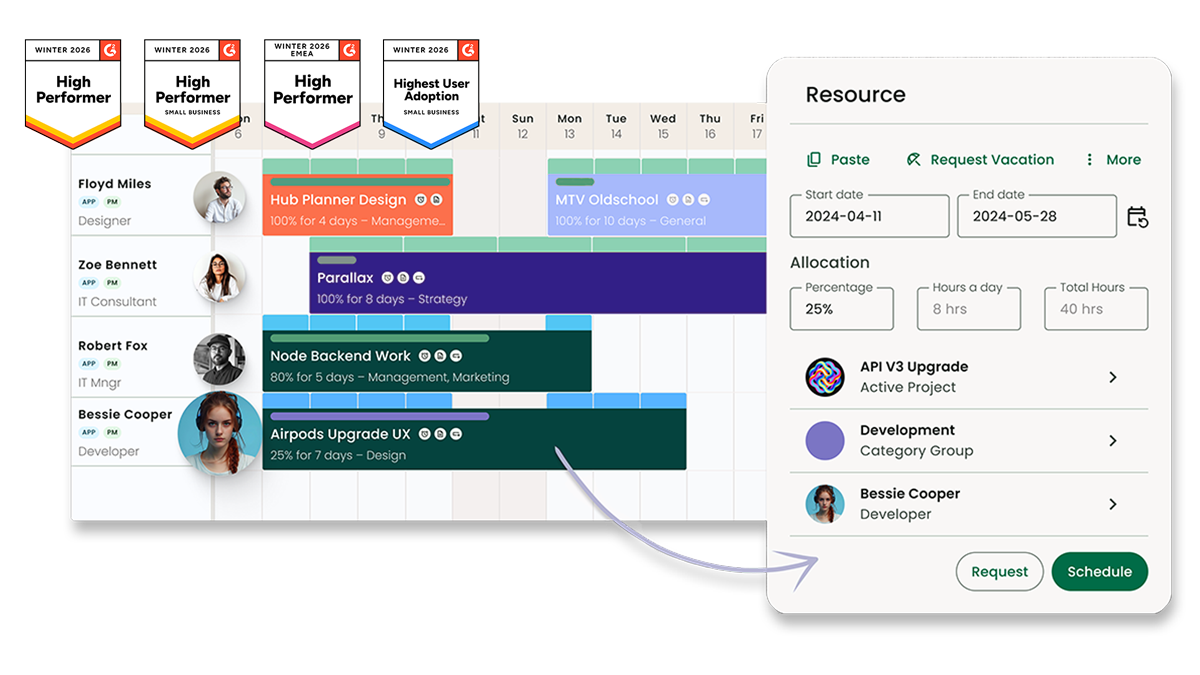
Where Resource Guru answers "who's available?", Milient’s Resource Flow answers "who's available, at what utilisation rate, with which skills, and what does that mean for project profitability?"
If you want to compare other software options in this category, check out this guide on finding an alternative to Resource Guru.
Here’s how you use Resource Flow as an alternative:
Resource Management: Scheduling, Capacity, and Skills
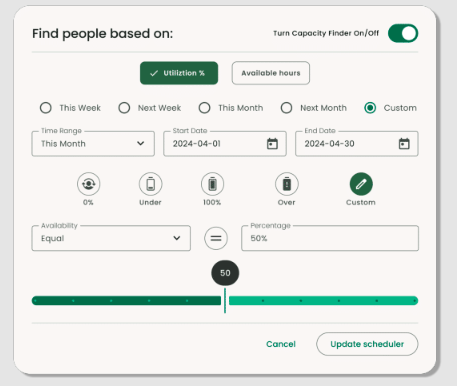
Milient Resource Flow’s resource management offers different features:
-
-
-
- Resource scheduling gives a full view of team availability, utilisation, and project needs across every active engagement
- Capacity planning filters that view by available hours, utilisation rate, location, and seniority, so you can plan ahead rather than react
- Skills matching lets you tag your entire resource pool and filter it instantly to assign the right person to the right project
- And, customisable dashboards and reports cover utilisation, availability, and spend, and are configurable, exportable, and built for operational decisions
-
-
Project Management: Budgets, Costs, and Profitability
/Hub_Planner_Resource-Management_Feature.jpg?width=1062&height=981&name=Hub_Planner_Resource-Management_Feature.jpg)
Resource Flow's project planning tools sit inside the same platform as scheduling.
Set project budgets, define internal and external rates, add phases and milestones, and track actual spend against scheduled spend through timesheets.
Fixed costs can be added per project and included in budget tracking, so one-off expenses don't disappear from your financials.
Does Resource Guru Pricing Fit Your Budget?
Resource Guru works for small teams comfortable paying per person and topping up individual resources. But that model scales fast for growing teams.
If you have a mid-size or enterprise team, get Milient Resource Flow for more predictable pricing and deeper operational control.
Book a demo to discuss your resource management needs.
FAQs
 Andrea Neeve
Marketing Associate
Want more content like this? Follow Milient:

/hubplanner_resource.png?width=1024&height=1024&name=hubplanner_resource.png)