Key takeaways
 Pick Milient Project Flow to decide which work to take on: Best for growing architecture, engineering, and consulting (AEC) firms who need margin, forecasts, and capacity for every project in one platform.
 Choose Deltek Vantagepoint or BQE Core to plan pursuits, people, and accounts in one system: Deltek Vantagepoint suits large firms that want a full enterprise resource planning (ERP) system with customer relationship management (CRM). BQE Core fits smaller US firms that also want payroll inside the same platform.
 Get CMap for UK practices that price new work from past projects: CMap builds fee estimates from earlier project performance and predicts staffing demand, with Xero, Sage, and QuickBooks connections.
 Consider Monograph or Projectworks for narrower needs: Monograph suits small US studios that plan phases visually. Projectworks suits consultancies that need work in progress (WIP) and margin reporting alongside resourcing forecasts.
A full project pipeline does not tell you whether your firm is winning the right work. Leaders need to know which commissions generate healthy margins and whether upcoming commitments leave room for the work they want to pursue.
For AEC firms, strategic project management software provides evidence for those decisions. Here are six platforms that bring project financials and staffing forecasts into the same review.
6 Best Strategic Project Management Software: A Quick Overview
1. Milient Project Flow: Best for Growing AEC Firms That Steer Their Portfolio by Margin and Capacity
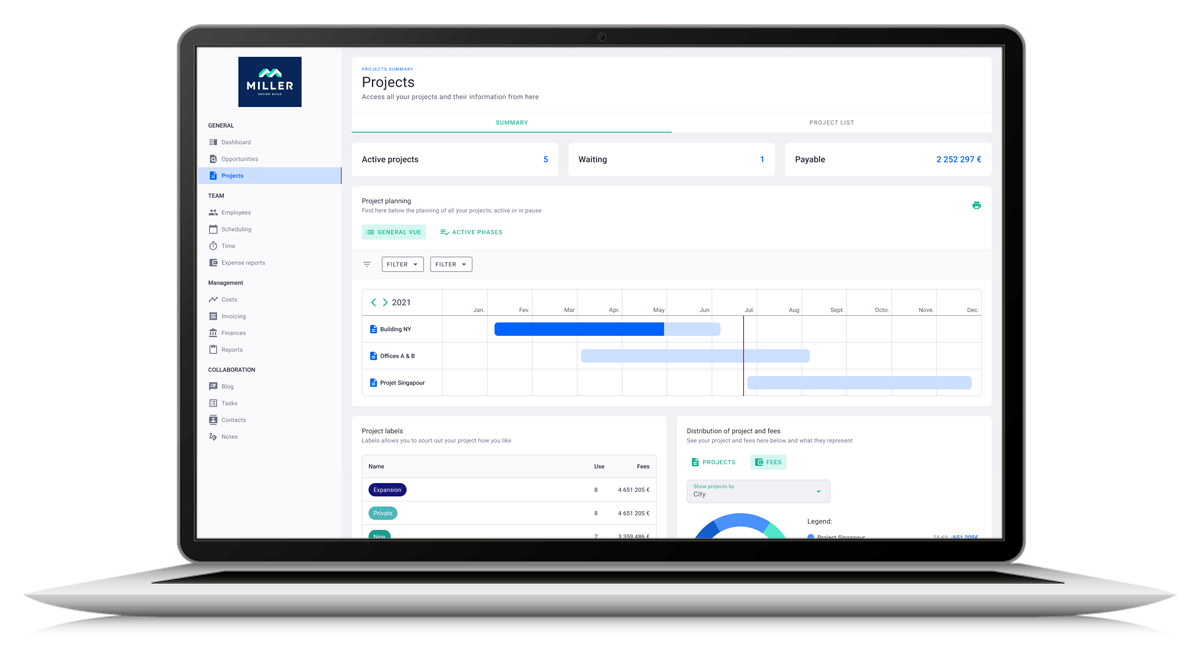
Milient Project Flow brings project financials and workload forecasts together for AEC firms. Leaders can use that information to review profitability and assess whether the team has capacity for the work they want to pursue. Each project runs by phase, with fee burn and invoicing rolling up into portfolio dashboards.
Project Flow Key Features
Three features connect everyday project work to the firm's strategy.
Portfolio Dashboards That Show How Each Project Contributes
Project profitability helps leaders assess financial performance, but it is only one part of strategic fit.
Project Flow's financial management tracks revenue, costs, and profitability per project and across the portfolio, providing figures for that review.
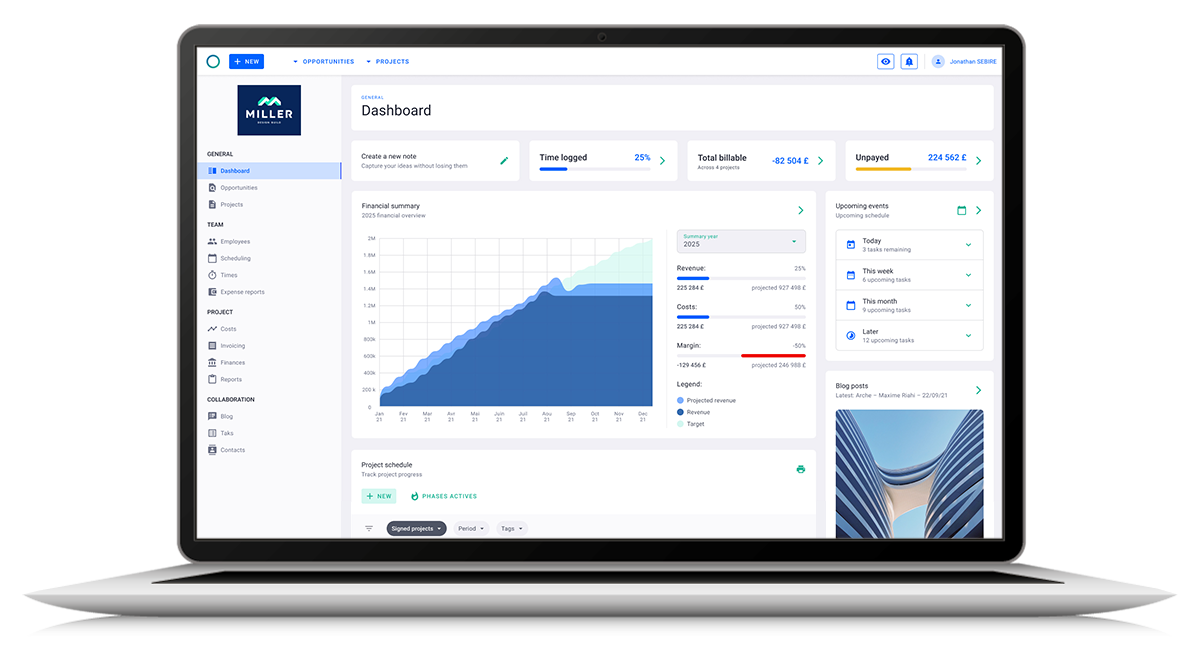
The Project Progress Dashboard puts every live project in one filterable view, with status, fees, budget consumed, and invoiced percentage. This way, practice directors can compare jobs side by side to understand their financial performance.
Patterns show up across the list. If one type of commission keeps finishing consistently finishes below its target margin, it's time to ask whether the next project is worth taking on.
Forecasts That Show Whether the Plan Will Hold
Long-term strategy needs a forward view: will this quarter's work cover the next quarter's costs? Project Flow's reports and analytics include forecasting and follow-up tools for future workload, revenue, and financial performance.
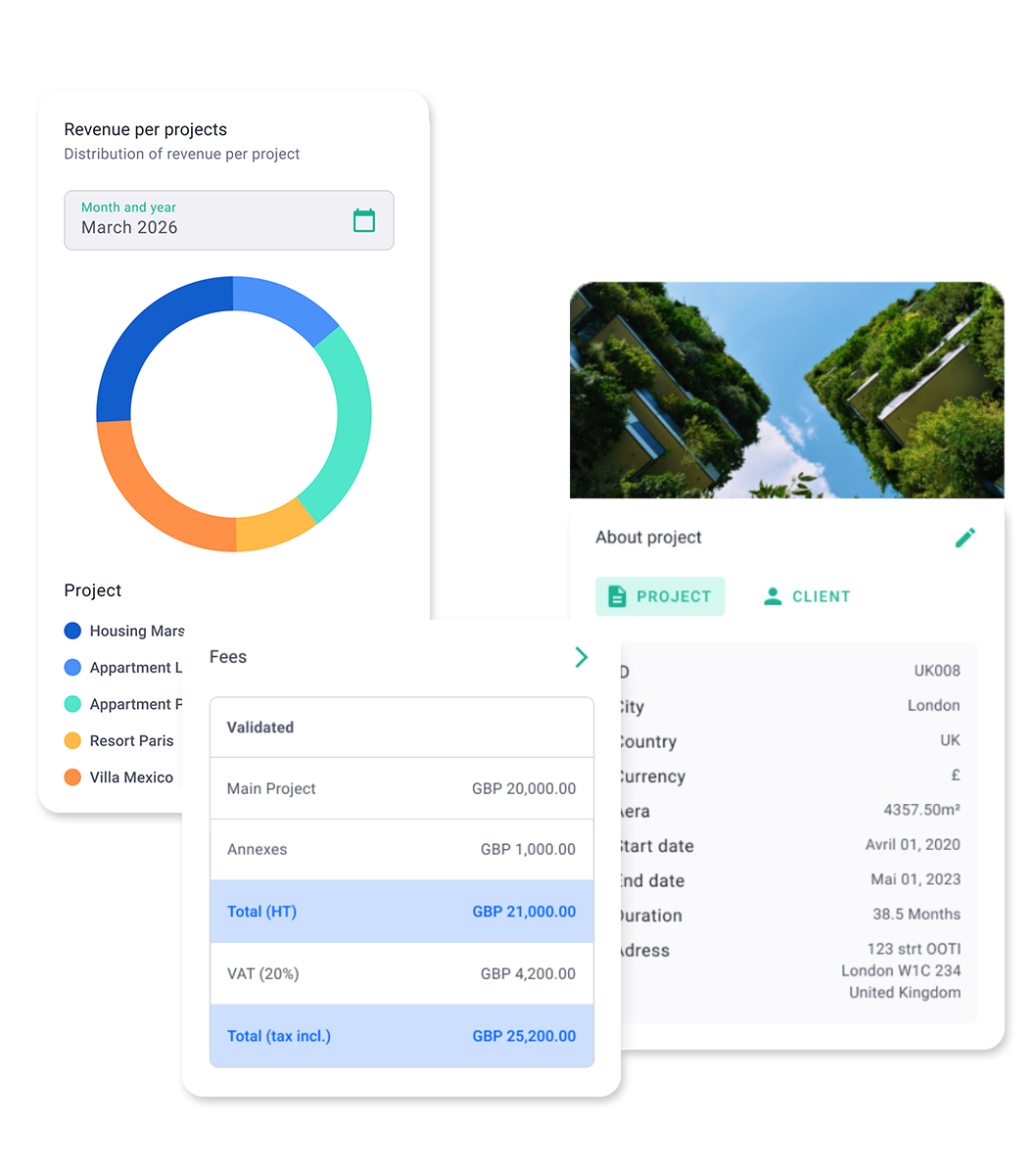
You track progress against each forecast and set actuals beside potential revenue. When results fall behind the forecast, you can investigate the cause and review staffing or remaining scope before committing further resources.
Reporting views also differ by role, letting a principal see firm-level revenue, while a project manager follows their own jobs.
Capacity Planning That Puts the Right Roles on Priority Work
Payroll made up 52% of Chartered Practice costs in 2025, per benchmarking from the Royal Institute of British Architects (RIBA). That makes staffing a major consideration when assessing project profitability.
Project Flow's resource management gives a capacity overview across projects and assigns work by role, availability, and project needs. Each role carries its own hourly rate, letting managers compare planned hours and their billing value.
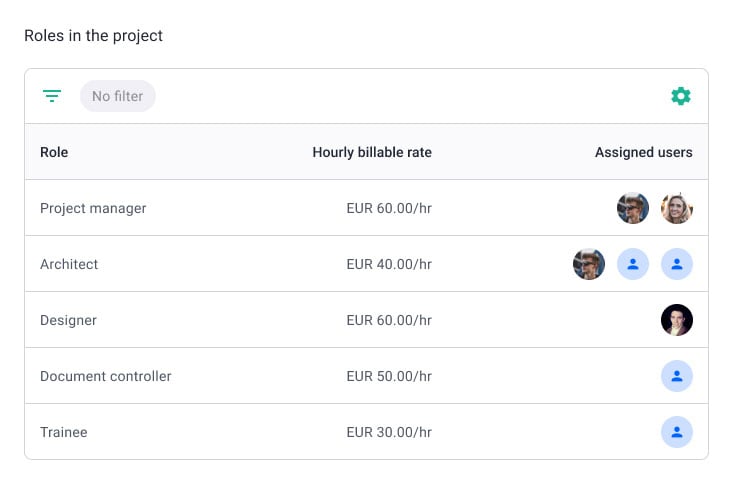
Before you accept a new commission, you can check whether the right roles are free in the months it needs them. Role-level splits of billable and non-billable time show how much of the team's capacity goes to fee-earning work.
Project Flow Pricing
Where Project Flow Shines
-
-
- Put every project's phases on one timeline: Phase-level planning schedules phases such as Concept, Coordination, and Technical Design across all projects in one Gantt view.
- Fees that follow delivery: A fees solver calculates base fees, discounts, and production totals, and Project Flow invoices by phase.
- Project records ready for leadership reviews: Each project keeps its team, roles, signed fees, key dates, and currency in one record. Timeline and deliverable reports export as PDFs for partner reviews or client updates.
-
Where Project Flow Falls Short
-
-
- No timesheet approval notifications: Project managers need to check manually whether timesheets have been submitted or validated.
-
Project Flow Customer Reviews
Milient holds 4.5/5 from 88 reviews on Capterra. Two verified users explain what they use it for most.
"Very user friendly. The display is easy to understand and I can change my operating language. I like the visualisation and the blog, which helps me and my colleagues communicate on our project progress."
Verified user, Capterra
"Project Flow allowed me to stop relying on endless Excel spreadsheets. Updating the billable forecast is the feature that has saved me a huge amount of time. The support team is very responsive."
Verified user, Capterra
“Recording time against specific project stages has given us much better visibility into where our time is going and how our projects are performing."
Ian Blake, Founder and Managing Director, IB Architects.
Who Project Flow Is Best For
-
-
- AEC principals who set the firm's direction: You decide which clients and commissions to pursue and want live project numbers behind each call.
- Practice directors running dozens of live projects: You want margin and capacity across the portfolio instead of a month-end spreadsheet export.
- Growing firms adding staff and multi-phase work: Your headcount and project complexity are growing faster than your current setup can report on. We explain how AEC practices stay resilient as projects scale.
-
2. Deltek Vantagepoint: Best for Large Firms That Want Pipeline, Staffing and Accounting in One ERP
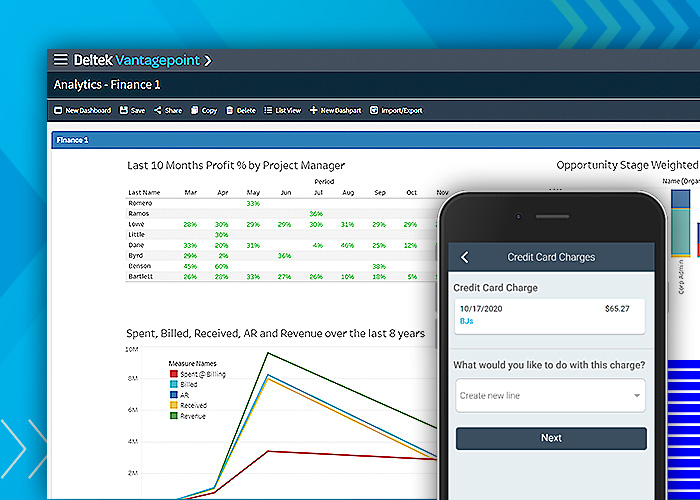
Deltek Vantagepoint connects pipeline, people, projects, and firm financials in one ERP for architecture, engineering, and consulting firms. Deltek describes it as one system from pursuit through to project closeout.
Deltek Vantagepoint Key Features
-
-
- CRM built around pursuits: The CRM links client records, pursuits, and resource data, so a bid decision can weigh who's free to deliver it. Business development and operations work from the same pipeline.
- Resource planning with skills search: Capacity planning, skills-based search and Gantt scheduling sit beside project budgets. Resource managers can balance workloads and forecast demand before they staff a win.
- Project KPIs and AI briefings: Dashboards track project-specific key performance indicators (KPIs) with automated notifications. Smart Summaries write short AI briefings on the firm and each project for leadership reviews.
-
Deltek Vantagepoint Pricing
Where Deltek Vantagepoint Shines
-
-
- Accounting and payables in the same system: Automated accounts payable processing, draft invoice markups, and Vantagepoint Payments cover money in and out. Finance can close the month without exporting to a separate ledger.
- Multi-company and multi-currency financials: Firms with several legal entities or overseas offices can run project financials across companies and currencies. That suits groups that bill clients in more than one currency.
- AI-assisted time and expense entry: Timesheet Assist and intelligent character recognition cut manual typing for timesheets and receipts. That matters to firms where late timesheets hold up billing.
-
Where Deltek Vantagepoint Falls Short
-
-
- Gantt scheduling needs a second module: Editing Gantt dates, setting dependencies, and building a critical path all require the Resource Planning module.
- AI briefings need a manual check: Deltek doesn't verify the accuracy of Smart Summaries briefings. Leaders must check each summary against project data before a portfolio review.
-
Deltek Vantagepoint Customer Reviews
On Capterra:
“Deltek Vision brings together project tracking, accounting, invoicing, and resource management within one platform. The project visibility is excellent, helping managers monitor budgets and schedules effectively,” says Gabriel I.
On Capterra:
“I didn't like the interface, it was hard on the eyes and not very user friendly. It reminded me of an old school system in look and in function,” shares Carra-Danielle G.
Who Deltek Vantagepoint Is Best For
- Large, multi-office architecture and engineering firms: You have a finance team, want CRM, staffing and accounting in one ERP, and can commit staff and time to the rollout.
3. CMap: Best for UK Practices That Price Fees From Past Project Data
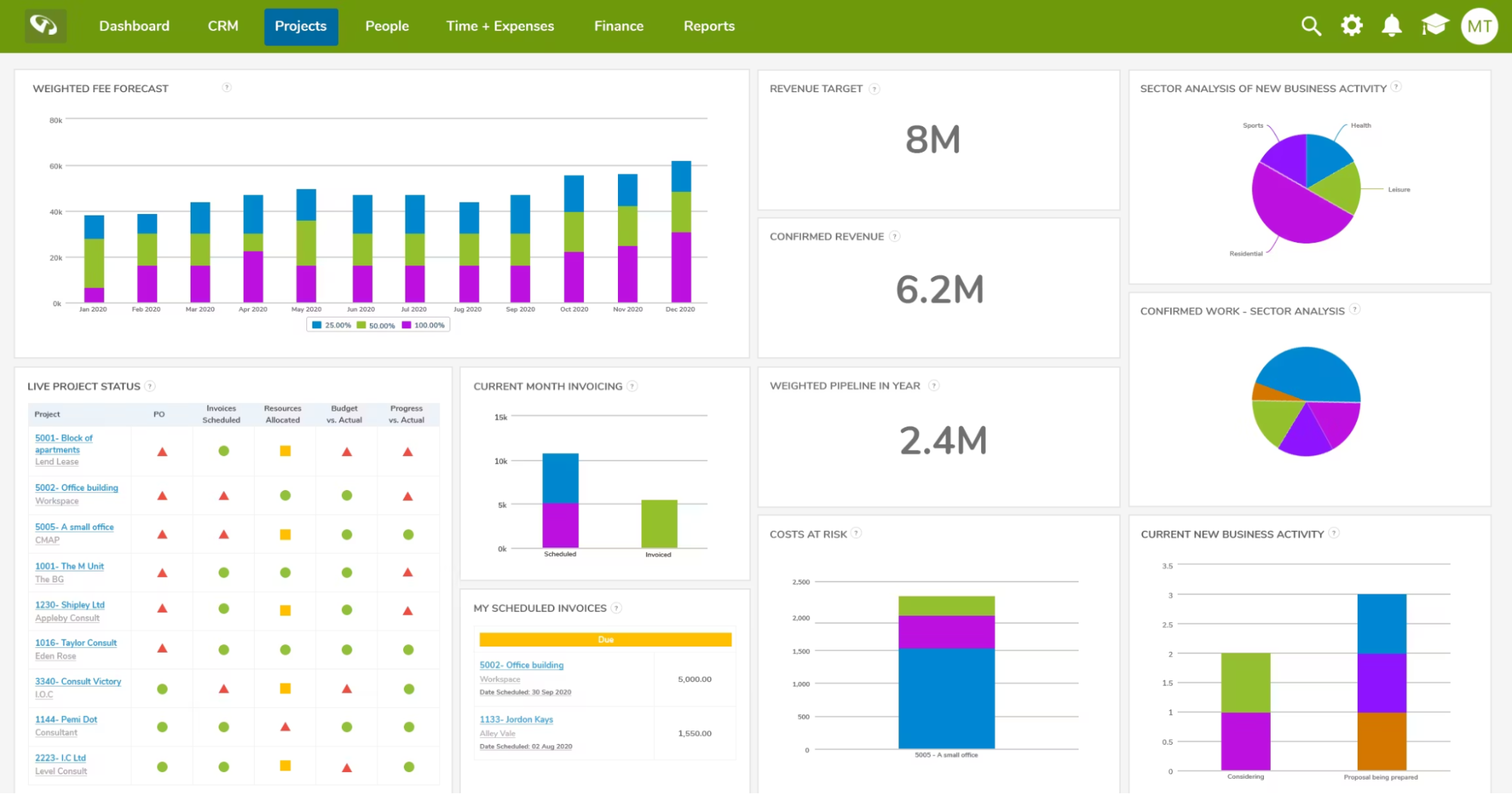
CMap runs proposals, timesheets, resourcing, invoicing, and reporting for design and engineering practices. Its AI layer, CMap Intelligence, answers questions about people, projects and profitability in plain language.
CMap Key Features
-
-
- Fee Estimator with margin flags: Fees draw on past project performance, and Intelligence flags margin erosion while you price. One project can mix several fee types, with budgets built from planned resourcing.
- Staffing Prediction Report: The report shows upcoming staffing demand, while a skills matrix, heatmap, and Team Picker suggest who fits each role. Resource managers can match won work to people before it starts.
- Budget vs. Actual in real time: Budget vs. Actual tracks profitability on each live project. Project Automation updates invoicing, revenue, and resourcing as tasks tied to stages move forward.
-
CMap Pricing
Where CMap Shines
-
-
- Accounting and CRM connections: CMap integrates with QuickBooks, Xero, and Sage for accounting, and with Salesforce and HubSpot for CRM. Your finance team keeps its ledger while CMap feeds it project data.
- Email and drawing management add-ons: CMap Mail files project email from Outlook, and CMap PIM manages documents and drawings on Microsoft 365. Project records then sit next to the financials.
- Cash flow alerts: Cashflow Insights predicts payment dates and flags risky payers early. Billing Insights shows what to raise, send, and chase each month.
-
Where CMap Falls Short
-
-
- Portfolio reporting sits on the top tier: CMap's plans page lists Portfolios under Enterprise, or as a paid add-on to lower plans. Custom reports and dashboards start on Pro.
-
CMap Customer Reviews
On G2:
“It’s easy to customise and adjust settings and preferences to suit our business needs. It also offers a lot of features, and even though we have a complex structure, CMAP can accommodate it without difficulty,” according to Coral B.
On G2:
“The functionality is comprehensive and supports our project management processes effectively. The main drawbacks are that some features take time to learn, and certain administrative tasks could be streamlined to cut down on the number of steps required,” says Paul G.
Who CMap Is Best For
-
-
- UK architecture and engineering practices with a finance lead: You price competitive fees, plan staffing from your pipeline, and already run Xero, Sage, or QuickBooks.
-
4. BQE Core: Best for Smaller US Firms That Want Accounting and Payroll in One Platform
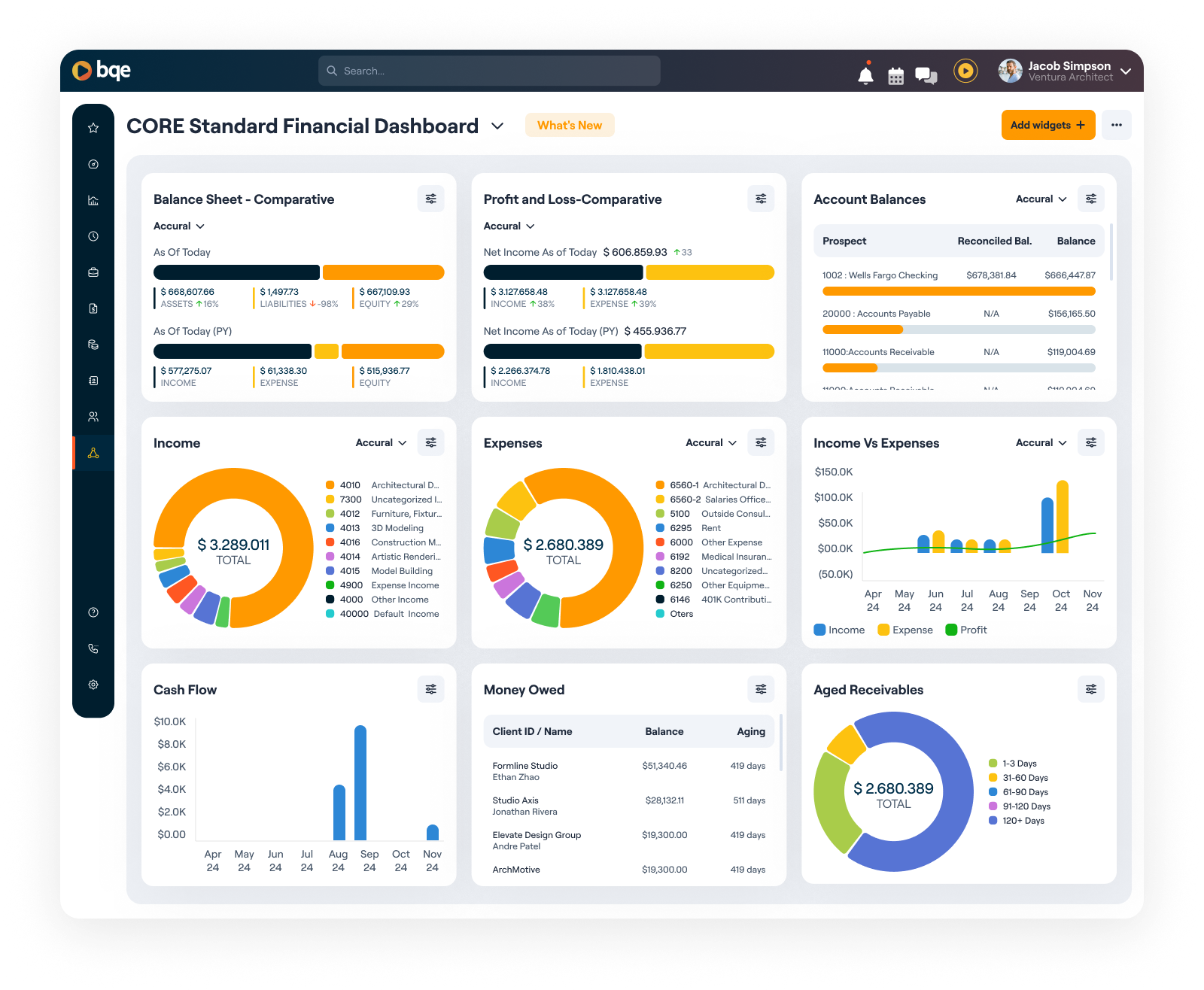
BQE Core runs time, billing, project accounting, and CRM for architects and engineers on one database. Data moves from timecards to invoices to the general ledger without re-keying.
BQE Core Key Features
-
-
- Budgets at three levels: Core budgets at project, department, and company level, with real-time views of progress and budget use. Unlimited custom dashboards put those figures on each user's start screen.
- Task allocation and forecasting: Core's planning features cover task allocation, workload balancing, and forecasts for new projects. Staffing plans tie back to delivery dates and profit targets.
- CORE Pursuit CRM: BQE's Pursuit CRM tracks campaigns and prospects for business development. An industry-tailored proposal builder sits alongside it for pricing new work.
-
BQE Core Pricing
Where BQE Core Shines
-
-
- Payroll inside the platform: US firms can run payroll, pay staff, and file federal, state, and local taxes inside Core, powered by Gusto. Employees handle pay stubs and withholdings through self-service.
- Flexible chart of accounts: Core Accounting posts to the general ledger automatically and supports a customizable chart of accounts. Firms that want one system for project and firm accounting can retire a separate bookkeeping package.
-
Where BQE Core Falls Short
-
-
- Payroll limited to the US: Core's payroll module serves US-based businesses only. UK and European practices would still need a separate payroll provider.
- Time entries out of sync: A G2 reviewer in architecture says dashboard time entries don't appear in the weekly Time Entries view. That gap matters when phase budgets depend on complete hours.
-
BQE Core Customer Reviews
On G2:
“The Project Overview screen is very helpful. It provides a clear, comprehensive snapshot of a project's status, making it easy to quickly understand what is happening with the project, including financial and operational information. It has become a useful tool for efficiently reviewing project performance and progress,” shares Randal D.
On Capterra:
“The platform has a lot of features, which can make it feel complex at first. Some workflows may require extra steps, and learning the more advanced functionality can take some time,” says Gagandeep S.
Who BQE Core Is Best For
-
-
- Smaller US architecture and engineering firms: You want project accounting, payroll, and CRM from one vendor and bill in US dollars.
-
5. Monograph: Best for Small US Studios That Plan Phases on a Visual Timeline
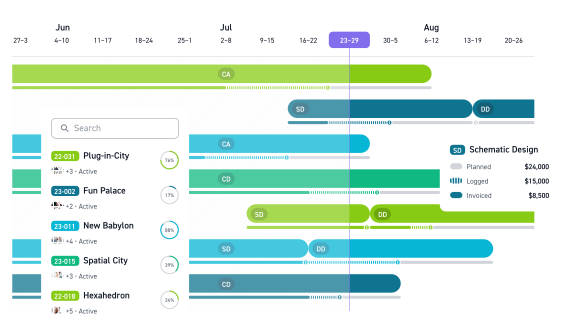
Monograph pairs visual phase plans with staffing forecasts, time tracking, and invoicing for US architecture and engineering practices. Its QuickBooks Online connection transfers invoices into the firm's accounting system.
Monograph Key Features
-
-
- Phase budgets by fee type: Each phase carries its own budget as a fixed fee, hourly, or a mix of both. Templates copy phases, roles, budgets, and milestones into new jobs, and milestones cascade when a date moves.
- Staffing forecasts months ahead: Capacity planning shows planned hours per month by team or person, so overcommitted months stand out early. Scenario modeling tests how a new win or scope change would shift workloads.
- Utilization by type of hour: Timesheet entries roll up live into billable, non-billable, and overhead time. Utilization then compares billable hours with available hours, leaving out paid time off.
- Weighted revenue forecasts: Opportunity forecasting blends weighted leads, active projects, and future revenue into one view. Each lead's weight follows its pipeline stage and updates as the lead moves.
-
Monograph Pricing
Where Monograph Shines
-
-
- Onboarding and training included: Every subscription comes with onboarding support, on-demand training, and learning center access. Projects and reports are unlimited in every subscription.
- QuickBooks Online connection: Monograph pushes invoices into QuickBooks Online, so US studios keep the ledger they already run while planning projects in Monograph.
-
Where Monograph Falls Short
-
-
- Pipeline sold separately: Weighted revenue forecasts draw on Monograph's Pipeline, which is an add-on outside the core subscription.
- QuickBooks sync for US companies only: The QuickBooks Online integration doesn't work for companies based outside the US. Time entries, payroll and project records don't sync either, and invoices reach QuickBooks without project names or numbers.
- One currency per firm: The currency a firm sets in Monograph applies to every project. Practices billing overseas clients in other currencies will need to convert fees outside the platform.
-
Monograph Customer Reviews
On G2:
“Visuals + data collection. Allows us to make the best decisions for the firm,” says Jessica S.
On G2:
“My only real wish would be for more flexibility around the daily and weekly administrative workflows that are still integral to running an architecture and engineering firm but aren’t necessarily tied to a specific project,” shares Heather M.
Who Monograph Is Best For
-
-
- Small US architecture studios on QuickBooks Online: You bill in dollars and want phase plans and staffing forecasts the whole team can read.
-
6. Projectworks: Best for Consultancies Reviewing WIP and Project Margins
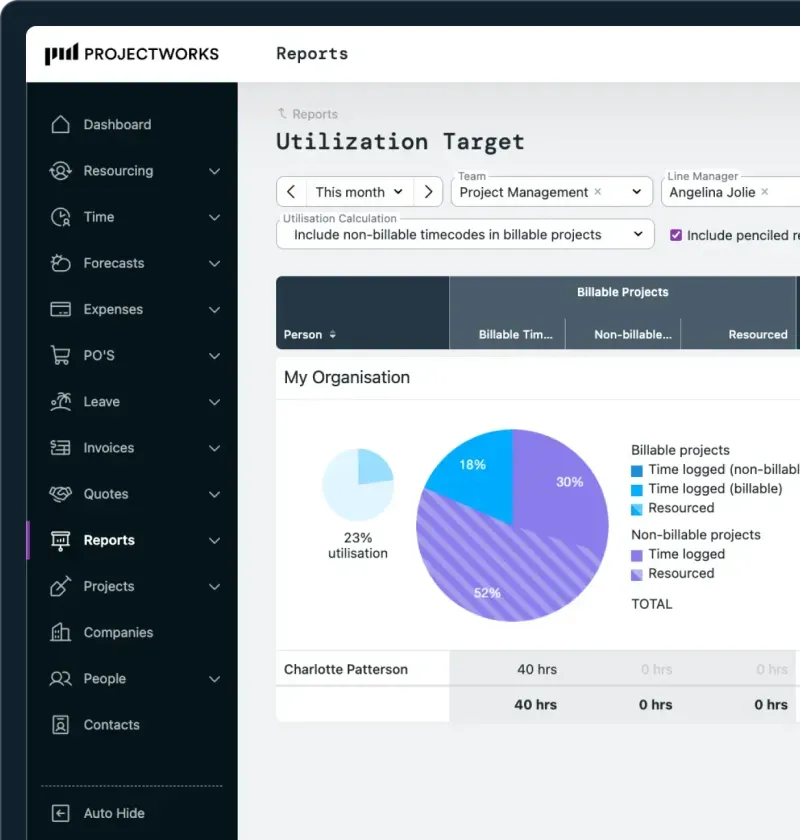
Projectworks serves professional services firms, with architecture and engineering among its listed industries. Its reports cover live WIP, utilization rates, margins, and project financials on real-time dashboards.
The Build plan starts at $17/user/month billed annually, with a 10-user minimum. Projectworks says most firms on its standard onboarding go live in four to six weeks.
-
-
- Resourcing and forecasting from the first plan: The Build plan includes resourcing, invoicing, forecasting, and Xero or QuickBooks sync.
- Room to grow into multi-office work: Higher plans add multi-office and multi-currency support, revenue recognition and a consulting CRM in beta.
-
Best for: Firms of 10 or more staff that want financial reporting and resourcing forecasts in one platform.
How to Choose the Best Strategic Project Management Software for Your Firm
These three checks are your guide to choosing strategic AEC project software. You can also read about the best project management software for architects for more options.
Match Platform Depth to Your Firm's Size and Finance Team
A full ERP requires someone to manage its setup, reporting, and ongoing administration. If your practice outsources bookkeeping, check who would own those responsibilities and whether you need the accounting modules.
Ask the vendor who owns the system after go-live at a firm your size, and for how many hours a month.
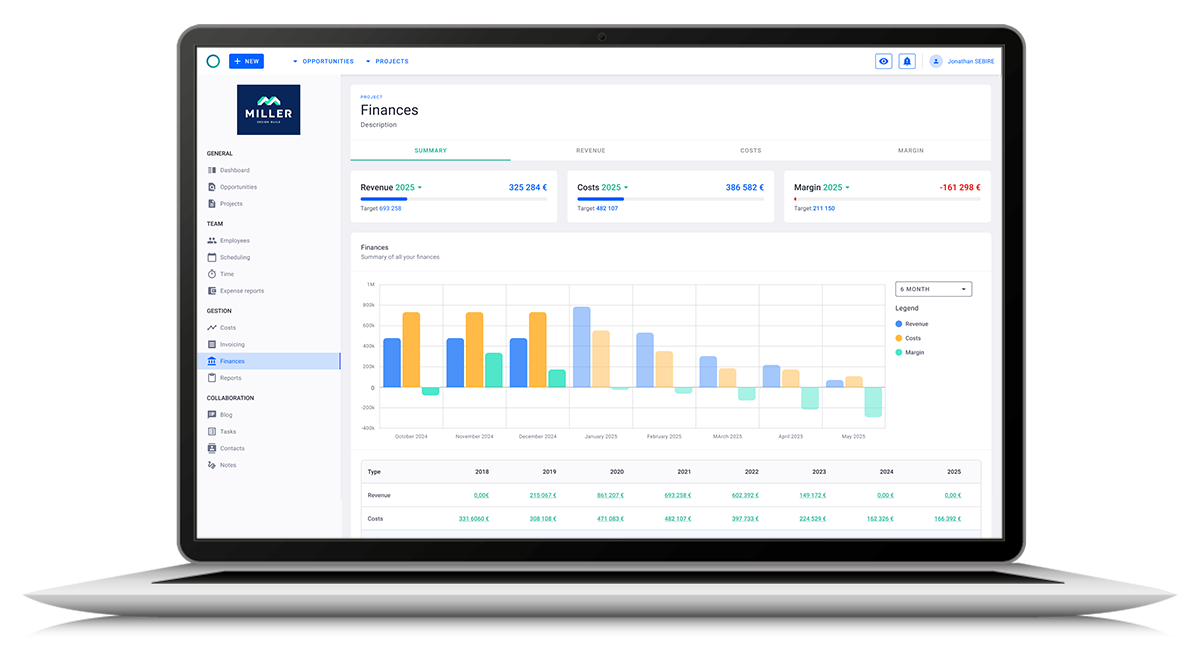
Milient Project Flow sits in the middle ground: financial control for growing AEC firms that don't need a full ERP. For firm-wide platforms beyond project delivery, see our roundup of architecture firm management software.
Decide Where Your Firm's Goals Will Live
Some strategy tools track objectives and key results (OKRs). Others, like every platform on this list, measure the projects that deliver those goals.
Firms with formal OKRs may need both. Ask each vendor to show one firm-level number, such as this year's revenue goal, with every live project measured against it.
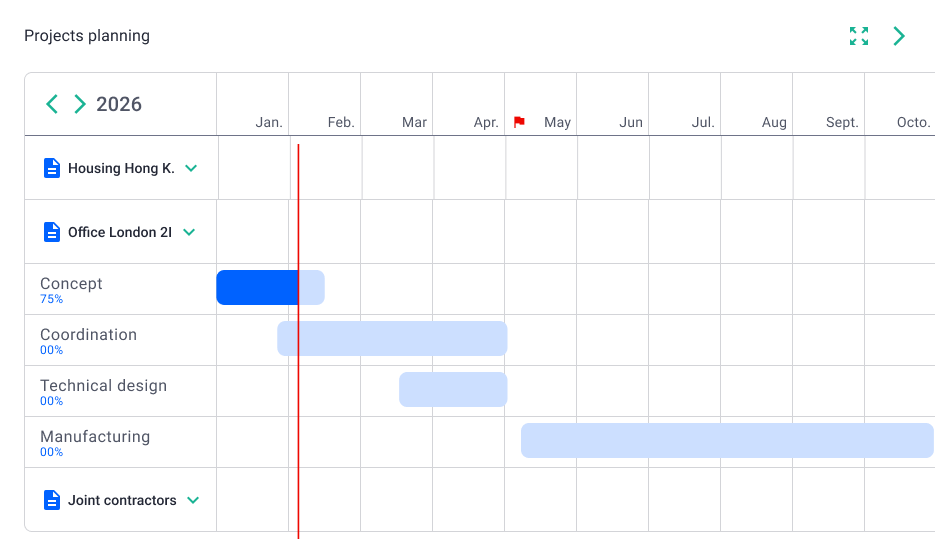
Project Flow's project and portfolio reports inform financial target reviews. When you need to assign strategic objectives to projects and track progress against them, we’ll demonstrate that workflow, too.
Plan for Rollout Time and Timesheet Adoption
Reliable forecasts need current project plans and actual hours recorded against the right work.
Agree how your team will submit and review timesheets before launch, so leadership reports do not rely on incomplete delivery data. Then, ask for a go-live plan for a firm your size, with the date of your first portfolio report.
Milient Project Flow trains superusers in workshops before go-live and follows up two to three days after.
Steer Every AEC Project Toward Your Firm's Goals With Milient Project Flow
If your firm's goals are already clear but project reporting makes progress hard to judge, Milient Project Flow belongs on your shortlist. Its financial and capacity views give leaders a basis for reviewing commitments and considering new work.
FAQs

Want more content like this? Follow Milient: