
Key takeaways
 Milient Software: Best for architecture, engineering, consultancies, and professional services firms that need project management, resource planning, financial control, and profitability tracking in one platform.
 Monday.com: Best for teams looking for highly customisable workflows and visual project management across a wide range of business functions.
 Teamwork: Best for client service businesses that need integrated project management, time tracking, budgeting, and collaboration tools.
 Scoro: Best for growing professional services organisations that want to combine project management, CRM, quoting, resource planning, and financial management in a single system.
If you're finding Productive.io difficult to scale, struggling with scope creep, utilisation gaps, or unclear project profitability, you're not alone. Many project-based businesses eventually start looking for Productive.io alternatives that provide better visibility into resources, financial performance, and day-to-day project delivery.
The good news is that there are several strong alternatives available. Whether you're an architecture or engineering practice, consultancy, agency, or professional services firm, the right platform can help you improve resource utilisation, streamline project management, and gain greater control over budgets and profitability.
In this guide, we'll compare the best Productive.io alternatives based on their features, pricing, strengths, weaknesses, and ideal use cases, helping you find the platform that best fits your organisation.
Best Productive.io Alternatives at a Glance
*Prices shown are entry-level plans based on annual billing and may change.
Milient Project Flow: Best for Architecture, Engineering, and Consulting Firms That Need Stronger Financial Project Control
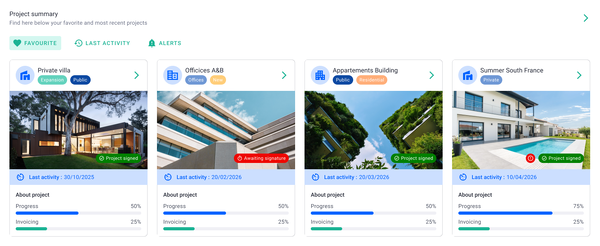
Milient Project Flow is purpose-built for architecture, engineering, and consulting (AEC) firms that have outgrown lightweight project management tools like Productive. Rather than focusing solely on task management, it combines project planning, financial tracking, resource management, automated invoicing, and reporting in one platform. For firms looking to improve profitability while reducing spreadsheet dependency, Project Flow provides greater visibility across every stage of a project lifecycle.
Key features
While many project management platforms help teams organise work, Project Flow places equal emphasis on commercial performance. It enables project managers, finance teams, and practice leaders to monitor budgets, resource utilisation, project progress, and profitability without switching between multiple systems.
Stand Out Feature #1: Real-Time Project Financial Visibility
/planning_team.png?width=1578&height=1122&name=planning_team.png)
One of Project Flow's biggest strengths is its live Project Progress Dashboard, which provides an instant overview of every active project. Users can monitor project status, budget consumption, invoiced percentages, fees, and revision history from a single screen.
Unlike general project management tools, Project Flow helps firms identify projects drifting over budget before profitability is affected, making it particularly valuable for firms managing multiple client engagements simultaneously.
Stand Out Feature #2: Time & Budget Tracking
/time%20management.svg)
Project Flow tracks expected hours, budgeted hours, and actual hours side by side, giving managers continuous insight into project performance. Teams can quickly identify budget overruns, compare planned versus actual effort, and make informed decisions before projects become unprofitable.
Combined with integrated time tracking, this creates a single source of truth for both project delivery and financial performance. Learn more about Milient's time tracking capabilities and how they support accurate budgeting and project reporting.
Stand Out Feature #3: Phase-Based Project Planning & Automated Invoicing
/invoicing_dashboard.png?width=1200&height=645&name=invoicing_dashboard.png)
AEC projects rarely follow a simple task list. Project Flow supports phase-based project delivery through built-in Gantt scheduling, allowing firms to manage Concept Design, Technical Design, Coordination, Construction, and other project stages from one timeline.
Once work progresses through each phase, Project Flow can automatically generate invoices based on agreed fees and project milestones, reducing manual administration while helping firms invoice clients faster and more accurately.
Where Milient shines
-
-
-
- Built specifically for AEC firms: Designed around the workflows of architecture, engineering, and consulting businesses rather than adapting generic project management functionality.
- Strong financial visibility: Combines project management with budgeting, invoicing, profitability tracking, and reporting to help firms stay commercially in control.
- Reduces spreadsheet dependency: Centralises project information, time tracking, resources, and reporting into one connected platform, improving collaboration and reducing manual work. Explore Milient's integrations to connect Project Flow with your wider software stack.
-
-
Where Milient falls short
-
-
- Timesheet workflow could be clearer: Some users would like better visibility when submitted timesheets have been approved or validated.
- Limited calendar view for logged hours: Currently, project hours cannot be viewed in a calendar-style layout.
- Some finance administration improvements requested: Users have highlighted features such as invoice numbering options that could be expanded further.
-
Customer reviews
Project Flow receives positive feedback for its intuitive interface, financial visibility, and customer support. Capterra reviewers frequently mention replacing Excel spreadsheets with Project Flow, while others praise its ease of use and responsive support team. Many users also highlight the billable forecast functionality as a significant time saver for project managers.
Who is Milient best for
-
-
-
- Growing AEC firms: Firms that need stronger project financial management alongside project delivery.
- Practice leaders and directors: Organisations wanting better visibility into budgets, utilisation, profitability, and invoicing.
- Mid-sized consulting businesses: Teams managing multiple concurrent client projects that have outgrown simpler project management software.
-
-
Milient Pricing
*Pricing may vary by region and contract. Visit the Project Flow pricing page for the latest information.
2. Asana:Best for Cross-Functional Teams That Need AI-Powered Work Management
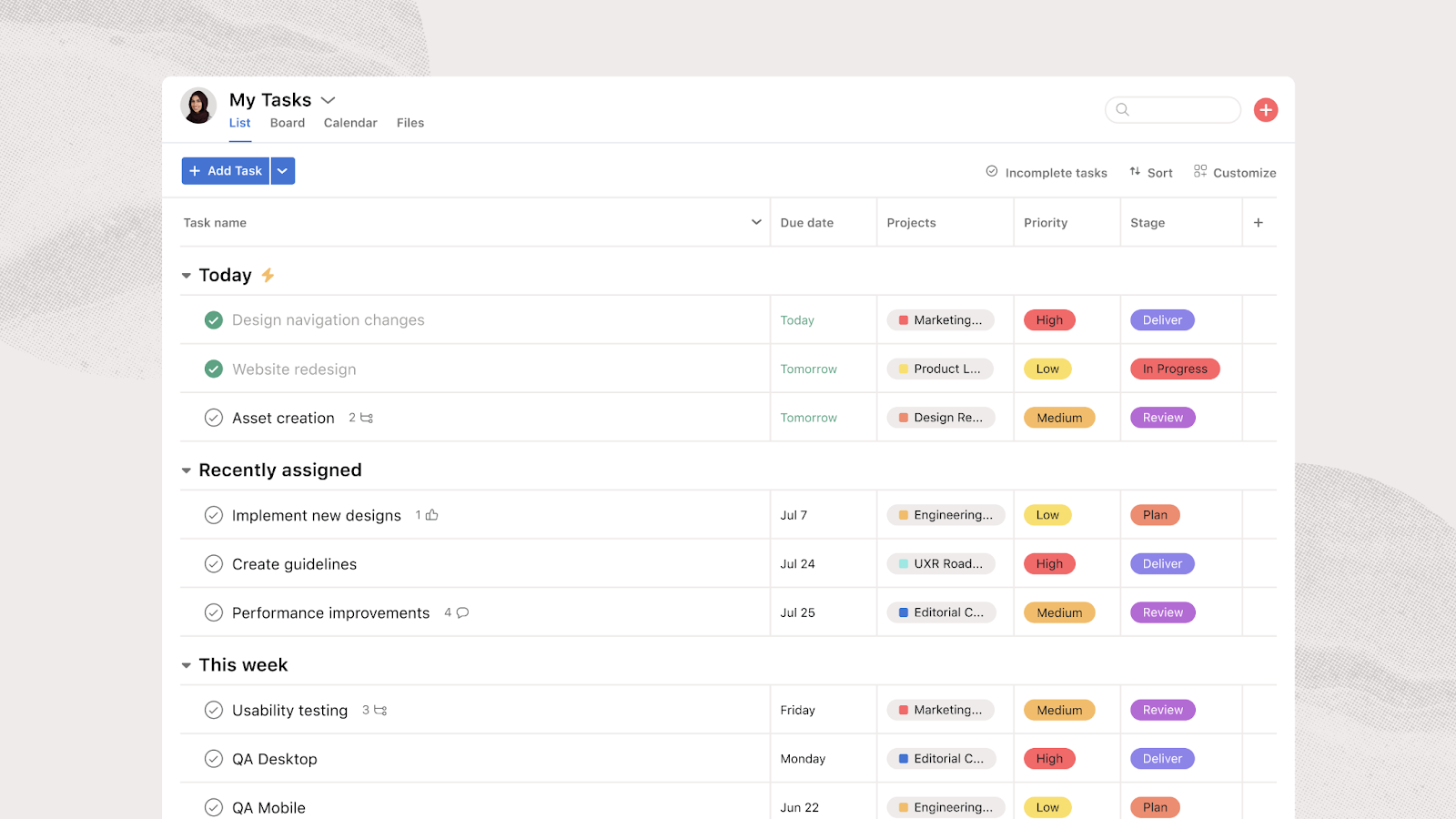
Asana is a work management platform designed to help teams plan, organise, and automate work across departments. While Productive focuses on project-based businesses and professional services, Asana offers broader project management capabilities with AI-powered workflows, automation, and hundreds of integrations. Its recent AI features—including AI teammates, AI Studio, and Asana Dash—make it particularly appealing for organisations looking to streamline repetitive work.
Key features
-
-
-
- AI Teammates: Prebuilt AI agents can assist with planning, reporting, compliance, research, and workflow optimisation, helping teams automate routine project tasks.
- AI Studio: Create no-code AI automations that route work, trigger actions, update projects, and reduce manual administration across teams.
- Work Graph & Integrations: Connects projects, tasks, people, goals, and external tools into one shared workspace, with integrations for Microsoft 365, Google Workspace, Salesforce, Slack, ChatGPT, and more.
-
-
Where Asana shines
-
-
-
- Powerful automation: AI Studio and workflow automation help reduce repetitive manual work while improving task routing and project consistency.
- Excellent user experience: The clean interface, dashboards, and timeline views make it easy for teams to adopt and manage projects.
- Extensive integrations: Connects with hundreds of business applications, making it suitable for organisations already using multiple software tools.
-
-
Where Asana falls short
-
-
-
- Limited resource and financial management: Unlike Productive, Asana doesn't provide the same depth of budgeting, profitability tracking, or billing capabilities for professional services firms.
- Search and workload limitations: Several users mention the search function can be slow, while others would like stronger workload balancing, capacity planning, and team utilisation reporting.
- Enterprise features can become expensive: Many advanced AI and governance capabilities are reserved for higher-tier plans.
-
-
Customer reviews
Review 1 (G2 – 5/5)
"I like the UX and the dashboards. The dashboard lets us have a more visual, rapid look at where we stand with to-dos and progress. The UX gives us the advantage of seamless adoption with the team. I also like the Claude–Asana connector, since our company uses Claude as our main AI tool. The connector lets us set up milestones with the help of Claude and have them show up in Asana without double work. The initial setup was pretty easy, and I loved it."
Review 2 (G2 – 4.5/5)
"What I like best about Asana is how effectively it brings structure and visibility to cross-functional work. As someone working closely with Sales Ops, Marketing Ops, and Tech Ops, Asana helps me break down complex, ongoing initiatives into clear projects, tasks, owners, and timelines."
Review 3 (G2 – 4/5)
"Task and subtask setup is what hooked me. I can break down a project into smaller pieces, assign them out, set due dates, and then actually forget about following up because the platform handles that nudging for me. The automations are genuinely useful, not just a feature that sounds good in a demo."
Who is Asana best for
-
-
-
- Cross-functional organisations: Teams managing projects across marketing, operations, product, IT, and other business functions.
- Growing businesses: Companies wanting AI-powered workflow automation without extensive technical setup.
- Enterprise teams: Organisations requiring advanced collaboration, automation, and integration capabilities.
-
-
Asana Pricing
3. Monday.com: Best for Teams Needing Highly Customisable Workflows and Automation
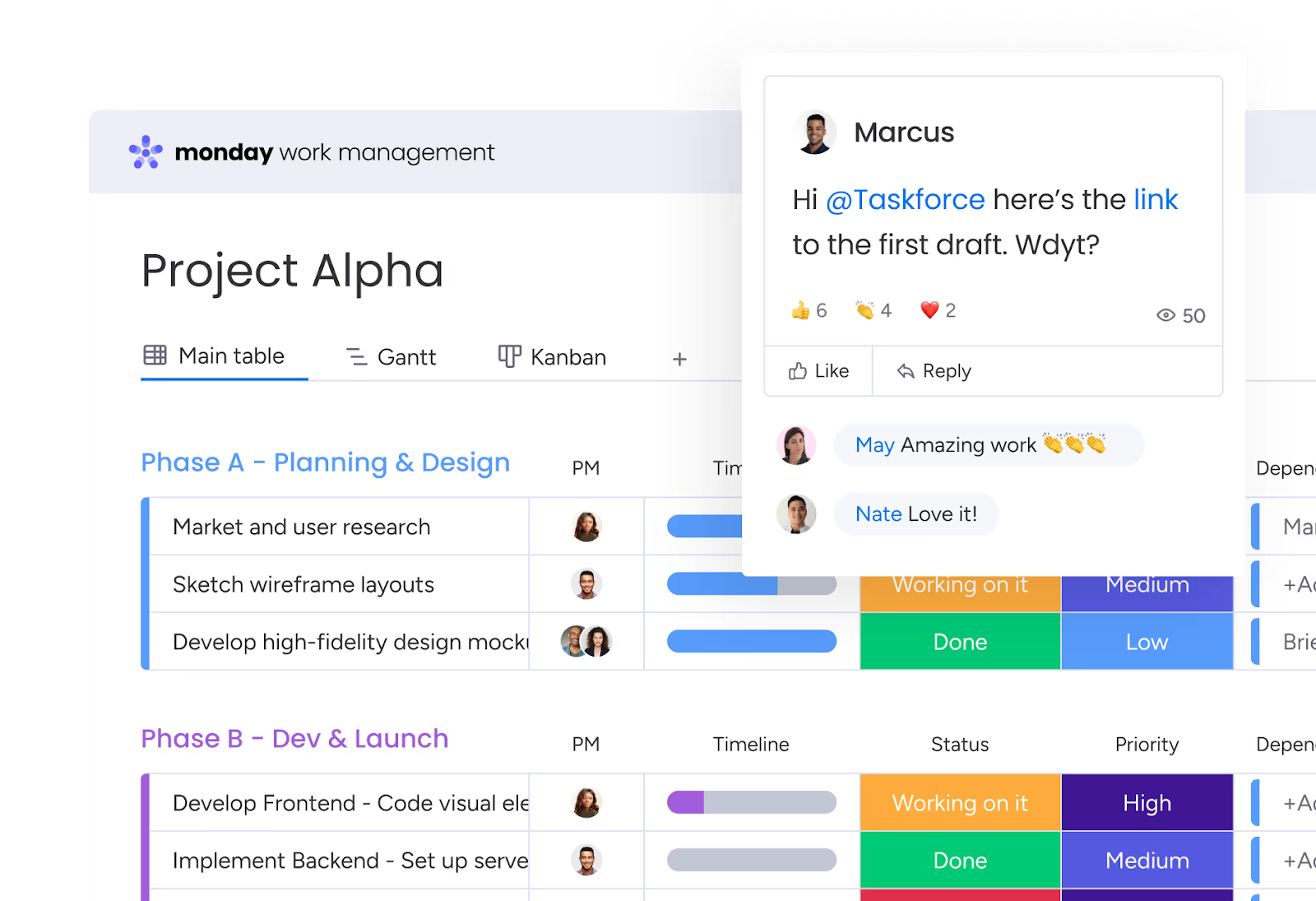
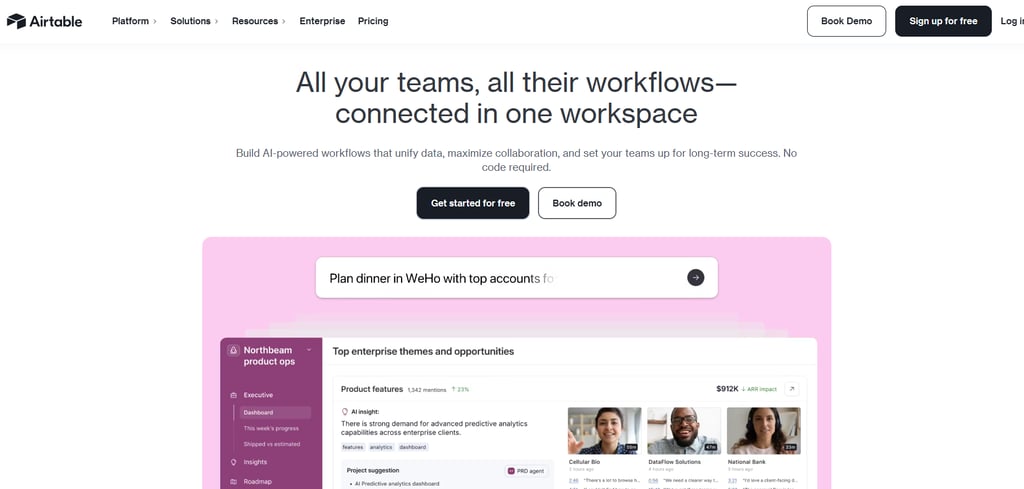
Monday.com is a flexible work management platform designed for teams that want to build custom workflows without coding. Unlike Productive, which is tailored to professional services businesses, monday.com supports a wide variety of industries and use cases through configurable boards, dashboards, automations, AI capabilities, and over 200 integrations. It's particularly well suited to organisations that value flexibility and cross-functional collaboration.
Key features
-
-
-
- Customisable workflows: Build bespoke project boards, forms, automations, and workspaces for departments including marketing, IT, HR, legal, operations, and sales.
- AI-powered automation: AI assistants and AI agents can automate repetitive tasks, generate content, summarise information, route requests, and streamline complex business processes.
- Dashboards & reporting: Create real-time dashboards that consolidate data across multiple boards, helping teams monitor project progress, workloads, KPIs, and business performance from one place.
-
-
Where Monday.com shines
-
-
-
- Highly configurable platform: Teams can customise almost every aspect of workflows, making it suitable for a wide range of industries and departments.
- Strong automation capabilities: No-code automations and AI features reduce repetitive manual work while improving operational efficiency.
- Large integration ecosystem: Connects with more than 200 applications including Microsoft Teams, Slack, Google Workspace, Salesforce, Jira, HubSpot, GitHub, and ChatGPT.
-
-
Where Monday.com falls short
-
-
-
- Pricing can increase quickly: Several advanced features, automation limits, and AI capabilities require higher-tier plans, which can become expensive as organisations grow.
- Steeper learning curve: The platform's flexibility means new users may need additional time to configure boards, workflows, and automations effectively.
- Support concerns: Recent reviewers report slow response times and unresolved technical issues when contacting customer support.
-
-
Customer reviews
Review 1 (Trustpilot – 1/5)
"Only communicate when they want more money"
"After many attempts for help, support and to communicate how the platform is working, especially the new AI feature, we are repeatedly asked to provide the same details. Very poor support model, cant speak to anyone, everything is done via chats and emails when the matter can be resolved quickly with a call. Considering we want to use the enterprise, I feel this is all about making money and not making partners happy."
Review 2 (Trustpilot – 1/5)
"The support is awful"
"The support is awful, we have been trying to fix an issue for months. It works for a week and then will randomly break. No notifications that it isn't working. Just silence.
I will then contact support, get given a ticket, speak to the same support guy over and over again. It is like they only have one person who can do it?
I then solve the problem myself as support do not help, integration breaks again.
Repeat."
Review 3 (Trustpilot – 1/5)
"So turned off of this program because..."
"So turned off of this program because it's constantly asking me to upgrade and pay more. Like so many other reviews I've seen... I keep hitting a limit with my current plan and need to upgrade. Already bought the standard plan for a full year. Wish I hadn't jumped in and done that right away. Will NOT be renewing. Don't waste your time setting up all your projects unless you plan to purchase the highest level (Enterprise) right away. I've wasted so much time."
Who is Monday.com best for
- Cross-functional organisations: Businesses wanting one configurable platform for projects, operations, sales, HR, marketing, and IT.
- Growing teams: Companies looking to automate workflows and connect multiple business tools.
- Teams with complex processes: Organisations needing highly customisable workflows rather than industry-specific project management.
Monday.com Pricing
4. Teamwork: Best for Client-Focused Agencies and Professional Services
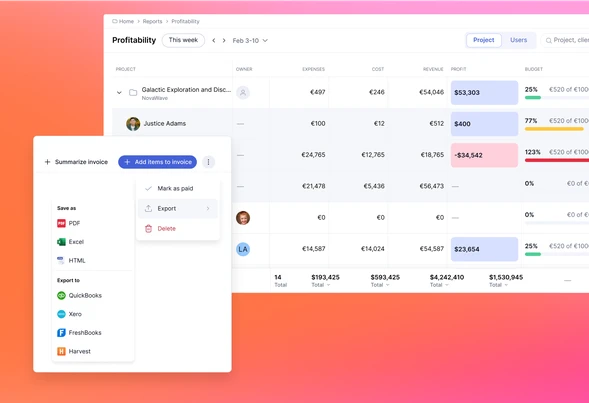
Teamwork is a project management platform built specifically for businesses that deliver work for clients. Unlike general task management tools, it combines project planning, time tracking, resource management, budgeting, invoicing, and profitability reporting in a single platform, making it well suited to agencies, consultants, IT service providers, and other professional services firms.
Key features
-
-
-
- Project and task management: Create projects using templates, manage dependencies, milestones, Kanban boards, Gantt charts, and multiple project views to keep work on schedule.
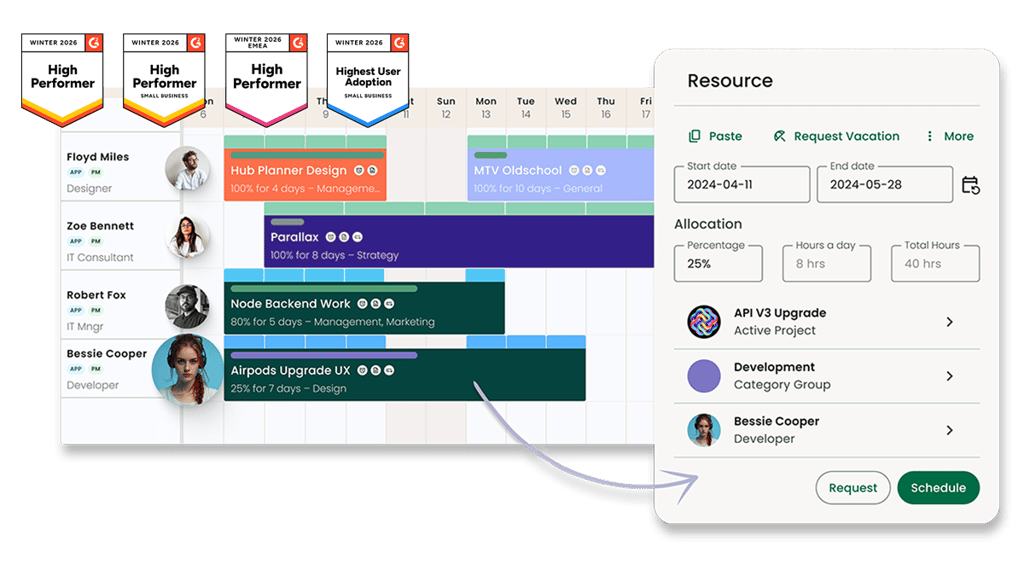
- Resource and workload planning: Visual workload planning helps managers balance team capacity, forecast demand, and prevent employees from becoming over or underutilized.
- Time tracking and profitability reporting: Built-in timers, billable hours, project budgets, and profitability dashboards help teams understand project margins while keeping client work financially on track.
- Client collaboration and request management: Client portals, intake forms, approvals, file sharing, and Teamwork Desk allow external stakeholders to collaborate without relying on lengthy email chains.
-
-
Where Teamwork shines
-
-
-
- Designed for service businesses: Unlike many general-purpose project management tools, Teamwork includes budgeting, billing, client management, and profitability reporting alongside project delivery.
- Strong financial visibility: Real-time budget tracking, billable time reporting, and margin insights help firms understand project performance before profitability becomes an issue.
- Excellent client collaboration: Shared workspaces, approvals, request forms, and integrated communication make it easier to manage client projects from proposal through delivery.
-
-
Where Teamwork falls short
-
-
-
- Steeper learning curve: The extensive feature set means new users may need additional onboarding before they become comfortable navigating the platform.
- Consistency requires governance: Several users note that projects can become inconsistent if teams don't establish standard templates, statuses, and workflows early.
- Higher-tier features: Advanced resource management, financial controls, and profitability features are primarily available on the more expensive plans.
-
-
Customer reviews
Review 1 (G2 – 5/5)
"Teamwork feels like it was built for teams that work with clients, not just for moving tasks from one column to another. Time tracking, budgets, workload planning, and profitability are all part of the daily workflow instead of feeling like features that were bolted on later... The updated Timeline has been especially useful because it gives me a clear view of deadlines and dependencies without making project planning feel overly complicated."
Review 2 (G2 – 5/5)
"One thing I learn pretty quickly is that Teamwork works best when everyone follows the same structure. We rush through the initial setup, and after a few months every project manager is using different statuses, tags, and templates. Nothing breaks, but comparing projects or finding information starts taking longer than it should."
Review 3 (G2 – 4/5)
"What I like best about Teamwork.com is its well-structured project management system combined with an intuitive and user-friendly interface... The integrations with other tools and the customizable workflows make it flexible enough to adapt to different business needs."
Who Teamwork is best for
-
-
-
- Professional services firms: Teams that need project management alongside budgeting, billable time tracking, profitability reporting, and resource planning.
- Marketing and creative agencies: Businesses managing multiple client projects with approvals, deadlines, and collaborative workflows.
- IT consultants and service providers: Organisations requiring workload management, project visibility, and integrated client communication.
-
-
Teamwork pricing
Pricing based on annual billing and subject to change.
5. Scoro: Best for Professional Services Firms Needing End-to-End Business Management
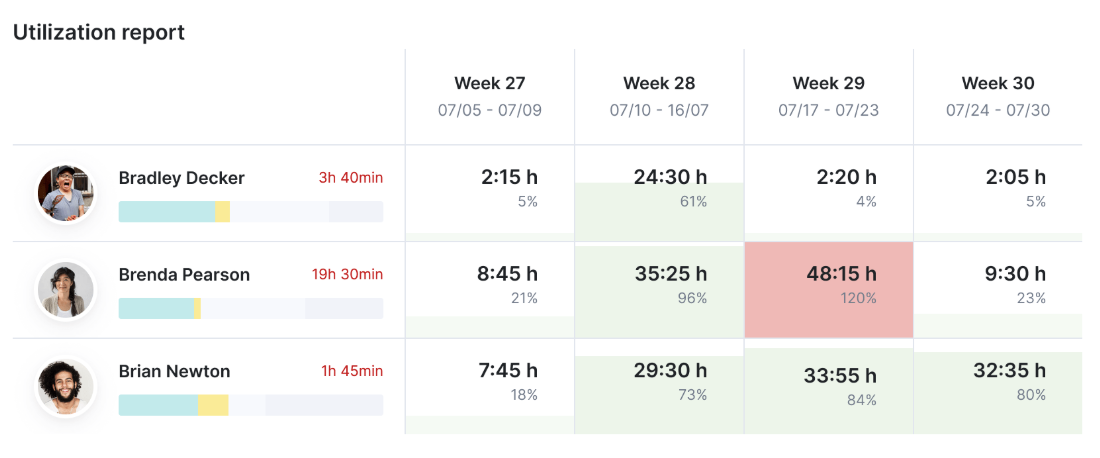
Scoro is an all-in-one work management platform designed for consultancies, agencies, IT firms, and other professional services businesses. It combines project management, CRM, quoting, budgeting, resource planning, invoicing, and reporting in a single platform, helping organisations manage the entire client lifecycle while maintaining visibility into project profitability.
Key features
-
-
-
- End-to-end project management: Manage projects from quotation through delivery and invoicing using Gantt charts, task management, milestones, templates, and real-time project tracking.
- Resource planning and forecasting: View team capacity, allocate work based on availability, and forecast future demand to improve utilisation and prevent resource bottlenecks.
- Financial management: Track budgets, quoted vs. actual costs, profitability, billable hours, and project margins with built-in financial reporting and forecasting tools.
- CRM and business operations: Manage client relationships, sales pipelines, quotes, contracts, invoices, and project documentation without switching between multiple systems.
-
-
Where Scoro shines
-
-
-
- Excellent financial visibility: Scoro connects project delivery with budgeting, quoting, invoicing, and profitability reporting, making it ideal for firms focused on commercial performance.
- Comprehensive business platform: Rather than only managing projects, Scoro covers CRM, sales, finance, resource planning, and reporting in one connected workspace.
- Strong reporting capabilities: Custom dashboards and real-time reporting provide managers with clear insight into project health, team performance, and overall business profitability.
-
-
Where Scoro falls short
-
-
-
- Steep learning curve: With so many modules and configuration options, Scoro takes longer to learn than simpler project management tools.
- Project management isn't its only focus: While capable, some users feel dedicated project management platforms offer smoother task management and collaboration experiences.
- Premium pricing: Many of the platform's advanced resource planning and financial management capabilities are reserved for higher-priced plans.
-
-
Customer reviews
Review 1 (G2 – 5/5)
"The Quoted vs Actual table is where Scoro becomes genuinely useful beyond basic project tracking. When we estimate an API, a migration, or a new frontend section, I can compare the original budget with the hours and costs already being consumed, while there’s still time to do something about it. It won’t rescue a bad estimate, but it makes the impact visible before the project reaches invoicing and everyone acts surprised."
Review 2 (G2 – 4.5/5)
"Task lists and planner are my most used tools. Project views work well, and I like the pace at which new improvements are being rolled out. Lately, AI both within Scoro and the possibilities to use the data gathered further with other AI tools has made a great difference. Scoro's own AI assistant sets projects up for me, which is a great help! I just tell it in plain language what I want, and things happen."
Review 3 (G2 – 3.5/5)
"I find project management a sticking point. We used Asana previously, which is really best in class in that area, so we knew that it would be harder for the team, but we potentially underestimated how much of a difference it would be. Having lots more different views to oversee projects, customisable timelines for whichever view a client wants, and fewer clicks on the system for a nicer UX/UI would make it better."
Who Scoro is best for
-
-
-
- Professional services firms: Businesses that need project management, CRM, budgeting, resource planning, invoicing, and financial reporting in one platform.
- Consultancies and agencies: Teams managing complex client portfolios where project profitability and resource utilisation are business-critical.
- Growing organisations: Companies looking to replace multiple disconnected business systems with a single operational platform.
-
-
Scoro pricing
Pricing based on annual billing. A free 14-day trial is available for eligible plans. Prices are subject to change.
Reasons to Consider an Alternative to Productive.io
While Productive.io is a capable platform for agencies and professional services firms, it may not be the right fit for every organisation. Depending on your team's size, industry, and operational requirements, you may benefit from an alternative that offers a simpler user experience, deeper industry-specific functionality, or greater flexibility.
1. The learning curve can be challenging
Productive.io offers extensive functionality across project management, resource planning, budgeting, CRM, and finance. However, this breadth can make onboarding more complex, particularly for smaller teams or organisations looking for a quicker implementation. Teams may need additional time to configure workflows and train users before realising the platform's full value.
Milient Project Flow provides an intuitive interface with purpose-built workflows for architects, engineers, and professional services firms, helping teams become productive faster.
/Centralised-data_Project2.png?width=1058&height=1072&name=Centralised-data_Project2.png)
2. Industry-specific workflows may be limited
Although Productive.io supports many professional service organisations, its workflows are designed to serve a broad audience. Firms in architecture and engineering may require more specialised project, resource, and financial management capabilities tailored to how their industries operate.
Milient is purpose-built for architecture, engineering, and consultancy businesses, with features designed around project profitability, resource planning, time management, and operational visibility.
/Project%20Card.png?width=352&height=452&name=Project%20Card.png)
3. Advanced functionality comes at a higher cost
Many of Productive.io's strongest capabilities are aimed at larger organisations with more complex requirements. For growing firms, the pricing and feature structure may exceed both their immediate needs and budget, especially when advanced financial management and forecasting are required.
Milient offers scalable solutions that support growing project-based businesses while providing the financial visibility, resource management, and project controls needed to improve profitability as teams expand.
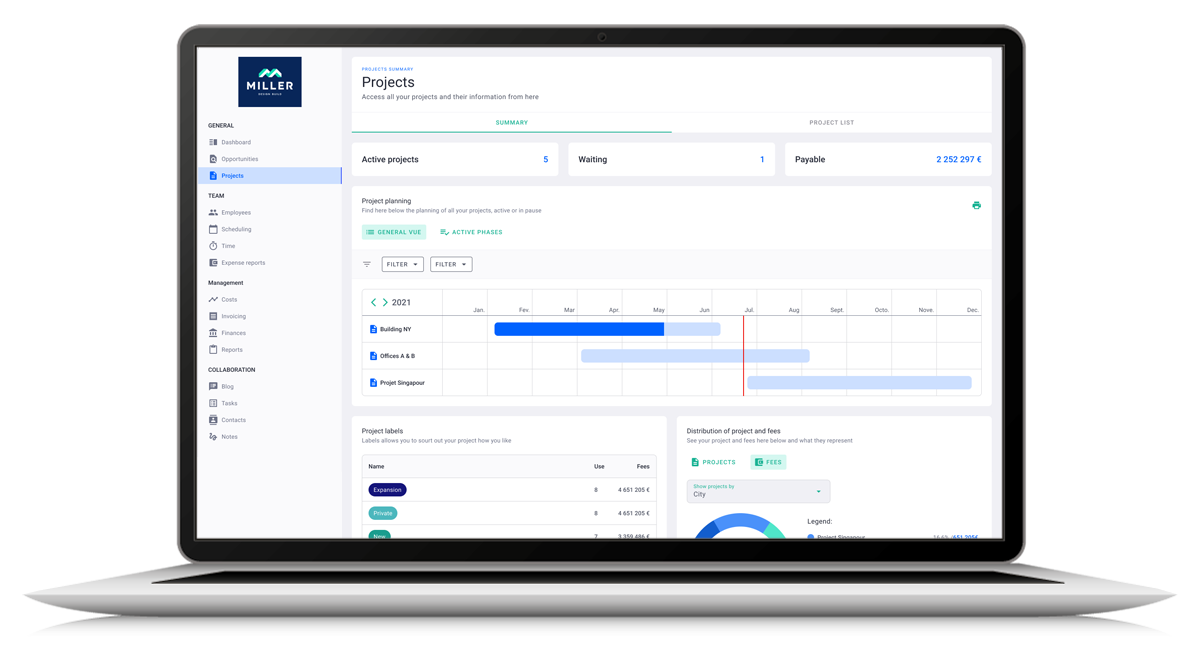
Get the Best Productive.io Alternative: Milient Software
If your organisation needs more than task management and wants complete visibility across projects, resources, time, and profitability, Milient Software is a strong Productive.io alternative. Built specifically for architecture, engineering, consultancies, and other professional services firms, it helps teams deliver projects more efficiently while maintaining control of budgets and business performance.
Whether you're ready to implement a new platform or simply exploring your options, start with a free trial, book a personalised demo, or explore how Milient supports project-based businesses.
 Andrea Neeve
Marketing Associate
Want more content like this? Follow Milient:
/Hub-Planner_Resource-Request_Hero.png?width=1024&height=1024&name=Hub-Planner_Resource-Request_Hero.png)